

A terminal interface that connects IFC files to LLMs. ifc-console loads
your model with IfcOpenShell and serves it over MCP. Claude, Cursor, VS Code,
Codex, and other MCP clients can inspect or edit the model while you keep
control from the terminal.
No Blender or host BIM application is required. It runs locally on Windows, macOS, and Linux.
| Terminal console | AI assistant | 3D viewer |
|---|---|---|
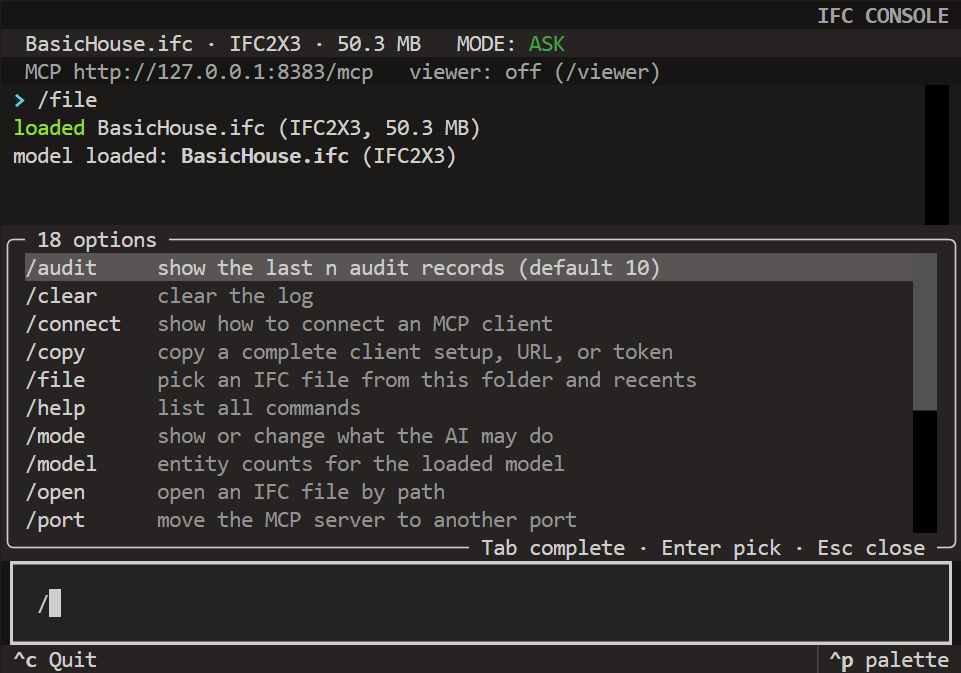 |
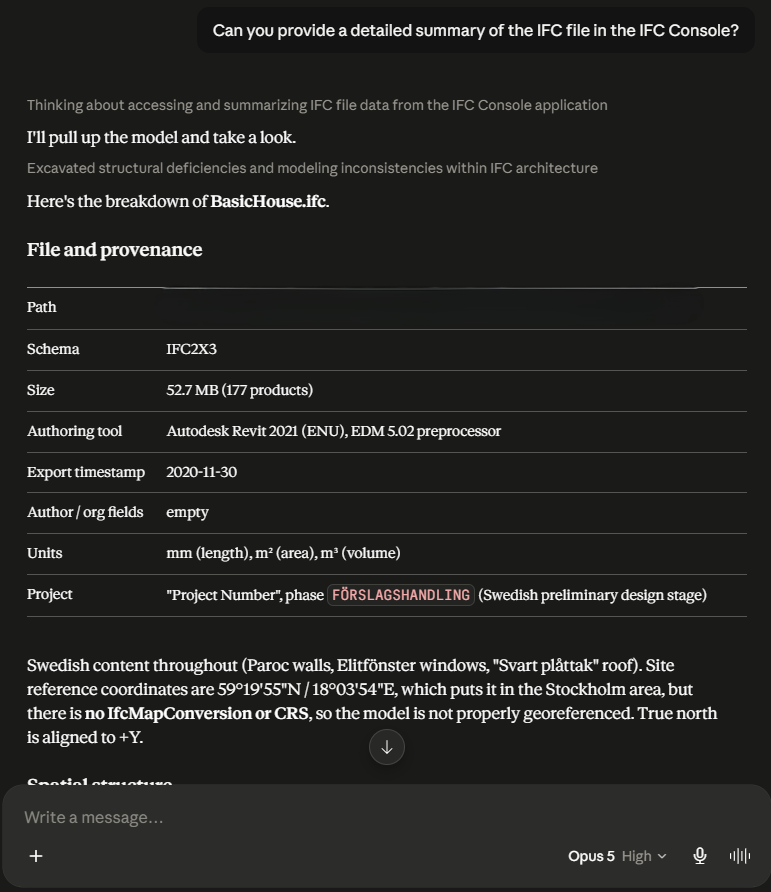 |
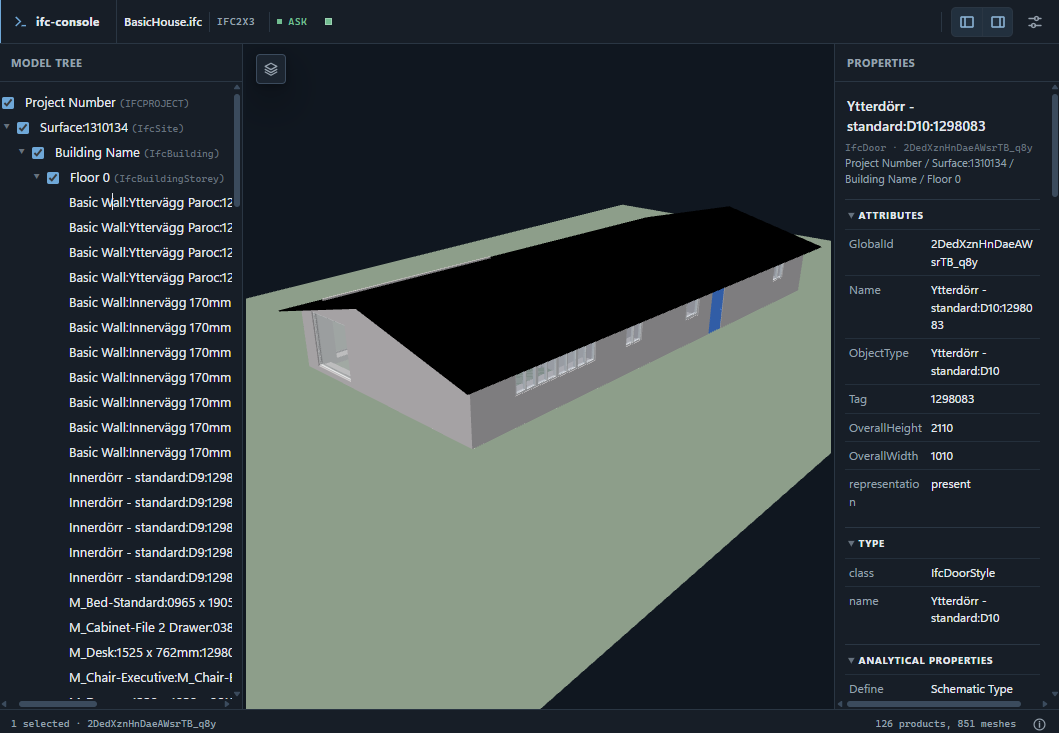 |
Why ifc-console
LLMs are good at BIM data work: finding elements, auditing properties, writing IfcOpenShell scripts, and explaining schema quirks. ifc-console is the safe, zero-setup bridge between an LLM client and an IFC file.
- You stay in control. The
ask/editswitch decides whether the LLM may change the in-memory model. AI saving is disabled by default, so only you persist reviewed changes with/save. - It runs anywhere. The core Python package runs on Windows, macOS, and Linux. The local 3D viewer is an optional install.
- It is honest. Errors include useful hints. Mutations are audited, saves are atomic with backups, and the docs state what the sandbox does and does not guarantee.
Install and run
uv tool install ifc-console
# Include the optional 3D viewer and browser chat:
uv tool install "ifc-console[viewer]"
You can use pip instead, or try the core application once with
uvx ifc-console.
Start it in the folder containing your models:
cd path/to/your/models
ifc-console
Then:
> /file             choose an IFC model
> /connect codex    copy one-time client setup
> /viewer           open the optional 3D viewer
Paste the copied setup into your AI client and restart that client once. Future sessions are simply: start ifc-console, choose a file, and chat.
Ask or edit
| mode | what the AI can do |
|---|---|
ask (default) |
inspect and analyze the model |
edit |
also change the model in memory |
Use /mode edit only when you want changes. Review them, then /save to keep
them or /reload to discard them. The AI cannot change the mode, and AI tools
cannot save unless you explicitly enable files.allow_ai_save.
On CPython 3.12+, eligible read-only generated code normally runs in a
restricted process without network or subprocess access. Python 3.10 and 3.11
remain supported, but cannot provide that complete audit-hook boundary; auto
reports a guarded fallback and strict refuses it. Mutating code runs in the
main process because it must reach the live model. Read
Safety before editing
untrusted files or prompts.
What it includes
- IFC queries, properties, quantities, validation, clash detection, and CSV export.
- Multi-model coordination and an offline IFC/IfcOpenShell reference.
- A Python SDK for scripts, CI, workflows, and agent applications.
- Optional browser viewer, chat panel, and trusted operation plugins.
from ifc_console import Workbench

with Workbench.open("tower.ifc") as wb:
    walls = wb.query("IfcWall")
    print(len(walls))
Documentation
For development setup and tests, see the contributing guide.
License
The core package is Apache-2.0 and uses IfcOpenShell (LGPL-3.0-or-later). The optional viewer includes Three.js (MIT) and web-ifc (MPL-2.0).
Inspired by Bonsai MCP.
1 maintainer

Metadata
1 maintainer
Release files for ifc-console 0.1.4
For a detailed explanation of source distributions (sdists) and built distributions (wheels), please see the package formats documentation.
Source distribution (sdist)
| File | Size | Uploaded | Provenance | Actions |
|---|---|---|---|---|
| ifc_console-0.1.4.tar.gz | 513.9 kB | With provenance | Details for ifc_console-0.1.4.tar.gz |
Built distribution (wheel)
| File | Interpreter | ABI | Platform | Actions Reset |
|---|---|---|---|---|
| ifc_console-0.1.4-py3-none-any.whl | Python 3 | none | any | Details for ifc_console-0.1.4-py3-none-any.whl |
Total release size: 907.1 kB
Release files / ifc_console-0.1.4.tar.gz
| Download URL | ifc_console-0.1.4.tar.gz |
|---|---|
| Size | 513.9 kB |
| Tags | Source |
|
SHA-256 checksum How to use checksums |
fd1459428ebddf20cc7c7b3ca49ad3ca49d8955816afb9c541794d2894a73504
|
|
BLAKE2b-256 checksum How to use checksums |
8dfea30cdd9e6ad98b313ade853bba75372e569d4e697601605e2d1e0e031ba3
|
| Upload date | |
|
Uploaded using Trusted Publishing? What is trusted publishing? |
Yes |
| Uploaded via |
twine/7.0.0 CPython/3.13.14
|
Provenance
Provenance describes where a file came from. On PyPI, provenance is shared via attestations, which provide a verifiable record of the build or publishing details. View details, limitations and caveats.


PyPI Publish Attestation
PyPI verified that this artifact, at this checksum, originated from the publisher listed below.
Signed by GitHub Actions, verified by PyPI on Aug 12, 2026.
Transparency logRelease files / ifc_console-0.1.4-py3-none-any.whl
| Download URL | ifc_console-0.1.4-py3-none-any.whl |
|---|---|
| Size | 393.1 kB |
| Tags | Python 3 |
|
SHA-256 checksum How to use checksums |
ca80409bcf0bf59a1d1d31e7553df3ec0d177922d4af28edc966c3ad7ebbdae6
|
|
BLAKE2b-256 checksum How to use checksums |
6e25e81eaa73e8a30f8665e59ad2e0866639790919453afb1cd6748576bf9751
|
| Upload date | |
|
Uploaded using Trusted Publishing? What is trusted publishing? |
Yes |
| Uploaded via |
twine/7.0.0 CPython/3.13.14
|
Provenance
Provenance describes where a file came from. On PyPI, provenance is shared via attestations, which provide a verifiable record of the build or publishing details. View details, limitations and caveats.
PyPI Publish Attestation
PyPI verified that this artifact, at this checksum, originated from the publisher listed below.
Signed by GitHub Actions, verified by PyPI on Aug 12, 2026.
Transparency logSecurity for ifc-console 0.1.4
Provenance
Provenance describes where a file came from. On PyPI, provenance is shared via attestations, which provide a verifiable record of the build or publishing details. View details, limitations and caveats.
Full provenance
All 2 files in this release have been uploaded with provenance metadata.
Attestation for ifc_console-0.1.4.tar.gz
PyPI Publish Attestation
PyPI verified that this artifact, at this checksum, originated from the publisher listed below.
Signed by GitHub Actions, verified by PyPI on Aug 12, 2026.
Transparency logA note on package security
PyPI is a repository for distributing packages, not a service for auditing them. While third-party security researchers and our staff do their best to detect and remove malicious packages, PyPI cannot guarantee the quality, security or suitability of any given package.
To learn more about protecting yourself from malicious actors, visit our package security documentation.














