

A terminal interface to connect IFC files to LLMs. ifc-console loads
your model with IfcOpenShell and serves it over MCP, so any LLM client
(Claude Code, Claude Desktop, Cursor, VS Code, Codex) can query and edit it,
while you stay in control from your terminal. No Blender, no host app.
| Terminal console | AI assistant | 3D viewer |
|---|---|---|
 |
 |
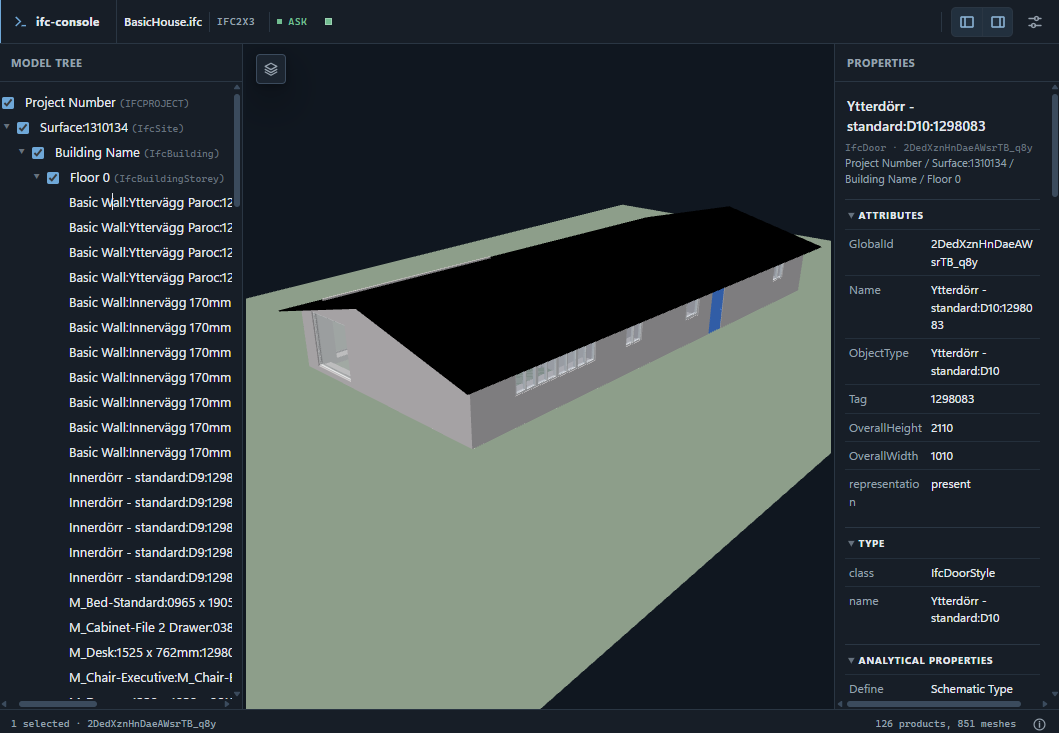 |
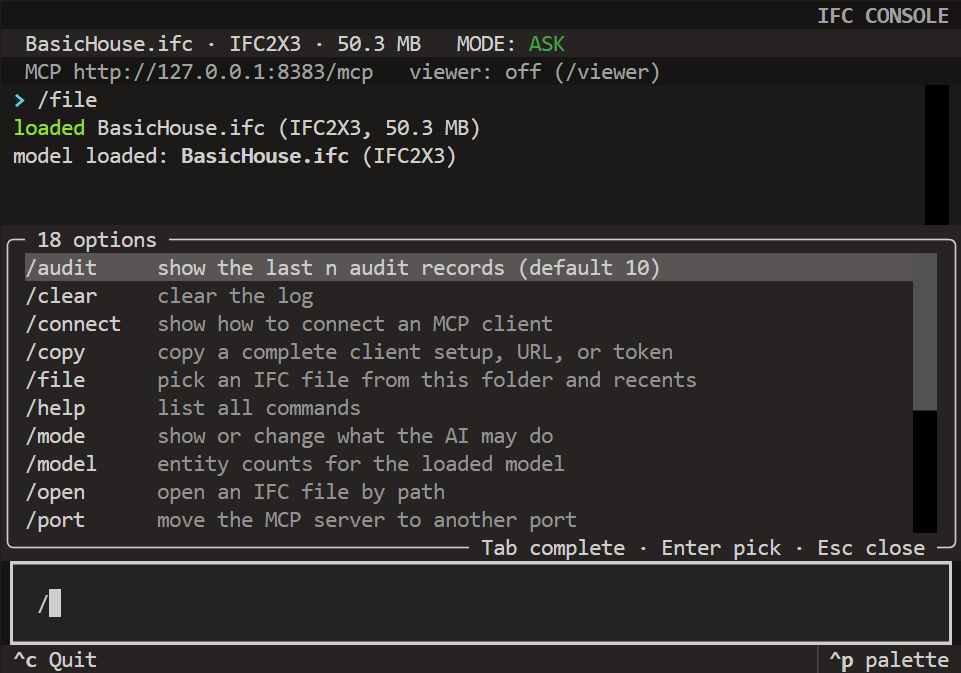
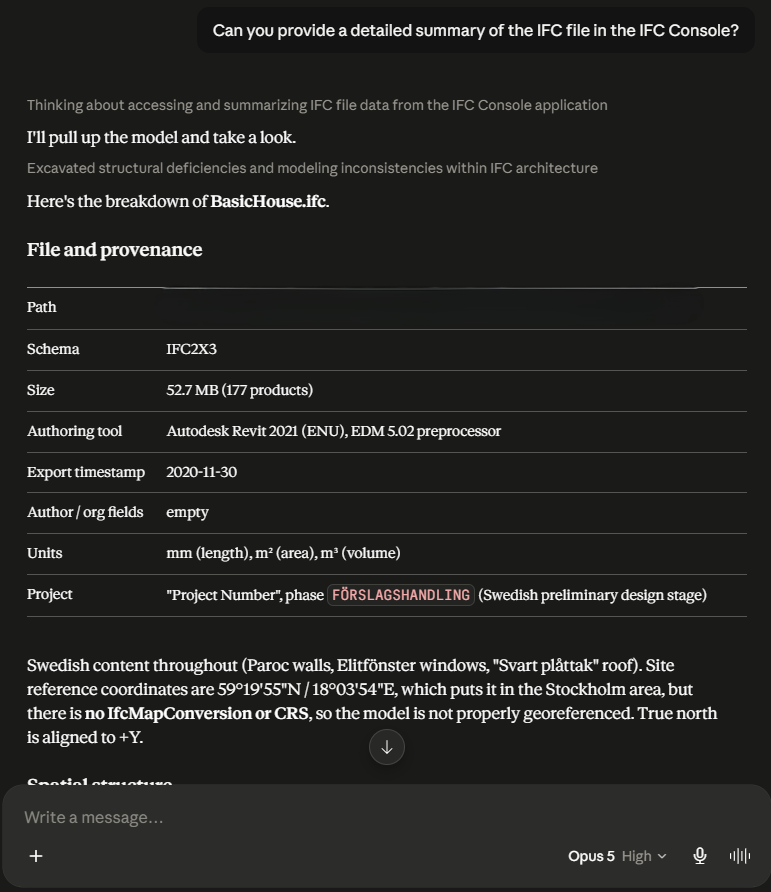
| The console to open an IFC file and decide what the AI is allowed to do. | An AI assistant connected to ifc-console, answering questions about the open model. | The optional viewer in the browser, showing the model tree, the 3D view, and element properties. |
Install and run
Install from PyPI with uv or pip:
uv tool install ifc-console    # puts the ifc-console command on your PATH, viewer included
# or: pip install ifc-console
Or try it without installing: uvx ifc-console. To update later:
uv tool upgrade ifc-console.
Start it in the folder with your models:
cd path/to/your/models
ifc-console
The MCP server comes up right away. Then, in the console:
> /file        pick a model from this folder
> /connect all one-time HTTP setup for every supported LLM client
> /copy codex  copy one complete client config to the clipboard
> /mode edit   let the AI change the model (ask = query-only, the default)
> /viewer      3D view in your browser
> /help        everything else
Wire up each client once. The token is stable per machine and no IFC path is
stored in the client config, so your daily loop is just ifc-console, /file,
and chat.
The mode switch
One switch, owned by you; the LLM cannot change it. Anything finer-grained (per-tool prompts, allowlists) belongs to your AI client.
| mode | what the LLM can do |
|---|---|
ask (default) |
query and generate code; anything that would change the model errors and tells it to ask you |
edit |
change and save the model; saves still make backups |
Switch with /mode. Every mutation path is gated, saves are atomic with
timestamped backups, and each session writes an audit log.
Honest caveat: the guards stop accidents, not a determined adversary. Treat
edit mode plus untrusted prompts like running a stranger's script.
What the LLM gets
11 core tools: project info, spatial tree, selector queries, element
details, property sets, schema docs, file list/open/save, and a gated
Python execute_ifc_code power tool.
3 more while the viewer runs: read your click-selection, highlight elements, and screenshot the canvas so it can check its own work.
Every response is one JSON envelope with an actionable hint on failure. Full reference: MCP tools.
The 3D viewer
Type /viewer. It runs entirely on localhost behind your session token:
click an element and the LLM knows what "this wall" means; it highlights
elements back and takes screenshots. Edits refresh the view live.
Install from source (for development)
If you would like to work on the code itself, clone the repo and install from your checkout (needs git and uv):
git clone https://github.com/nbharathik/ifc-console
cd ifc-console
uv tool install .
To update later: git pull, then uv tool install . --force. For working on
the code itself, see
Development.
Docs
License
Apache-2.0. Bundles three.js (MIT) and web-ifc (MPL-2.0, unmodified); uses IfcOpenShell (LGPL-3.0-or-later) as a library.
Acknowledgments
Inspired by Bonsai MCP. If you would like to work with the Bonsai viewer in Blender instead of a standalone terminal, check that project out.
1 maintainer

Download files
Download the file for your platform. If you're not sure which to choose, learn more about installing packages.
Source Distribution
Built Distribution
Filter files by name, interpreter, ABI, and platform.
If you're not sure about the file name format, learn more about wheel file names.
Copy a direct link to the current filters
File details
Details for the file ifc_console-0.1.2.tar.gz.
File metadata
- Download URL: ifc_console-0.1.2.tar.gz
- Upload date:
- Size: 1.8 MB
- Tags: Source
- Uploaded using Trusted Publishing? Yes
- Uploaded via:
twine/7.0.0 CPython/3.13.14
File hashes
| Algorithm | Hash digest | |
|---|---|---|
| SHA256 |
dde025eb82877f612ca54c8f1d19a1f12117bf575e4897e4e4fd2a4e0a1bfbf5
|
|
| MD5 |
ea35feea4236aa00fa640a40c423aaa6
|
|
| BLAKE2b-256 |
1c6b40bc06d5b7d97f9d408c79f211e17b70db05945e78b1c4043b176a13e36a
|
Provenance
The following attestation bundles were made for ifc_console-0.1.2.tar.gz:
Publisher:
release.yml on nbharathik/ifc-console
-
Statement:
-
Statement type:
https://in-toto.io/Statement/v1 -
Predicate type:
https://docs.pypi.org/attestations/publish/v1 -
Subject name:
ifc_console-0.1.2.tar.gz -
Subject digest:
dde025eb82877f612ca54c8f1d19a1f12117bf575e4897e4e4fd2a4e0a1bfbf5 - Sigstore transparency entry: 2281734395
- Sigstore integration time:
-
Permalink:
nbharathik/ifc-console@ce17a4c877af200603a1098e2fe9d836255f00d7 -
Branch / Tag:
refs/tags/v0.1.2 - Owner: https://github.com/nbharathik
-
Access:
public
-
Token Issuer:
https://token.actions.githubusercontent.com -
Runner Environment:
github-hosted -
Publication workflow:
release.yml@ce17a4c877af200603a1098e2fe9d836255f00d7 -
Trigger Event:
push
-
Statement type:
File details
Details for the file ifc_console-0.1.2-py3-none-any.whl.
File metadata
- Download URL: ifc_console-0.1.2-py3-none-any.whl
- Upload date:
- Size: 1.3 MB
- Tags: Python 3
- Uploaded using Trusted Publishing? Yes
- Uploaded via:
twine/7.0.0 CPython/3.13.14
File hashes
| Algorithm | Hash digest | |
|---|---|---|
| SHA256 |
efd34fb1f73447998ff7d7c6590b5ecfee2dc441c7d5a3e8bc390a839635bbb1
|
|
| MD5 |
83b8cf8947a80564d22803c62c839b10
|
|
| BLAKE2b-256 |
0f886baa6f5344c6d8579021114b42e4117efd494b65073e9f0559c8ff509be0
|
Provenance
The following attestation bundles were made for ifc_console-0.1.2-py3-none-any.whl:
Publisher:
release.yml on nbharathik/ifc-console
-
Statement:
-
Statement type:
https://in-toto.io/Statement/v1 -
Predicate type:
https://docs.pypi.org/attestations/publish/v1 -
Subject name:
ifc_console-0.1.2-py3-none-any.whl -
Subject digest:
efd34fb1f73447998ff7d7c6590b5ecfee2dc441c7d5a3e8bc390a839635bbb1 - Sigstore transparency entry: 2281734416
- Sigstore integration time:
-
Permalink:
nbharathik/ifc-console@ce17a4c877af200603a1098e2fe9d836255f00d7 -
Branch / Tag:
refs/tags/v0.1.2 - Owner: https://github.com/nbharathik
-
Access:
public
-
Token Issuer:
https://token.actions.githubusercontent.com -
Runner Environment:
github-hosted -
Publication workflow:
release.yml@ce17a4c877af200603a1098e2fe9d836255f00d7 -
Trigger Event:
push
-
Statement type:














