
Agent Communication System
A sophisticated multi-agent communication framework that enables seamless collaboration between AI agents through MCP (Model Context Protocol) tools, with support for real-time message routing, admin control, and dual-language operation.
🌟 Features
- Multi-Agent Communication: Enable Agent 1 and Agent 2 to communicate efficiently
- Admin Control System: Absolute priority commands with SOURCE tag authority
- Real-time Message Routing: Smart delivery and manual routing options
- Dual Language Support: Vietnamese and English rule sets
- Advanced UI Controller: Comprehensive interface for message management
- File & Image Attachments: Support for mixed content communication
- Workspace-Aware: Intelligent path processing for different workspaces
📋 Prerequisites
- Python
- MCP-compatible AI environment (e.g., Claude, Cursor)
- Git for repository cloning
⚙️ Installation
1. Clone Repository
git clone https://github.com/your-repo/mcp-server-agent-comm.git
cd mcp-server-agent-comm
2. Install Dependencies
pip install -r requirements.txt
3. MCP Server Configuration
Add the following configuration to your MCP settings:
{
  "agent_chat_1": {
    "command": "python",
    "args": ["E:/MCP-servers-github/Utils/mcp_server_agent1.py"],
    "stdio": true,
    "enabled": true
  },
  "agent_chat_2": {
    "command": "python",
    "args": ["E:/MCP-servers-github/Utils/mcp_server_agent2.py"],
    "stdio": true,
    "enabled": true
  }
}
Note: Update the path E:/MCP-servers-github/Utils/ to match your actual installation directory.
📚 Rule Configuration
Language Options
Choose one of the rule files based on your preferred language:
- Vietnamese:
rule_for_AI_VI.txt - English:
rule_for_AI_EN.txt
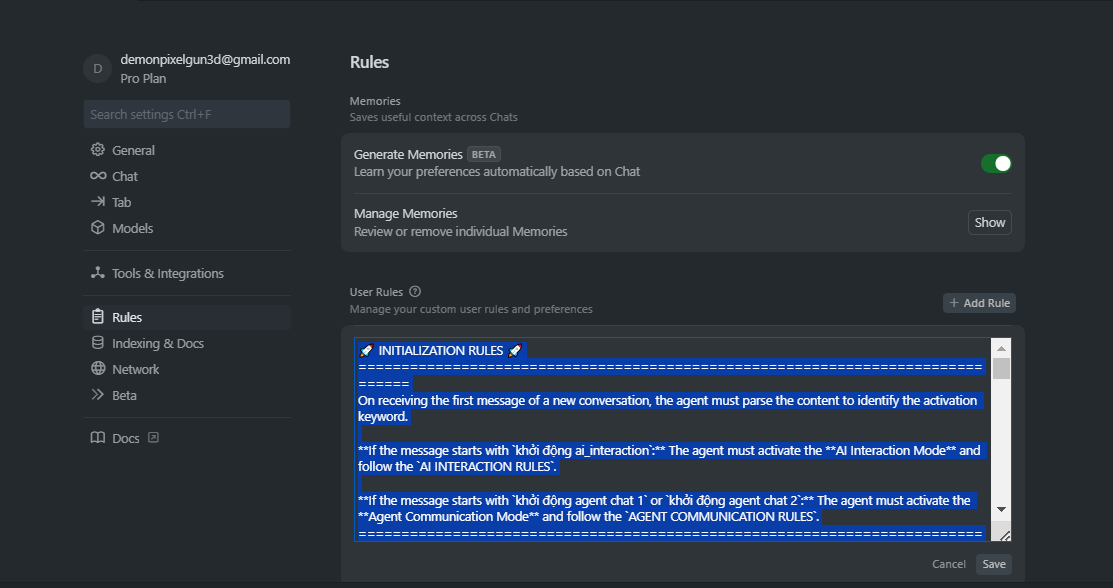
Setup in Cursor
- Open Cursor settings
- Navigate to "Rules for AI" section
- Copy and paste the content of your chosen rule file
- Save the configuration
🚀 Usage
Step 1: Start Controller UI
Open your terminal/command prompt and run:
python E:\MCP-servers-github\Utils\main_controller.py
Note: Replace E:\MCP-servers-github\Utils\ with your actual installation path.
The Controller UI will open, allowing you to monitor and control agent communication.
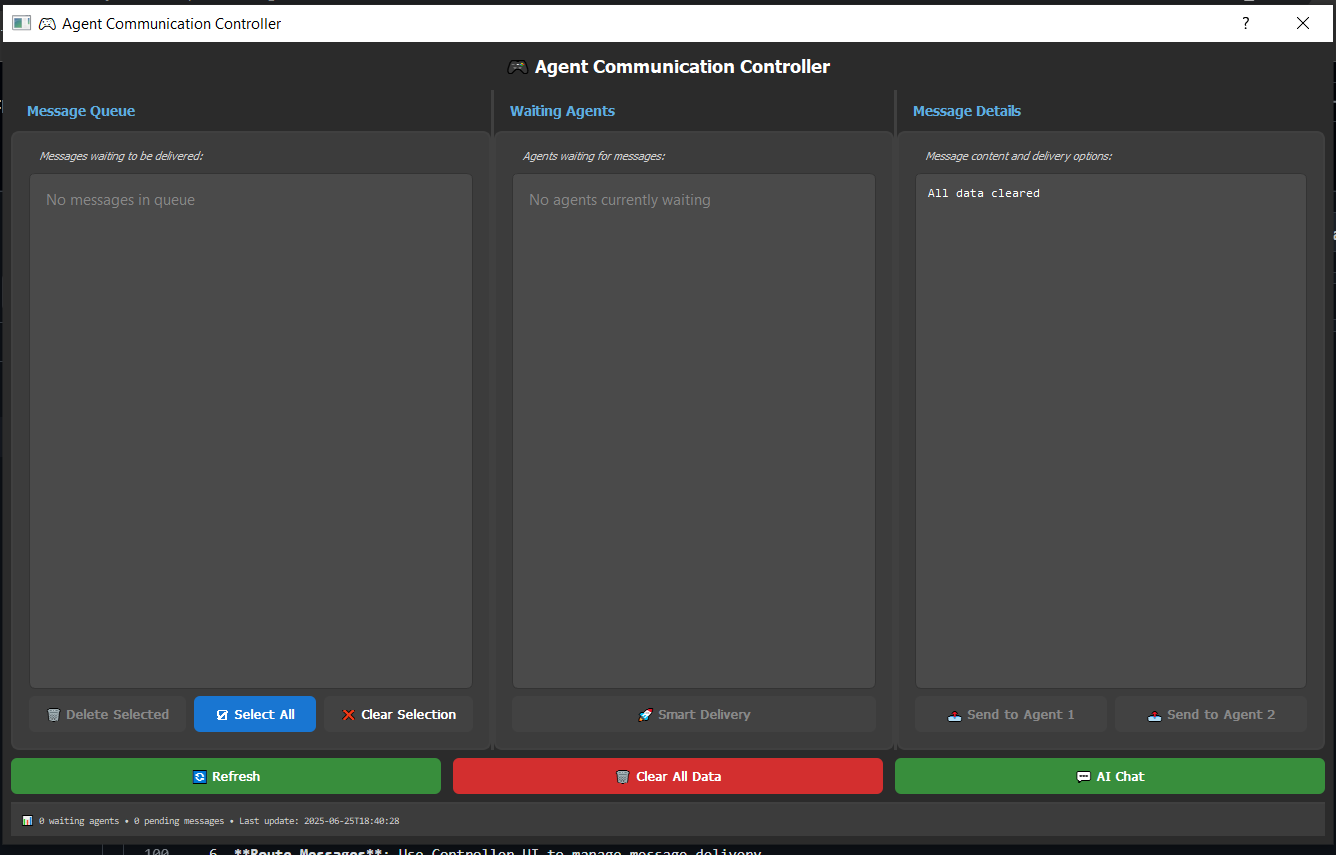
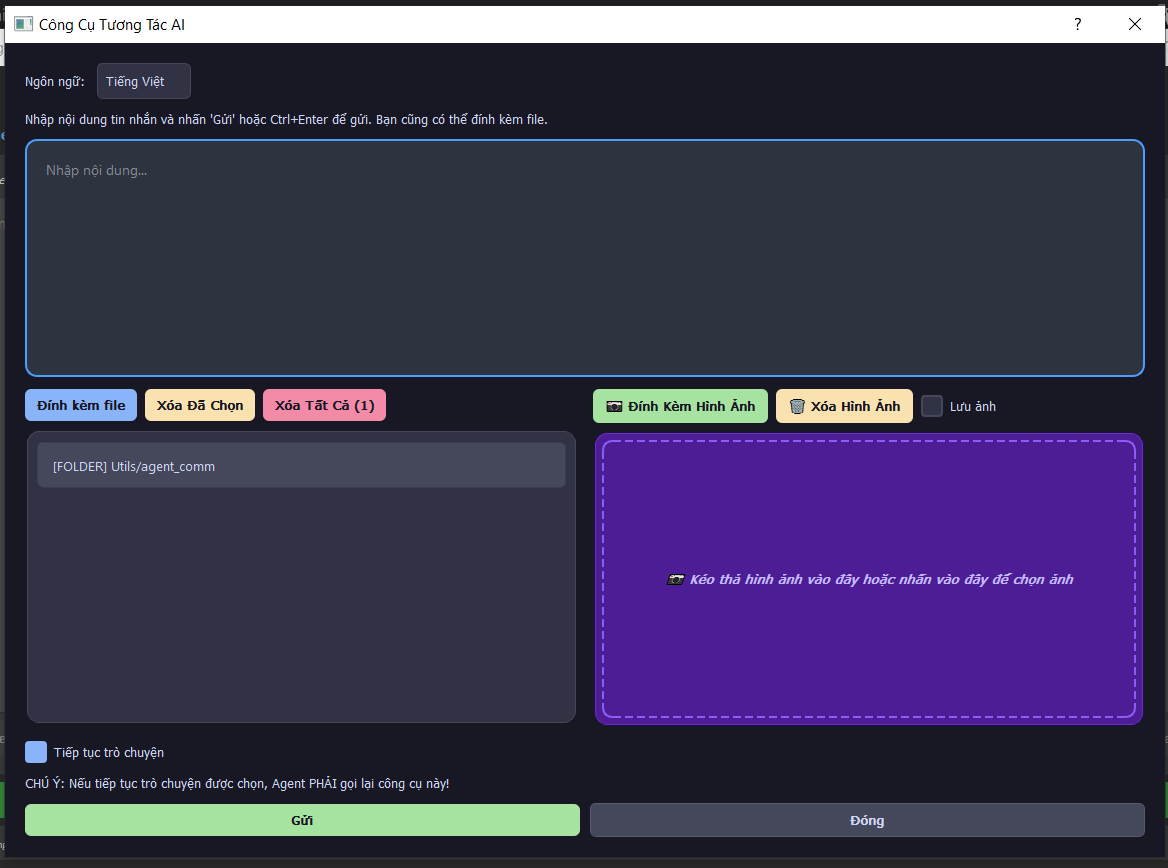
Feature "AI Chat" -> user can chat with all waiting agent.
Step 2: Setup Agents in Cursor
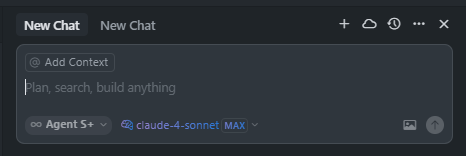
- Open Two Tabs: Create two separate chat tabs in Cursor
- Tab 1 - Agent 1: Type activation command to start Agent 1
- Tab 2 - Agent 2: Type activation command to start Agent 2
- Execute Tools: Allow AI to call the MCP server agent chat tools
- Monitor Controller: Check Controller UI for registered agents
- Route Messages: Use Controller UI to manage message delivery
Activation Commands
For AI Interaction Mode:
- Vietnamese:
start ai_interaction - English:
start ai_interaction
For Agent Communication Mode:
- Vietnamese:
start agent chat 1orstart agent chat 2 - English:
start agent chat 1orstart agent chat 2
Communication Flow
- Agent Registration: Agents register with their respective tools
- Message Routing: Controller UI manages message delivery
- Priority System: Admin commands (SOURCE=admin) have absolute priority
- Collaboration: Agents discuss and confirm execution plans for admin tasks
Detailed Workflow
Initial Setup:
- Start Controller UI with
python main_controller.py - Open Cursor with two chat tabs
- Activate Agent 1 in Tab 1:
start agent chat 1 - Activate Agent 2 in Tab 2:
start agent chat 2 - Verify both agents appear in Controller UI "Waiting Agents" section
Message Communication:
- Send message from Agent 1 (will appear in message queue)
- Use Controller UI to route message to Agent 2
- Agent 2 receives and can respond
- Continue conversation through Controller UI routing
Admin Controls:
- Send admin messages with absolute priority
- Use "Smart Delivery" for automatic routing
- Monitor real-time agent status
- Clear data when needed
Admin Controls
- Absolute Authority: Admin messages override all agent activities
- Smart Delivery: Automatic routing to available agents
- Manual Routing: Precise control over message delivery
- Real-time Monitoring: Live status of waiting agents and message queue
🏗️ Project Structure
Utils/
├── agent_comm/
│   ├── core/                    # Core system components
│   │   ├── config_manager.py    # Configuration management
│   │   ├── flow_manager.py      # Message flow control
│   │   ├── message_handler.py   # Message processing
│   │   └── state_manager.py     # System state management
│   ├── ui/                      # User interface components
│   │   ├── controller_ui.py     # Main controller interface
│   │   └── styles.py           # UI styling
│   ├── chat_ui/                # Chat interface system
│   └── shared_data/            # Persistent data storage
├── mcp_server_agent1.py        # Agent 1 MCP server
├── mcp_server_agent2.py        # Agent 2 MCP server
├── rule_for_AI_VI.txt          # Vietnamese rules
├── rule_for_AI_EN.txt          # English rules
└── README.md                   # This file
🎯 Key Components
Agent Chat Tools
- mcp_agent_chat_1_agent_chat_1_tool: Communication tool for Agent 1
- mcp_agent_chat_2_agent_chat_2_tool: Communication tool for Agent 2
Controller Features
- Message queue management
- Agent status monitoring
- Smart delivery system
- File and image attachment support
- Real-time refresh capability
Rule System
- SOURCE Tag Authority: admin = absolute priority, agent = standard
- Initialization Rules: Keyword-based activation system
- Workflow Compliance: Mandatory tool recall and thinking blocks
- Language Consistency: Vietnamese or English throughout communication
🔧 Advanced Features
Message Types
- Text Messages: Standard communication
- File Attachments: Document and code sharing
- Image Support: Visual content communication
- Mixed Content: Combined text, files, and images
Priority System
- Admin Commands: Immediate execution, override all activities
- Agent Messages: Standard peer-to-peer communication
- Collaboration Required: Agents must discuss admin task execution
UI Controller
- Real-time Updates: 1.5-second refresh intervals
- Multi-selection: Batch operations on messages
- Smart Routing: Automatic agent selection
- Status Tracking: Comprehensive system monitoring
🐛 Troubleshooting
Common Issues
-
MCP Server Not Starting
- Verify Python path in configuration
- Check file permissions
- Ensure all dependencies are installed
-
Agents Not Communicating
- Confirm both agents are registered
- Check controller UI for waiting agents
- Verify rule file is properly configured
-
Message Queue Issues
- Use "Clear All Data" in controller UI
- Restart MCP servers
- Check shared_data directory permissions
💡 Related Projects:
1 maintainer

Metadata
1 maintainer
Release files for iflow-mcp-khaihuynhvn-mcp-server-agent-comm 1.0.2
For a detailed explanation of source distributions (sdists) and built distributions (wheels), please see the package formats documentation.
Source distribution (sdist)
| File | Size | Uploaded | |
|---|---|---|---|
| iflow_mcp_khaihuynhvn_mcp_server_agent_comm-1.0.2.tar.gz | 90.2 kB | Details |
Built distribution (wheel)
| File | Interpreter | ABI | Platform | Reset |
|---|---|---|---|---|
| iflow_mcp_khaihuynhvn_mcp_server_agent_comm-1.0.2-py3-none-any.whl | Python 3 | none | any | Details |
Total release size: 198.5 kB
Release files / iflow_mcp_khaihuynhvn_mcp_server_agent_comm-1.0.2.tar.gz
| Download URL | iflow_mcp_khaihuynhvn_mcp_server_agent_comm-1.0.2.tar.gz |
|---|---|
| Size | 90.2 kB |
| Tags | Source |
|
SHA-256 checksum How to use checksums |
a502847bdf1bd8f870dbff8e1d3d3d2bd11d2b859ee9fc807a87e97dbdeeaff2
|
|
BLAKE2b-256 checksum How to use checksums |
bf7a61cc455fc629941611c6105d20c4a2cfc5c46d4d0ee75560ede5874e819b
|
| Upload date | |
|
Uploaded using Trusted Publishing? What is trusted publishing? |
No |
| Uploaded via |
uv/0.9.26 {"installer":{"name":"uv","version":"0.9.26","subcommand":["publish"]},"python":null,"implementation":{"name":null,"version":null},"distro":{"name":"Debian GNU/Linux","version":"13","id":"trixie","libc":null},"system":{"name":null,"release":null},"cpu":null,"openssl_version":null,"setuptools_version":null,"rustc_version":null,"ci":null}
|
Release files / iflow_mcp_khaihuynhvn_mcp_server_agent_comm-1.0.2-py3-none-any.whl
| Download URL | iflow_mcp_khaihuynhvn_mcp_server_agent_comm-1.0.2-py3-none-any.whl |
|---|---|
| Size | 108.4 kB |
| Tags | Python 3 |
|
SHA-256 checksum How to use checksums |
c81debe0f66b591974de01abb5652bf73cc4733b342e31bd32109824895354d7
|
|
BLAKE2b-256 checksum How to use checksums |
682c565599ff7bdde935dca9ac424081ef1359807963efe5c30bec8b1cca776e
|
| Upload date | |
|
Uploaded using Trusted Publishing? What is trusted publishing? |
No |
| Uploaded via |
uv/0.9.26 {"installer":{"name":"uv","version":"0.9.26","subcommand":["publish"]},"python":null,"implementation":{"name":null,"version":null},"distro":{"name":"Debian GNU/Linux","version":"13","id":"trixie","libc":null},"system":{"name":null,"release":null},"cpu":null,"openssl_version":null,"setuptools_version":null,"rustc_version":null,"ci":null}
|














