
Agent Communication System - Multi-agent communication framework through MCP tools

Project description
Agent Communication System
A sophisticated multi-agent communication framework that enables seamless collaboration between AI agents through MCP (Model Context Protocol) tools, with support for real-time message routing, admin control, and dual-language operation.
🌟 Features
- Multi-Agent Communication: Enable Agent 1 and Agent 2 to communicate efficiently
- Admin Control System: Absolute priority commands with SOURCE tag authority
- Real-time Message Routing: Smart delivery and manual routing options
- Dual Language Support: Vietnamese and English rule sets
- Advanced UI Controller: Comprehensive interface for message management
- File & Image Attachments: Support for mixed content communication
- Workspace-Aware: Intelligent path processing for different workspaces
📋 Prerequisites
- Python
- MCP-compatible AI environment (e.g., Claude, Cursor)
- Git for repository cloning
⚙️ Installation
1. Clone Repository
git clone https://github.com/your-repo/mcp-server-agent-comm.git
cd mcp-server-agent-comm
2. Install Dependencies
pip install -r requirements.txt
3. MCP Server Configuration
Add the following configuration to your MCP settings:
{
  "agent_chat_1": {
    "command": "python",
    "args": ["E:/MCP-servers-github/Utils/mcp_server_agent1.py"],
    "stdio": true,
    "enabled": true
  },
  "agent_chat_2": {
    "command": "python",
    "args": ["E:/MCP-servers-github/Utils/mcp_server_agent2.py"],
    "stdio": true,
    "enabled": true
  }
}
Note: Update the path E:/MCP-servers-github/Utils/ to match your actual installation directory.
📚 Rule Configuration
Language Options
Choose one of the rule files based on your preferred language:
- Vietnamese:
rule_for_AI_VI.txt - English:
rule_for_AI_EN.txt
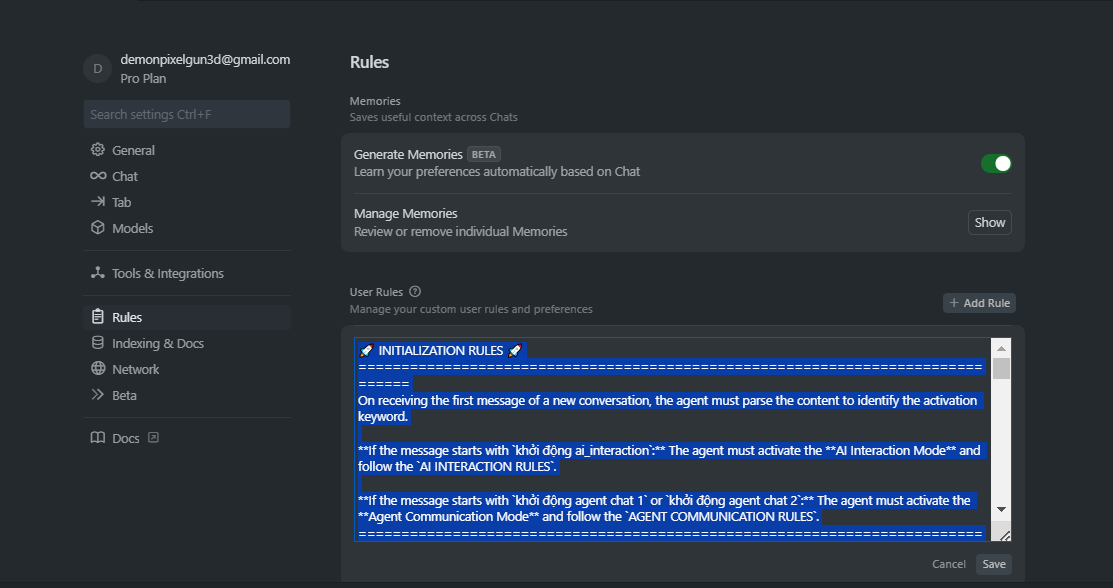
Setup in Cursor
- Open Cursor settings
- Navigate to "Rules for AI" section
- Copy and paste the content of your chosen rule file
- Save the configuration
🚀 Usage
Step 1: Start Controller UI
Open your terminal/command prompt and run:
python E:\MCP-servers-github\Utils\main_controller.py
Note: Replace E:\MCP-servers-github\Utils\ with your actual installation path.
The Controller UI will open, allowing you to monitor and control agent communication.
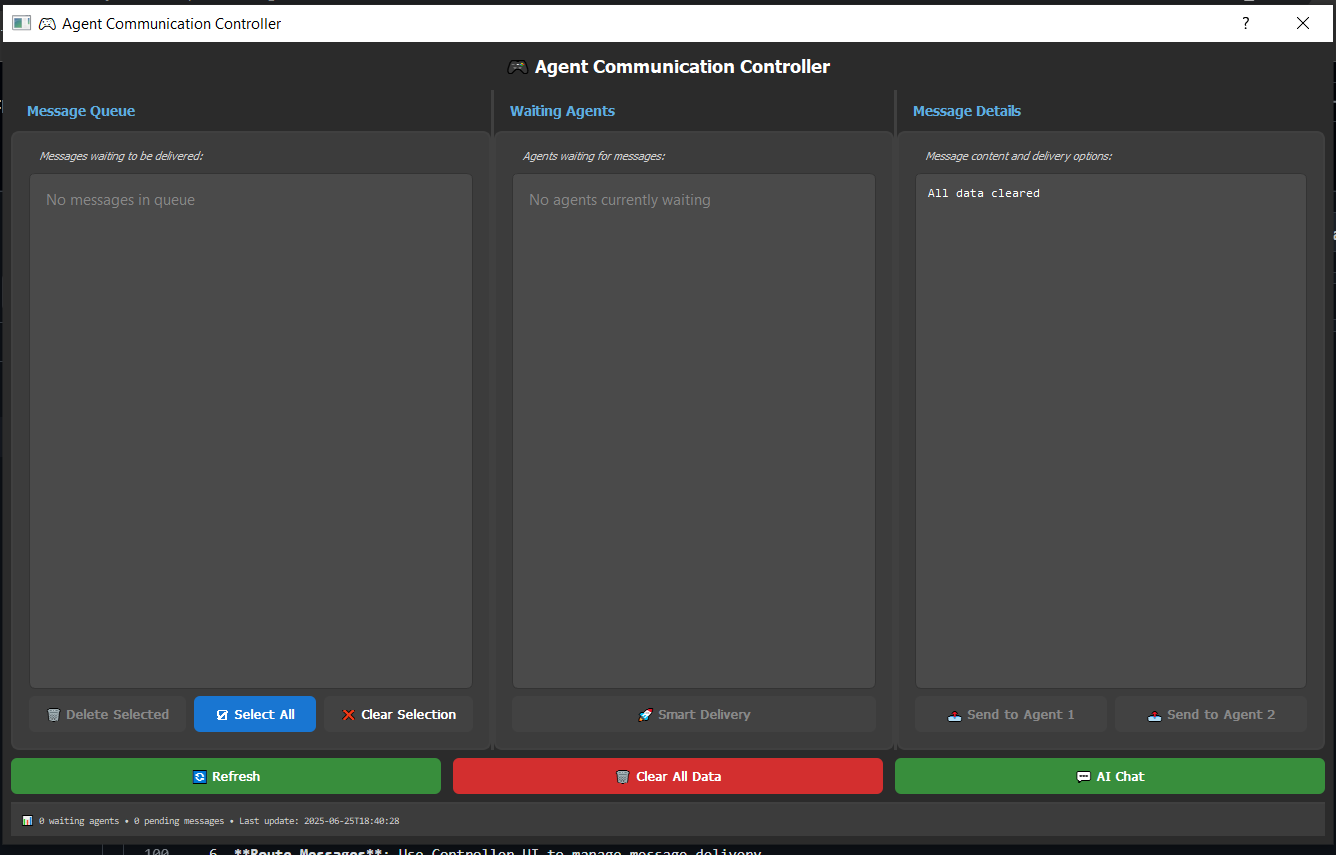
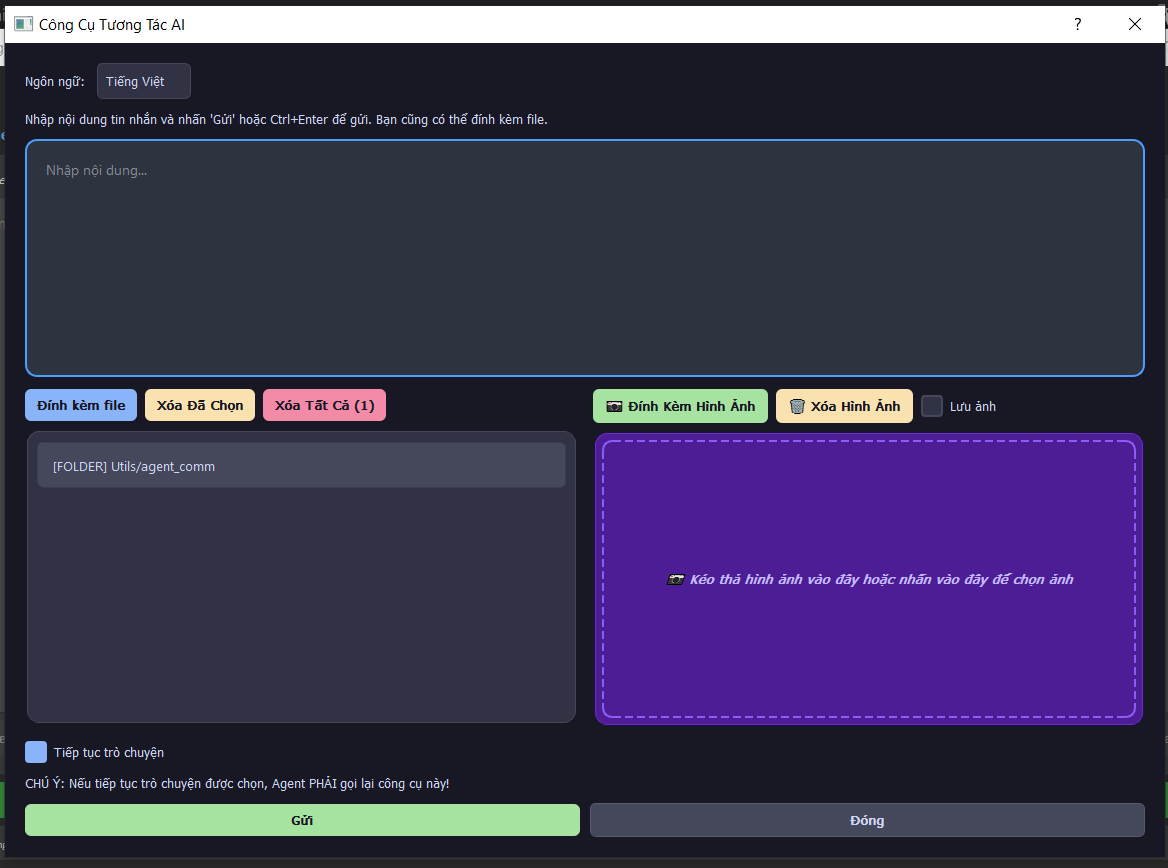
Feature "AI Chat" -> user can chat with all waiting agent.
Step 2: Setup Agents in Cursor
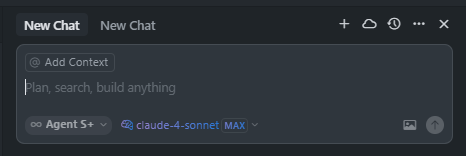
- Open Two Tabs: Create two separate chat tabs in Cursor
- Tab 1 - Agent 1: Type activation command to start Agent 1
- Tab 2 - Agent 2: Type activation command to start Agent 2
- Execute Tools: Allow AI to call the MCP server agent chat tools
- Monitor Controller: Check Controller UI for registered agents
- Route Messages: Use Controller UI to manage message delivery
Activation Commands
For AI Interaction Mode:
- Vietnamese:
start ai_interaction - English:
start ai_interaction
For Agent Communication Mode:
- Vietnamese:
start agent chat 1orstart agent chat 2 - English:
start agent chat 1orstart agent chat 2
Communication Flow
- Agent Registration: Agents register with their respective tools
- Message Routing: Controller UI manages message delivery
- Priority System: Admin commands (SOURCE=admin) have absolute priority
- Collaboration: Agents discuss and confirm execution plans for admin tasks
Detailed Workflow
Initial Setup:
- Start Controller UI with
python main_controller.py - Open Cursor with two chat tabs
- Activate Agent 1 in Tab 1:
start agent chat 1 - Activate Agent 2 in Tab 2:
start agent chat 2 - Verify both agents appear in Controller UI "Waiting Agents" section
Message Communication:
- Send message from Agent 1 (will appear in message queue)
- Use Controller UI to route message to Agent 2
- Agent 2 receives and can respond
- Continue conversation through Controller UI routing
Admin Controls:
- Send admin messages with absolute priority
- Use "Smart Delivery" for automatic routing
- Monitor real-time agent status
- Clear data when needed
Admin Controls
- Absolute Authority: Admin messages override all agent activities
- Smart Delivery: Automatic routing to available agents
- Manual Routing: Precise control over message delivery
- Real-time Monitoring: Live status of waiting agents and message queue
🏗️ Project Structure
Utils/
├── agent_comm/
│   ├── core/                    # Core system components
│   │   ├── config_manager.py    # Configuration management
│   │   ├── flow_manager.py      # Message flow control
│   │   ├── message_handler.py   # Message processing
│   │   └── state_manager.py     # System state management
│   ├── ui/                      # User interface components
│   │   ├── controller_ui.py     # Main controller interface
│   │   └── styles.py           # UI styling
│   ├── chat_ui/                # Chat interface system
│   └── shared_data/            # Persistent data storage
├── mcp_server_agent1.py        # Agent 1 MCP server
├── mcp_server_agent2.py        # Agent 2 MCP server
├── rule_for_AI_VI.txt          # Vietnamese rules
├── rule_for_AI_EN.txt          # English rules
└── README.md                   # This file
🎯 Key Components
Agent Chat Tools
- mcp_agent_chat_1_agent_chat_1_tool: Communication tool for Agent 1
- mcp_agent_chat_2_agent_chat_2_tool: Communication tool for Agent 2
Controller Features
- Message queue management
- Agent status monitoring
- Smart delivery system
- File and image attachment support
- Real-time refresh capability
Rule System
- SOURCE Tag Authority: admin = absolute priority, agent = standard
- Initialization Rules: Keyword-based activation system
- Workflow Compliance: Mandatory tool recall and thinking blocks
- Language Consistency: Vietnamese or English throughout communication
🔧 Advanced Features
Message Types
- Text Messages: Standard communication
- File Attachments: Document and code sharing
- Image Support: Visual content communication
- Mixed Content: Combined text, files, and images
Priority System
- Admin Commands: Immediate execution, override all activities
- Agent Messages: Standard peer-to-peer communication
- Collaboration Required: Agents must discuss admin task execution
UI Controller
- Real-time Updates: 1.5-second refresh intervals
- Multi-selection: Batch operations on messages
- Smart Routing: Automatic agent selection
- Status Tracking: Comprehensive system monitoring
🐛 Troubleshooting
Common Issues
-
MCP Server Not Starting
- Verify Python path in configuration
- Check file permissions
- Ensure all dependencies are installed
-
Agents Not Communicating
- Confirm both agents are registered
- Check controller UI for waiting agents
- Verify rule file is properly configured
-
Message Queue Issues
- Use "Clear All Data" in controller UI
- Restart MCP servers
- Check shared_data directory permissions
💡 Related Projects:
Release history Release notifications | RSS feed


Download files
Download the file for your platform. If you're not sure which to choose, learn more about installing packages.
Source Distribution
Built Distribution
Filter files by name, interpreter, ABI, and platform.
If you're not sure about the file name format, learn more about wheel file names.
Copy a direct link to the current filters
File details
Details for the file iflow_mcp_khaihuynhvn_mcp_server_agent_comm-1.0.1.tar.gz.
File metadata
- Download URL: iflow_mcp_khaihuynhvn_mcp_server_agent_comm-1.0.1.tar.gz
- Upload date:
- Size: 94.7 kB
- Tags: Source
- Uploaded using Trusted Publishing? No
- Uploaded via: uv/0.9.26 {"installer":{"name":"uv","version":"0.9.26","subcommand":["publish"]},"python":null,"implementation":{"name":null,"version":null},"distro":{"name":"Debian GNU/Linux","version":"13","id":"trixie","libc":null},"system":{"name":null,"release":null},"cpu":null,"openssl_version":null,"setuptools_version":null,"rustc_version":null,"ci":null}
File hashes
| Algorithm | Hash digest | |
|---|---|---|
| SHA256 |
f2db592dd9dbe3517414db3ac7384eb299d8f675380d7881e3ac3d8600d75290
|
|
| MD5 |
1306eee4622fa833139411bdbf794ee5
|
|
| BLAKE2b-256 |
8f5cd225e8cd8d0b94330109631f5a934d9feb8ab8897c0ca2aff0e2658d2f26
|
File details
Details for the file iflow_mcp_khaihuynhvn_mcp_server_agent_comm-1.0.1-py3-none-any.whl.
File metadata
- Download URL: iflow_mcp_khaihuynhvn_mcp_server_agent_comm-1.0.1-py3-none-any.whl
- Upload date:
- Size: 108.0 kB
- Tags: Python 3
- Uploaded using Trusted Publishing? No
- Uploaded via: uv/0.9.26 {"installer":{"name":"uv","version":"0.9.26","subcommand":["publish"]},"python":null,"implementation":{"name":null,"version":null},"distro":{"name":"Debian GNU/Linux","version":"13","id":"trixie","libc":null},"system":{"name":null,"release":null},"cpu":null,"openssl_version":null,"setuptools_version":null,"rustc_version":null,"ci":null}
File hashes
| Algorithm | Hash digest | |
|---|---|---|
| SHA256 |
2546a42427d2425152de3071cf0ca0342728bfe89bbaf1a44974784d61084d87
|
|
| MD5 |
91cd4fe64878be2e59b8524ea50a5c7a
|
|
| BLAKE2b-256 |
83610cb26098ce5e9d18eaccfbd758c2bf18fd470d5e2dc5a9fb5d24748aa781
|






