
MCP KQL Server
mcp-name: io.github.4R9UN/mcp-kql-server
AI-Powered KQL Query Execution with Natural Language to KQL (NL2KQL) Conversion and Execution
A Model Context Protocol (MCP) server that transforms natural language questions into optimized KQL queries with intelligent schema discovery, AI-powered caching, and seamless Azure Data Explorer integration. Simply ask questions in plain English and get instant, accurate KQL queries with context-aware results.
Latest Version: v2.1.0 - Now with schema-only NL2KQL and auto-update detection!













🎬 Demo
Watch a quick demo of the MCP KQL Server in action:
🆕 What's New in v2.1.0
- 🎯 Schema-Only NL2KQL: Natural Language to KQL now uses ONLY data from schema memory - no hardcoded values
- 🔄 Auto-Update Detection: Checks PyPI for new versions at startup with optional auto-install
- 📋 Clean Logs: Removed Unicode characters for better terminal compatibility
- ✅ Improved Accuracy: Better column validation against discovered schema
See RELEASE_NOTES.md for full details.
🚀 Features
-
execute_kql_query:- Natural Language to KQL: Generate KQL queries from natural language descriptions.
- Direct KQL Execution: Execute raw KQL queries.
- Multiple Output Formats: Supports JSON, CSV, and table formats.
- Live Schema Validation: Ensures query accuracy by using live schema discovery.
-
schema_memory:- Schema Discovery: Discover and cache schemas for tables.
- Database Exploration: List all tables within a database.
- AI Context: Get AI-driven context for tables.
- Analysis Reports: Generate reports with visualizations.
- Cache Management: Clear or refresh the schema cache.
- Memory Statistics: Get statistics about the memory usage.
📊 MCP Tools Execution Flow
graph TD
    A[👤 User Submits KQL Query] --> B{🔍 Query Validation}
    B -->|❌ Invalid| C[📝 Syntax Error Response]
    B -->|✅ Valid| D[🧠 Load Schema Context]

    D --> E{💾 Schema Cache Available?}
    E -->|✅ Yes| F[⚡ Load from Memory]
    E -->|❌ No| G[🔍 Discover Schema]

    F --> H[🎯 Execute Query]
    G --> I[💾 Cache Schema + AI Context]
    I --> H

    H --> J{🎯 Query Success?}
    J -->|❌ Error| K[🚨 Enhanced Error Message]
    J -->|✅ Success| L[📊 Process Results]

    L --> M[🎨 Generate Visualization]
    M --> N[📤 Return Results + Context]

    K --> O[💡 AI Suggestions]
    O --> N

    style A fill:#4a90e2,stroke:#2c5282,stroke-width:2px,color:#ffffff
    style B fill:#7c7c7c,stroke:#4a4a4a,stroke-width:2px,color:#ffffff
    style C fill:#e74c3c,stroke:#c0392b,stroke-width:2px,color:#ffffff
    style D fill:#8e44ad,stroke:#6a1b99,stroke-width:2px,color:#ffffff
    style E fill:#7c7c7c,stroke:#4a4a4a,stroke-width:2px,color:#ffffff
    style F fill:#27ae60,stroke:#1e8449,stroke-width:2px,color:#ffffff
    style G fill:#f39c12,stroke:#d68910,stroke-width:2px,color:#ffffff
    style H fill:#2980b9,stroke:#1f618d,stroke-width:2px,color:#ffffff
    style I fill:#f39c12,stroke:#d68910,stroke-width:2px,color:#ffffff
    style J fill:#7c7c7c,stroke:#4a4a4a,stroke-width:2px,color:#ffffff
    style K fill:#e74c3c,stroke:#c0392b,stroke-width:2px,color:#ffffff
    style L fill:#27ae60,stroke:#1e8449,stroke-width:2px,color:#ffffff
    style M fill:#8e44ad,stroke:#6a1b99,stroke-width:2px,color:#ffffff
    style N fill:#27ae60,stroke:#1e8449,stroke-width:2px,color:#ffffff
    style O fill:#f39c12,stroke:#d68910,stroke-width:2px,color:#ffffff
Schema Memory Discovery Flow
The kql_schema_memory functionality is now seamlessly integrated into the kql_execute tool. When you run a query, the server automatically discovers and caches the schema for any tables it hasn't seen before. This on-demand process ensures you always have the context you need without any manual steps.
graph TD
    A[👤 User Requests Schema Discovery] --> B[🔗 Connect to Cluster]
    B --> C[📂 Enumerate Databases]
    C --> D[📋 Discover Tables]

    D --> E[🔍 Get Table Schemas]
    E --> F[🤖 AI Analysis]
    F --> G[📝 Generate Descriptions]

    G --> H[💾 Store in Memory]
    H --> I[📊 Update Statistics]
    I --> J[✅ Return Summary]

    style A fill:#4a90e2,stroke:#2c5282,stroke-width:2px,color:#ffffff
    style B fill:#8e44ad,stroke:#6a1b99,stroke-width:2px,color:#ffffff
    style C fill:#f39c12,stroke:#d68910,stroke-width:2px,color:#ffffff
    style D fill:#2980b9,stroke:#1f618d,stroke-width:2px,color:#ffffff
    style E fill:#7c7c7c,stroke:#4a4a4a,stroke-width:2px,color:#ffffff
    style F fill:#e67e22,stroke:#bf6516,stroke-width:2px,color:#ffffff
    style G fill:#8e44ad,stroke:#6a1b99,stroke-width:2px,color:#ffffff
    style H fill:#f39c12,stroke:#d68910,stroke-width:2px,color:#ffffff
    style I fill:#2980b9,stroke:#1f618d,stroke-width:2px,color:#ffffff
    style J fill:#27ae60,stroke:#1e8449,stroke-width:2px,color:#ffffff
📋 Prerequisites
- Python 3.10 or higher
- Azure CLI installed and authenticated (
az login) - Access to Azure Data Explorer cluster(s)
🚀 One-Command Installation
Quick Install (Recommended)
From Source
git clone https://github.com/4R9UN/mcp-kql-server.git && cd mcp-kql-server && pip install -e .
Alternative Installation Methods
pip install mcp-kql-server
That's it! The server automatically:
- ✅ Sets up memory directories in
%APPDATA%\KQL_MCP(Windows) or~/.local/share/KQL_MCP(Linux/Mac) - ✅ Configures optimal defaults for production use
- ✅ Suppresses verbose Azure SDK logs
- ✅ No environment variables required
📱 MCP Client Configuration
Claude Desktop
Add to your Claude Desktop MCP settings file (mcp_settings.json):
Location:
- Windows:
%APPDATA%\Claude\mcp_settings.json - macOS:
~/Library/Application Support/Claude/mcp_settings.json - Linux:
~/.config/Claude/mcp_settings.json
{
  "mcpServers": {
    "mcp-kql-server": {
      "command": "python",
      "args": ["-m", "mcp_kql_server"],
      "env": {}
    }
  }
}
VSCode (with MCP Extension)
Add to your VSCode MCP configuration:
Settings.json location:
- Windows:
%APPDATA%\Code\User\mcp.json - macOS:
~/Library/Application Support/Code/User/mcp.json - Linux:
~/.config/Code/User/mcp.json
{
 "MCP-kql-server": {
			"command": "python",
			"args": [
				"-m",
				"mcp_kql_server"
			],
			"type": "stdio"
		}
}
Roo-code Or Cline (VS-code Extentions)
Ask or Add to your Roo-code Or Cline MCP settings:
MCP Settings location:
- All platforms: Through Roo-code extension settings or
mcp_settings.json
{
   "MCP-kql-server": {
      "command": "python",
      "args": [
        "-m",
        "mcp_kql_server"
      ],
      "type": "stdio",
      "alwaysAllow": [
      ]
    },
}
Generic MCP Client
For any MCP-compatible application:
# Command to run the server
python -m mcp_kql_server

# Server provides these tools:
# - kql_execute: Execute KQL queries with AI context
# - kql_schema_memory: Discover and cache cluster schemas
🔧 Quick Start
1. Authenticate with Azure (One-time setup)
az login
2. Start the MCP Server (Zero configuration)
python -m mcp_kql_server
The server starts immediately with:
- 📁 Auto-created memory path:
%APPDATA%\KQL_MCP\cluster_memory - 🔧 Optimized defaults: No configuration files needed
- 🔐 Secure setup: Uses your existing Azure CLI credentials
3. Use via MCP Client
The server provides two main tools:
kql_execute- Execute KQL Queries with AI Context
kql_schema_memory- Discover and Cache Cluster Schemas
💡 Usage Examples
Basic Query Execution
Ask your MCP client (like Claude):
"Execute this KQL query against the help cluster:
cluster('help.kusto.windows.net').database('Samples').StormEvents | take 10and summarize the result and give me high level insights "
Complex Analytics Query
Ask your MCP client:
"Query the Samples database in the help cluster to show me the top 10 states by storm event count, include visualization"
Schema Discovery
Ask your MCP client:
"Discover and cache the schema for the help.kusto.windows.net cluster, then tell me what databases and tables are available"
Data Exploration with Context
Ask your MCP client:
"Using the StormEvents table in the Samples database on help cluster, show me all tornado events from 2007 with damage estimates over $1M"
Time-based Analysis
Ask your MCP client:
"Analyze storm events by month for the year 2007 in the StormEvents table, group by event type and show as a visualization"
🎯 Key Benefits
For Data Analysts
- ⚡ Faster Query Development: AI-powered autocomplete and suggestions
- 🎨 Rich Visualizations: Instant markdown tables for data exploration
- 🧠 Context Awareness: Understand your data structure without documentation
For DevOps Teams
- 🔄 Automated Schema Discovery: Keep schema information up-to-date
- 💾 Smart Caching: Reduce API calls and improve performance
- 🔐 Secure Authentication: Leverage existing Azure CLI credentials
For AI Applications
- 🤖 Intelligent Query Assistance: AI-generated table descriptions and suggestions
- 📊 Structured Data Access: Clean, typed responses for downstream processing
- 🎯 Context-Aware Responses: Rich metadata for better AI decision making
🏗️ Architecture
%%{init: {'theme':'dark', 'themeVariables': {
  'primaryColor':'#1a1a2e',
  'primaryTextColor':'#00d9ff',
  'primaryBorderColor':'#00d9ff',
  'secondaryColor':'#16213e',
  'secondaryTextColor':'#c77dff',
  'secondaryBorderColor':'#c77dff',
  'tertiaryColor':'#0f3460',
  'tertiaryTextColor':'#ffaa00',
  'tertiaryBorderColor':'#ffaa00',
  'lineColor':'#00d9ff',
  'textColor':'#ffffff',
  'mainBkg':'#0a0e27',
  'nodeBorder':'#00d9ff',
  'clusterBkg':'#16213e',
  'clusterBorder':'#9d4edd',
  'titleColor':'#00ffff',
  'edgeLabelBackground':'#1a1a2e',
  'fontFamily':'Inter, Segoe UI, sans-serif',
  'fontSize':'16px',
  'flowchart':{'nodeSpacing':60, 'rankSpacing':80, 'curve':'basis', 'padding':20}
}}}%%
graph LR
    Client["🖥️ MCP Client<br/><b>Claude / AI / Custom</b><br/>─────────<br/>Natural Language<br/>Interface"]

    subgraph Server["🚀 MCP KQL Server"]
        direction TB
        FastMCP["⚡ FastMCP<br/>Framework<br/>─────────<br/>MCP Protocol<br/>Handler"]
        NL2KQL["🧠 NL2KQL<br/>Engine<br/>─────────<br/>AI Query<br/>Generation"]
        Executor["⚙️ Query<br/>Executor<br/>─────────<br/>Validation &<br/>Execution"]
        Memory["💾 Schema<br/>Memory<br/>─────────<br/>AI Cache"]

        FastMCP --> NL2KQL
        NL2KQL --> Executor
        Executor --> Memory
        Memory --> Executor
    end

    subgraph Azure["☁️ Azure Services"]
        direction TB
        ADX["📊 Azure Data<br/>Explorer<br/>─────────<br/><b>Kusto Cluster</b><br/>KQL Engine"]
        Auth["🔐 Azure<br/>Identity<br/>─────────<br/>Device Code<br/>CLI Auth"]
    end

    %% Client to Server
    Client ==>|"📡 MCP Protocol<br/>STDIO/SSE"| FastMCP

    %% Server to Azure
    Executor ==>|"🔍 Execute KQL<br/>Query & Analyze"| ADX
    Executor -->|"🔐 Authenticate"| Auth
    Memory -.->|"📥 Fetch Schema<br/>On Demand"| ADX

    %% Styling - Using cyberpunk palette
    style Client fill:#1a1a2e,stroke:#00d9ff,stroke-width:4px,color:#00ffff
    style FastMCP fill:#16213e,stroke:#c77dff,stroke-width:3px,color:#c77dff
    style NL2KQL fill:#1a1a40,stroke:#ffaa00,stroke-width:3px,color:#ffaa00
    style Executor fill:#16213e,stroke:#9d4edd,stroke-width:3px,color:#9d4edd
    style Memory fill:#0f3460,stroke:#00d9ff,stroke-width:3px,color:#00d9ff
    style ADX fill:#1a1a2e,stroke:#ff6600,stroke-width:4px,color:#ff6600
    style Auth fill:#16213e,stroke:#00ffff,stroke-width:2px,color:#00ffff

    style Server fill:#0a0e27,stroke:#9d4edd,stroke-width:3px,stroke-dasharray: 5 5
    style Azure fill:#0a0e27,stroke:#ff6600,stroke-width:3px,stroke-dasharray: 5 5
Report Generated by MCP-KQL-Server | ⭐ Star this repo on GitHub
🚀 Production Deployment
Ready to deploy MCP KQL Server to Azure for production use? We provide comprehensive deployment automation for Azure Container Apps with enterprise-grade security and scalability.
🌟 Features
- ✅ Serverless Compute: Azure Container Apps with auto-scaling
- ✅ Managed Identity: Passwordless authentication with Azure AD
- ✅ Infrastructure as Code: Bicep templates for reproducible deployments
- ✅ Monitoring: Integrated Log Analytics and Application Insights
- ✅ Secure by Default: Network isolation, RBAC, and least-privilege access
- ✅ One-Command Deploy: Automated PowerShell and Bash scripts
📖 Deployment Guide
For complete deployment instructions, architecture details, and troubleshooting:
👉 View Production Deployment Guide
The guide includes:
- 🏗️ Detailed architecture diagrams
- ⚙️ Step-by-step deployment instructions (PowerShell & Bash)
- 🔒 Security configuration best practices
- 🐛 Troubleshooting common issues
- 📦 Docker containerization details
Quick Deploy
# PowerShell (Windows)
cd deployment
.\deploy.ps1 -SubscriptionId "YOUR_SUB_ID" -ResourceGroupName "mcp-kql-prod-rg" -ClusterUrl "https://yourcluster.region.kusto.windows.net"

# Bash (Linux/Mac/WSL)
cd deployment
./deploy.sh --subscription "YOUR_SUB_ID" --resource-group "mcp-kql-prod-rg" --cluster-url "https://yourcluster.region.kusto.windows.net"
📁 Project Structure
mcp-kql-server/
├── mcp_kql_server/
│   ├── __init__.py          # Package initialization
│   ├── mcp_server.py        # Main MCP server implementation
│   ├── execute_kql.py       # KQL query execution logic
│   ├── memory.py            # Advanced memory management
│   ├── kql_auth.py          # Azure authentication
│   ├── utils.py             # Utility functions
│   └── constants.py         # Configuration constants
├── docs/                    # Documentation
├── Example/                 # Usage examples
├── pyproject.toml          # Project configuration
└── README.md               # This file
🔒 Security
- Azure CLI Authentication: Leverages your existing Azure device login
- No Credential Storage: Server doesn't store authentication tokens
- Local Memory: Schema cache stored locally, not transmitted
🐛 Troubleshooting
Common Issues
-
Authentication Errors
# Re-authenticate with Azure CLI
az login --tenant your-tenant-id
-
Memory Issues
# The memory cache is now managed automatically. If you suspect issues,
# you can clear the cache directory, and it will be rebuilt on the next query.
# Windows:
rmdir /s /q "%APPDATA%\KQL_MCP\unified_memory.json"

# macOS/Linux:
rm -rf ~/.local/share/KQL_MCP/cluster_memory
-
Connection Timeouts
- Check cluster URI format
- Verify network connectivity
- Confirm Azure permissions
🤝 Contributing
We welcome contributions! Please do.
📞 Support
- Issues: GitHub Issues
- PyPI Package: PyPI Project Page
- Author: Arjun Trivedi
- Certified : MCPHub
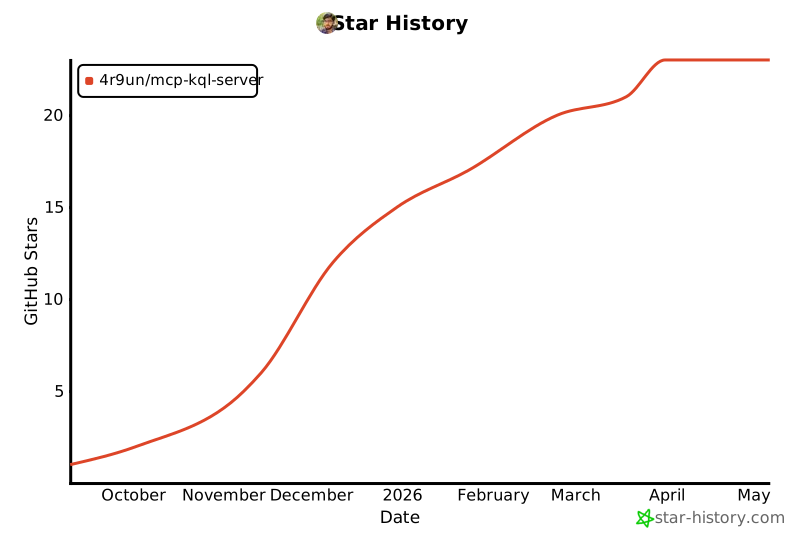
🌟 Star History
mcp-name: io.github.4R9UN/mcp-kql-server
Happy Querying! 🎉
1 maintainer

Metadata
1 maintainer
Release files for iflow-mcp_4r9un-mcp-kql-server 2.1.0
For a detailed explanation of source distributions (sdists) and built distributions (wheels), please see the package formats documentation.
Source distribution (sdist)
| File | Size | Uploaded | |
|---|---|---|---|
| iflow_mcp_4r9un_mcp_kql_server-2.1.0.tar.gz | 434.8 kB | Details |
Built distribution (wheel)
| File | Interpreter | ABI | Platform | Reset |
|---|---|---|---|---|
| iflow_mcp_4r9un_mcp_kql_server-2.1.0-py3-none-any.whl | Python 3 | none | any | Details |
Total release size: 524.9 kB
Release files / iflow_mcp_4r9un_mcp_kql_server-2.1.0.tar.gz
| Download URL | iflow_mcp_4r9un_mcp_kql_server-2.1.0.tar.gz |
|---|---|
| Size | 434.8 kB |
| Tags | Source |
|
SHA-256 checksum How to use checksums |
8e68d60273fee0093df181511134aa3fbada7425ce8d0883dc0a6c12c6fde141
|
|
BLAKE2b-256 checksum How to use checksums |
29e10a300963218fe0f05a1006774221acd31893b374e240d54f2df6e9ddc5cd
|
| Upload date | |
|
Uploaded using Trusted Publishing? What is trusted publishing? |
No |
| Uploaded via |
uv/0.10.0 {"installer":{"name":"uv","version":"0.10.0","subcommand":["publish"]},"python":null,"implementation":{"name":null,"version":null},"distro":{"name":"Debian GNU/Linux","version":"13","id":"trixie","libc":null},"system":{"name":null,"release":null},"cpu":null,"openssl_version":null,"setuptools_version":null,"rustc_version":null,"ci":null}
|
Release files / iflow_mcp_4r9un_mcp_kql_server-2.1.0-py3-none-any.whl
| Download URL | iflow_mcp_4r9un_mcp_kql_server-2.1.0-py3-none-any.whl |
|---|---|
| Size | 90.0 kB |
| Tags | Python 3 |
|
SHA-256 checksum How to use checksums |
efa9092280f7da5f78338a07bdeaed501453dc1d05136cb545240c17f3a03137
|
|
BLAKE2b-256 checksum How to use checksums |
e66ac85ce359f543469d0cde3a34a3b69d660192e0d857cb49de1e27d0db7d37
|
| Upload date | |
|
Uploaded using Trusted Publishing? What is trusted publishing? |
No |
| Uploaded via |
uv/0.10.0 {"installer":{"name":"uv","version":"0.10.0","subcommand":["publish"]},"python":null,"implementation":{"name":null,"version":null},"distro":{"name":"Debian GNU/Linux","version":"13","id":"trixie","libc":null},"system":{"name":null,"release":null},"cpu":null,"openssl_version":null,"setuptools_version":null,"rustc_version":null,"ci":null}
|













