
BloodHound-MCP

Model Context Protocol (MCP) Server for BloodHound
BloodHound-MCP is a powerful integration that brings the capabilities of Model Context Procotol (MCP) Server to BloodHound, the industry-standard tool for Active Directory security analysis. This integration allows you to analyze BloodHound data using natural language, making complex Active Directory attack path analysis accessible to everyone.
🥇 First-Ever BloodHound AI Integration!
This is the first integration that connects BloodHound with AI through MCP, originally announced here.
🔍 What is BloodHound-MCP?
BloodHound-MCP combines the power of:
- BloodHound: Industry-standard tool for visualizing and analyzing Active Directory attack paths
- Model Context Protocol (MCP): An open protocol for creating custom AI tools, compatible with various AI models
- Neo4j: Graph database used by BloodHound to store AD relationship data
With over 75 specialized tools based on the original BloodHound CE Cypher queries, BloodHound-MCP allows security professionals to:
- Query BloodHound data using natural language
- Discover complex attack paths in Active Directory environments
- Assess Active Directory security posture more efficiently
- Generate detailed security reports for stakeholders
📱 Community
Join our Telegram channel for updates, tips, and discussion:
- Telegram: root_sec
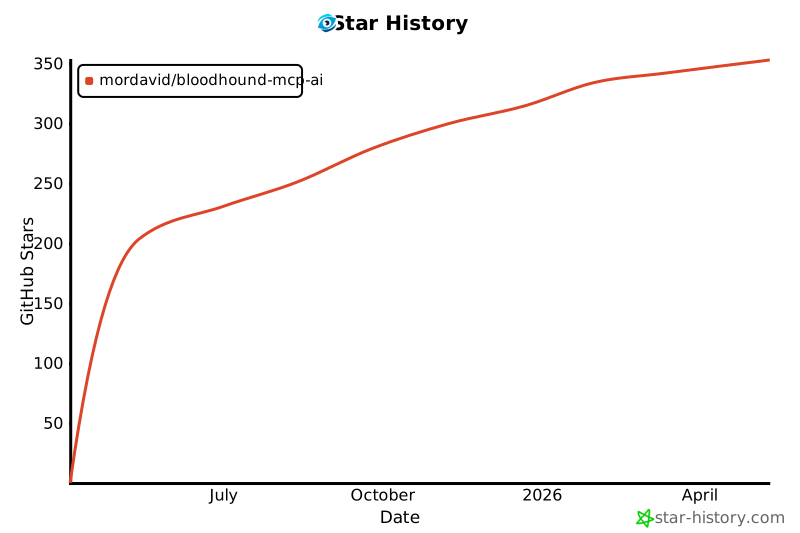
🌟 Star History
✨ Features
- Natural Language Interface: Query BloodHound data using plain English
- Comprehensive Analysis Categories:
- Domain structure mapping
- Privilege escalation paths
- Kerberos security issues (Kerberoasting, AS-REP Roasting)
- Certificate services vulnerabilities
- Active Directory hygiene assessment
- NTLM relay attack vectors
- Delegation abuse opportunities
- And much more!
📋 Prerequisites
- BloodHound 4.x+ with data collected from an Active Directory environment
- Neo4j database with BloodHound data loaded
- Python 3.8 or higher
- MCP Client
🔧 Installation
-
Clone this repository:
git clone https://github.com/your-username/MCP-BloodHound.git
cd MCP-BloodHound
-
Install dependencies:
pip install -r requirements.txt
-
Configure the MCP Server
"mcpServers": {
    "BloodHound-MCP": {
        "command": "python",
        "args": [
            "<Your_Path>\\BloodHound-MCP.py"
        ],
        "env": {
            "BLOODHOUND_URI": "bolt://localhost:7687",
            "BLOODHOUND_USERNAME": "neo4j",
            "BLOODHOUND_PASSWORD": "bloodhoundcommunityedition"
        }
    }
}
🚀 Usage
Example queries you can ask through the MCP:
- "Show me all paths from kerberoastable users to Domain Admins"
- "Find computers where Domain Users have local admin rights"
- "Identify Domain Controllers vulnerable to NTLM relay attacks"
- "Map all Active Directory certificate services vulnerabilities"
- "Generate a comprehensive security report for my domain"
- "Find inactive privileged accounts"
- "Show me attack paths to high-value targets"
🔐 Security Considerations
This tool is designed for legitimate security assessment purposes. Always:
- Obtain proper authorization before analyzing any Active Directory environment
- Handle BloodHound data as sensitive information
- Follow responsible disclosure practices for any vulnerabilities discovered
📜 License
This project is licensed under the MIT License - see the LICENSE file for details.
🙏 Acknowledgments
- The BloodHound team for creating an amazing Active Directory security tool
- The security community for continuously advancing AD security practices

Note: This is not an official Anthropic product. BloodHound-MCP is a community-driven integration between BloodHound and MCP.
1 maintainer

Metadata
1 maintainer
Release files for iflow-mcp_BloodHound-MCP-AI 1.0.0
For a detailed explanation of source distributions (sdists) and built distributions (wheels), please see the package formats documentation.
Source distribution (sdist)
| File | Size | Uploaded | |
|---|---|---|---|
| iflow_mcp_bloodhound_mcp_ai-1.0.0.tar.gz | 8.3 kB | Details |
Built distribution (wheel)
| File | Interpreter | ABI | Platform | Reset |
|---|---|---|---|---|
| iflow_mcp_bloodhound_mcp_ai-1.0.0-py3-none-any.whl | Python 3 | none | any | Details |
Total release size: 17.1 kB
Release files / iflow_mcp_bloodhound_mcp_ai-1.0.0.tar.gz
| Download URL | iflow_mcp_bloodhound_mcp_ai-1.0.0.tar.gz |
|---|---|
| Size | 8.3 kB |
| Tags | Source |
|
SHA-256 checksum How to use checksums |
4c6a3a9862884d9ca20d1df2b4cf89b44946dcd3bc1af2160f10803ad76a423b
|
|
BLAKE2b-256 checksum How to use checksums |
02715dabcb2922cf150ae760cd39281d67ac56dbb848d473a1af86dece7c0156
|
| Upload date | |
|
Uploaded using Trusted Publishing? What is trusted publishing? |
No |
| Uploaded via |
uv/0.9.8
|
Release files / iflow_mcp_bloodhound_mcp_ai-1.0.0-py3-none-any.whl
| Download URL | iflow_mcp_bloodhound_mcp_ai-1.0.0-py3-none-any.whl |
|---|---|
| Size | 8.8 kB |
| Tags | Python 3 |
|
SHA-256 checksum How to use checksums |
b661af32128e06cb8bfd89162e399b6ab855a198fb2d9d5111d71b369d8eabc5
|
|
BLAKE2b-256 checksum How to use checksums |
11020b60399d1218375903448861eafca33cfb8f27b226721cbf15e284b6b20b
|
| Upload date | |
|
Uploaded using Trusted Publishing? What is trusted publishing? |
No |
| Uploaded via |
uv/0.9.8
|













