
该项目已经集成应急响应的相关的 MCP 工具接口,仅提供 AI 生成的提示词参考。具体根据个人需求更改 @mcp.tool() 提示词。

该项目为 AutoIR 的 FastMCP 版本,可以使用 Vscode / cursor 进行 AI 自动化应急响应,并未进行 Debug,如果有问题可以 Issues 或者联系作者。

配置 config 设置本地雷池地址,配置方法与 AutoIR_Remote 配置相同,详细跳转 [https://github.com/IHK-ONE/AutoIR_Remote](https://github.com/IHK-ONE/AutoIR_Remote)
功能列表
# 劫持排查
  1. 排查环境是否被劫持,以及劫持环境变量

# 恶意用户排查
  1. 排查 home 下用户
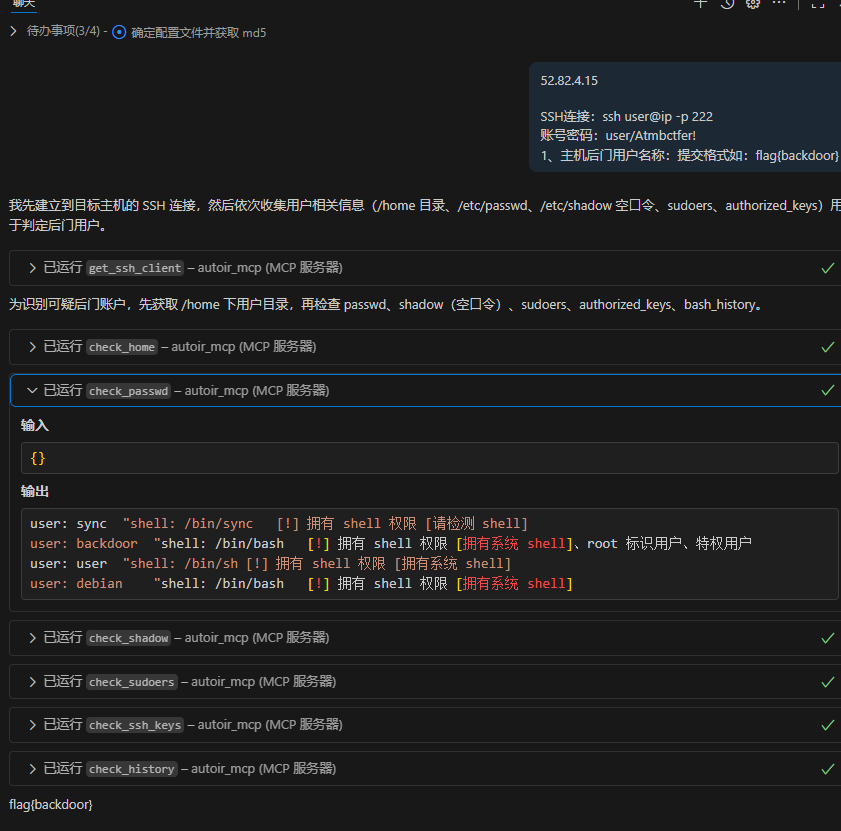
  2. 排查 /etc/passwd 下,拥有 shell 权限、root 权限、特殊权限的用户
  3. 排查 /etc/shadow 下,空口令用户(无密码登录用户)
  4. 排查 sudo 中权限异常用户
  5. 排查 拥有 authorized_keys 免密登录用户

# ProcAnalysis 恶意进程排查
  1. 排查 恶意挖矿脚本
  2. 排查 恶意启动,恶意命令执行的进程
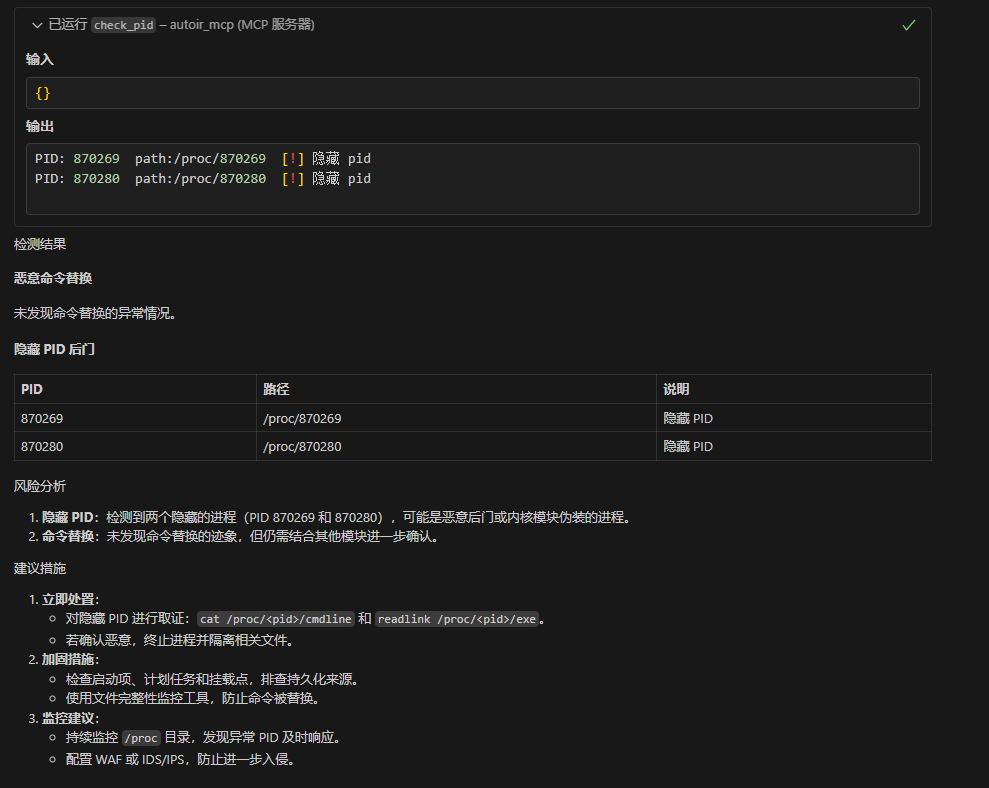
  3. 排查 隐藏pid检
  4. 排查 被恶意替换命令名称的进程
  5. 排查 被恶意 mount 挂载的进程

# NetworkAnalysis 网络排查
  1. 分析网络对外连接
  2. 检测存在的网卡
  3. hosts 排查

# FileAnalysis 恶意文件检测
  1. /usr/bin 排查
  2. /tmp 排查
  3. webroot webshell

# BackdoorAnalysis 后门排查
  1. LD_PRELOAD后门检测
  2. LD_AOUT_PRELOAD后门检测
  3. LD_ELF_PRELOAD后门检测
  4. LD_LIBRARY_PATH后门检测
  5. ld.so.preload后门检测
  6. PROMPT_COMMAND后门检测
  7. cron后门检测
  8. alias后门
  9. ssh后门 ln -sf /usr/sbin/sshd /tmp/su; /tmp/su -oPort=5555;
  10. SSH Server wrapper 后门,替换/user/sbin/sshd 为脚本文件
  11. /etc/inetd.conf 后门
  12. /etc/xinetd.conf/后门
  13. setuid类后门
  14. /etc/fstab类后门(待写)
  13. 系统启动项后门检测

# LogAnalysis
  1. apache2 日志排查信息统计(并未制作 IIS Nginx Ruoyi 等服务日志审计,一般情况下 应急响应出题使用 Apache 居多)
  2. 登入成功和登入失败信息统计

# Rookit 排查
  1. 使用 rkhunter 实现
MCP 导入
pip install uv
cd ./AutoIR_MCP
uv sync
初始化后,可以直接在 Vscode 与 Cursor 中让 AI 加载 MCP
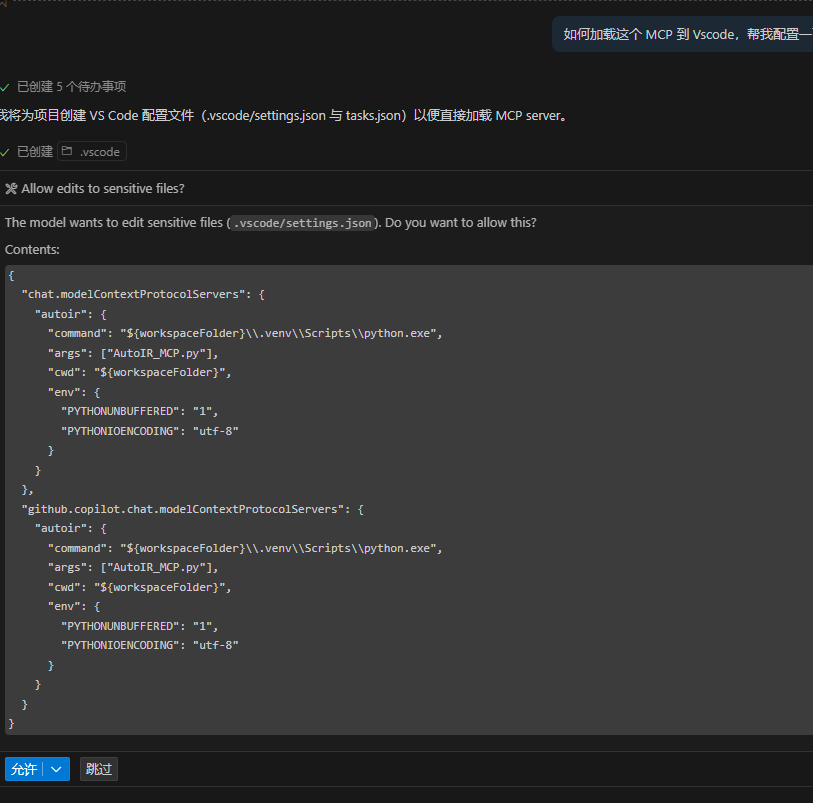
配置完后直接询问即可,尽量使用高参数模型,回答更加精准
测试1
测试2
1 maintainer

Metadata
1 maintainer
Release files for iflow-mcp_IHK-ONE-autoir-mcp 0.1.3
For a detailed explanation of source distributions (sdists) and built distributions (wheels), please see the package formats documentation.
Source distribution (sdist)
| File | Size | Uploaded | |
|---|---|---|---|
| iflow_mcp_ihk_one_autoir_mcp-0.1.3.tar.gz | 16.1 MB | Details |
Built distribution (wheel)
| File | Interpreter | ABI | Platform | Reset |
|---|---|---|---|---|
| iflow_mcp_ihk_one_autoir_mcp-0.1.3-py3-none-any.whl | Python 3 | none | any | Details |
Total release size: 32.2 MB
Release files / iflow_mcp_ihk_one_autoir_mcp-0.1.3.tar.gz
| Download URL | iflow_mcp_ihk_one_autoir_mcp-0.1.3.tar.gz |
|---|---|
| Size | 16.1 MB |
| Tags | Source |
|
SHA-256 checksum How to use checksums |
0cb51d16cbd57c37225aaaabeb8546f955500b341b7866b07db7aa862034288e
|
|
BLAKE2b-256 checksum How to use checksums |
802031083e8c5130149c1dbe0001e02813939d81b02caf70591437d2b6824f3b
|
| Upload date | |
|
Uploaded using Trusted Publishing? What is trusted publishing? |
No |
| Uploaded via |
uv/0.10.2 {"installer":{"name":"uv","version":"0.10.2","subcommand":["publish"]},"python":null,"implementation":{"name":null,"version":null},"distro":{"name":"Debian GNU/Linux","version":"13","id":"trixie","libc":null},"system":{"name":null,"release":null},"cpu":null,"openssl_version":null,"setuptools_version":null,"rustc_version":null,"ci":null}
|
Release files / iflow_mcp_ihk_one_autoir_mcp-0.1.3-py3-none-any.whl
| Download URL | iflow_mcp_ihk_one_autoir_mcp-0.1.3-py3-none-any.whl |
|---|---|
| Size | 16.1 MB |
| Tags | Python 3 |
|
SHA-256 checksum How to use checksums |
b623a70e1f61c5c978ae82d3ac693a7f28e8e4bff1c1be450c08e8c349418892
|
|
BLAKE2b-256 checksum How to use checksums |
392a3d34bf6fa5a1a429d7d22062a441c283c3badde7010aea941fd9fa70c906
|
| Upload date | |
|
Uploaded using Trusted Publishing? What is trusted publishing? |
No |
| Uploaded via |
uv/0.10.2 {"installer":{"name":"uv","version":"0.10.2","subcommand":["publish"]},"python":null,"implementation":{"name":null,"version":null},"distro":{"name":"Debian GNU/Linux","version":"13","id":"trixie","libc":null},"system":{"name":null,"release":null},"cpu":null,"openssl_version":null,"setuptools_version":null,"rustc_version":null,"ci":null}
|














