
AutoIR MCP - Automated Incident Response tools for security analysis

Project description
该项目已经集成应急响应的相关的 MCP 工具接口,仅提供 AI 生成的提示词参考。具体根据个人需求更改 @mcp.tool() 提示词。

该项目为 AutoIR 的 FastMCP 版本,可以使用 Vscode / cursor 进行 AI 自动化应急响应,并未进行 Debug,如果有问题可以 Issues 或者联系作者。

配置 config 设置本地雷池地址,配置方法与 AutoIR_Remote 配置相同,详细跳转 [https://github.com/IHK-ONE/AutoIR_Remote](https://github.com/IHK-ONE/AutoIR_Remote)
功能列表
# 劫持排查
  1. 排查环境是否被劫持,以及劫持环境变量

# 恶意用户排查
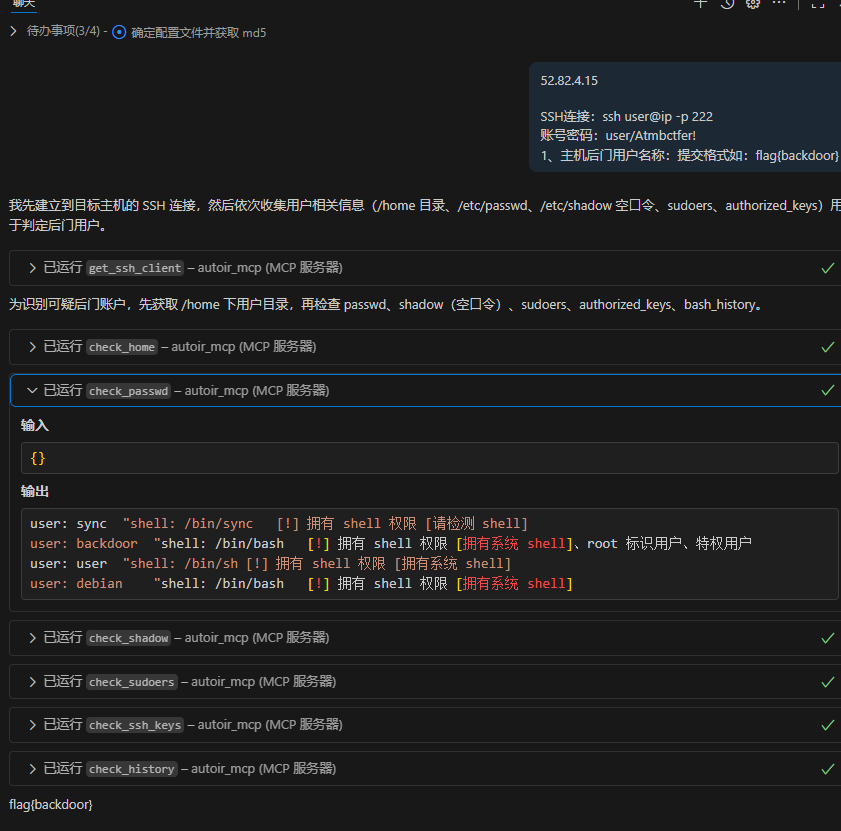
  1. 排查 home 下用户
  2. 排查 /etc/passwd 下,拥有 shell 权限、root 权限、特殊权限的用户
  3. 排查 /etc/shadow 下,空口令用户(无密码登录用户)
  4. 排查 sudo 中权限异常用户
  5. 排查 拥有 authorized_keys 免密登录用户

# ProcAnalysis 恶意进程排查
  1. 排查 恶意挖矿脚本
  2. 排查 恶意启动,恶意命令执行的进程
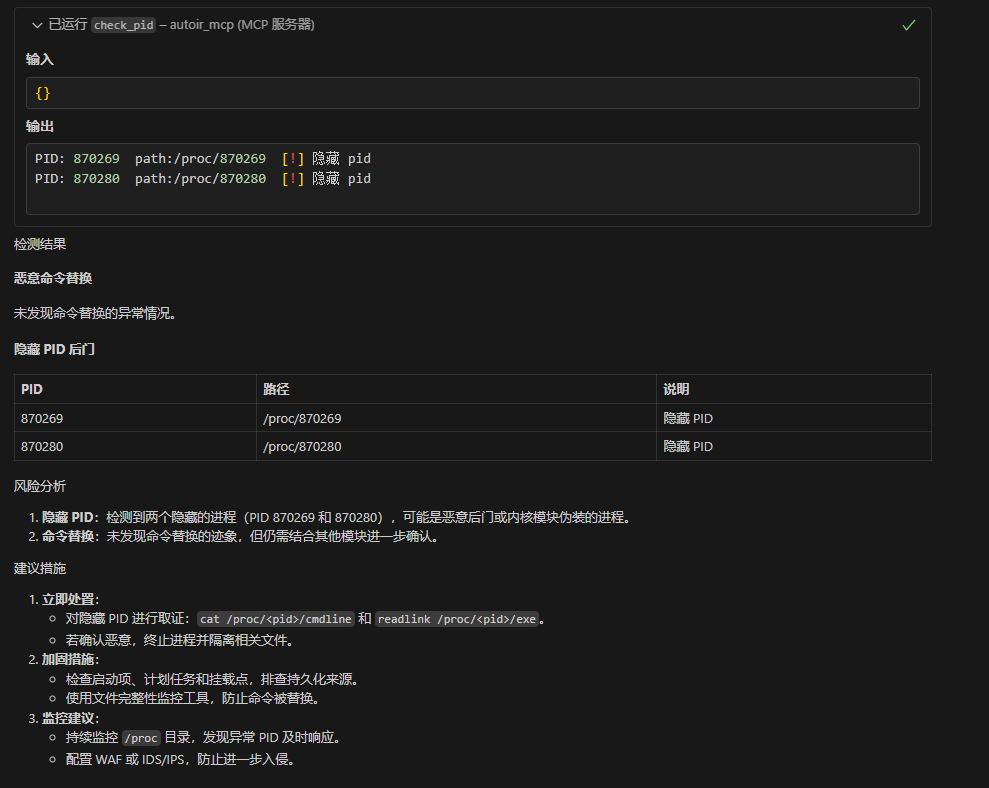
  3. 排查 隐藏pid检
  4. 排查 被恶意替换命令名称的进程
  5. 排查 被恶意 mount 挂载的进程

# NetworkAnalysis 网络排查
  1. 分析网络对外连接
  2. 检测存在的网卡
  3. hosts 排查

# FileAnalysis 恶意文件检测
  1. /usr/bin 排查
  2. /tmp 排查
  3. webroot webshell

# BackdoorAnalysis 后门排查
  1. LD_PRELOAD后门检测
  2. LD_AOUT_PRELOAD后门检测
  3. LD_ELF_PRELOAD后门检测
  4. LD_LIBRARY_PATH后门检测
  5. ld.so.preload后门检测
  6. PROMPT_COMMAND后门检测
  7. cron后门检测
  8. alias后门
  9. ssh后门 ln -sf /usr/sbin/sshd /tmp/su; /tmp/su -oPort=5555;
  10. SSH Server wrapper 后门,替换/user/sbin/sshd 为脚本文件
  11. /etc/inetd.conf 后门
  12. /etc/xinetd.conf/后门
  13. setuid类后门
  14. /etc/fstab类后门(待写)
  13. 系统启动项后门检测

# LogAnalysis
  1. apache2 日志排查信息统计(并未制作 IIS Nginx Ruoyi 等服务日志审计,一般情况下 应急响应出题使用 Apache 居多)
  2. 登入成功和登入失败信息统计

# Rookit 排查
  1. 使用 rkhunter 实现
MCP 导入
pip install uv
cd ./AutoIR_MCP
uv sync
初始化后,可以直接在 Vscode 与 Cursor 中让 AI 加载 MCP
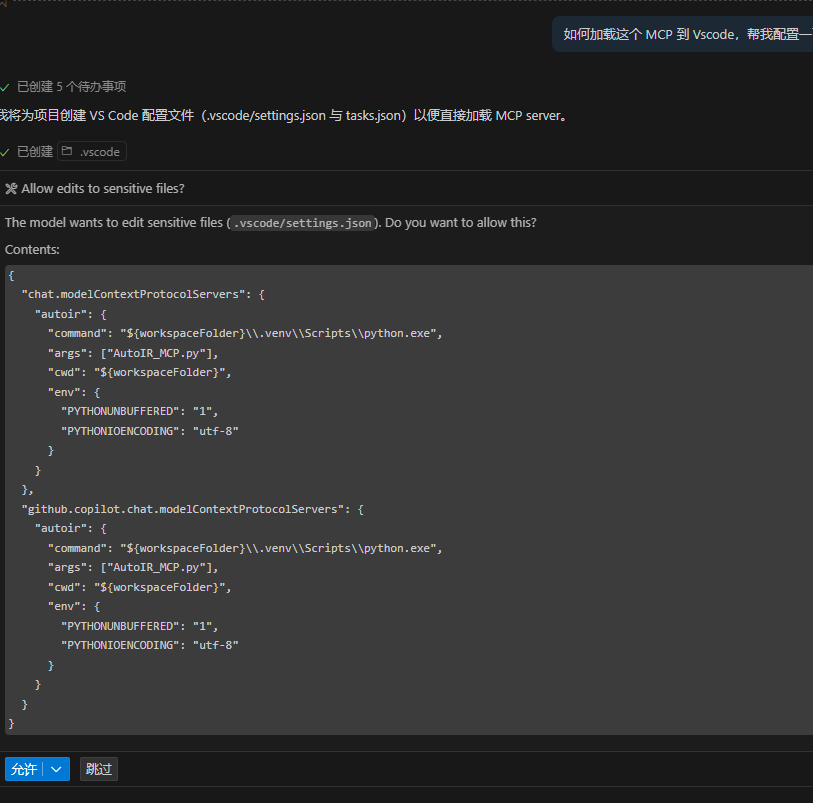
配置完后直接询问即可,尽量使用高参数模型,回答更加精准
测试1
测试2


Download files
Download the file for your platform. If you're not sure which to choose, learn more about installing packages.
Source Distribution
Built Distribution
Filter files by name, interpreter, ABI, and platform.
If you're not sure about the file name format, learn more about wheel file names.
Copy a direct link to the current filters
File details
Details for the file iflow_mcp_ihk_one_autoir_mcp-0.1.0.tar.gz.
File metadata
- Download URL: iflow_mcp_ihk_one_autoir_mcp-0.1.0.tar.gz
- Upload date:
- Size: 16.1 MB
- Tags: Source
- Uploaded using Trusted Publishing? No
- Uploaded via: uv/0.10.2 {"installer":{"name":"uv","version":"0.10.2","subcommand":["publish"]},"python":null,"implementation":{"name":null,"version":null},"distro":{"name":"Debian GNU/Linux","version":"13","id":"trixie","libc":null},"system":{"name":null,"release":null},"cpu":null,"openssl_version":null,"setuptools_version":null,"rustc_version":null,"ci":null}
File hashes
| Algorithm | Hash digest | |
|---|---|---|
| SHA256 |
cfe4af4266c90c7af60eb99523c200385d0677cb34aeded24ffb6ecaa105349b
|
|
| MD5 |
06760ef9e6d689bc554206c67da54772
|
|
| BLAKE2b-256 |
3c29d0dbc8414129ddd2f4772b804f124c5c518372ff744ce696de931d6de4cf
|
File details
Details for the file iflow_mcp_ihk_one_autoir_mcp-0.1.0-py3-none-any.whl.
File metadata
- Download URL: iflow_mcp_ihk_one_autoir_mcp-0.1.0-py3-none-any.whl
- Upload date:
- Size: 16.1 MB
- Tags: Python 3
- Uploaded using Trusted Publishing? No
- Uploaded via: uv/0.10.2 {"installer":{"name":"uv","version":"0.10.2","subcommand":["publish"]},"python":null,"implementation":{"name":null,"version":null},"distro":{"name":"Debian GNU/Linux","version":"13","id":"trixie","libc":null},"system":{"name":null,"release":null},"cpu":null,"openssl_version":null,"setuptools_version":null,"rustc_version":null,"ci":null}
File hashes
| Algorithm | Hash digest | |
|---|---|---|
| SHA256 |
024b3de4a3323630caa49d3860266f05d6e81ebd09a3b538ee7dace3426139ef
|
|
| MD5 |
ff0bdb9016f3e15de968e429570f536b
|
|
| BLAKE2b-256 |
de005342c18535d101ea74453e53269b71d6d7ccbc283230c88d8fbade7b92c0
|






