
MCP Stripe Server

A Model Context Protocol (MCP) server implementation that integrates with Stripe for handling payments, customers, and refunds. This server provides a structured API to manage financial transactions securely.
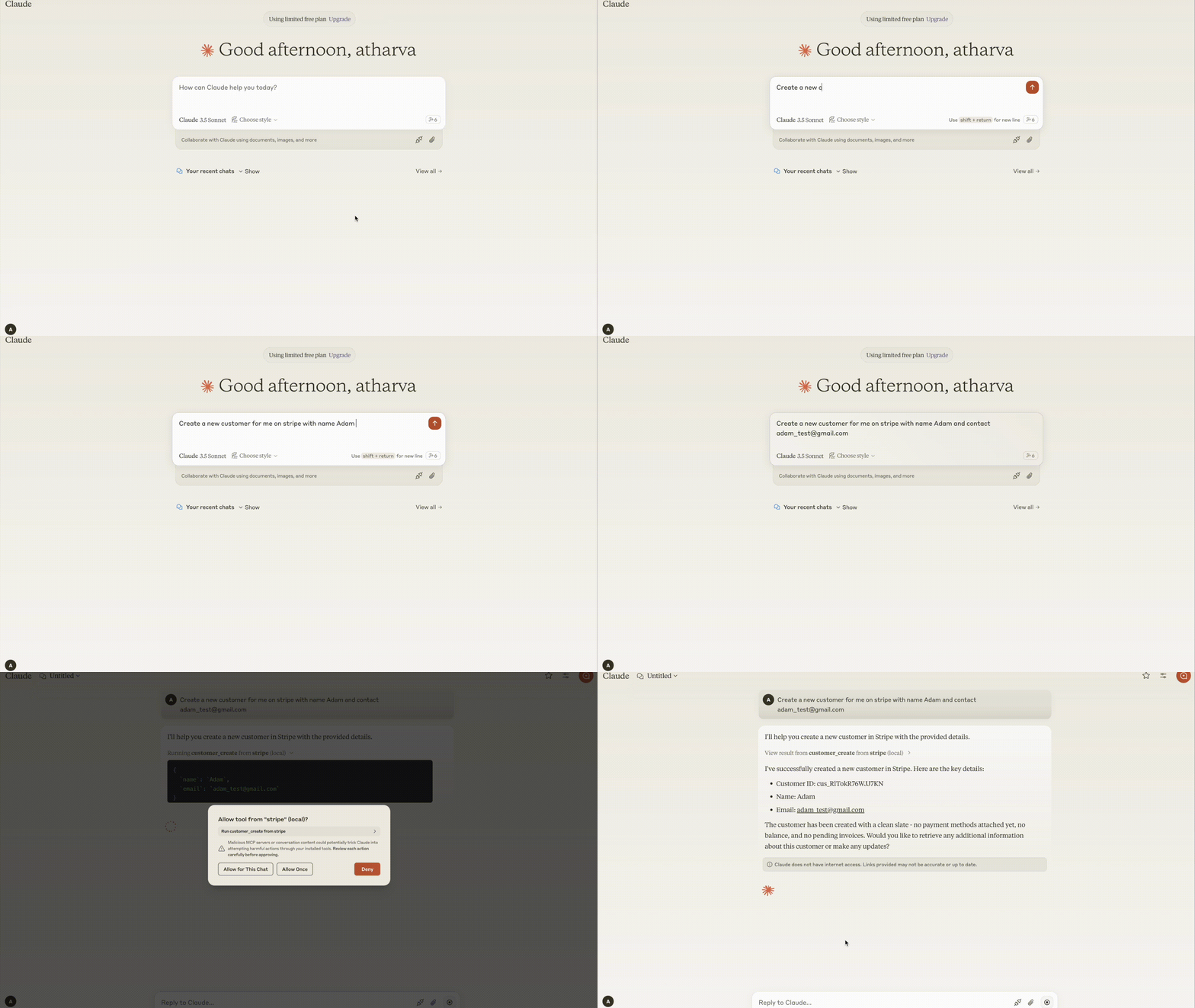
Demo
Requirements
- Python 3.8+
- MCP SDK 0.1.0+
- Stripe Python SDK
- dotenv
Components
Resources
The server provides audit logging of all Stripe operations:
- Stores audit logs of customer, payment, and refund operations
- Supports structured logging for better traceability
- Uses MCP resource endpoints to retrieve audit data
Tools
The server implements Stripe API operations, including:
Customer Management
- customer_create: Create a new customer
- customer_retrieve: Retrieve a customer's details
- customer_update: Update customer information
Payment Operations
- payment_intent_create: Create a payment intent for processing payments
- charge_list: List recent charges
Refund Operations
- refund_create: Create a refund for a charge
Features
- Secure Payments: Integrates with Stripe for robust payment handling
- Audit Logging: Keeps track of all Stripe transactions
- Error Handling: Comprehensive error handling with clear messages
- MCP Integration: Supports MCP-compatible tools and resource listing
Installation
Installing via Smithery
To install Stripe Server for Claude Desktop automatically via Smithery:
npx -y @smithery/cli install @atharvagupta2003/mcp-stripe --client claude
Install dependencies
python -m venv venv
source venv/bin/activate  # On macOS/Linux
venv\Scripts\activate    # On Windows
pip install -e .
Configuration
Set up the environment variables in a .env file:
STRIPE_API_KEY=your_stripe_secret_key
Claude Desktop
Add the server configuration to your Claude Desktop config:
Windows: C:\Users<username>\AppData\Roaming\Claude\claude_desktop_config.json
MacOS: ~/Library/Application Support/Claude/claude_desktop_config.json
{
  "mcpServers": {
    "stripe": {
      "command": "uv",
      "args": [
        "--directory",
        "/ABSOLUTE/PATH/TO/PARENT/FOLDER/src",
        "run",
        "server.py"
      ]
    }
  }
}
Usage
Start the server
uv run src/server.py
Example MCP Commands
Create a customer
{
    "tool": "customer_create",
    "arguments": {
        "email": "customer@example.com",
        "name": "John Doe"
    }
}
Retrieve a customer
{
    "tool": "customer_retrieve",
    "arguments": {
        "customer_id": "cus_123456"
    }
}
Create a payment intent
{
    "tool": "payment_intent_create",
    "arguments": {
        "amount": 5000,
        "currency": "usd",
        "customer": "cus_123456"
    }
}
Create a refund
{
    "tool": "refund_create",
    "arguments": {
        "charge_id": "ch_abc123"
    }
}
Error Handling
The server provides clear error messages for common scenarios:
- Missing API Key: STRIPE_API_KEY required
- Invalid API Key: Authentication error
- Customer not found: Invalid customer ID
- Invalid input: Missing or incorrect parameters
Development
Testing
Run the MCP Inspector for interactive testing:
npx @modelcontextprotocol/inspector uv --directory /ABSOLUTE/PATH/TO/PARENT/FOLDER/src run server.py
Building
- Update dependencies:
uv compile pyproject.toml
- Build package:
uv build
Contributing
We welcome contributions! Please see our Contributing Guidelines for details.
License
This project is licensed under the MIT License - see the LICENSE file for details.
1 maintainer

Metadata
1 maintainer
Release files for iflow-mcp_atharvagupta2003_mcp-stripe 0.1.5
For a detailed explanation of source distributions (sdists) and built distributions (wheels), please see the package formats documentation.
Source distribution (sdist)
| File | Size | Uploaded | |
|---|---|---|---|
| iflow_mcp_atharvagupta2003_mcp_stripe-0.1.5.tar.gz | 6.7 kB | Details |
Built distribution (wheel)
| File | Interpreter | ABI | Platform | Reset |
|---|---|---|---|---|
| iflow_mcp_atharvagupta2003_mcp_stripe-0.1.5-py3-none-any.whl | Python 3 | none | any | Details |
Total release size: 15.0 kB
Release files / iflow_mcp_atharvagupta2003_mcp_stripe-0.1.5.tar.gz
| Download URL | iflow_mcp_atharvagupta2003_mcp_stripe-0.1.5.tar.gz |
|---|---|
| Size | 6.7 kB |
| Tags | Source |
|
SHA-256 checksum How to use checksums |
ee17bdc1c103e3ab16bd548d923dce4f0c7abfaae86ff7dc9987450601a843c4
|
|
BLAKE2b-256 checksum How to use checksums |
09b9db255360467df482b9c2016e0fde9240f5ecaf6cfd784e8146a24f64f528
|
| Upload date | |
|
Uploaded using Trusted Publishing? What is trusted publishing? |
No |
| Uploaded via |
uv/0.9.26 {"installer":{"name":"uv","version":"0.9.26","subcommand":["publish"]},"python":null,"implementation":{"name":null,"version":null},"distro":{"name":"Debian GNU/Linux","version":"13","id":"trixie","libc":null},"system":{"name":null,"release":null},"cpu":null,"openssl_version":null,"setuptools_version":null,"rustc_version":null,"ci":null}
|
Release files / iflow_mcp_atharvagupta2003_mcp_stripe-0.1.5-py3-none-any.whl
| Download URL | iflow_mcp_atharvagupta2003_mcp_stripe-0.1.5-py3-none-any.whl |
|---|---|
| Size | 8.3 kB |
| Tags | Python 3 |
|
SHA-256 checksum How to use checksums |
02b70275797fd1febf462d46a5909d58a319b04d08f9f0b98266190a2cb34e83
|
|
BLAKE2b-256 checksum How to use checksums |
5b53e177bbcc1f5bed04433be76f795b6f838f781cb36d34fe8557793151b42c
|
| Upload date | |
|
Uploaded using Trusted Publishing? What is trusted publishing? |
No |
| Uploaded via |
uv/0.9.26 {"installer":{"name":"uv","version":"0.9.26","subcommand":["publish"]},"python":null,"implementation":{"name":null,"version":null},"distro":{"name":"Debian GNU/Linux","version":"13","id":"trixie","libc":null},"system":{"name":null,"release":null},"cpu":null,"openssl_version":null,"setuptools_version":null,"rustc_version":null,"ci":null}
|














