
MCP server for Stripe payments, customers, and refunds

Project description
MCP Stripe Server

A Model Context Protocol (MCP) server implementation that integrates with Stripe for handling payments, customers, and refunds. This server provides a structured API to manage financial transactions securely.
Demo
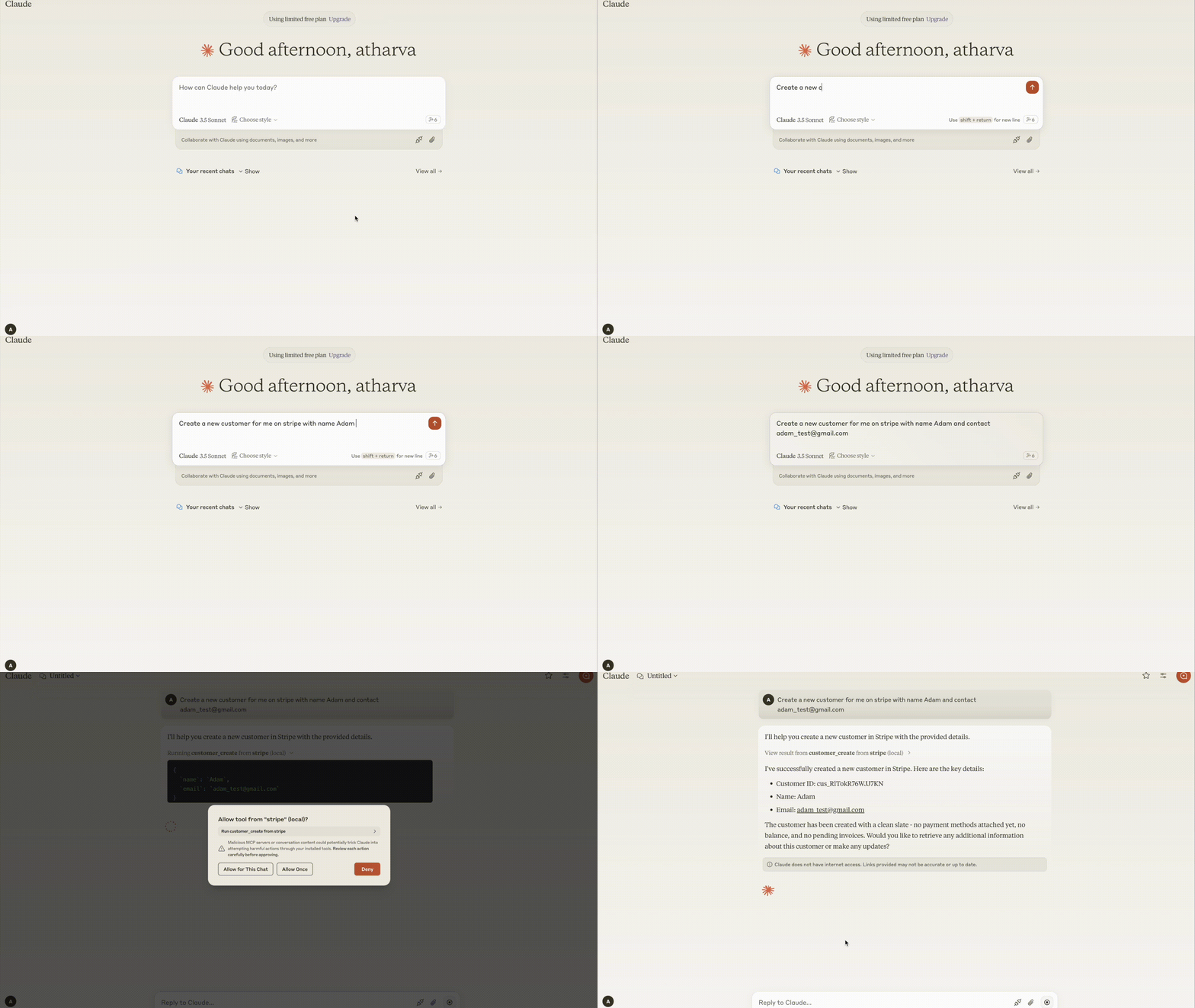
Requirements
- Python 3.8+
- MCP SDK 0.1.0+
- Stripe Python SDK
- dotenv
Components
Resources
The server provides audit logging of all Stripe operations:
- Stores audit logs of customer, payment, and refund operations
- Supports structured logging for better traceability
- Uses MCP resource endpoints to retrieve audit data
Tools
The server implements Stripe API operations, including:
Customer Management
- customer_create: Create a new customer
- customer_retrieve: Retrieve a customer's details
- customer_update: Update customer information
Payment Operations
- payment_intent_create: Create a payment intent for processing payments
- charge_list: List recent charges
Refund Operations
- refund_create: Create a refund for a charge
Features
- Secure Payments: Integrates with Stripe for robust payment handling
- Audit Logging: Keeps track of all Stripe transactions
- Error Handling: Comprehensive error handling with clear messages
- MCP Integration: Supports MCP-compatible tools and resource listing
Installation
Installing via Smithery
To install Stripe Server for Claude Desktop automatically via Smithery:
npx -y @smithery/cli install @atharvagupta2003/mcp-stripe --client claude
Install dependencies
python -m venv venv
source venv/bin/activate  # On macOS/Linux
venv\Scripts\activate    # On Windows
pip install -e .
Configuration
Set up the environment variables in a .env file:
STRIPE_API_KEY=your_stripe_secret_key
Claude Desktop
Add the server configuration to your Claude Desktop config:
Windows: C:\Users<username>\AppData\Roaming\Claude\claude_desktop_config.json
MacOS: ~/Library/Application Support/Claude/claude_desktop_config.json
{
  "mcpServers": {
    "stripe": {
      "command": "uv",
      "args": [
        "--directory",
        "/ABSOLUTE/PATH/TO/PARENT/FOLDER/src",
        "run",
        "server.py"
      ]
    }
  }
}
Usage
Start the server
uv run src/server.py
Example MCP Commands
Create a customer
{
    "tool": "customer_create",
    "arguments": {
        "email": "customer@example.com",
        "name": "John Doe"
    }
}
Retrieve a customer
{
    "tool": "customer_retrieve",
    "arguments": {
        "customer_id": "cus_123456"
    }
}
Create a payment intent
{
    "tool": "payment_intent_create",
    "arguments": {
        "amount": 5000,
        "currency": "usd",
        "customer": "cus_123456"
    }
}
Create a refund
{
    "tool": "refund_create",
    "arguments": {
        "charge_id": "ch_abc123"
    }
}
Error Handling
The server provides clear error messages for common scenarios:
- Missing API Key: STRIPE_API_KEY required
- Invalid API Key: Authentication error
- Customer not found: Invalid customer ID
- Invalid input: Missing or incorrect parameters
Development
Testing
Run the MCP Inspector for interactive testing:
npx @modelcontextprotocol/inspector uv --directory /ABSOLUTE/PATH/TO/PARENT/FOLDER/src run server.py
Building
- Update dependencies:
uv compile pyproject.toml
- Build package:
uv build
Contributing
We welcome contributions! Please see our Contributing Guidelines for details.
License
This project is licensed under the MIT License - see the LICENSE file for details.


Download files
Download the file for your platform. If you're not sure which to choose, learn more about installing packages.
Source Distribution
Built Distribution
Filter files by name, interpreter, ABI, and platform.
If you're not sure about the file name format, learn more about wheel file names.
Copy a direct link to the current filters
File details
Details for the file iflow_mcp_atharvagupta2003_mcp_stripe-0.1.3.tar.gz.
File metadata
- Download URL: iflow_mcp_atharvagupta2003_mcp_stripe-0.1.3.tar.gz
- Upload date:
- Size: 6.5 kB
- Tags: Source
- Uploaded using Trusted Publishing? No
- Uploaded via: uv/0.9.26 {"installer":{"name":"uv","version":"0.9.26","subcommand":["publish"]},"python":null,"implementation":{"name":null,"version":null},"distro":{"name":"Debian GNU/Linux","version":"13","id":"trixie","libc":null},"system":{"name":null,"release":null},"cpu":null,"openssl_version":null,"setuptools_version":null,"rustc_version":null,"ci":null}
File hashes
| Algorithm | Hash digest | |
|---|---|---|
| SHA256 |
7fa881ebcab02ad7e7901149bd3b68eaac6349bd120f8740717a0ff7031b526a
|
|
| MD5 |
f47a5267f6f984ffc45fb0b876216990
|
|
| BLAKE2b-256 |
66aef707ea9c5c01d6e53ad1a13724ce282342d29d5d8166ee3434078770259e
|
File details
Details for the file iflow_mcp_atharvagupta2003_mcp_stripe-0.1.3-py3-none-any.whl.
File metadata
- Download URL: iflow_mcp_atharvagupta2003_mcp_stripe-0.1.3-py3-none-any.whl
- Upload date:
- Size: 7.6 kB
- Tags: Python 3
- Uploaded using Trusted Publishing? No
- Uploaded via: uv/0.9.26 {"installer":{"name":"uv","version":"0.9.26","subcommand":["publish"]},"python":null,"implementation":{"name":null,"version":null},"distro":{"name":"Debian GNU/Linux","version":"13","id":"trixie","libc":null},"system":{"name":null,"release":null},"cpu":null,"openssl_version":null,"setuptools_version":null,"rustc_version":null,"ci":null}
File hashes
| Algorithm | Hash digest | |
|---|---|---|
| SHA256 |
d0ace8e728b1695bc4a3f031dc8166eb29004a8e168184c25a9b14d054a64d28
|
|
| MD5 |
438f3eb7b292c40b15ba2a072428433e
|
|
| BLAKE2b-256 |
fdd6da2a169cbf30256cc2031ac51da0fd3fd62543d01105aa3628dde1b852e6
|






