
PromptShopMCP

English | 中文
A powerful MCP (Model Context Protocol) server that transforms images using simple text commands. Edit photos like a professional designer - just describe what you want in natural language!
Demo
Original Image

Prompt: add a coat to the dog

Prompt: Add a hat to it

Features
- Image Generation: Create images from text prompts using Google's Gemini models
- Image Modification: Transform existing images based on text instructions
- Background Removal: Remove backgrounds from images using the remove.bg API
- Image Hosting: Share generated images via FreeImage.host
- Resource Management: Track and manage generated and uploaded images
Requirements
- Python 3.11 or higher
- Required API keys:
Installation
-
Clone this repository:
git https://github.com/Kira-Pgr/Image-Toolkit-MCP-Server.git
cd Image-Toolkit-MCP-Server
-
Install UV (if not already installed):
# On macOS and Linux.
curl -LsSf https://astral.sh/uv/install.sh | sh
# On Windows.
powershell -ExecutionPolicy ByPass -c "irm https://astral.sh/uv/install.ps1 | iex"
# With pip.
pip install uv
-
Install dependencies using UV:
uv venv --python=python3.11
source .venv/bin/activate #or .venv/Scripts/activate on Windows
uv pip install -r requirements.txt
Usage
- Claude Desktop Integration: Add the following configuration to your
claude_desktop_config.jsonfile to run the server directly from Claude Desktop:"PromptShopMCP": { "command": "uv", "args": [ "--directory", "/project/dir/", "run", "mcp", "run", "/project/dir/server.py" ], "env": { "GEMINI_API_KEY": "key", "FREEIMAGE_API_KEY": "key", "REMOVEBG_API_KEY": "key" } }
Note: Replace the placeholder"key"values with your actual API keys. - Cursor Integration:
Linux/macOS: Modify thecursor.shfile to set your API keys and project directory.
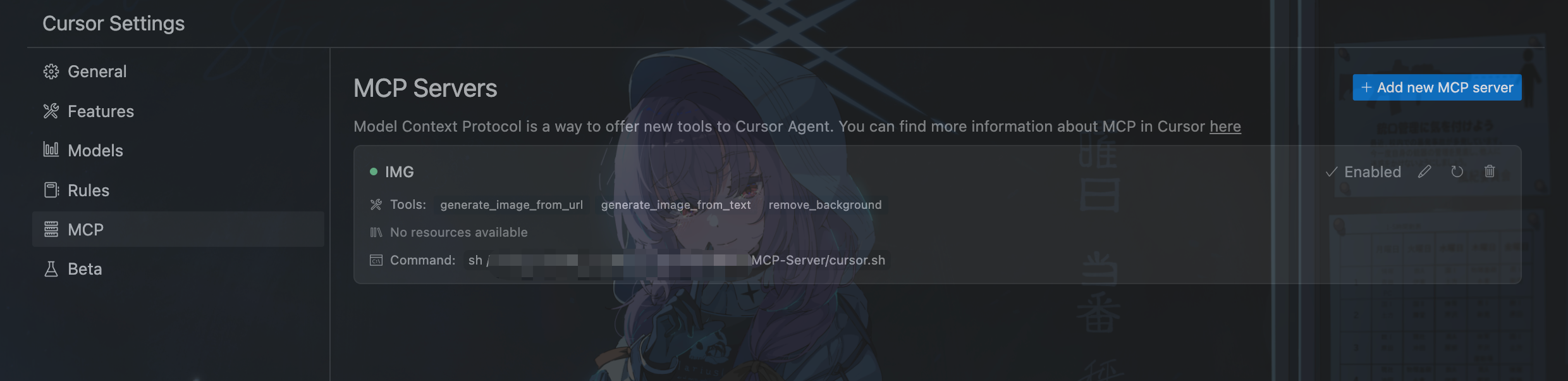
- In cursor settings, go to the "MCP" tab, click on
Add new MCP server, - Name the server whatever you want, and set the command to
sh /absolute/path/to/cursor.sh. - Wait for the server to start, and you can see the server and available tools.
- Then when you use the agent, it would automatically detect whether use the tools.
Windows:
Modify the cursor.bat file to set your API keys and project directory.
- In cursor settings, go to the "MCP" tab, click on
Add new MCP server, - Name the server whatever you want, and set the command to
cmd /c C:\absolute\path\to\cursor.bat. - Wait for the server to start, and you can see the server and available tools.
- Then when you use the agent, it would automatically detect whether use the tools.
Acknowledgements
- Google Gemini: For the image generation capabilities
- Remove.bg: For background removal services
- FreeImage.host: For image hosting services
- MCP: For the Model Context Protocol
1 maintainer

Metadata
1 maintainer
Release files for iflow-mcp_kira-pgr-promptshopmcp 0.1.2
For a detailed explanation of source distributions (sdists) and built distributions (wheels), please see the package formats documentation.
Source distribution (sdist)
| File | Size | Uploaded | |
|---|---|---|---|
| iflow_mcp_kira_pgr_promptshopmcp-0.1.2.tar.gz | 11.9 kB | Details |
Built distribution (wheel)
| File | Interpreter | ABI | Platform | Reset |
|---|---|---|---|---|
| iflow_mcp_kira_pgr_promptshopmcp-0.1.2-py3-none-any.whl | Python 3 | none | any | Details |
Total release size: 23.9 kB
Release files / iflow_mcp_kira_pgr_promptshopmcp-0.1.2.tar.gz
| Download URL | iflow_mcp_kira_pgr_promptshopmcp-0.1.2.tar.gz |
|---|---|
| Size | 11.9 kB |
| Tags | Source |
|
SHA-256 checksum How to use checksums |
6ad14ff57dfe1d9e96a852ca8332229763f7b848988a92e39de1fbbf3f259454
|
|
BLAKE2b-256 checksum How to use checksums |
5a2e7c0c1d446c28c3a2b9481eb5097b05c8c78ff46690b98bb9993fa681fe5e
|
| Upload date | |
|
Uploaded using Trusted Publishing? What is trusted publishing? |
No |
| Uploaded via |
uv/0.10.0 {"installer":{"name":"uv","version":"0.10.0","subcommand":["publish"]},"python":null,"implementation":{"name":null,"version":null},"distro":{"name":"Debian GNU/Linux","version":"13","id":"trixie","libc":null},"system":{"name":null,"release":null},"cpu":null,"openssl_version":null,"setuptools_version":null,"rustc_version":null,"ci":null}
|
Release files / iflow_mcp_kira_pgr_promptshopmcp-0.1.2-py3-none-any.whl
| Download URL | iflow_mcp_kira_pgr_promptshopmcp-0.1.2-py3-none-any.whl |
|---|---|
| Size | 12.0 kB |
| Tags | Python 3 |
|
SHA-256 checksum How to use checksums |
fede52cd03c1e6fcadd0c41a85520b52e4f666c349e6a11737e7e68f5ad91271
|
|
BLAKE2b-256 checksum How to use checksums |
f1d713ca08c762eb164efed60f324a7d917ed13000046765d0dd869e12e38a80
|
| Upload date | |
|
Uploaded using Trusted Publishing? What is trusted publishing? |
No |
| Uploaded via |
uv/0.10.0 {"installer":{"name":"uv","version":"0.10.0","subcommand":["publish"]},"python":null,"implementation":{"name":null,"version":null},"distro":{"name":"Debian GNU/Linux","version":"13","id":"trixie","libc":null},"system":{"name":null,"release":null},"cpu":null,"openssl_version":null,"setuptools_version":null,"rustc_version":null,"ci":null}
|














