
A powerful MCP server that transforms images using simple text commands

Project description
PromptShopMCP

English | 中文
A powerful MCP (Model Context Protocol) server that transforms images using simple text commands. Edit photos like a professional designer - just describe what you want in natural language!
Demo
Original Image

Prompt: add a coat to the dog

Prompt: Add a hat to it

Features
- Image Generation: Create images from text prompts using Google's Gemini models
- Image Modification: Transform existing images based on text instructions
- Background Removal: Remove backgrounds from images using the remove.bg API
- Image Hosting: Share generated images via FreeImage.host
- Resource Management: Track and manage generated and uploaded images
Requirements
- Python 3.11 or higher
- Required API keys:
Installation
-
Clone this repository:
git https://github.com/Kira-Pgr/Image-Toolkit-MCP-Server.git
cd Image-Toolkit-MCP-Server
-
Install UV (if not already installed):
# On macOS and Linux.
curl -LsSf https://astral.sh/uv/install.sh | sh
# On Windows.
powershell -ExecutionPolicy ByPass -c "irm https://astral.sh/uv/install.ps1 | iex"
# With pip.
pip install uv
-
Install dependencies using UV:
uv venv --python=python3.11
source .venv/bin/activate #or .venv/Scripts/activate on Windows
uv pip install -r requirements.txt
Usage
- Claude Desktop Integration: Add the following configuration to your
claude_desktop_config.jsonfile to run the server directly from Claude Desktop:"PromptShopMCP": { "command": "uv", "args": [ "--directory", "/project/dir/", "run", "mcp", "run", "/project/dir/server.py" ], "env": { "GEMINI_API_KEY": "key", "FREEIMAGE_API_KEY": "key", "REMOVEBG_API_KEY": "key" } }
Note: Replace the placeholder"key"values with your actual API keys. - Cursor Integration:
Linux/macOS: Modify thecursor.shfile to set your API keys and project directory.
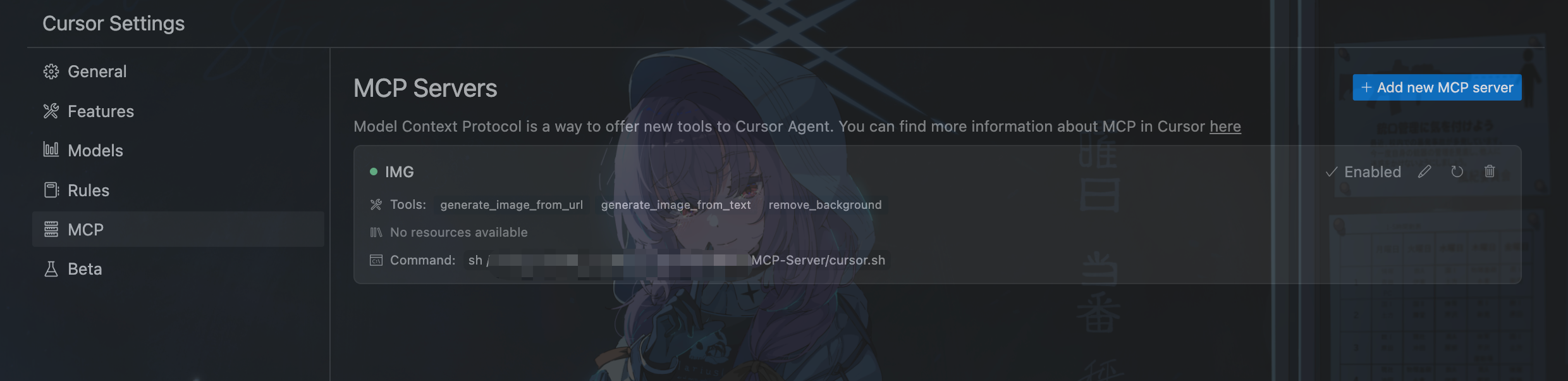
- In cursor settings, go to the "MCP" tab, click on
Add new MCP server, - Name the server whatever you want, and set the command to
sh /absolute/path/to/cursor.sh. - Wait for the server to start, and you can see the server and available tools.
- Then when you use the agent, it would automatically detect whether use the tools.
Windows:
Modify the cursor.bat file to set your API keys and project directory.
- In cursor settings, go to the "MCP" tab, click on
Add new MCP server, - Name the server whatever you want, and set the command to
cmd /c C:\absolute\path\to\cursor.bat. - Wait for the server to start, and you can see the server and available tools.
- Then when you use the agent, it would automatically detect whether use the tools.
Acknowledgements
- Google Gemini: For the image generation capabilities
- Remove.bg: For background removal services
- FreeImage.host: For image hosting services
- MCP: For the Model Context Protocol
Release history Release notifications | RSS feed


Download files
Download the file for your platform. If you're not sure which to choose, learn more about installing packages.
Source Distribution
Built Distribution
Filter files by name, interpreter, ABI, and platform.
If you're not sure about the file name format, learn more about wheel file names.
Copy a direct link to the current filters
File details
Details for the file iflow_mcp_kira_pgr_promptshopmcp-0.1.2.tar.gz.
File metadata
- Download URL: iflow_mcp_kira_pgr_promptshopmcp-0.1.2.tar.gz
- Upload date:
- Size: 11.9 kB
- Tags: Source
- Uploaded using Trusted Publishing? No
- Uploaded via: uv/0.10.0 {"installer":{"name":"uv","version":"0.10.0","subcommand":["publish"]},"python":null,"implementation":{"name":null,"version":null},"distro":{"name":"Debian GNU/Linux","version":"13","id":"trixie","libc":null},"system":{"name":null,"release":null},"cpu":null,"openssl_version":null,"setuptools_version":null,"rustc_version":null,"ci":null}
File hashes
| Algorithm | Hash digest | |
|---|---|---|
| SHA256 |
6ad14ff57dfe1d9e96a852ca8332229763f7b848988a92e39de1fbbf3f259454
|
|
| MD5 |
23ab74d06969b1ec8fe8342f36d0fcad
|
|
| BLAKE2b-256 |
5a2e7c0c1d446c28c3a2b9481eb5097b05c8c78ff46690b98bb9993fa681fe5e
|
File details
Details for the file iflow_mcp_kira_pgr_promptshopmcp-0.1.2-py3-none-any.whl.
File metadata
- Download URL: iflow_mcp_kira_pgr_promptshopmcp-0.1.2-py3-none-any.whl
- Upload date:
- Size: 12.0 kB
- Tags: Python 3
- Uploaded using Trusted Publishing? No
- Uploaded via: uv/0.10.0 {"installer":{"name":"uv","version":"0.10.0","subcommand":["publish"]},"python":null,"implementation":{"name":null,"version":null},"distro":{"name":"Debian GNU/Linux","version":"13","id":"trixie","libc":null},"system":{"name":null,"release":null},"cpu":null,"openssl_version":null,"setuptools_version":null,"rustc_version":null,"ci":null}
File hashes
| Algorithm | Hash digest | |
|---|---|---|
| SHA256 |
fede52cd03c1e6fcadd0c41a85520b52e4f666c349e6a11737e7e68f5ad91271
|
|
| MD5 |
a9f269e9c69a2cb824fcf413678f32d9
|
|
| BLAKE2b-256 |
f1d713ca08c762eb164efed60f324a7d917ed13000046765d0dd869e12e38a80
|






