
🧠 Serveur MCP pour ComfyUI (Version Alpha-1)

Ce projet expose ComfyUI via un serveur compatible MCP (Model Context Protocol).
Il permet :
- de piloter ComfyUI depuis ChatGPT via un connecteur (mode dev) ;
- de piloter l’interface ComfyUI dans Chrome via une extension WebSocket.
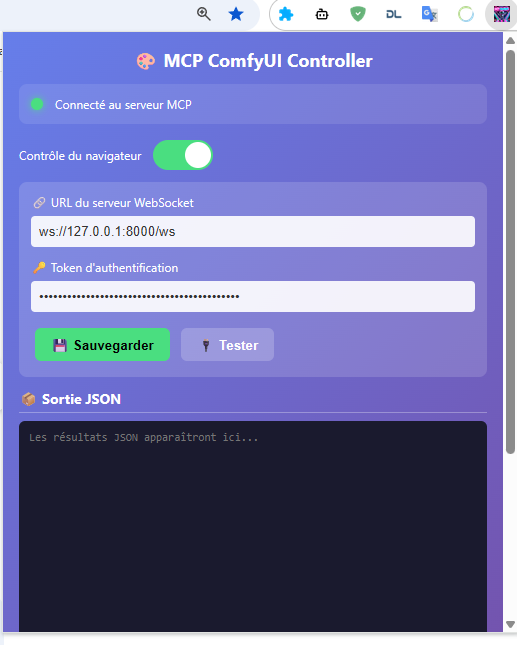
Pour bientôt : en local, interfaces Gradio pour Ollama et Google CLI
⚙️ Installation
1️⃣ Cloner le dépôt
git clone https://github.com/orion4d/ComfyUI_mcp.git
2️⃣ Créer l’environnement virtuel
python -m venv venv
# Linux / Mac
source venv/bin/activate
# Windows
venv\Scripts\activate
3️⃣ Installer les dépendances
pip install -r requirements.txt
🔐 Génération des clés et configuration
python generate_key.py
Ce script :
- génère MCP_API_KEY (pour ChatGPT)
- génère WEBSOCKET_TOKEN (pour l’extension Chrome)
- crée automatiquement
.envet.env.example
🚀 Démarrage du serveur
python server.py
Le serveur démarre par défaut sur :
http://127.0.0.1:8000
🌐 Points d’accès
🔧 MCP Tools exposés
list_workflows,save_workflow,load_workflowread_custom_node,write_custom_nodequeue_prompt,get_historycreate_custom_node_template,list_custom_subdirui_click_element,ui_fill_input,ui_get_current_workflow
🧩 Routes Debug
/debug/health→ infos système, versions, outils/ws→ WebSocket pour l’extension Chrome
🧱 Exemple d’usage
Depuis ChatGPT (Custom GPT)
- Authentification :
X-API-Key→ ta clé MCP_API_KEY - Appels possibles :
list_workflows,queue_prompt,read_custom_node, etc.
Depuis Chrome (Extension MCP)
- URL WebSocket :
ws://127.0.0.1:8000/ws - Token : WEBSOCKET_TOKEN
🧠 Intégration ComfyUI
Le client (ComfyUIClient) communique via HTTP avec ton ComfyUI local :
- URL :
http://127.0.0.1:8188 - Support des workflows UI et API
- Conversion automatique via
_convert_ui_to_api()
Tester la connexion
curl http://127.0.0.1:8000/debug/health
📘 Commandes MCP–ComfyUI
🗂️ Arborescence des commandes
ComfyUI
│
├── 🧠 Exécution (moteur)
│   ├─ /queue_prompt
│   ├─ /get_queue_status
│   ├─ /cancel_prompt
│   ├─ /get_history
│   └─ /interrupt_execution
│
├── ⚙️ Système & Modèles
│   ├─ /get_system_stats
│   ├─ /list_models
│   └─ /model_info
│
├── 🧩 Workflows
│   ├─ /save_workflow
│   ├─ /load_workflow
│   ├─ /list_workflows
│   └─ /inspect_workflow
│
├── 🔧 Custom Nodes (→ ComfyUI/custom_nodes/)
│   ├─ /create_custom_node_template
│   ├─ /write_custom_node
│   ├─ /read_custom_node
│   ├─ /list_custom_subdir
│   └─ /autodoc_nodes
│
├── 🖼️ Images
│   ├─ /upload_image
│   ├─ /get_image
│   └─ /list_output_images
│
└── 📂 MCP_exchange (→ output/MCP_exchange/)
    ├─ /list_exchange
    ├─ /read_exchange
    ├─ /write_exchange
    └─ /delete_exchange
🧠 Exécution & File
- /queue_prompt → exécuter un workflow
- /get_queue_status → état de la file
- /get_history → historique d’un prompt
- /cancel_prompt → annuler un prompt
- /interrupt_execution → stopper tout en cours
⚙️ Système & Modèles
- /get_system_stats → infos GPU, RAM, versions
- /list_models → lister les modèles disponibles
- /model_info → détails d’un modèle
🧩 Workflows
- /save_workflow → enregistrer un workflow
- /load_workflow → charger un workflow
- /list_workflows → lister tous les workflows
- /inspect_workflow → analyser la structure
🖼️ Images & Fichiers
- /list_output_images → voir les images produites
- /get_image → récupérer une image
- /upload_image → envoyer une image d’entrée
🔧 Custom Nodes
- /create_custom_node_template → créer un squelette de node
- /write_custom_node → écrire un fichier node
- /read_custom_node → lire le code d’un node
- /list_custom_subdir → explorer un dossier custom
- /autodoc_nodes → générer la doc de tous les custom nodes
🖥️ Interface (Chrome UI)
- /ui_click_element → simuler un clic
- /ui_fill_input → remplir un champ texte
- /ui_get_current_workflow → récupérer le workflow affiché
📂 Structure MCP_exchange
Ce répertoire sert d’espace d’échange entre MCP–ComfyUI et ton environnement local.
Toutes les commandes ci-dessous interagissent uniquement avec le dossier :
output/MCP_exchange/
🔍 Lister les fichiers
call_tool /MCP-ComfyUI/.../list_exchange {"limit": 200, "exts": "png,jpg,jpeg,webp,bmp,tif,tiff,txt,md,html,htm,json,js,py,css"}
📖 Lire un fichier
call_tool /MCP-ComfyUI/.../read_exchange {"name": "nom_du_fichier.txt", "as_data_url": true}
✏️ Écrire un fichier
call_tool /MCP-ComfyUI/.../write_exchange {"name": "nouveau_fichier.md", "content": "contenu du fichier", "mode": "text", "overwrite": true}
Modes disponibles : text, base64, data_url.
❌ Supprimer un fichier
call_tool /MCP-ComfyUI/.../delete_exchange {"name": "fichier_a_supprimer.json"}
🧭 Usages typiques
- Exporter un résultat ou une image générée pour inspection.
- Importer un script, un JSON de workflow ou un dataset.
- Automatiser des échanges entre MCP et ComfyUI.
Chemin complet : ComfyUI/output/MCP_exchange/
Les autres commandes (workflows, modèles, nœuds) agissent ailleurs ; ce groupe-ci se limite à la gestion des fichiers d’échange.
1 maintainer

Metadata
1 maintainer
Release files for iflow-mcp_orion4d-comfyui_mcp 1.0.4
For a detailed explanation of source distributions (sdists) and built distributions (wheels), please see the package formats documentation.
Source distribution (sdist)
| File | Size | Uploaded | |
|---|---|---|---|
| iflow_mcp_orion4d_comfyui_mcp-1.0.4.tar.gz | 106.0 kB | Details |
Built distribution (wheel)
| File | Interpreter | ABI | Platform | Reset |
|---|---|---|---|---|
| iflow_mcp_orion4d_comfyui_mcp-1.0.4-py3-none-any.whl | Python 3 | none | any | Details |
Total release size: 128.4 kB
Release files / iflow_mcp_orion4d_comfyui_mcp-1.0.4.tar.gz
| Download URL | iflow_mcp_orion4d_comfyui_mcp-1.0.4.tar.gz |
|---|---|
| Size | 106.0 kB |
| Tags | Source |
|
SHA-256 checksum How to use checksums |
3716818c45d2845ab9a738dab25a32fa412656cb9ac4fb15018935663f31f435
|
|
BLAKE2b-256 checksum How to use checksums |
2fe7c0db1d5d0daeb6e4436f34e80f427d579fb23a90171523751cfac36837fa
|
| Upload date | |
|
Uploaded using Trusted Publishing? What is trusted publishing? |
No |
| Uploaded via |
uv/0.9.28 {"installer":{"name":"uv","version":"0.9.28","subcommand":["publish"]},"python":null,"implementation":{"name":null,"version":null},"distro":{"name":"Debian GNU/Linux","version":"13","id":"trixie","libc":null},"system":{"name":null,"release":null},"cpu":null,"openssl_version":null,"setuptools_version":null,"rustc_version":null,"ci":null}
|
Release files / iflow_mcp_orion4d_comfyui_mcp-1.0.4-py3-none-any.whl
| Download URL | iflow_mcp_orion4d_comfyui_mcp-1.0.4-py3-none-any.whl |
|---|---|
| Size | 22.4 kB |
| Tags | Python 3 |
|
SHA-256 checksum How to use checksums |
af6e0f9f32c52853979fbd2ba3a80a266529f3ce0841d5297d4a823254c4033a
|
|
BLAKE2b-256 checksum How to use checksums |
c21d1a3fd494b5694843c692eb328855cf8e7bd0cc5df734af9ac577c944beb6
|
| Upload date | |
|
Uploaded using Trusted Publishing? What is trusted publishing? |
No |
| Uploaded via |
uv/0.9.28 {"installer":{"name":"uv","version":"0.9.28","subcommand":["publish"]},"python":null,"implementation":{"name":null,"version":null},"distro":{"name":"Debian GNU/Linux","version":"13","id":"trixie","libc":null},"system":{"name":null,"release":null},"cpu":null,"openssl_version":null,"setuptools_version":null,"rustc_version":null,"ci":null}
|














