
MCP server for ComfyUI - enables ChatGPT to control ComfyUI workflows

Project description
🧠 Serveur MCP pour ComfyUI (Version Alpha-1)

Ce projet expose ComfyUI via un serveur compatible MCP (Model Context Protocol).
Il permet :
- de piloter ComfyUI depuis ChatGPT via un connecteur (mode dev) ;
- de piloter l’interface ComfyUI dans Chrome via une extension WebSocket.
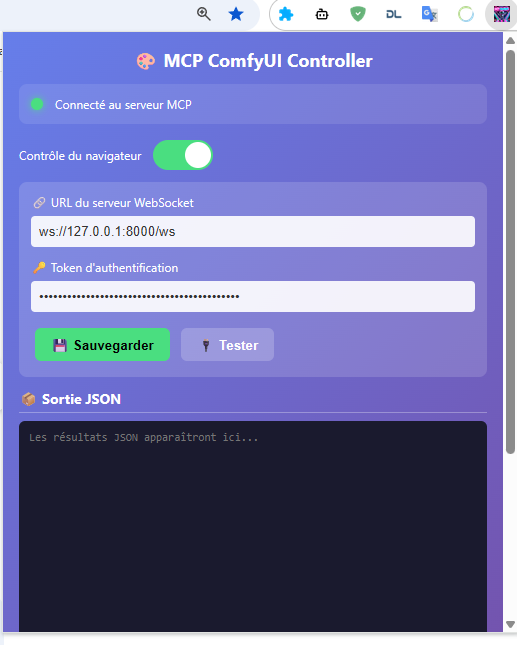
Pour bientôt : en local, interfaces Gradio pour Ollama et Google CLI
⚙️ Installation
1️⃣ Cloner le dépôt
git clone https://github.com/orion4d/ComfyUI_mcp.git
2️⃣ Créer l’environnement virtuel
python -m venv venv
# Linux / Mac
source venv/bin/activate
# Windows
venv\Scripts\activate
3️⃣ Installer les dépendances
pip install -r requirements.txt
🔐 Génération des clés et configuration
python generate_key.py
Ce script :
- génère MCP_API_KEY (pour ChatGPT)
- génère WEBSOCKET_TOKEN (pour l’extension Chrome)
- crée automatiquement
.envet.env.example
🚀 Démarrage du serveur
python server.py
Le serveur démarre par défaut sur :
http://127.0.0.1:8000
🌐 Points d’accès
🔧 MCP Tools exposés
list_workflows,save_workflow,load_workflowread_custom_node,write_custom_nodequeue_prompt,get_historycreate_custom_node_template,list_custom_subdirui_click_element,ui_fill_input,ui_get_current_workflow
🧩 Routes Debug
/debug/health→ infos système, versions, outils/ws→ WebSocket pour l’extension Chrome
🧱 Exemple d’usage
Depuis ChatGPT (Custom GPT)
- Authentification :
X-API-Key→ ta clé MCP_API_KEY - Appels possibles :
list_workflows,queue_prompt,read_custom_node, etc.
Depuis Chrome (Extension MCP)
- URL WebSocket :
ws://127.0.0.1:8000/ws - Token : WEBSOCKET_TOKEN
🧠 Intégration ComfyUI
Le client (ComfyUIClient) communique via HTTP avec ton ComfyUI local :
- URL :
http://127.0.0.1:8188 - Support des workflows UI et API
- Conversion automatique via
_convert_ui_to_api()
Tester la connexion
curl http://127.0.0.1:8000/debug/health
📘 Commandes MCP–ComfyUI
🗂️ Arborescence des commandes
ComfyUI
│
├── 🧠 Exécution (moteur)
│   ├─ /queue_prompt
│   ├─ /get_queue_status
│   ├─ /cancel_prompt
│   ├─ /get_history
│   └─ /interrupt_execution
│
├── ⚙️ Système & Modèles
│   ├─ /get_system_stats
│   ├─ /list_models
│   └─ /model_info
│
├── 🧩 Workflows
│   ├─ /save_workflow
│   ├─ /load_workflow
│   ├─ /list_workflows
│   └─ /inspect_workflow
│
├── 🔧 Custom Nodes (→ ComfyUI/custom_nodes/)
│   ├─ /create_custom_node_template
│   ├─ /write_custom_node
│   ├─ /read_custom_node
│   ├─ /list_custom_subdir
│   └─ /autodoc_nodes
│
├── 🖼️ Images
│   ├─ /upload_image
│   ├─ /get_image
│   └─ /list_output_images
│
└── 📂 MCP_exchange (→ output/MCP_exchange/)
    ├─ /list_exchange
    ├─ /read_exchange
    ├─ /write_exchange
    └─ /delete_exchange
🧠 Exécution & File
- /queue_prompt → exécuter un workflow
- /get_queue_status → état de la file
- /get_history → historique d’un prompt
- /cancel_prompt → annuler un prompt
- /interrupt_execution → stopper tout en cours
⚙️ Système & Modèles
- /get_system_stats → infos GPU, RAM, versions
- /list_models → lister les modèles disponibles
- /model_info → détails d’un modèle
🧩 Workflows
- /save_workflow → enregistrer un workflow
- /load_workflow → charger un workflow
- /list_workflows → lister tous les workflows
- /inspect_workflow → analyser la structure
🖼️ Images & Fichiers
- /list_output_images → voir les images produites
- /get_image → récupérer une image
- /upload_image → envoyer une image d’entrée
🔧 Custom Nodes
- /create_custom_node_template → créer un squelette de node
- /write_custom_node → écrire un fichier node
- /read_custom_node → lire le code d’un node
- /list_custom_subdir → explorer un dossier custom
- /autodoc_nodes → générer la doc de tous les custom nodes
🖥️ Interface (Chrome UI)
- /ui_click_element → simuler un clic
- /ui_fill_input → remplir un champ texte
- /ui_get_current_workflow → récupérer le workflow affiché
📂 Structure MCP_exchange
Ce répertoire sert d’espace d’échange entre MCP–ComfyUI et ton environnement local.
Toutes les commandes ci-dessous interagissent uniquement avec le dossier :
output/MCP_exchange/
🔍 Lister les fichiers
call_tool /MCP-ComfyUI/.../list_exchange {"limit": 200, "exts": "png,jpg,jpeg,webp,bmp,tif,tiff,txt,md,html,htm,json,js,py,css"}
📖 Lire un fichier
call_tool /MCP-ComfyUI/.../read_exchange {"name": "nom_du_fichier.txt", "as_data_url": true}
✏️ Écrire un fichier
call_tool /MCP-ComfyUI/.../write_exchange {"name": "nouveau_fichier.md", "content": "contenu du fichier", "mode": "text", "overwrite": true}
Modes disponibles : text, base64, data_url.
❌ Supprimer un fichier
call_tool /MCP-ComfyUI/.../delete_exchange {"name": "fichier_a_supprimer.json"}
🧭 Usages typiques
- Exporter un résultat ou une image générée pour inspection.
- Importer un script, un JSON de workflow ou un dataset.
- Automatiser des échanges entre MCP et ComfyUI.
Chemin complet : ComfyUI/output/MCP_exchange/
Les autres commandes (workflows, modèles, nœuds) agissent ailleurs ; ce groupe-ci se limite à la gestion des fichiers d’échange.


Download files
Download the file for your platform. If you're not sure which to choose, learn more about installing packages.
Source Distribution
Built Distribution
Filter files by name, interpreter, ABI, and platform.
If you're not sure about the file name format, learn more about wheel file names.
Copy a direct link to the current filters
File details
Details for the file iflow_mcp_orion4d_comfyui_mcp-1.0.2.tar.gz.
File metadata
- Download URL: iflow_mcp_orion4d_comfyui_mcp-1.0.2.tar.gz
- Upload date:
- Size: 106.0 kB
- Tags: Source
- Uploaded using Trusted Publishing? No
- Uploaded via: uv/0.9.28 {"installer":{"name":"uv","version":"0.9.28","subcommand":["publish"]},"python":null,"implementation":{"name":null,"version":null},"distro":{"name":"Debian GNU/Linux","version":"13","id":"trixie","libc":null},"system":{"name":null,"release":null},"cpu":null,"openssl_version":null,"setuptools_version":null,"rustc_version":null,"ci":null}
File hashes
| Algorithm | Hash digest | |
|---|---|---|
| SHA256 |
3242b0aab14f220a4333f70ddc988dc272bd568a149aaef2472a7f62944e1f4e
|
|
| MD5 |
e1579016304beb53ce85d521fe3765f8
|
|
| BLAKE2b-256 |
b4a4fcd5b6edec5f5c06e1a6dd340b0b8cb159daf515a672159baaae2048c846
|
File details
Details for the file iflow_mcp_orion4d_comfyui_mcp-1.0.2-py3-none-any.whl.
File metadata
- Download URL: iflow_mcp_orion4d_comfyui_mcp-1.0.2-py3-none-any.whl
- Upload date:
- Size: 22.4 kB
- Tags: Python 3
- Uploaded using Trusted Publishing? No
- Uploaded via: uv/0.9.28 {"installer":{"name":"uv","version":"0.9.28","subcommand":["publish"]},"python":null,"implementation":{"name":null,"version":null},"distro":{"name":"Debian GNU/Linux","version":"13","id":"trixie","libc":null},"system":{"name":null,"release":null},"cpu":null,"openssl_version":null,"setuptools_version":null,"rustc_version":null,"ci":null}
File hashes
| Algorithm | Hash digest | |
|---|---|---|
| SHA256 |
b5bec857a67d8d78fe229987ad7bf8e5cdce57a3d09bc93ffa4f3c21e38b2cbd
|
|
| MD5 |
c8e3a13b035fa301743cc7cc556c3183
|
|
| BLAKE2b-256 |
d14cc035a254125436c4e6cd7d63613319a3d44ae3f5b34f8c7bf2fb4ef2b0ab
|






