



AWS WAF Solution
This CDK Construct modify and rebuild from Cloudfront with Automated WAF.
The solution use CDK construct to automatically deploy a set of AWS WAF rules design to filter common web-based attacks.Users can select from preconfigured protective features that define the rules included in an AWS WAF web access control list (web ACL). After the solution deploys, AWS WAF begins inspecting web requests to the user’s existing Amazon CloudFront distributions、Application Load Balancers、API Gateway, and blocks them when applicable.
What is difference
- The project is CDK Construct which is handy to integrate into your existing CDK project.
- Support count mode for testing WAF rule, see API.md.
- Support Application Load Balancers and API Gateway (The origin repository doesn't support ALB any more in next release, see issue )
- AWS Shield Advance is optional (The origin repository enforce to enable it)
Support CDKv1 and CDKv2
CDKv2
npm install @ikala-cloud/aws-waf-solution
or
npm install @ikala-cloud/aws-waf-solution@latest
or
npm install @ikala-cloud/aws-waf-solution@^2.0.0
CDKv1
npm install @ikala-cloud/aws-waf-solution@cdkv1
or
npm install @ikala-cloud/aws-waf-solution@^1.0.38
Construct Props
Ref API Reference
CloudFront Usage
const envUSEast1 = {
  region: 'us-east-1',
  account: process.env.CDK_DEFAULT_ACCOUNT,
};

const stackTest1 = new cdk.Stack(app, 'TestStackAutomatedWafForCloudFront', { env: envUSEast1 });

new AutomatedWaf(stackTest1, 'AutomatedWaf', {
  waf2Scope: Waf2ScopeOption.CLOUDFRONT,
  resourceNamingPrefix: 'CloudFront_ApiGW',
  errorThreshold: 55,
  requestThreshold: 300,
  blockPeriod: 60,
  logLevel: LogLevel.DEBUG,
});
Notice the WAF region must be us-east-1 for CloudFront.
After deploying, it need to do two things on AWS Management Console.
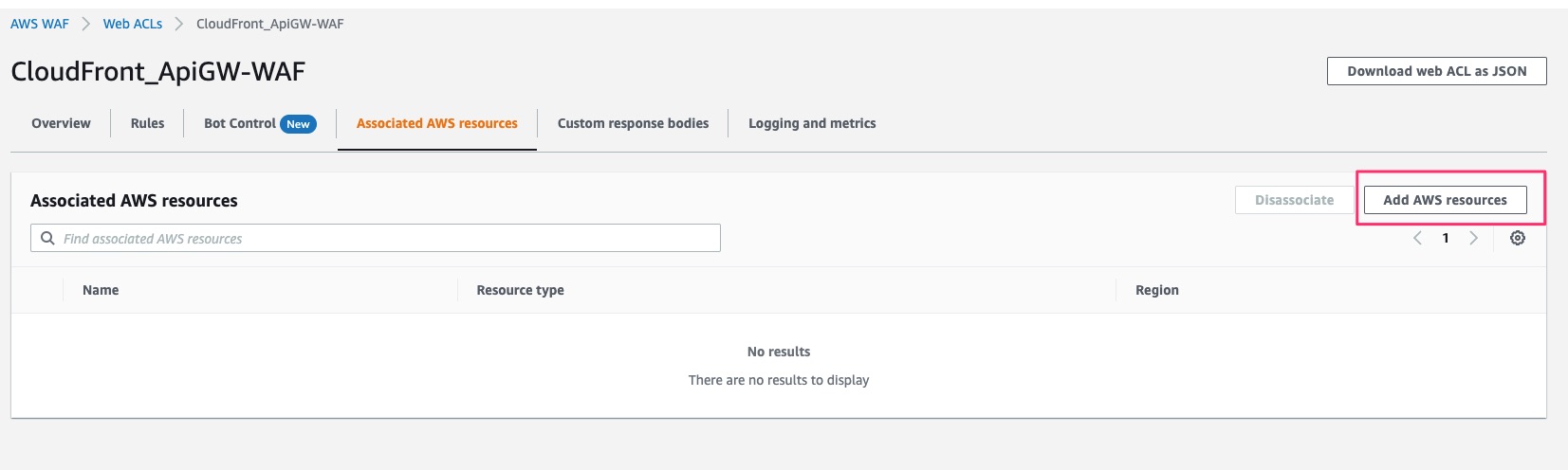
1. Attach Cloudfront to WAF.
Click add AWS Resources
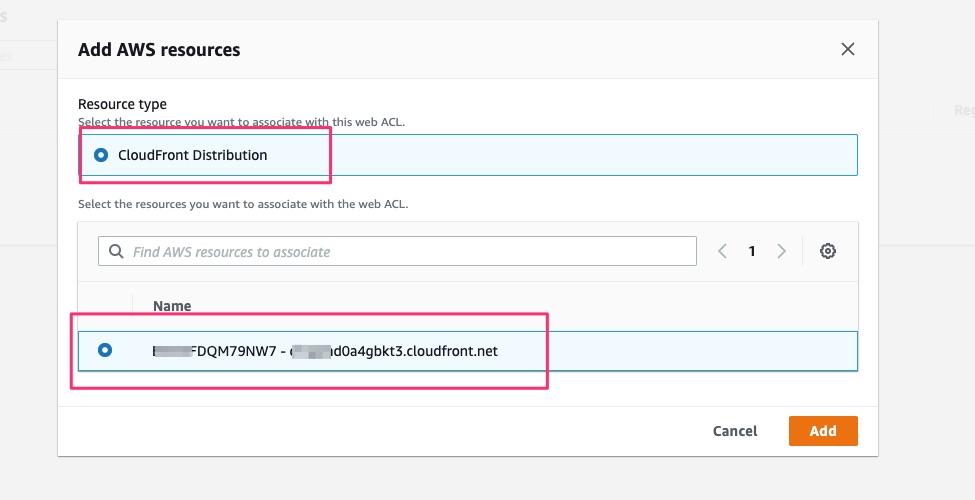
Select existing CloudFront Distribution.
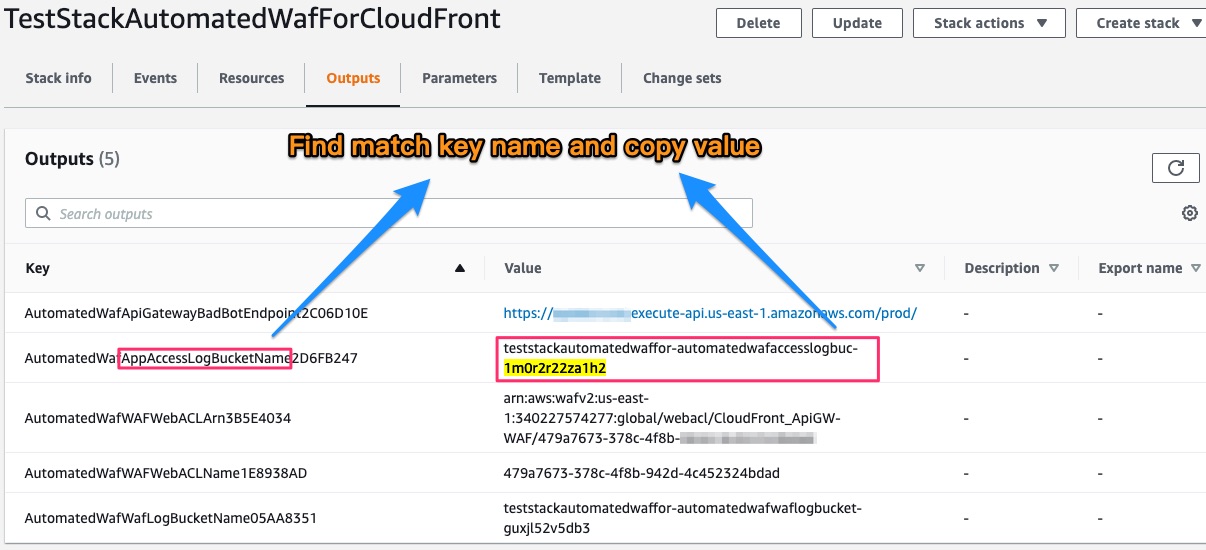
2. Set S3 bucket on CloudFront standand logging
Find S3 bucket name on CloudFormation output
Set CloudFront standard logging on CloudFront Settings
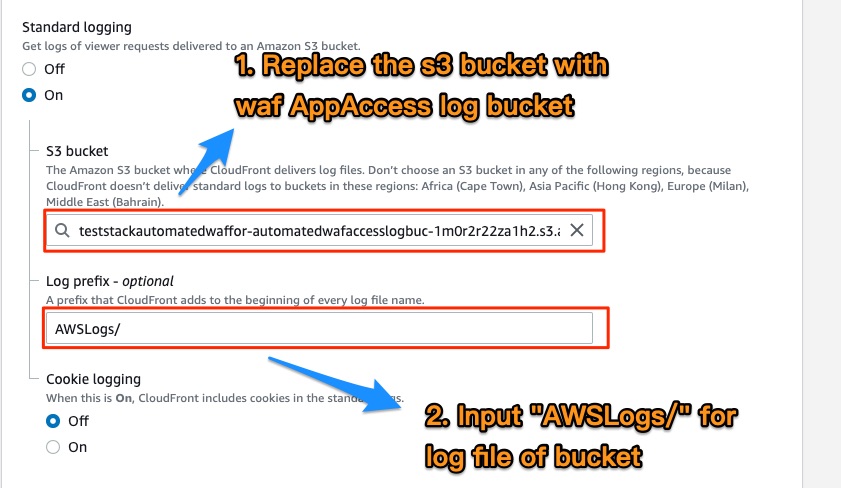
:warning: Log Prefix must be AWSLogs/
Application Load Balancers Usage
const env = {
  region: process.env.CDK_DEFAULT_REGION,
  account: process.env.CDK_DEFAULT_ACCOUNT,
};

const stackTest2 = new cdk.Stack(app, 'TestStackAutomatedWafForALB', { env });

const albArn = `arn:aws:elasticloadbalancing:${cdk.Aws.REGION}:${cdk.Aws.ACCOUNT_ID}:loadbalancer/app/ApiNe-Alb16-2VIC9075YQEZ/db92cdc88d2e7c9d`;

new AutomatedWaf(stackTest2, 'AutomatedWaf', {
  waf2Scope: Waf2ScopeOption.REGIONAL,
  associatedResourceArn: albArn,
  resourceNamingPrefix: 'Alb_Api',
  errorThreshold: 50,
  requestThreshold: 300,
  blockPeriod: 60,
  logLevel: LogLevel.DEBUG,
});
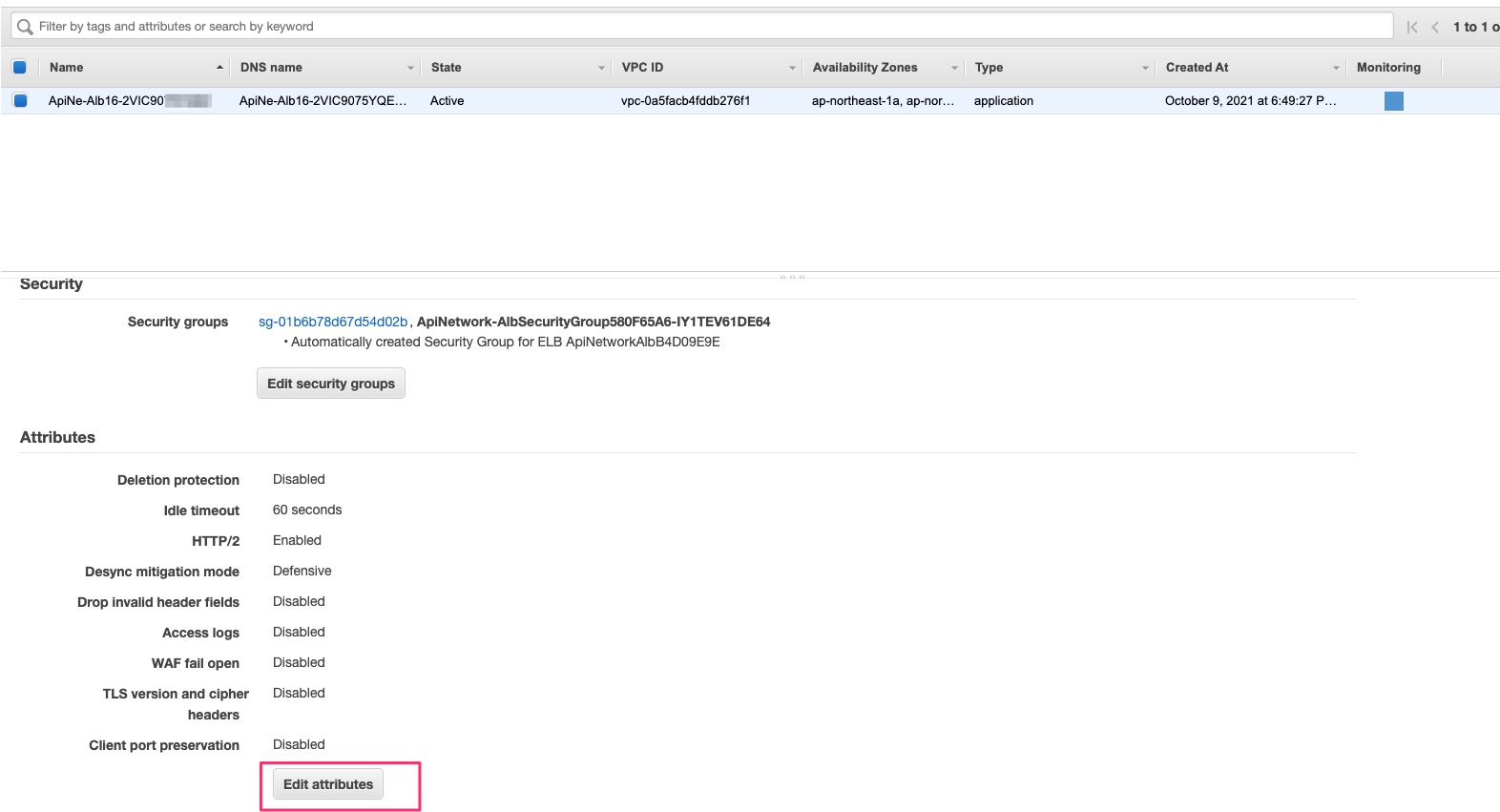
After deploying, follow these steps on AWS Management Console. See below:
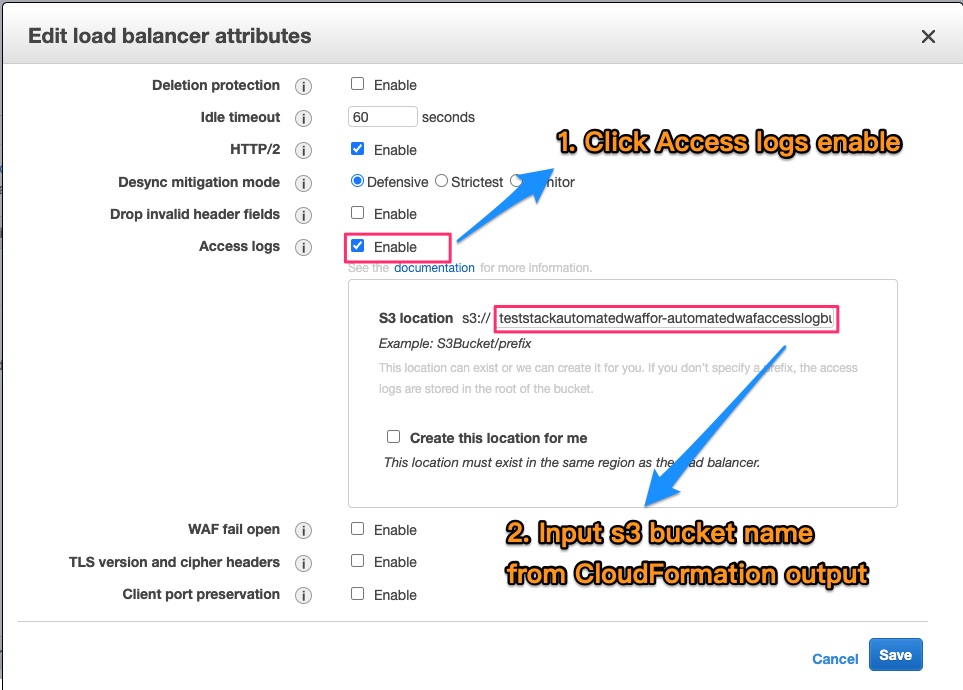
Find S3 bucket name on CloudFormation output
Click Edit Attributes on Basic Configuration of Load Balancers
Enable Access logs and input S3 bucket
API Gateway Usage
const env = {
  region: process.env.CDK_DEFAULT_REGION,
  account: process.env.CDK_DEFAULT_ACCOUNT,
};

const stackTest3 = new cdk.Stack(app, 'TestStackAutomatedWafForApiGW', { env });

/**
 * Ref Stage arn in https://docs.aws.amazon.com/apigateway/latest/developerguide/arn-format-reference.html
 */
const restApiArn = `arn:aws:apigateway:${cdk.Aws.REGION}::/restapis/0j90w09yf9/stages/prod`;

new AutomatedWaf(stackTest3, 'AutomatedWaf', {
  waf2Scope: Waf2ScopeOption.REGIONAL,
  associatedResourceArn: restApiArn,
  resourceNamingPrefix: 'ApiGW',
  errorThreshold: 50,
  requestThreshold: 300,
  blockPeriod: 60,
  logLevel: LogLevel.DEBUG,
});
Troubleshooting
If deployment error, the cloudFormation Error event like this
Received response status [FAILED] from custom resource. Message returned: 'HttpFloodLambdaLogParser' (RequestId: b4e08ea2-fe0a-46f8-98aa-6f96d4558579)
If any custom resource deploy error like above, delete the stack and redeploy it that will pass.
1 maintainer

Release files for ikala-cloud.aws-waf-solution 2.0.20
For a detailed explanation of source distributions (sdists) and built distributions (wheels), please see the package formats documentation.
Source distribution (sdist)
| File | Size | Uploaded | |
|---|---|---|---|
| ikala-cloud.aws-waf-solution-2.0.20.tar.gz | 112.0 kB | Details |
Built distribution (wheel)
| File | Interpreter | ABI | Platform | Reset |
|---|---|---|---|---|
| ikala_cloud.aws_waf_solution-2.0.20-py3-none-any.whl | Python 3 | none | any | Details |
Total release size: 222.5 kB
Release files / ikala-cloud.aws-waf-solution-2.0.20.tar.gz
| Download URL | ikala-cloud.aws-waf-solution-2.0.20.tar.gz |
|---|---|
| Size | 112.0 kB |
| Tags | Source |
|
SHA-256 checksum How to use checksums |
f17f2023edfb862b2b4373c0bbc8b193f7599020fc373c1f86fbfc8f81c9e344
|
|
BLAKE2b-256 checksum How to use checksums |
f629a0141db8671ecd27ee05f5fe7e5831bb99643ab940a9b433dc45c3f5f5a1
|
| Upload date | |
|
Uploaded using Trusted Publishing? What is trusted publishing? |
No |
| Uploaded via |
twine/3.7.1 importlib_metadata/4.10.0 pkginfo/1.8.2 requests/2.27.1 requests-toolbelt/0.9.1 tqdm/4.62.3 CPython/3.10.1
|
Release files / ikala_cloud.aws_waf_solution-2.0.20-py3-none-any.whl
| Download URL | ikala_cloud.aws_waf_solution-2.0.20-py3-none-any.whl |
|---|---|
| Size | 110.5 kB |
| Tags | Python 3 |
|
SHA-256 checksum How to use checksums |
476d4e75ec322cbd7e6f2b6bc80d96decf209e2974c0e55c741a8d85f3a79db8
|
|
BLAKE2b-256 checksum How to use checksums |
d0697e6c20f3383dacdd23d10db01f6c039579ff4706e22f024b683f51546d18
|
| Upload date | |
|
Uploaded using Trusted Publishing? What is trusted publishing? |
No |
| Uploaded via |
twine/3.7.1 importlib_metadata/4.10.0 pkginfo/1.8.2 requests/2.27.1 requests-toolbelt/0.9.1 tqdm/4.62.3 CPython/3.10.1
|














