
Cloudfront,ALB and API Gateway with Automated WAF

Project description



AWS WAF Solution
This CDK Construct modify and rebuild from Cloudfront with Automated WAF.
The solution use CDK construct to automatically deploy a set of AWS WAF rules design to filter common web-based attacks.Users can select from preconfigured protective features that define the rules included in an AWS WAF web access control list (web ACL). After the solution deploys, AWS WAF begins inspecting web requests to the user’s existing Amazon CloudFront distributions、Application Load Balancers、API Gateway, and blocks them when applicable.
What is difference
- The project is CDK Construct which is handy to integrate into your existing CDK project.
- Support count mode for testing WAF rule, see API.md.
- Support Application Load Balancers and API Gateway (The origin repository doesn't support ALB any more in next release, see issue )
- AWS Shield Advance is optional (The origin repository enforce to enable it)
Construct Props
Ref API Reference
CloudFront Usage
# Example automatically generated from non-compiling source. May contain errors.
env_uSEast1 = {
    "region": "us-east-1",
    "account": process.env.CDK_DEFAULT_ACCOUNT
}

stack_test1 = cdk.Stack(app, "TestStackAutomatedWafForCloudFront", env=env_uSEast1)

AutomatedWaf(stack_test1, "AutomatedWaf",
    waf2_scope=Waf2ScopeOption.CLOUDFRONT,
    resource_naming_prefix="CloudFront_ApiGW",
    error_threshold=55,
    request_threshold=300,
    block_period=60,
    log_level=LogLevel.DEBUG
)
Notice the WAF region must be us-east-1 for CloudFront.
After deploying, it need to do two things on AWS Management Console.
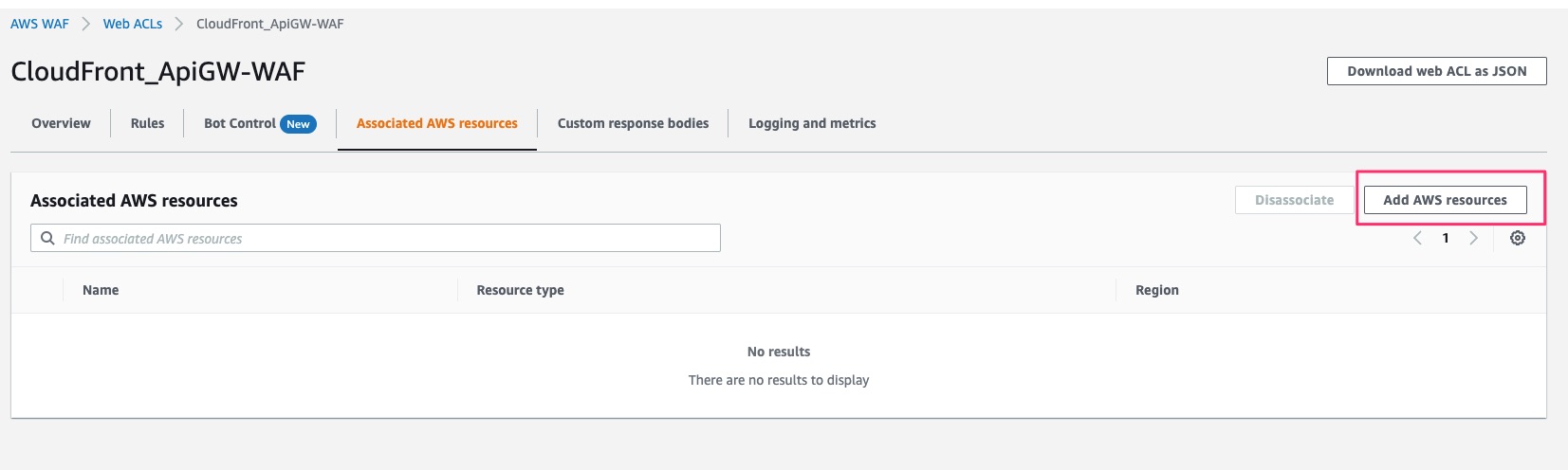
1. Attach Cloudfront to WAF.
Click add AWS Resources
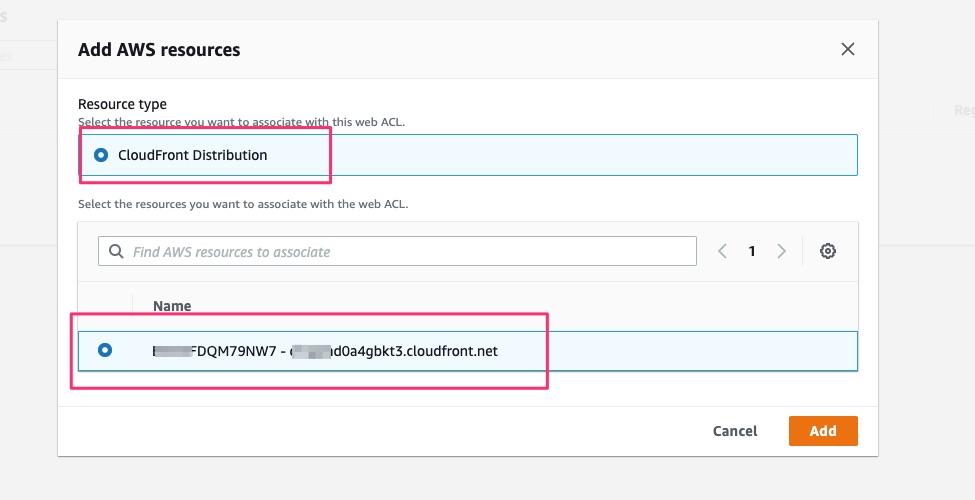
Select existing CloudFront Distribution.
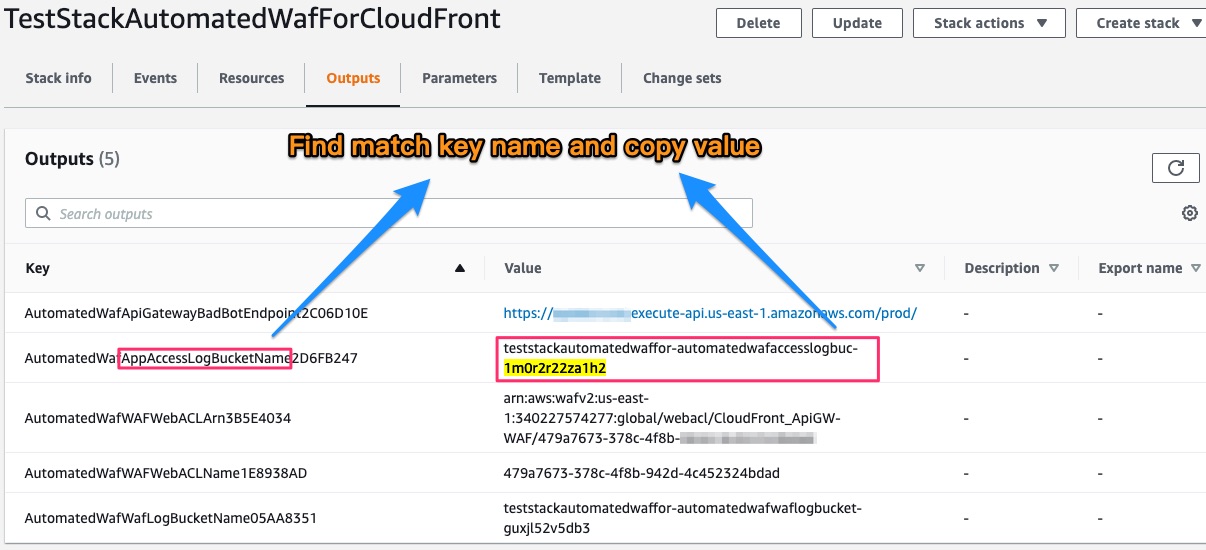
2. Set S3 bucket on CloudFront standand logging
Find S3 bucket name on CloudFormation output
Set CloudFront standard logging on CloudFront Settings
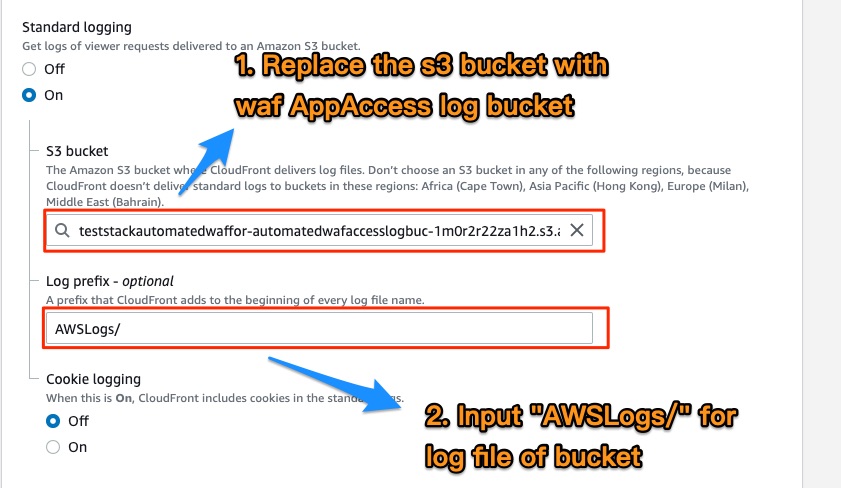
:warning: Log Prefix must be AWSLogs/
Application Load Balancers Usage
# Example automatically generated from non-compiling source. May contain errors.
env = {
    "region": process.env.CDK_DEFAULT_REGION,
    "account": process.env.CDK_DEFAULT_ACCOUNT
}

stack_test2 = cdk.Stack(app, "TestStackAutomatedWafForALB", env=env)

alb_arn = f"arn:aws:elasticloadbalancing:{cdk.Aws.REGION}:{cdk.Aws.ACCOUNT_ID}:loadbalancer/app/ApiNe-Alb16-2VIC9075YQEZ/db92cdc88d2e7c9d"

AutomatedWaf(stack_test2, "AutomatedWaf",
    waf2_scope=Waf2ScopeOption.REGIONAL,
    associated_resource_arn=alb_arn,
    resource_naming_prefix="Alb_Api",
    error_threshold=50,
    request_threshold=300,
    block_period=60,
    log_level=LogLevel.DEBUG
)
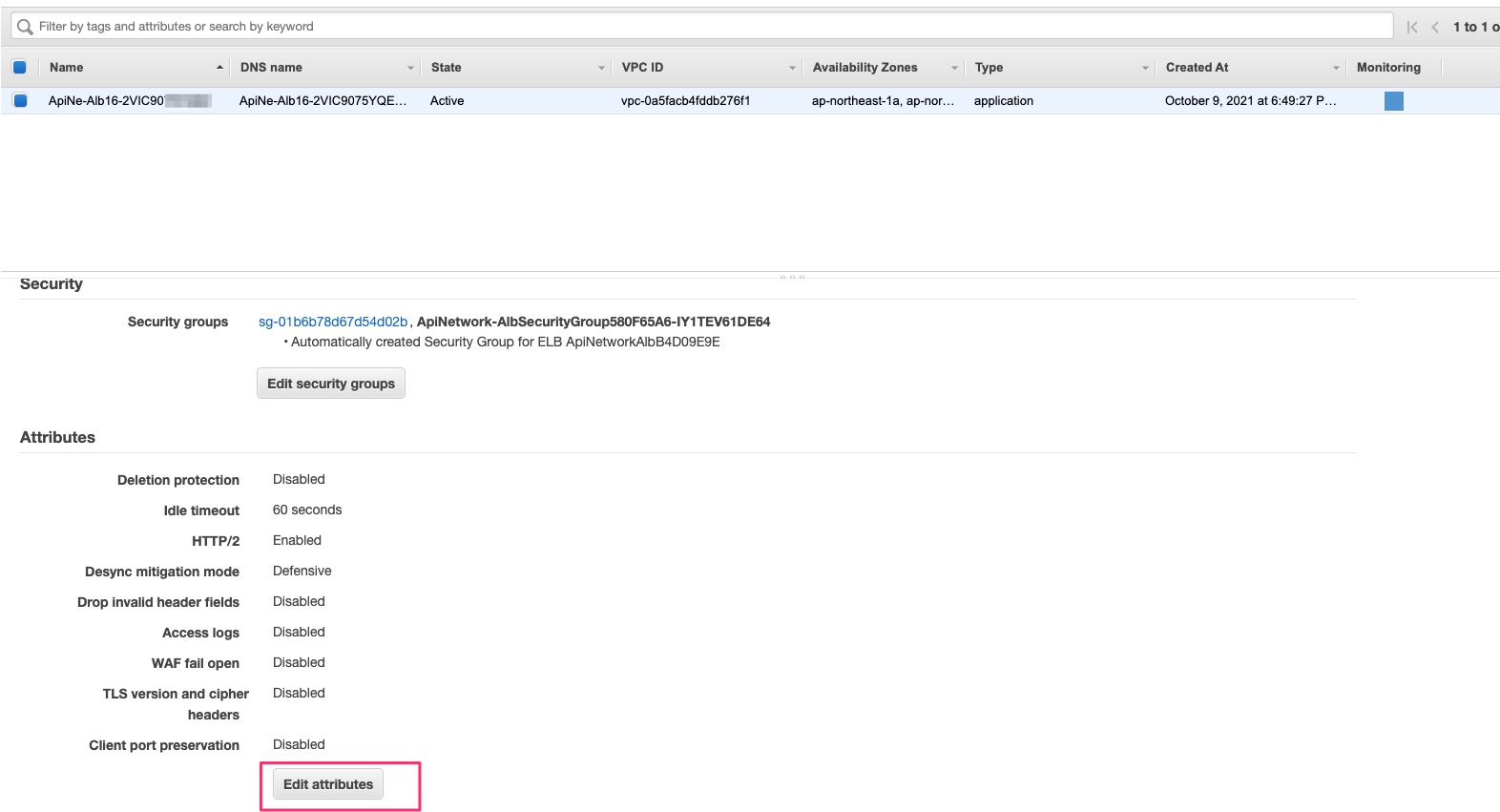
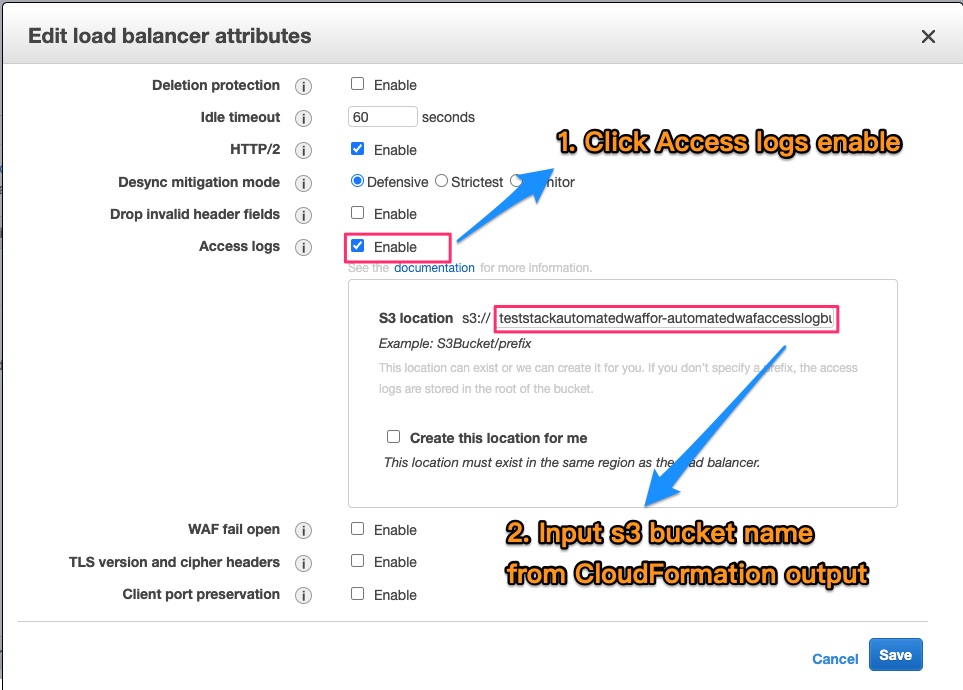
After deploying, follow these steps on AWS Management Console. See below:
Find S3 bucket name on CloudFormation output
Click Edit Attributes on Basic Configuration of Load Balancers
Enable Access logs and input S3 bucket
API Gateway Usage
# Example automatically generated from non-compiling source. May contain errors.
env = {
    "region": process.env.CDK_DEFAULT_REGION,
    "account": process.env.CDK_DEFAULT_ACCOUNT
}

stack_test3 = cdk.Stack(app, "TestStackAutomatedWafForApiGW", env=env)

#
# Ref Stage arn in https://docs.aws.amazon.com/apigateway/latest/developerguide/arn-format-reference.html
#
rest_api_arn = f"arn:aws:apigateway:{cdk.Aws.REGION}::/restapis/0j90w09yf9/stages/prod"

AutomatedWaf(stack_test3, "AutomatedWaf",
    waf2_scope=Waf2ScopeOption.REGIONAL,
    associated_resource_arn=rest_api_arn,
    resource_naming_prefix="ApiGW",
    error_threshold=50,
    request_threshold=300,
    block_period=60,
    log_level=LogLevel.DEBUG
)
Troubleshooting
If deployment error, the cloudFormation Error event like this
Received response status [FAILED] from custom resource. Message returned: 'HttpFloodLambdaLogParser' (RequestId: b4e08ea2-fe0a-46f8-98aa-6f96d4558579)
If any custom resource deploy error like above, delete the stack and redeploy it that will pass.
Release history Release notifications | RSS feed


Download files
Download the file for your platform. If you're not sure which to choose, learn more about installing packages.
Source Distribution
Built Distribution
Filter files by name, interpreter, ABI, and platform.
If you're not sure about the file name format, learn more about wheel file names.
Copy a direct link to the current filters
File details
Details for the file ikala-cloud.aws-waf-solution-1.0.36.tar.gz.
File metadata
- Download URL: ikala-cloud.aws-waf-solution-1.0.36.tar.gz
- Upload date:
- Size: 108.6 kB
- Tags: Source
- Uploaded using Trusted Publishing? No
- Uploaded via: twine/3.7.0 importlib_metadata/4.8.2 pkginfo/1.8.1 requests/2.26.0 requests-toolbelt/0.9.1 tqdm/4.62.3 CPython/3.7.3
File hashes
| Algorithm | Hash digest | |
|---|---|---|
| SHA256 |
7be7a28f9c75f2b5322aa88695a2e23db1a008b4fa0fbf8c7eb17d6d9c4701a8
|
|
| MD5 |
45ca5384c6141e4b1c097a12040556a6
|
|
| BLAKE2b-256 |
6400d0139c50a27a0916ab7adf62e0ff524eb3ce93439d13becb5d5538372623
|
File details
Details for the file ikala_cloud.aws_waf_solution-1.0.36-py3-none-any.whl.
File metadata
- Download URL: ikala_cloud.aws_waf_solution-1.0.36-py3-none-any.whl
- Upload date:
- Size: 107.4 kB
- Tags: Python 3
- Uploaded using Trusted Publishing? No
- Uploaded via: twine/3.7.0 importlib_metadata/4.8.2 pkginfo/1.8.1 requests/2.26.0 requests-toolbelt/0.9.1 tqdm/4.62.3 CPython/3.7.3
File hashes
| Algorithm | Hash digest | |
|---|---|---|
| SHA256 |
c3a889b6afb7d8dbcd5767c0cbd4071a85221ab9c85516ee3beaa4f8c8cf20e6
|
|
| MD5 |
39bab10e7771e2595b9d3503f346601e
|
|
| BLAKE2b-256 |
2120c9dd8fcecbf3f8cd7dafbdcbfe03279cf3ac015b83699595d96b8cca341b
|






