
Image Viewer
iview is a command line app for viewing images using open_cv.
Installation
Using Pip
$ pip install image_viewer
Manual
  $ git clone https://github.com/John-Lee-Cooper/image-viewer
  $ cd image-viewer
  $ python setup.py install
Usage
$ iview --version
$ iview --help
$ iview -r ~/Pictures
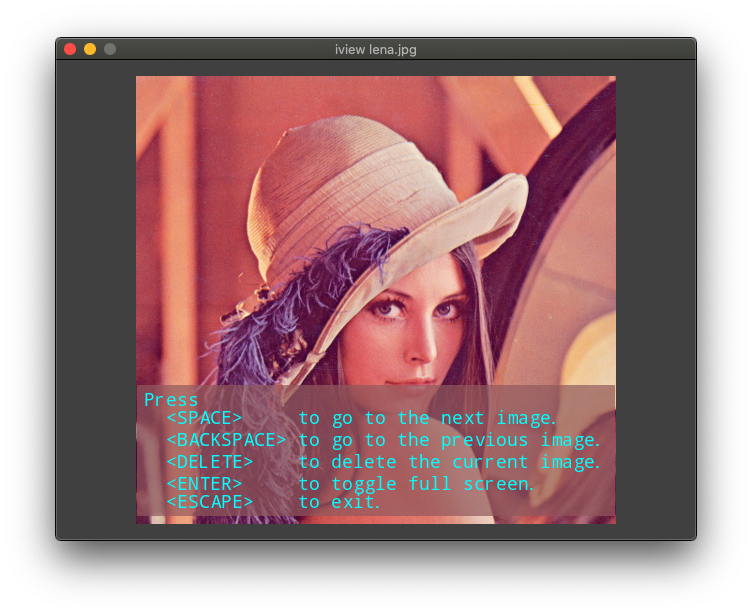
User Interface
| Key | Result |
|---|---|
| SPACE | Go to the next image |
| BACKSPACE | Go to the previous image |
| DELETE | Delete the current image |
| ENTER | Toggle full screen |
| ESCAPE | Exit |
| other | Help screen |
Holding the left mouse button down and moving the mouse will pan the image.
Rolling the mouse wheel up and down will zoom out and in where the mouse is.
Todo
- UI error
- Pan/zoom via keypad
- Config dynamic singleton
- Requirements linux vs mac
- Display image name, size, location, date taken
- Crop
- Transition
Written by
John Lee Cooper
john.lee.cooper@gatech.edu
1 maintainer

Release files for image-viewer 0.0.2
For a detailed explanation of source distributions (sdists) and built distributions (wheels), please see the package formats documentation.
Source distribution (sdist)
| File | Size | Uploaded | |
|---|---|---|---|
| image-viewer-0.0.2.tar.gz | 89.3 kB | Details |
Built distributions (wheels)
| File | Interpreter | ABI | Platform | Reset |
|---|---|---|---|---|
| image_viewer-0.0.2-py3.8.egg | Legacy Egg format | - | - | Details |
| image_viewer-0.0.2-py3-none-any.whl | Python 3 | none | any | Details |
Total release size: 306.7 kB
Release files / image-viewer-0.0.2.tar.gz
| Download URL | image-viewer-0.0.2.tar.gz |
|---|---|
| Size | 89.3 kB |
| Tags | Source |
|
SHA-256 checksum How to use checksums |
f22345b8bba18185df1e2b5615a4fea3f5505b9fa2a1570a0af566b7ba928d26
|
|
BLAKE2b-256 checksum How to use checksums |
d9307156d76e4bfe004383420dd8bd7dcd24682fc8516d5bcaab23982ffcc07c
|
| Upload date | |
|
Uploaded using Trusted Publishing? What is trusted publishing? |
No |
| Uploaded via |
twine/3.3.0 pkginfo/1.7.0 requests/2.25.1 setuptools/51.3.2 requests-toolbelt/0.9.1 tqdm/4.56.0 CPython/3.8.6
|
Release files / image_viewer-0.0.2-py3.8.egg
| Download URL | image_viewer-0.0.2-py3.8.egg |
|---|---|
| Size | 113.1 kB |
| Tags | Egg |
|
SHA-256 checksum How to use checksums |
d02228bc9a890de6396631065c3074e1adcee6fec07646ff09ca2faa81d10fc5
|
|
BLAKE2b-256 checksum How to use checksums |
26db755450a6388c4ed7f5eaa9d79cd4fc5a699a01eb42c862d67436971d665f
|
| Upload date | |
|
Uploaded using Trusted Publishing? What is trusted publishing? |
No |
| Uploaded via |
twine/3.3.0 pkginfo/1.7.0 requests/2.25.1 setuptools/51.3.2 requests-toolbelt/0.9.1 tqdm/4.56.0 CPython/3.8.6
|
Release files / image_viewer-0.0.2-py3-none-any.whl
| Download URL | image_viewer-0.0.2-py3-none-any.whl |
|---|---|
| Size | 104.3 kB |
| Tags | Python 3 |
|
SHA-256 checksum How to use checksums |
0cf0be6094753c0b5ddead95e3d5c5b142171ca720bf1b537115bf85a0482b7b
|
|
BLAKE2b-256 checksum How to use checksums |
110654755dd9e1f6a2faf258c2021aa33e171ba4c4e1b5f26c77dd5145878362
|
| Upload date | |
|
Uploaded using Trusted Publishing? What is trusted publishing? |
No |
| Uploaded via |
twine/3.3.0 pkginfo/1.7.0 requests/2.25.1 setuptools/51.3.2 requests-toolbelt/0.9.1 tqdm/4.56.0 CPython/3.8.6
|














