
iview is a command line app for viewing images using open_cv.

Project description
Image Viewer
iview is a command line app for viewing images using open_cv.
Installation
Using Pip
$ pip install image_viewer
Manual
  $ git clone https://github.com/John-Lee-Cooper/image-viewer
  $ cd image-viewer
  $ python setup.py install
Usage
$ iview --version
$ iview --help
$ iview -r ~/Pictures
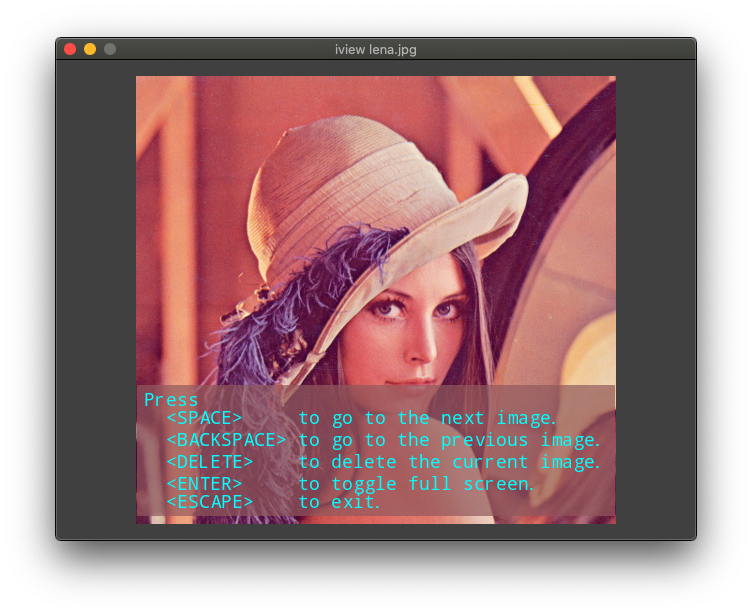
User Interface
| Key | Result |
|---|---|
| SPACE | Go to the next image |
| BACKSPACE | Go to the previous image |
| DELETE | Delete the current image |
| ENTER | Toggle full screen |
| ESCAPE | Exit |
| other | Help screen |
Holding the left mouse button down and moving the mouse will pan the image.
Rolling the mouse wheel up and down will zoom out and in where the mouse is.
Todo
- UI error
- Pan/zoom via keypad
- Config dynamic singleton
- Requirements linux vs mac
- Display image name, size, location, date taken
- Crop
- Transition
Written by
John Lee Cooper
john.lee.cooper@gatech.edu
Release history Release notifications | RSS feed


Download files
Download the file for your platform. If you're not sure which to choose, learn more about installing packages.
Source Distribution
Built Distributions
Filter files by name, interpreter, ABI, and platform.
If you're not sure about the file name format, learn more about wheel file names.
Copy a direct link to the current filters
File details
Details for the file image-viewer-0.0.2.tar.gz.
File metadata
- Download URL: image-viewer-0.0.2.tar.gz
- Upload date:
- Size: 89.3 kB
- Tags: Source
- Uploaded using Trusted Publishing? No
- Uploaded via: twine/3.3.0 pkginfo/1.7.0 requests/2.25.1 setuptools/51.3.2 requests-toolbelt/0.9.1 tqdm/4.56.0 CPython/3.8.6
File hashes
| Algorithm | Hash digest | |
|---|---|---|
| SHA256 |
f22345b8bba18185df1e2b5615a4fea3f5505b9fa2a1570a0af566b7ba928d26
|
|
| MD5 |
1c4cb10d39325da71a2fbd0b19e1d9c6
|
|
| BLAKE2b-256 |
d9307156d76e4bfe004383420dd8bd7dcd24682fc8516d5bcaab23982ffcc07c
|
File details
Details for the file image_viewer-0.0.2-py3.8.egg.
File metadata
- Download URL: image_viewer-0.0.2-py3.8.egg
- Upload date:
- Size: 113.1 kB
- Tags: Egg
- Uploaded using Trusted Publishing? No
- Uploaded via: twine/3.3.0 pkginfo/1.7.0 requests/2.25.1 setuptools/51.3.2 requests-toolbelt/0.9.1 tqdm/4.56.0 CPython/3.8.6
File hashes
| Algorithm | Hash digest | |
|---|---|---|
| SHA256 |
d02228bc9a890de6396631065c3074e1adcee6fec07646ff09ca2faa81d10fc5
|
|
| MD5 |
02978cc4b9d285d0719e846531e99afe
|
|
| BLAKE2b-256 |
26db755450a6388c4ed7f5eaa9d79cd4fc5a699a01eb42c862d67436971d665f
|
File details
Details for the file image_viewer-0.0.2-py3-none-any.whl.
File metadata
- Download URL: image_viewer-0.0.2-py3-none-any.whl
- Upload date:
- Size: 104.3 kB
- Tags: Python 3
- Uploaded using Trusted Publishing? No
- Uploaded via: twine/3.3.0 pkginfo/1.7.0 requests/2.25.1 setuptools/51.3.2 requests-toolbelt/0.9.1 tqdm/4.56.0 CPython/3.8.6
File hashes
| Algorithm | Hash digest | |
|---|---|---|
| SHA256 |
0cf0be6094753c0b5ddead95e3d5c5b142171ca720bf1b537115bf85a0482b7b
|
|
| MD5 |
360125a7e550a1b16912c44143c5c6b0
|
|
| BLAKE2b-256 |
110654755dd9e1f6a2faf258c2021aa33e171ba4c4e1b5f26c77dd5145878362
|






