
Physical Simulations on Images.

Project description
Image-Physics-Simulation
This is a library for 2D Ray-Tracing on an image. For example the Physgen Dataset, see here.
Contents:
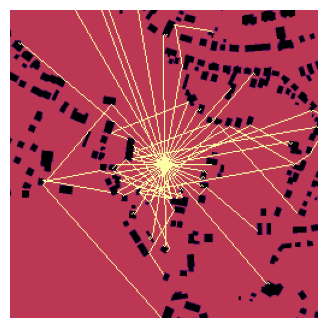
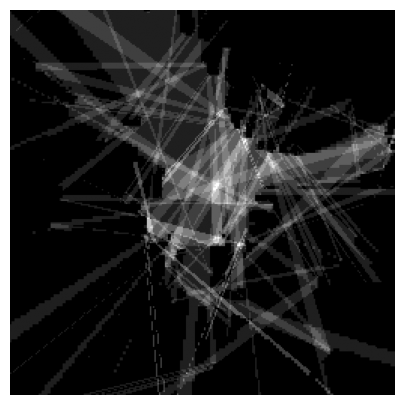
Classical Ray-Beams and ISM
Installation
This repo only need some basic libraries:
numpymatplotlibopencv-pythonscikit-imagejoblibnumbashapely
If you want to use the data module then this package needs also:
torchtorchvisiondatasets
You can download / clone this repo and run the example notebook via following Python/Anaconda setup:
conda create -n img-phy-sim python=3.13 pip -y
conda activate img-phy-sim
pip install numpy matplotlib opencv-python ipython jupyter shapely datasets==3.6.0 scikit-image joblib shapely numba
pip install torch torchvision torchaudio --index-url https://download.pytorch.org/whl/cu126
You can also use this repo via Python Package Index (PyPI) as a package:
pip install img-phy-sim
# or for using `data` module:
pip install img-phy-sim[full]
Here the instructions to use the package version of ips and an anconda setup:
conda create -n img-phy-sim python=3.13 pip -y
conda activate img-phy-sim
pip install img-phy-sim
# or for using `data` module:
pip install img-phy-sim[full]
To run the example code you also need (these packages are included in img-phy-sim[full]):
pip install datasets==3.6.0
pip install torch torchvision torchaudio --index-url https://download.pytorch.org/whl/cu126
Download Example Data
You can download Physgen data if wanted via the data.py using following commands:
conda activate img-phy-sim
cd "D:\Informatik\Projekte\Image-Physics-Simulation\img_phy_sim" && D:
python data.py --output_real_path ./datasets/physgen_train_raw/real --output_osm_path ./datasets/physgen_train_raw/osm --variation sound_reflection --input_type osm --output_type standard --data_mode train
python data.py --output_real_path ./datasets/physgen_test_raw/real --output_osm_path ./datasets/physgen_test_raw/osm --variation sound_reflection --input_type osm --output_type standard --data_mode test
python data.py --output_real_path ./datasets/physgen_val_raw/real --output_osm_path ./datasets/physgen_val_raw/osm --variation sound_reflection --input_type osm --output_type standard --data_mode validation
Usage
Here we will show following (always for classical ray-traces and ISM):
- the basic usage
- iterative usage
- saving and loading
→ The example notebook can be helpful 👀
Classical Ray-Tracing:
# calc rays
rays = ips.ray_tracing.trace_beams(rel_position=[0.5, 0.5],
                                   img_src=input_src,
                                   directions_in_degree=ips.math.get_linear_degree_range(start=0, stop=360, step_size=5),
                                   wall_values=None,
                                   wall_thickness=1,
                                   img_border_also_collide=False,
                                   reflexion_order=3,
                                   should_scale_rays=True,
                                   should_scale_img=False)

# show rays on input
ray_img = ips.ray_tracing.draw_rays(rays, detail_draw=False,
                                    output_format="single_image",
                                    img_background=input_, ray_value=2, ray_thickness=1,
                                    img_shape=(256, 256), dtype=float, standard_value=0,
                                    should_scale_rays_to_image=True, original_max_width=None, original_max_height=None,
                                    show_only_reflections=True)
ips.img.imshow(ray_img, size=4)
ISM:
reflection_map = ips.ism.compute_reflection_map(
    source_rel=(0.5, 0.5),
    img=ips.img.open(input_src),
    wall_values=[0],
    wall_thickness=1,
    max_order=1,
    step_px=1,
)

ips.img.imshow(ips.ism.reflection_map_to_img(reflection_map), size=5)
Both formats are also available in a iterative format.
Classical Ray-Tracing:
# compute rays
rays_ = ips.ray_tracing.trace_beams(rel_position=[0.5, 0.5],
                                   img_src=img_src,
                                   directions_in_degree=[22, 56, 90, 146, 234, 285, 320],
                                   wall_values=0.0,
                                   wall_thickness=0,
                                   img_border_also_collide=False,
                                   reflexion_order=2,
                                   should_scale_rays=False,
                                   should_scale_img=True,
                                   iterative_tracking=True,    # IMPORTANT
                                   iterative_steps=None        # IMPORTANT
                                   )
print("\nAccessing works the same, example Ray:", rays_[0][0][:min(len(rays_[0][0])-1, 3)])

# (optional) limit rays to X steps
rays_.reduce_to_x_steps(20)

# (optional) get a given operation
rays_.get_iteration(0)

# export as multiple images
ray_imgs = ips.ray_tracing.draw_rays(rays_, detail_draw=False,
                                    output_format="single_image",
                                    img_background=img, ray_value=2, ray_thickness=1,
                                    img_shape=(256, 256), dtype=float, standard_value=0,
                                    should_scale_rays_to_image=False, original_max_width=None, original_max_height=None)

# show exported images (first 10 imges)
ips.img.advanced_imshow(ray_imgs[:10], title=None, image_width=4, axis=False,
                        color_space="gray", cmap=None, cols=5, save_to=None,
                        hspace=0.2, wspace=0.2,
                        use_original_style=False, invert=False)
ISM:
reflection_map_per_time = ips.ism.compute_reflection_map(
    source_rel=(0.5, 0.5),
    img=ips.img.open(input_src),
    wall_values=[0],
    wall_thickness=1,
    max_order=1,
    step_px=1,
    iterative_tracking=True,
    iterative_steps=6,
)

ips.img.imshow(ips.ism.reflection_map_to_img(reflection_map_per_time[0]), size=5)

len_ = len(reflection_map_per_time)
ips.img.advanced_imshow([reflection_map_per_time[0], reflection_map_per_time[1], reflection_map_per_time[2],
                         reflection_map_per_time[3], reflection_map_per_time[4], reflection_map_per_time[5]],
                        title=None, image_width=4, axis=False,
                        color_space="gray", cmap=None, cols=3, save_to=None,
                        hspace=0.2, wspace=0.2,
                        use_original_style=False, invert=False)
Loading and saving:
Classical Rays
# saving
rays_saved = ips.ray_tracing.trace_beams(rel_position=[0.5, 0.5],
                                        img_src=img_src,
                                        directions_in_degree=ips.math.get_linear_degree_range(start=0, stop=360, step_size=10),
                                        wall_values=None,
                                        wall_thickness=1,
                                        img_border_also_collide=False,
                                        reflexion_order=1,
                                        should_scale_rays=True,
                                        should_scale_img=True)
ips.ray_tracing.print_rays_info(rays_saved)
ips.ray_tracing.save(path="./my_awesome_rays.txt", rays=rays_saved)

# loading
rays_loaded = ips.ray_tracing.open(path="./my_awesome_rays.txt")
Or you export the rays as image and save and load the image:
# compute rays
# ... (as before)

# export rays
# ... (as before)

# saving
ips.img.save(ray_img, "./cache_iterative_saving.png")

# loading
ray_img = ips.img.open("./cache_iterative_saving.png")
ISM
# saving
ips.img.save(reflection_map, "./cache_iterative_saving.png")

# loading
reflection_map = ips.img.open("./cache_iterative_saving.png")
Ray-Tracing Formats
In short:
Pixel-based + stochastic/directed (original approach here) vs. continuous + deterministically constructed (used by noise modelling software).
Classic Ray-Tracing Approach (DDA / Pixel Ray Marching)
- Forward integration: Ray is propagated step by step through a discrete grid (pixel/grid).
- Collision model: A "hit" occurs when the ray enters a wall cell (quantization).
- Reflection: Occurs locally at the collision pixel with a (often quantized) normal/orientation.
- Result: good for "many rays" / field of view, but not deterministic with regard to reflection paths (you need directions/sampling).
Noise Modeling Approach (image source method / geometric acoustics)
- Path construction: Reflection paths are constructed deterministically via mirror sources (virtual sources).
- Continuous geometry: works in $\mathbb{R}^2 / \mathbb{R}^3$ with lines/segments/polygons ("infinity-based" in the sense of continuous space, not raster).
- Validation: Path is then accepted/rejected via visibility/occlusion checks.
- Result: Delivers all specular paths up to order N without angle sampling.
Library Overview
- Img-Phy-Sim (ips)
ray_tracingtrace_beams: load an image, extract the wall-map and trace multiple beamsdraw_rays: draw/export the rays as/inside an imagetrace_and_draw_rays: combinestrace_beamsanddraw_raysin order to get directly an image outputprint_rays_info: get some interesting informations about your rayssave: save your rays as txt fileopen: load your saved rays txt fileget_linear_degree_range: get a range for your beam-directions -> example beams between 0-360 with stepsize 10merge_rays: merge 2 rays to one 'object'
ismcompute_reflection_map: Evaluates all valid ISM paths from one source to a receiver grid and accumulates path countsreflection_map_to_img: Normalizes the reflection map from 0.0-1.0 to 0.0-255.0
imgopen: load an image via Open-CVsave: save an imageimshow: show an single image (without much features)advanced_imshow: show multiple images with many optionsshow_image_with_line_and_profile: show an image with a red line + the values of the image on this lineplot_image_with_values: plot an image with it's value plotted and averaged to see your image in values
mathget_linear_degree_range: generate evenly spaced degrees within a rangedegree_to_vector: convert a degree angle to a 2D unit vectorvector_to_degree: convert a 2D vector into its corresponding degreenormalize_point: Normalize a 2D point to [0, 1] rangedenormalize_point: Denormalize a 2D point to pixel coordinatesnumpy_info: Get statistics about an numpy array
evalcalc_metrices: calculate F1, Recall and Precision between rays (or optinal an image) and an image
dataPhysGenDataset(): PyTorch dataset wrapper for PhysGen with flexible input/output configurationresize_tensor_to_divisible_by_14: resize tensors so height and width are divisible by 14get_dataloader: create a PyTorch DataLoader for the PhysGen datasetget_image: retrieve a single dataset sample (optionally as NumPy arrays)save_dataset: export PhysGen inputs and targets as PNG images to disk
That are not all functions but the ones which should be most useful. Check out the documentation for all functions.
Release history Release notifications | RSS feed


Download files
Download the file for your platform. If you're not sure which to choose, learn more about installing packages.
Source Distribution
File details
Details for the file img_phy_sim-1.5.tar.gz.
File metadata
- Download URL: img_phy_sim-1.5.tar.gz
- Upload date:
- Size: 59.4 kB
- Tags: Source
- Uploaded using Trusted Publishing? No
- Uploaded via: twine/6.2.0 CPython/3.13.12
File hashes
| Algorithm | Hash digest | |
|---|---|---|
| SHA256 |
d494186c25bc2609429115cbd66503ae4076e4dd7f2260508f12fb1667f66b01
|
|
| MD5 |
8ac518577f9cd153044cd57534f79919
|
|
| BLAKE2b-256 |
f2ed7a993e5f62c8d920705d8d5bee3d9a2864fb30d3c60e91a43b0ab8f01f49
|






