
imgeda
High-performance CLI tool for exploratory data analysis of image datasets.
Scan folders of images, generate JSONL manifests with metadata and pixel statistics, detect quality issues, find duplicates, and produce publication-ready visualizations — all from the command line.



Installation
pip install imgeda
Or with uv:
uv tool install imgeda
Optional extras
pip install imgeda[parquet]      # Parquet export
pip install imgeda[embeddings]   # CLIP embeddings + UMAP visualization (torch, open_clip)
pip install imgeda[opencv]       # OpenCV-accelerated scanning
Quick Start
# Scan a directory of images
imgeda scan ./images -o manifest.jsonl

# View dataset summary
imgeda info -m manifest.jsonl

# Check for quality issues
imgeda check all -m manifest.jsonl

# Detect blurry images
imgeda check blur -m manifest.jsonl

# Detect cross-split data leakage
imgeda check leakage -m train.jsonl -m val.jsonl

# Analyze annotations (auto-detects YOLO, COCO, VOC)
imgeda annotations ./dataset

# Generate all plots (11 plot types)
imgeda plot all -m manifest.jsonl

# Generate an HTML report
imgeda report -m manifest.jsonl

# Compare two manifests
imgeda diff --old v1.jsonl --new v2.jsonl

# Run quality gate (exit code 2 on failure — CI-friendly)
imgeda gate -m manifest.jsonl -p policy.yml

# Export to CSV or Parquet
imgeda export csv -m manifest.jsonl -o dataset.csv
imgeda export parquet -m manifest.jsonl -o dataset.parquet

# Compute CLIP embeddings with UMAP visualization (requires: pip install imgeda[embeddings])
imgeda embed -m manifest.jsonl -o embeddings.npz --plot
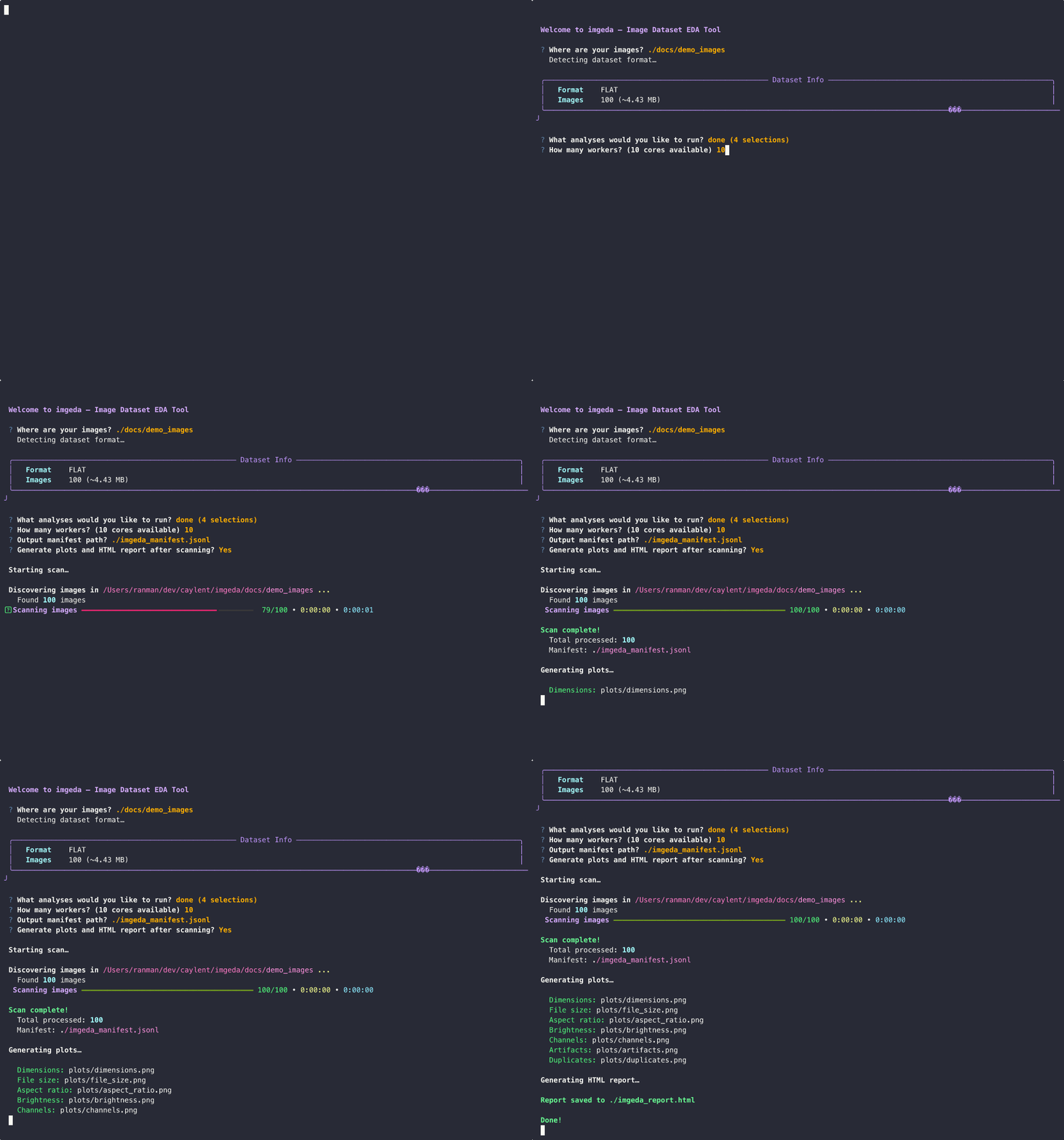
Or just run imgeda with no arguments for an interactive wizard that walks you through everything:
# Interactive mode — auto-detects dataset format (YOLO, COCO, VOC, classification, flat)
imgeda
The wizard detects your dataset structure, shows a summary panel with image counts, splits, and class info, then lets you pick which splits and analyses to run.
Features
- Fast parallel scanning with multi-core
ProcessPoolExecutorand Rich progress bars - Resumable — Ctrl+C anytime, progress is saved. Re-run and it picks up where it left off
- JSONL manifest — append-only, crash-tolerant, one record per image
- Per-image analysis: dimensions, file size, pixel statistics (mean/std per channel), brightness, perceptual hashing (phash + dhash), border artifact detection, blur detection (Laplacian variance), EXIF metadata (camera, lens, focal length, exposure, GPS flagging, distortion risk)
- Quality checks: corrupt files, dark/overexposed images, border artifacts, blur detection, exact and near-duplicate detection
- Cross-split leakage detection — find duplicate images across train/val/test splits using perceptual hashing
- Annotation analysis — parse and summarize YOLO, COCO, and Pascal VOC annotations with per-class statistics
- CLIP embeddings — compute image embeddings with OpenCLIP, detect outliers, find semantic near-duplicates, and visualize with UMAP (optional extra)
- 11 plot types with automatic large-dataset adaptations: dimensions, file size, aspect ratio, brightness, channels, artifacts, duplicates, blur scores, EXIF camera/focal/ISO distributions
- Single-page HTML report with embedded plots and summary tables
- Dataset format detection — auto-detects YOLO, COCO, Pascal VOC, classification, and flat image directories with split-aware scanning
- Interactive configurator with Rich panels, split selection, and smart defaults
- Lambda-compatible core — the analysis functions have zero CLI dependencies, ready for serverless deployment
- Manifest diff — compare two manifests to track dataset changes over time
- Quality gate — policy-as-code YAML rules with 11 configurable checks and CI-friendly exit codes
- CSV and Parquet export — export manifests with flattened nested fields
- AWS serverless deployment — CDK + Step Functions + Lambda for S3-scale analysis
Example Output
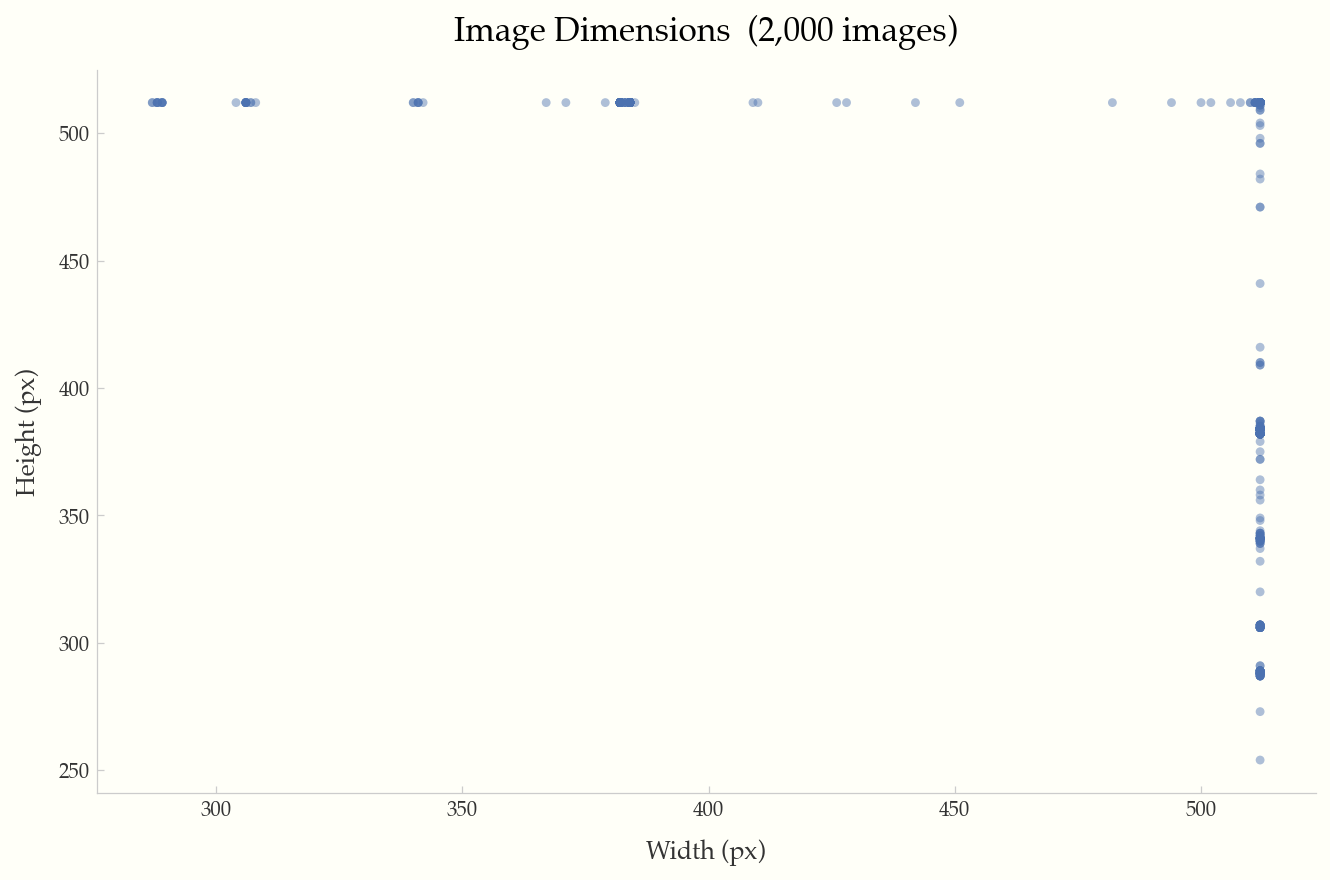
All examples below were generated from the Food-101 dataset (2,000 images).
Dimensions
Width vs. height scatter plot with reference lines for 720p, 1080p, and 4K resolutions.
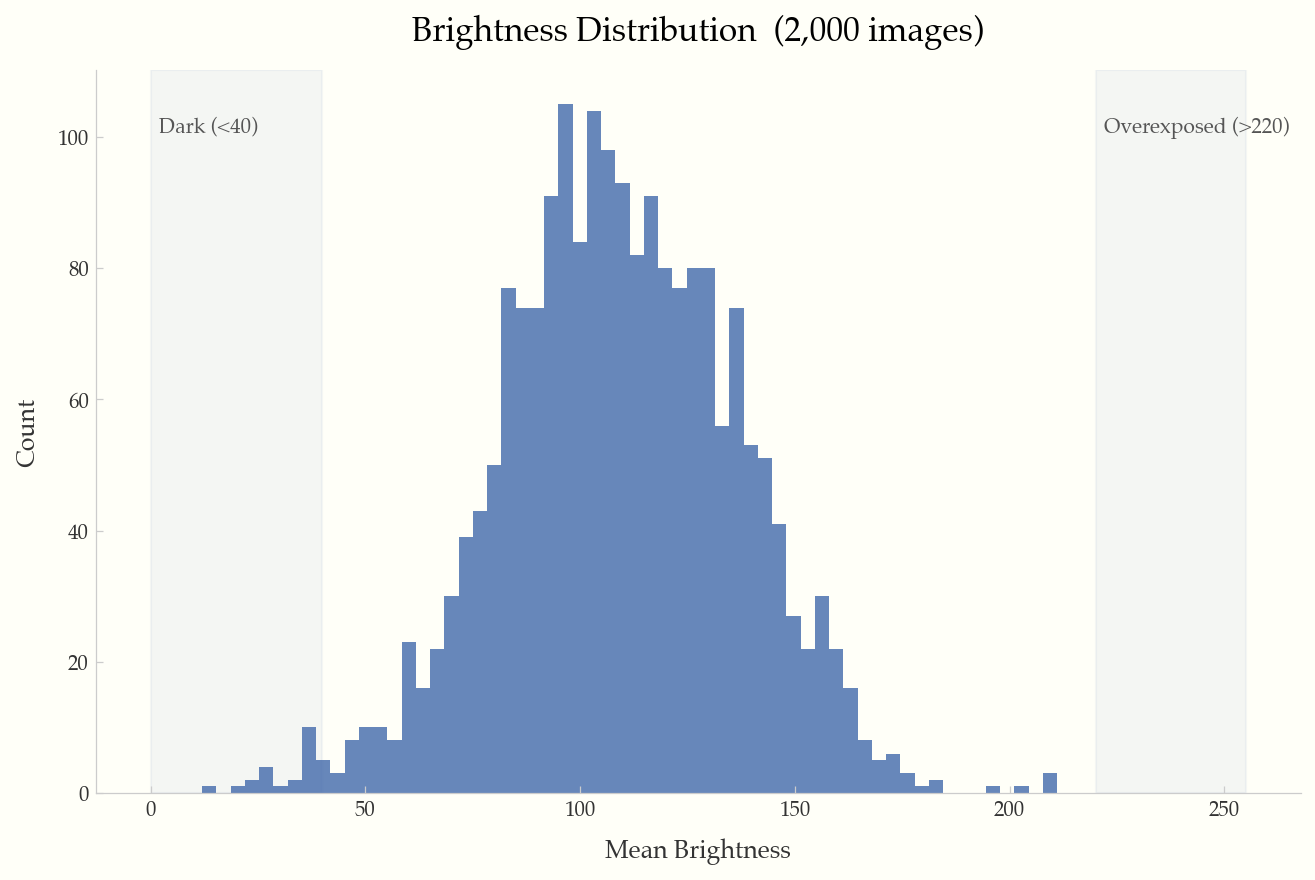
Brightness Distribution
Histogram of mean brightness per image, with shaded regions for dark (<40) and overexposed (>220) images.
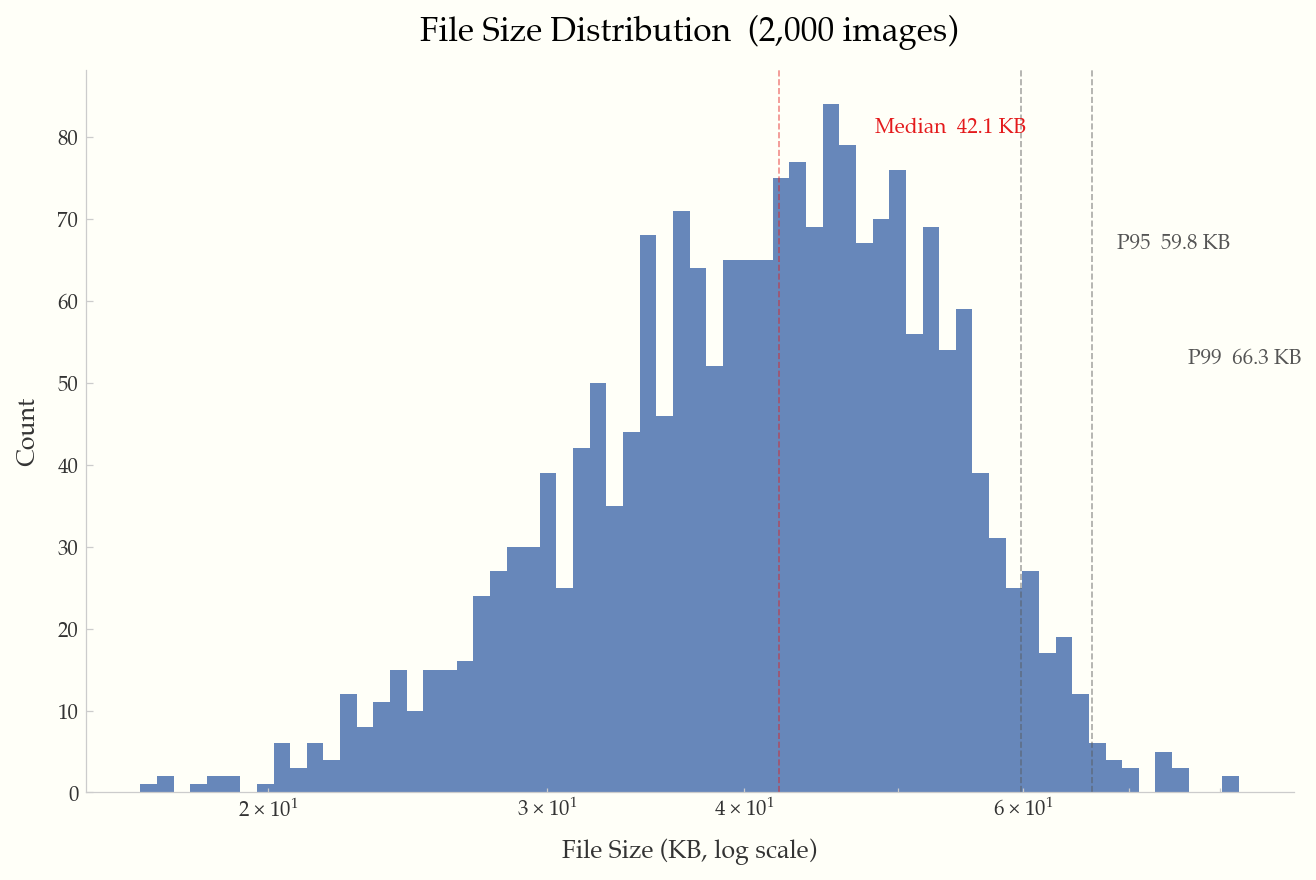
File Size Distribution
Log-scale histogram with annotated median, P95, and P99 percentile lines.
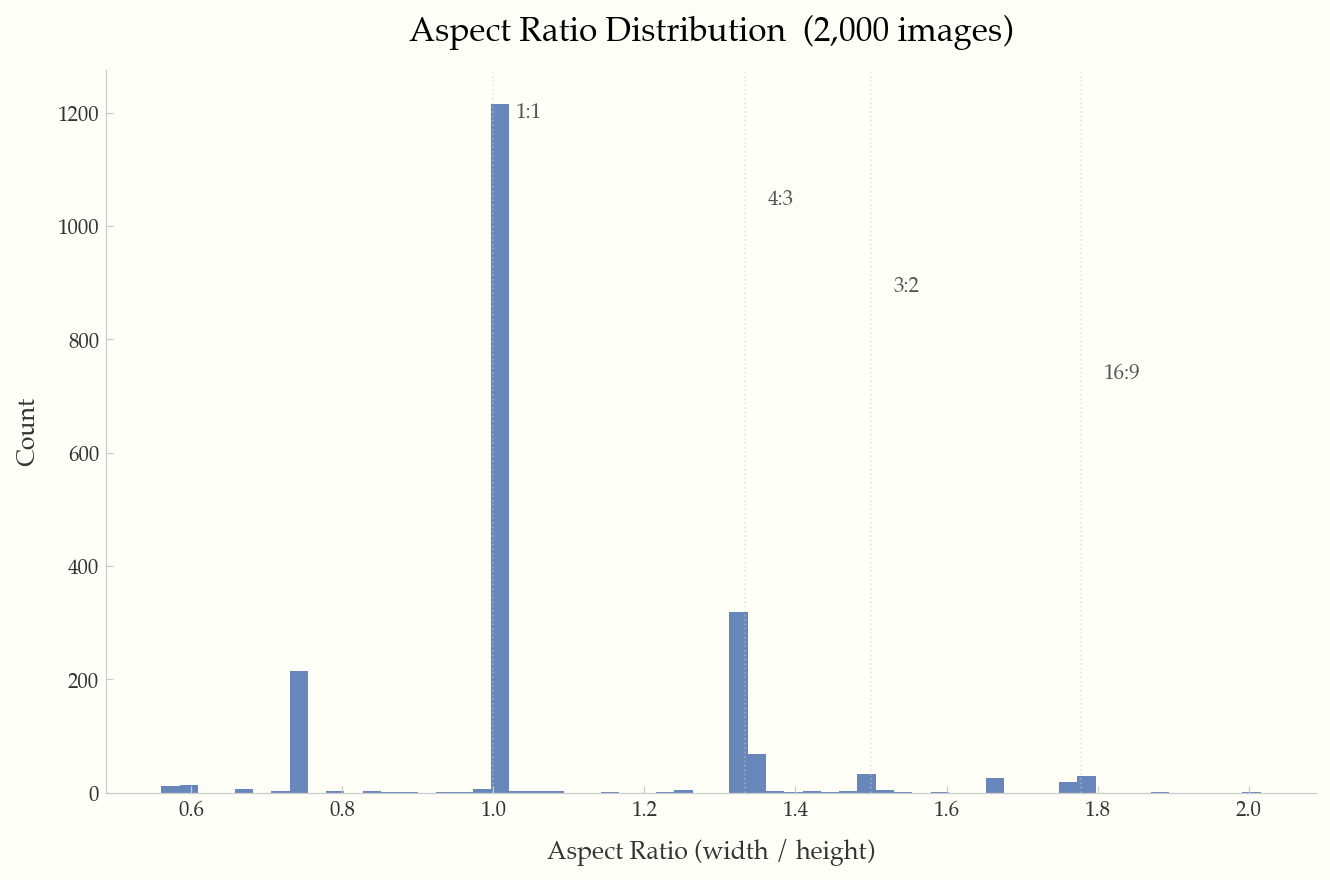
Aspect Ratio Distribution
Histogram with reference lines at common ratios (1:1, 4:3, 3:2, 16:9).
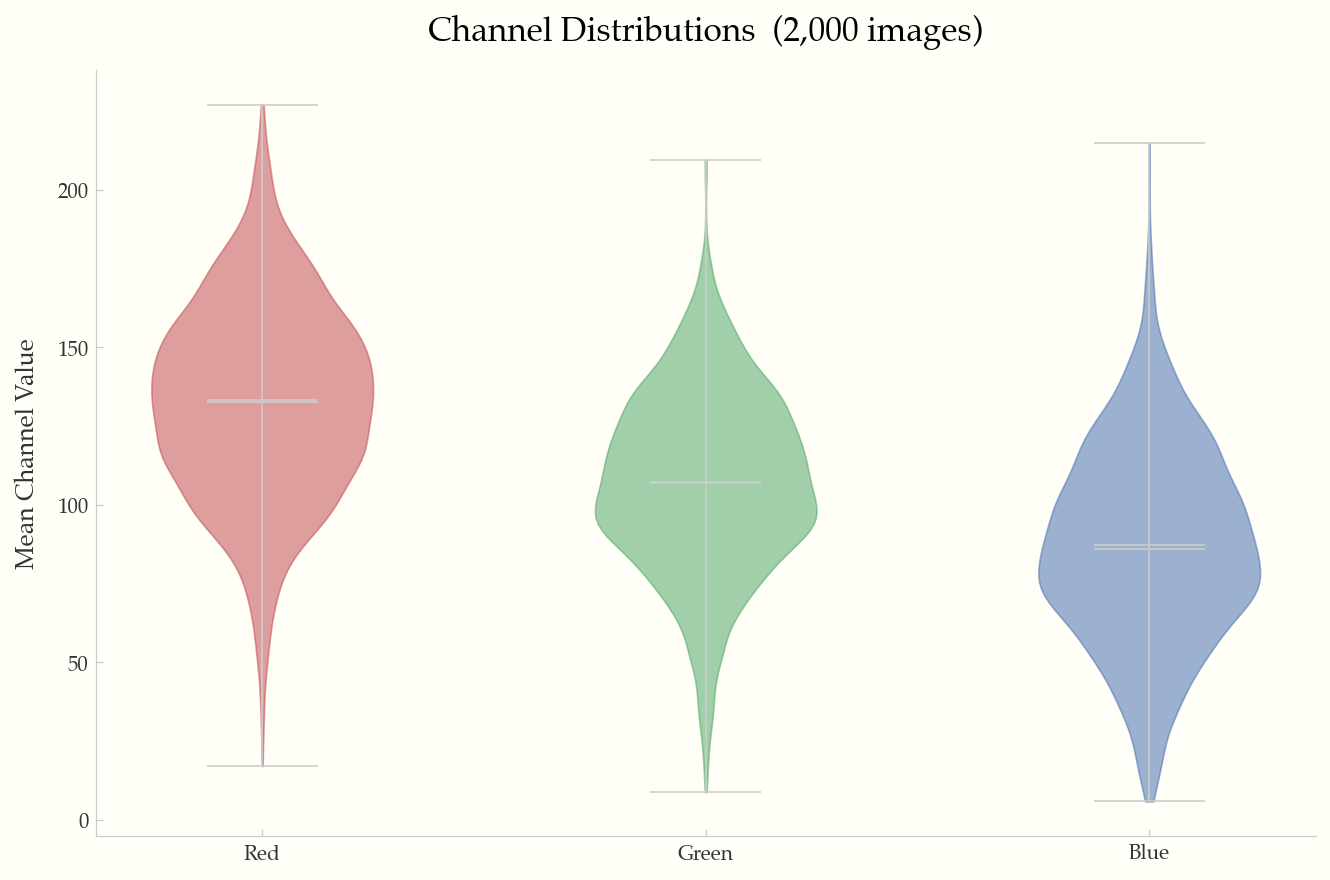
Channel Distributions
Violin plots of mean R/G/B channel values across the dataset.
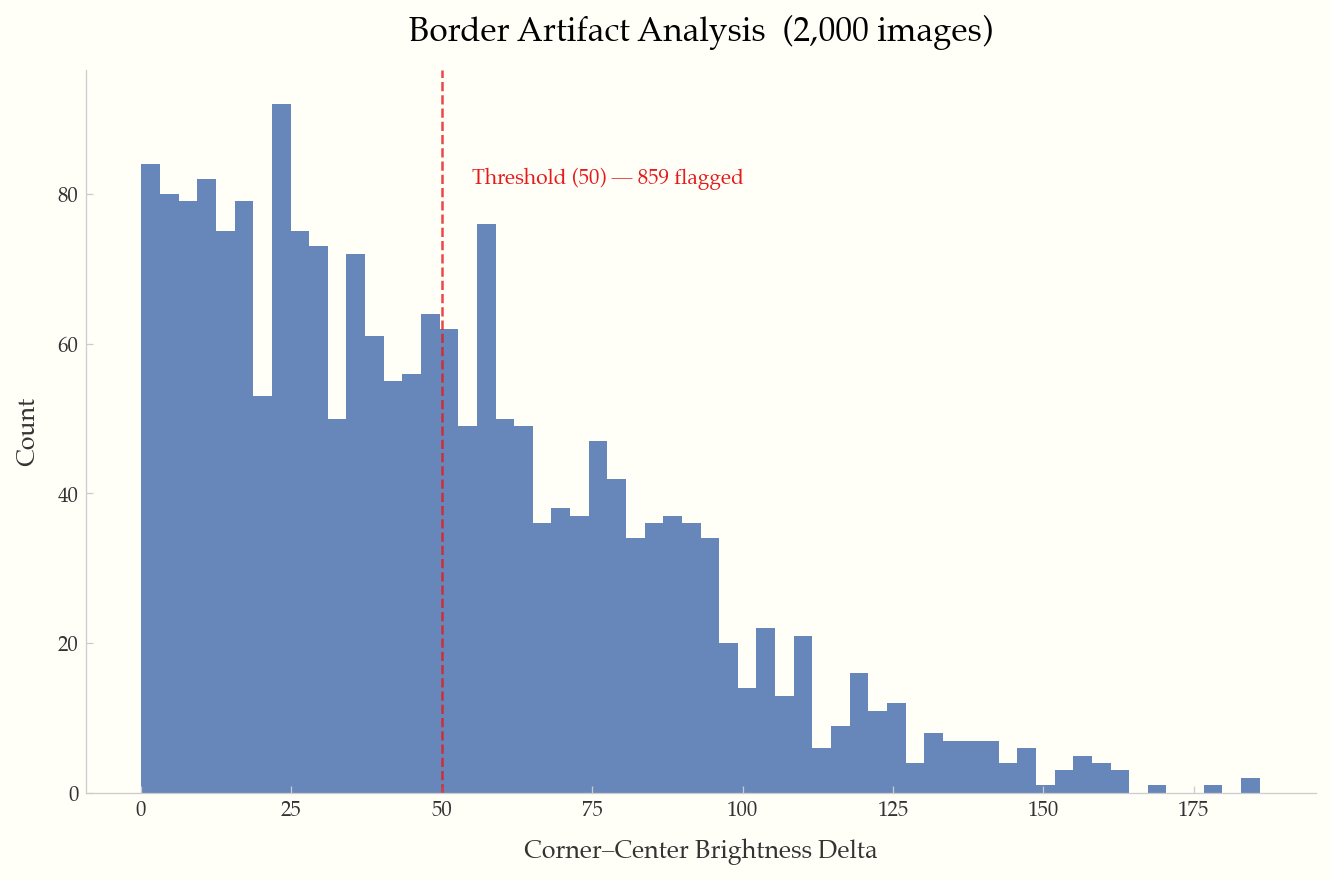
Border Artifact Analysis
Corner-to-center brightness delta histogram with configurable threshold line.
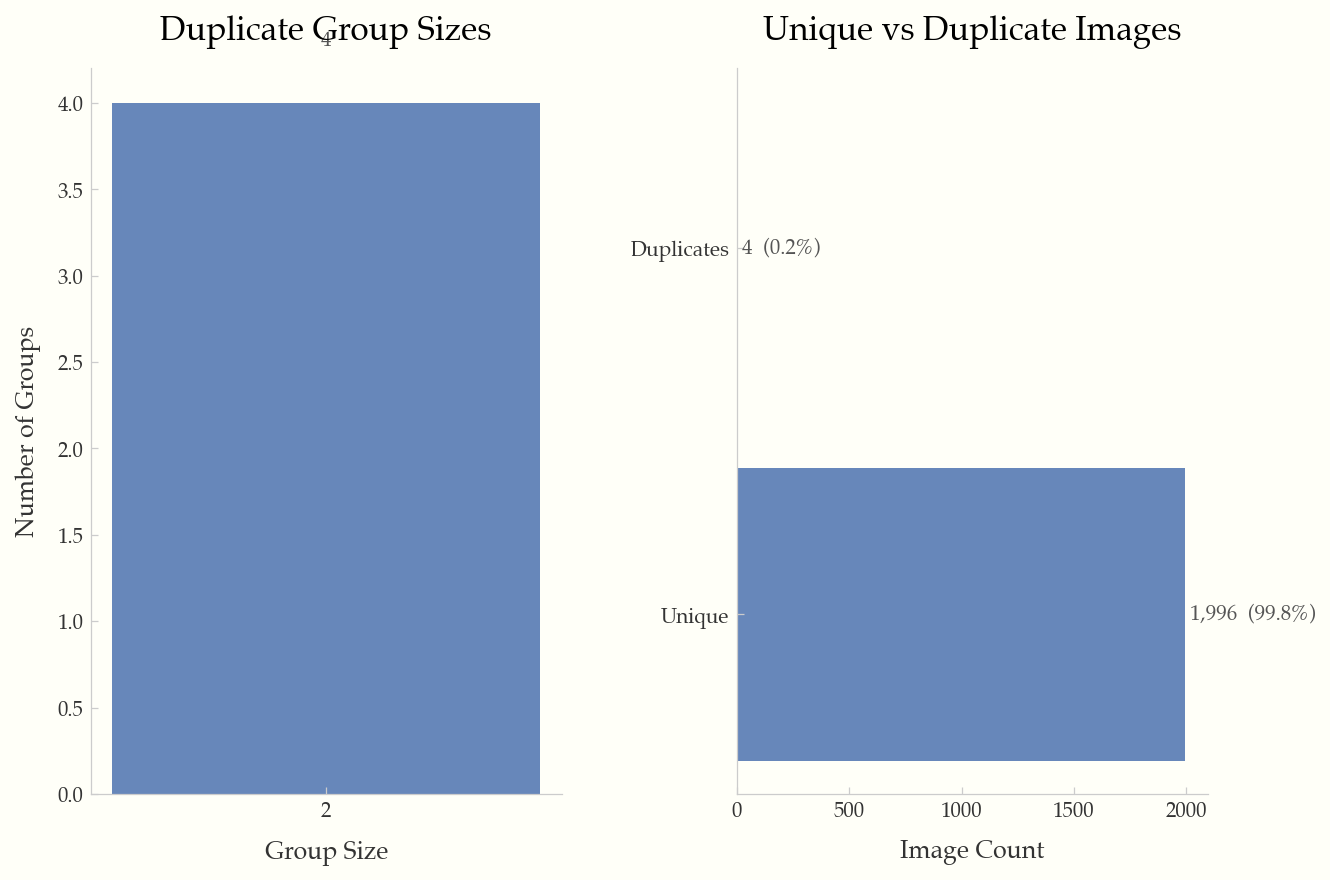
Duplicate Analysis
Duplicate group sizes and unique vs. duplicate breakdown.
CLI Reference
imgeda scan <DIR>
Scan a directory of images and produce a JSONL manifest.
Options:
  -o, --output PATH           Output manifest path [default: imgeda_manifest.jsonl]
  --workers INTEGER           Parallel workers [default: CPU count]
  --checkpoint-every INTEGER  Flush interval [default: 500]
  --resume / --no-resume      Auto-resume from existing manifest [default: resume]
  --force                     Force full rescan (ignore existing manifest)
  --skip-pixel-stats          Metadata-only scan (faster)
  --skip-exif                 Skip EXIF metadata extraction
  --no-hashes                 Skip perceptual hashing
  --extensions TEXT            Comma-separated extensions to include
  --dark-threshold FLOAT      Dark image threshold [default: 40.0]
  --overexposed-threshold FLOAT  Overexposed threshold [default: 220.0]
  --artifact-threshold FLOAT  Border artifact threshold [default: 50.0]
  --max-image-dim INTEGER     Downsample threshold for pixel stats [default: 2048]
imgeda info -m <MANIFEST>
Print a Rich-formatted dataset summary.
imgeda check <SUBCOMMAND> -m <MANIFEST>
Subcommands: corrupt, exposure, artifacts, duplicates, blur, all
imgeda check leakage -m <MANIFEST> -m <MANIFEST>
Detect cross-split data leakage between two or more manifests using perceptual hashing.
Options:
  --threshold INTEGER   Hamming distance threshold [default: 8]
  -o, --out PATH        Output JSON path (optional)
imgeda annotations <DIR>
Analyze annotations in a dataset directory. Auto-detects YOLO, COCO, and Pascal VOC formats.
Options:
  -f, --format TEXT          Force format: yolo, coco, voc (auto-detected if omitted)
  --labels PATH              YOLO labels directory
  --annotation-file PATH     COCO JSON annotation file
  -o, --out PATH             Output JSON path (optional)
imgeda plot <SUBCOMMAND> -m <MANIFEST>
Subcommands: dimensions, file-size, aspect-ratio, brightness, channels, artifacts, duplicates, blur, exif-camera, exif-focal, exif-iso, all
Common options:
  -o, --output PATH    Output directory [default: ./plots]
  --format TEXT         Output format: png, pdf, svg [default: png]
  --dpi INTEGER         DPI for output [default: 150]
  --sample INTEGER      Sample N records for large datasets
imgeda report -m <MANIFEST>
Generate a single-page HTML report with embedded plots and statistics.
imgeda diff --old <MANIFEST> --new <MANIFEST>
Compare two manifests and show added, removed, and changed images with field-level diffs.
Options:
  -o, --out PATH    Output JSON path (optional)
imgeda gate -m <MANIFEST> -p <POLICY>
Evaluate a manifest against a YAML quality policy. Exit code 0 = pass, 2 = fail.
Options:
  -o, --out PATH    Output JSON path (optional)
Example policy (policy.yml):
min_images_total: 100
max_corrupt_pct: 1.0
max_overexposed_pct: 5.0
max_underexposed_pct: 5.0
max_duplicate_pct: 10.0
max_blurry_pct: 10.0
max_artifact_pct: 5.0
min_width: 224
min_height: 224
max_aspect_ratio: 3.0
allowed_formats: [jpeg, png]
imgeda export csv -m <MANIFEST> -o <OUTPUT>
Export manifest to CSV with flattened nested fields.
imgeda export parquet -m <MANIFEST> -o <OUTPUT>
Export manifest to Parquet format with flattened nested fields. Requires pip install imgeda[parquet].
imgeda embed -m <MANIFEST>
Compute CLIP image embeddings, detect outliers, and generate a UMAP scatter plot. Requires pip install imgeda[embeddings].
Options:
  -o, --out PATH             Output .npz file [default: ./embeddings.npz]
  --model TEXT               OpenCLIP model name [default: ViT-B-32]
  --pretrained TEXT          Pretrained weights [default: laion2b_s34b_b79k]
  --batch-size INTEGER       Inference batch size [default: 32]
  --device TEXT              Torch device (auto-detected)
  --plot / --no-plot         Generate UMAP plot [default: --plot]
  --plot-dir PATH            Plot output directory [default: ./plots]
Architecture
See docs/architecture.md for detailed system diagrams including the local CLI flow, AWS serverless flow, CI/CD quality gate flow, and full module dependency graph.
Manifest Format
The manifest is a JSONL file (one JSON object per line):
- Line 1: Metadata header (input directory, scan settings, schema version)
- Lines 2+: One
ImageRecordper image with all computed fields
{"__manifest_meta__": true, "input_dir": "./images", "created_at": "2026-02-17T12:00:00", ...}
{"path": "./images/cat.jpg", "width": 500, "height": 375, "format": "JPEG", "camera_make": "Canon", "focal_length_35mm": 50, "distortion_risk": "low", "has_gps_data": false, "phash": "a1b2c3d4", ...}
The manifest is append-only and crash-tolerant. Resume is keyed on (path, file_size, mtime) — modified files are automatically re-analyzed.
Performance
Tested on a 10-core Apple M1 Pro with SSD:
| Operation | 3,680 images |
|---|---|
| Full scan (metadata + pixels + hashes) | ~8s |
| Plot generation | ~3s |
| HTML report | ~4s |
The tool is designed to handle 100K+ image datasets with batched processing, memory-bounded futures, and automatic plot adaptations for large datasets.
Development
git clone https://github.com/caylent/imgeda.git
cd imgeda
uv sync --extra dev --extra parquet --extra opencv
uv run pytest
uv run ruff check src/ tests/
uv run mypy src/
License
MIT
1 maintainer

Metadata
1 maintainer
Release files for imgeda 0.1.0
For a detailed explanation of source distributions (sdists) and built distributions (wheels), please see the package formats documentation.
Source distribution (sdist)
| File | Size | Uploaded | |
|---|---|---|---|
| imgeda-0.1.0.tar.gz | 52.6 kB | Details |
Built distribution (wheel)
| File | Interpreter | ABI | Platform | Reset |
|---|---|---|---|---|
| imgeda-0.1.0-py3-none-any.whl | Python 3 | none | any | Details |
Total release size: 130.3 kB
Release files / imgeda-0.1.0.tar.gz
| Download URL | imgeda-0.1.0.tar.gz |
|---|---|
| Size | 52.6 kB |
| Tags | Source |
|
SHA-256 checksum How to use checksums |
ccacc49155ce486394bf9ebbd3e752a193cc4133284413303318f0e296d974db
|
|
BLAKE2b-256 checksum How to use checksums |
b2e3e0694000f26e38d2d9eebae950ea1ee3cde39ba7ad9579378b7f9935168a
|
| Upload date | |
|
Uploaded using Trusted Publishing? What is trusted publishing? |
Yes |
| Uploaded via |
twine/6.1.0 CPython/3.13.7
|
Provenance
Provenance describes where a file came from. On PyPI, provenance is shared via attestations, which provide a verifiable record of the build or publishing details. View details, limitations and caveats.


PyPI Publish Attestation
PyPI verified that this artifact, at this checksum, originated from the publisher listed below.
Signed by GitHub Actions, verified by PyPI on Feb 19, 2026.
Transparency logRelease files / imgeda-0.1.0-py3-none-any.whl
| Download URL | imgeda-0.1.0-py3-none-any.whl |
|---|---|
| Size | 77.7 kB |
| Tags | Python 3 |
|
SHA-256 checksum How to use checksums |
7ca5684067d3fc6a649862fa8d8ecdec0098b294758ec159cb65306d6dcdd53c
|
|
BLAKE2b-256 checksum How to use checksums |
8015259f78a756f384ed1190e7ea87d8a9a74b38b21d106c571d11356e44d9eb
|
| Upload date | |
|
Uploaded using Trusted Publishing? What is trusted publishing? |
Yes |
| Uploaded via |
twine/6.1.0 CPython/3.13.7
|
Provenance
Provenance describes where a file came from. On PyPI, provenance is shared via attestations, which provide a verifiable record of the build or publishing details. View details, limitations and caveats.
PyPI Publish Attestation
PyPI verified that this artifact, at this checksum, originated from the publisher listed below.
Signed by GitHub Actions, verified by PyPI on Feb 19, 2026.
Transparency log













