
README
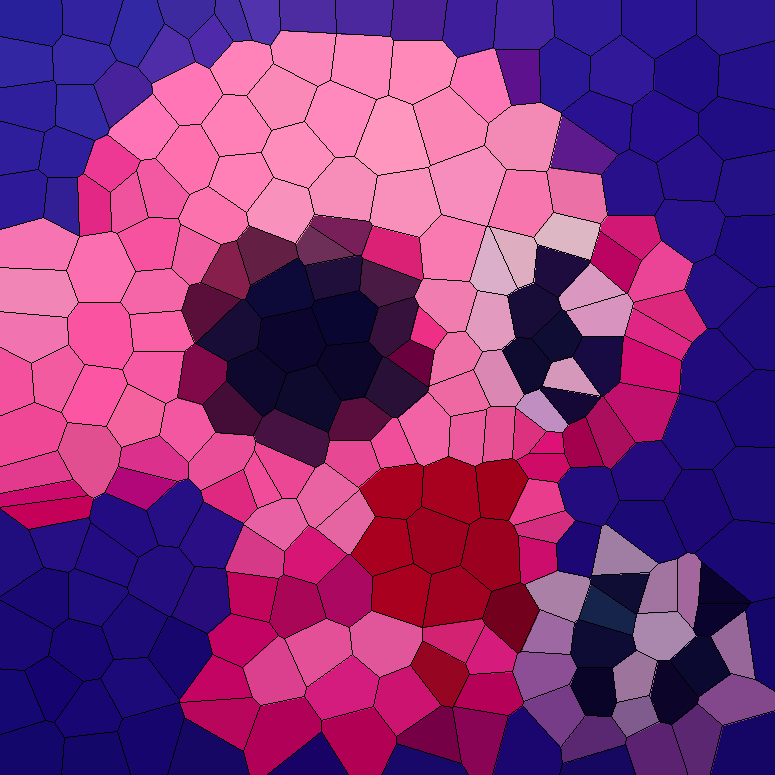
This is a tiny image processing library to convert your images to Voronoi mosaic, Voronoi relief, or Warhol effect images. We used k-means clustering algorithms to determine the position of Voronoi sites and pixel groups of Warhol effect.
How to use
pip install imgrit
The library depends on Pillow, NumPy, and SciPy.
If you have scikit-learn, the library uses the faster k-means. You can install it together with pip install "imgrit[sklearn]".
The following is the input image.

from PIL import Image
import imgrit

my_image = Image.open("../images/original.jpg")
voronoi_mosaic = imgrit.voronoi_mosaic(my_image, 250)
voronoi_mosaic.save("voronoi-mosaic.png")
warhol_effect = imgrit.warhol_effect(my_image, 10)
warhol_effect.save("warhol-effect.png")

Voronoi relief
voronoi_relief renders each Voronoi region as smooth, slightly raised paint. The regions are separated by recessed gray lines, and the whole image is lit from the upper left.
voronoi_relief = imgrit.voronoi_relief(my_image, 250)
voronoi_relief.save("voronoi-relief.jpg")
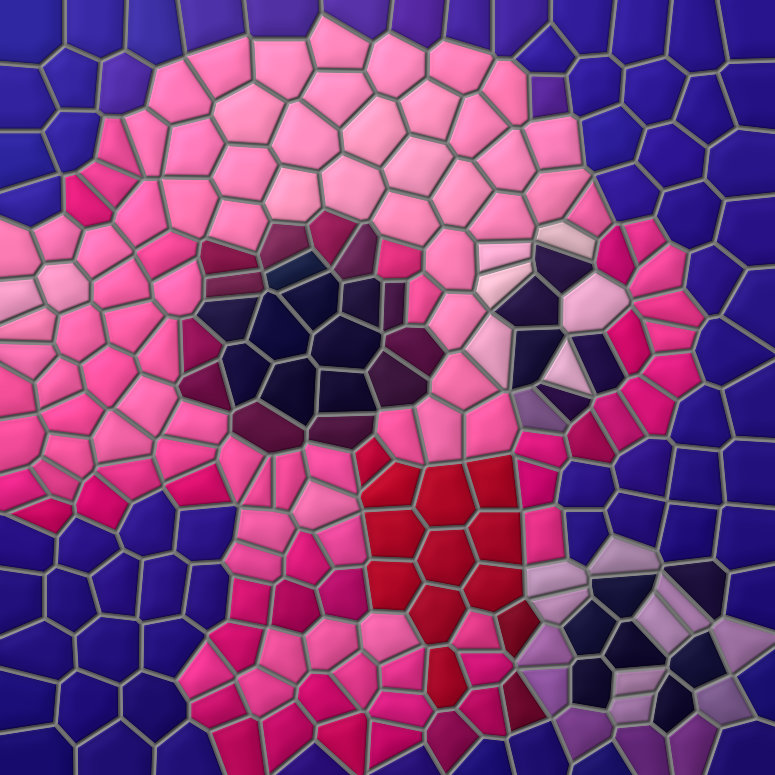
You can adjust the look with the following arguments. Sizes are relative to the typical region size, which is the square root of the number of pixels divided by the number of regions. So the look stays similar for any number of regions.
| Argument | Default | Description |
|---|---|---|
line_width |
0.11 |
Width of the boundary lines. 0 removes the lines. |
line_color |
(115, 115, 115) |
Color of the lines as (R, G, B). An int gives a gray level. |
height |
0.04 |
Height of the raised regions. 0 makes them flat. |
groove |
0.04 |
Depth of the grooves under the lines. |
gloss |
0.12 |
Strength of the specular highlights. |
For example, the following makes darker lines and flatter regions.
imgrit.voronoi_relief(my_image, 250, line_color=40, height=0.02)
The relief is computed as a height map. For each pixel, the library computes the exact distance to the boundary of its Voronoi region. The height rises from the boundary and becomes flat inside the region, and the lines sit in U-shaped grooves. The image is then shaded with diffuse and specular lighting based on the slope of the height map.
Performance
Rough execution times by image size. voronoi_mosaic fits k-means on a random subsample of pixels (200 pixels per region, at least 10,000 pixels), so the number of regions has little effect on the time up to a few hundred regions. For large images, most of the time is spent on pixel-wise processing, which grows with the number of pixels.
With scikit-learn (pip install "imgrit[sklearn]"):
| Image size | voronoi_mosaic20 regions (default) |
voronoi_mosaic250 regions |
voronoi_mosaic1000 regions |
warhol_effect5 colors (default) |
warhol_effect10 colors |
|---|---|---|---|---|---|
| 0.5 MP (800×600) | 0.6 s | 1.0 s | 8.7 s | 0.4 s | 0.5 s |
| 1.9 MP (1600×1200) | 2.5 s | 3.0 s | 10 s | 1.6 s | 2.1 s |
| 7.7 MP (3200×2400) | 9.7 s | 10 s | 18 s | 6.0 s | 7.4 s |
| 12.2 MP (4032×3024) | 16 s | 17 s | 25 s | 9.9 s | 12 s |
Without scikit-learn (SciPy's k-means is used):
| Image size | voronoi_mosaic20 regions (default) |
voronoi_mosaic250 regions |
voronoi_mosaic1000 regions |
warhol_effect5 colors (default) |
warhol_effect10 colors |
|---|---|---|---|---|---|
| 0.5 MP (800×600) | 0.6 s | 2.8 s | 147 s | 0.4 s | 0.5 s |
| 1.9 MP (1600×1200) | 2.5 s | 5.0 s | 149 s | 1.7 s | 2.0 s |
| 7.7 MP (3200×2400) | 10 s | 13 s | 163 s | 7.1 s | 8.3 s |
| 12.2 MP (4032×3024) | 16 s | 18 s | 163 s | 11 s | 13 s |
SciPy's k-means becomes very slow with many regions, so installing scikit-learn is recommended if you use more than a few hundred regions. Peak memory usage was about 4 GB for a 12 MP image.
voronoi_relief places the regions in the same way as voronoi_mosaic:
| Image size | 20 regions (default) with scikit-learn |
250 regions with scikit-learn |
1000 regions with scikit-learn |
20 regions (default) without scikit-learn |
250 regions without scikit-learn |
1000 regions without scikit-learn |
|---|---|---|---|---|---|---|
| 0.5 MP (800×600) | 0.5 s | 1.0 s | 8.6 s | 0.4 s | 2.8 s | 149 s |
| 1.9 MP (1600×1200) | 1.9 s | 2.5 s | 11 s | 1.8 s | 4.5 s | 152 s |
| 7.7 MP (3200×2400) | 7.4 s | 8.7 s | 16 s | 7.2 s | 10 s | 157 s |
| 12.2 MP (4032×3024) | 11 s | 13 s | 23 s | 13 s | 15 s | 160 s |
Peak memory usage was also about 4 GB for a 12 MP image.
Measurement environment: Mac mini (Apple M4, 10 cores, 24 GB memory), macOS 15.7, Python 3.14.7, NumPy 2.5.3, SciPy 1.18.1, Pillow 12.3.0, scikit-learn 1.9.1. voronoi_relief was measured later on the same machine with NumPy 2.5.4 and Pillow 13.0.0. Each value is a single run on images/original.jpg resized to the given size. Times vary with your machine and the input image, so please use them as a rough guide.
OpenSea
If you'd like to see more images, please visit Asakura Gallery Digital at OpenSea.
Citations
A novel method for Voronoi mosaic effect using k-means clustering
1 maintainer

Metadata
1 maintainer
Release files for imgrit 0.3.0
For a detailed explanation of source distributions (sdists) and built distributions (wheels), please see the package formats documentation.
Source distribution (sdist)
| File | Size | Uploaded | Provenance | Actions |
|---|---|---|---|---|
| imgrit-0.3.0.tar.gz | 341.5 kB | With provenance | Details for imgrit-0.3.0.tar.gz |
Built distribution (wheel)
| File | Interpreter | ABI | Platform | Actions Reset |
|---|---|---|---|---|
| imgrit-0.3.0-py3-none-any.whl | Python 3 | none | any | Details for imgrit-0.3.0-py3-none-any.whl |
Total release size: 354.3 kB
Release files / imgrit-0.3.0.tar.gz
| Download URL | imgrit-0.3.0.tar.gz |
|---|---|
| Size | 341.5 kB |
| Tags | Source |
|
SHA-256 checksum How to use checksums |
7f9a0508c1eab43e897e5fa4132e485645006731158c0185060b7f639e6139a2
|
|
BLAKE2b-256 checksum How to use checksums |
2d37befb653b077cb01799647e2f02df8a8ee487de3b849862393165583eed7d
|
| Upload date | |
|
Uploaded using Trusted Publishing? What is trusted publishing? |
Yes |
| Uploaded via |
twine/7.0.0 CPython/3.13.16
|
Provenance
Provenance describes where a file came from. On PyPI, provenance is shared via attestations, which provide a verifiable record of the build or publishing details. View details, limitations and caveats.


PyPI Publish Attestation
PyPI verified that this artifact, at this checksum, originated from the publisher listed below.
Signed by GitHub Actions, verified by PyPI on Oct 26, 2026.
Transparency logRelease files / imgrit-0.3.0-py3-none-any.whl
| Download URL | imgrit-0.3.0-py3-none-any.whl |
|---|---|
| Size | 12.8 kB |
| Tags | Python 3 |
|
SHA-256 checksum How to use checksums |
54f90b9d8e2714de04273576a525ae7386adb31dfb3d648205f840dc792e6abe
|
|
BLAKE2b-256 checksum How to use checksums |
2e57692d2d4ad2df02aa24d9e846791b6924383624320f47c8e92c436276be0c
|
| Upload date | |
|
Uploaded using Trusted Publishing? What is trusted publishing? |
Yes |
| Uploaded via |
twine/7.0.0 CPython/3.13.16
|
Provenance
Provenance describes where a file came from. On PyPI, provenance is shared via attestations, which provide a verifiable record of the build or publishing details. View details, limitations and caveats.
PyPI Publish Attestation
PyPI verified that this artifact, at this checksum, originated from the publisher listed below.
Signed by GitHub Actions, verified by PyPI on Oct 26, 2026.
Transparency logSecurity for imgrit 0.3.0
Provenance
Provenance describes where a file came from. On PyPI, provenance is shared via attestations, which provide a verifiable record of the build or publishing details. View details, limitations and caveats.
Full provenance
Both files in this release have been uploaded with provenance metadata.
Attestation for imgrit-0.3.0.tar.gz
PyPI Publish Attestation
PyPI verified that this artifact, at this checksum, originated from the publisher listed below.
Signed by GitHub Actions, verified by PyPI on Oct 26, 2026.
Transparency logA note on package security
PyPI is a repository for distributing packages, not a service for auditing them. While third-party security researchers and our staff do their best to detect and remove malicious packages, PyPI cannot guarantee the quality, security or suitability of any given package.
To learn more about protecting yourself from malicious actors, visit our package security documentation.














