
IMRO Neuropixels Generator
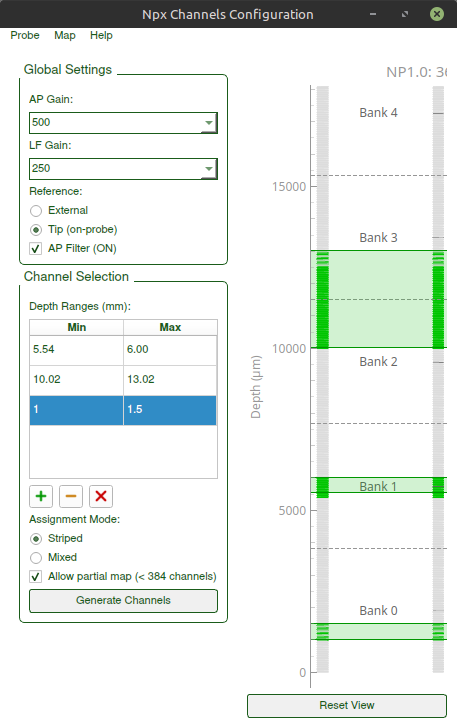
Neuropixels probe channel configuration tool. Create IMRO files for SpikeGLX/OpenEphys and export probe configurations for Kilosort.
Problem: The OpenEphys Neuropixels Plugin can load SpikeGLX IMRO files but provides no tool to create them.
Solution: IMRO Generator lets you configure which electrodes to record from based on depth coverage, then export as IMRO files or Kilosort probe dictionaries.
The GUI lets you:
- Choose one or more recording depth ranges (0–44.16 mm) — several disjoint windows at once ("virtual banks")
- Select assignment mode (Mixed or Striped) for uniform electrode distribution
- Optionally export a partial map (only in-range channels, < 384)
- Configure gains, filters, and reference type
- Save IMRO files for OpenEphys/SpikeGLX
- Save JSON file for kilosort
- Load and modify existing IMRO configurations
Installation
For an isolated environment, create a separate conda environment, any python>3.8 (for example, 3.11) and name it for example imro
$ conda -n imro python==3.11

$ conda activate imro
Installation using pip
$ pip install imro-neuropixels
Run the gui
$ imro-gui
Documentation
Quick Start Architecture Electrodes-channel assignment algorithm User Guide
Future directions
Adding more probes.
Currently works fine with a single Neropixels1.0-NHP probe. The definitions are not hard-coded, but rather are defined in settings files. Need to add more probes to the settings/probes and test with other probes.
MRI pictures overlay
Don't have this functionality at the moment, but might be useful in future
Example use
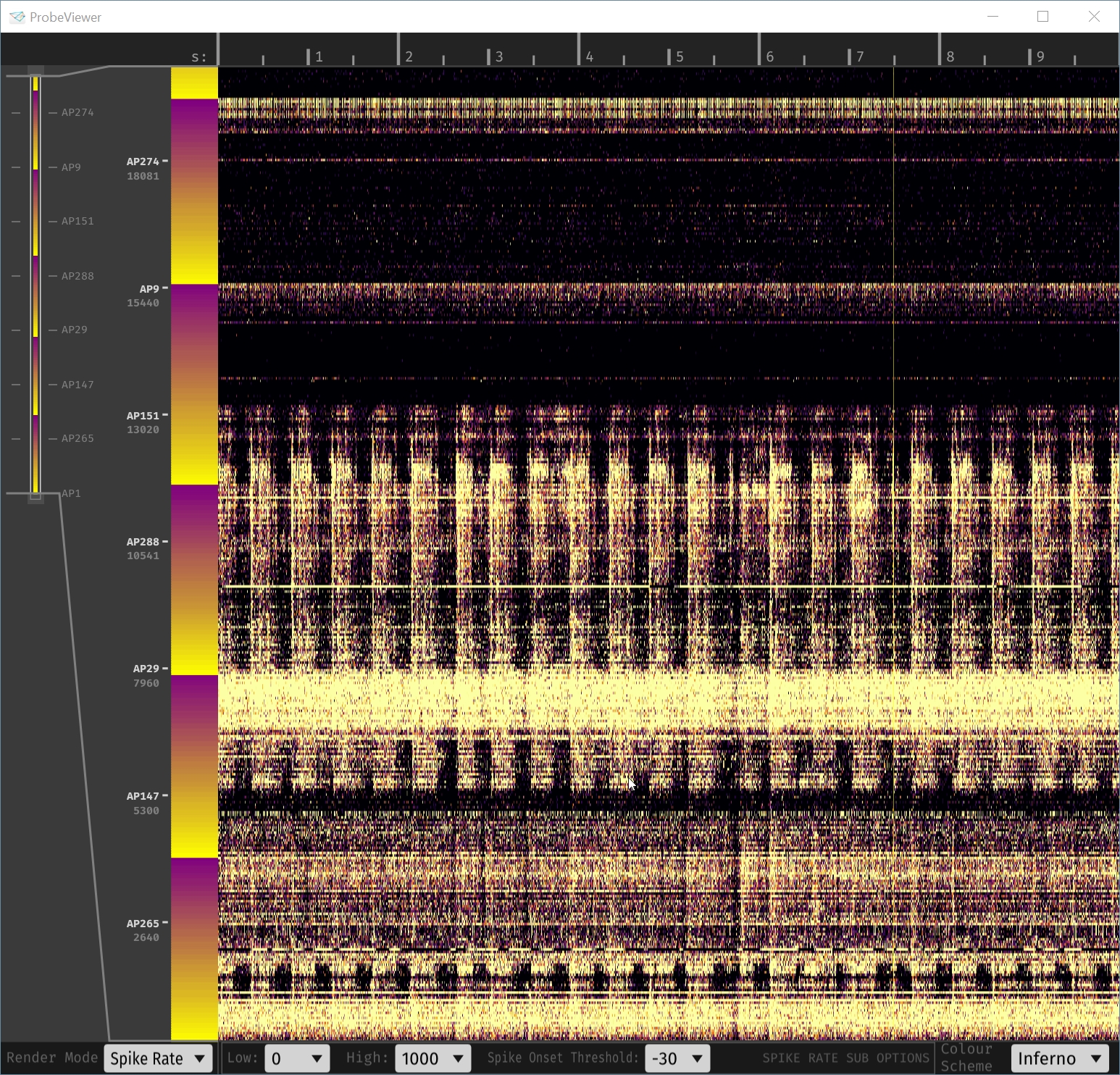
Mapping 2cm from the tip up
example file 20mm.imro in action, as seen in OpenEphys Probe Viewer, when flashes of light (2Hz) are shown to a fixating subject, while Neuropixels1.0-NHP is inserted in a visual area.
Picking an active region for recording
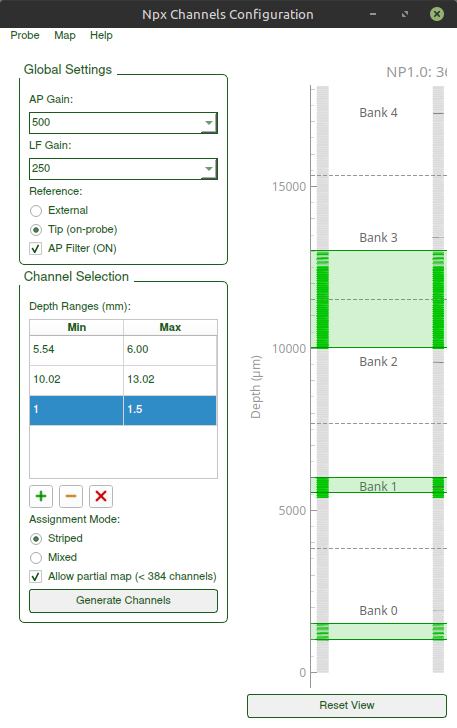
Set boundaries according to what you Map -> Save as IMRO Map -> Save kilosort probe
Helpful Resources
- OpenEphys Neuropixels Plugin — GUI for recording with Neuropixels probes, loads IMRO files
- SpikeGLX IMRO Format — Complete IMRO specification and format documentation
- Kilosort Probe Dictionary — Format for probe configurations in Kilosort4
- Neuropixels Probe 1.0 NHP — Official probe specifications
1 maintainer

Metadata
1 maintainer
Release files for imro-neuropixels 0.2.0
For a detailed explanation of source distributions (sdists) and built distributions (wheels), please see the package formats documentation.
Source distribution (sdist)
| File | Size | Uploaded | |
|---|---|---|---|
| imro_neuropixels-0.2.0.tar.gz | 65.1 kB | Details |
Built distribution (wheel)
| File | Interpreter | ABI | Platform | Reset |
|---|---|---|---|---|
| imro_neuropixels-0.2.0-py3-none-any.whl | Python 3 | none | any | Details |
Total release size: 125.8 kB
Release files / imro_neuropixels-0.2.0.tar.gz
| Download URL | imro_neuropixels-0.2.0.tar.gz |
|---|---|
| Size | 65.1 kB |
| Tags | Source |
|
SHA-256 checksum How to use checksums |
a9605dd5e6f3158cfaa3bcccbc63841594fb796f723b723744d7e092dc487d58
|
|
BLAKE2b-256 checksum How to use checksums |
69249cb785cc11cbbe4cafbef1c7e52c831cfdac72ffa79ced004bcc8b24bb64
|
| Upload date | |
|
Uploaded using Trusted Publishing? What is trusted publishing? |
No |
| Uploaded via |
twine/6.2.0 CPython/3.13.5
|
Release files / imro_neuropixels-0.2.0-py3-none-any.whl
| Download URL | imro_neuropixels-0.2.0-py3-none-any.whl |
|---|---|
| Size | 60.8 kB |
| Tags | Python 3 |
|
SHA-256 checksum How to use checksums |
6139f7201a1c9168bea16a83d9f87af5d45e48c4f1a4c0b0bb91dc21183f0ee9
|
|
BLAKE2b-256 checksum How to use checksums |
8011c989470bfc5cd50641b3e60e8fa0dbd0b780b0dc3696b391a85aea32b524
|
| Upload date | |
|
Uploaded using Trusted Publishing? What is trusted publishing? |
No |
| Uploaded via |
twine/6.2.0 CPython/3.13.5
|














