
indipydriver
Enable drivers to be written for instrument control using the INDI protocol.
INDI - Instrument Neutral Distributed Interface.
See https://en.wikipedia.org/wiki/Instrument_Neutral_Distributed_Interface
The protocol defines the format of the data sent, such as light, number, text, switch or BLOB (Binary Large Object) and the client can send commands to control the instrument. The client takes the display format of switches, numbers etc., from the protocol.
INDI is often used with astronomical instruments, but is a general purpose protocol which can be used for any instrument control.
Indipydriver provides classes of 'members', 'vectors' and 'devices', where members hold instrument values, such as switch and number values. Vectors group members together, with labels and group strings, which inform the client how to display the values. 'Devices' hold a number of vectors, so a single device can display several groups of controls.
The 'IPyDriver' class holds one or more devices, and provides methods you can use to send and receive data, which you would use to interface with your own code.
This is one of associated packages.
Indipydriver provides classes to work with your own code to control instruments and produce the INDI protocol.
Indipyserver provides an 'IPyServer' class to run drivers and serve the INDI protocol on a port.
Indipyweb is an INDI client and a web server, it connects to the serving INDI port and provides a web view of instruments.
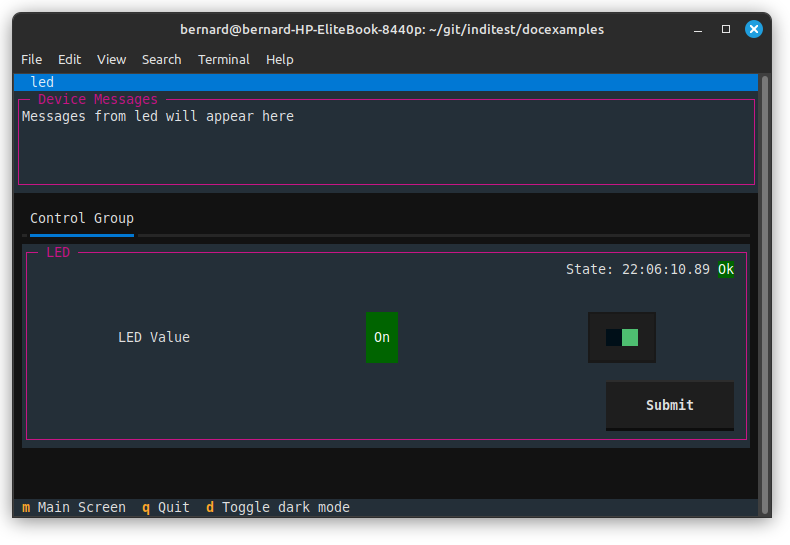
Indipyterm is a terminal client, which connects to the serving port and can be run to view the instrument controls.
Indipyterm can be remote, or could work on the same machine. As it is a terminal client, it could be run from an SSH connection, conveniently allowing headless operation.
These packages are available on Pypi, and should interwork with other services that follow the INDI specification.
The image below shows the indipyterm terminal connected to a server running an example driver (switching on or off an LED on a RaspberryyPi). The example is described at:
https://indipydriver.readthedocs.io/en/latest/usage/firstexample.html#firstexample
To write a driver, you would create a subclass of IPyDriver and override the following methods.
async def rxevent(self, event)
This is automatically called whenever data is received from the client to set an instrument parameter. The event object describes the received data, and you provide the code which then controls your instrument.
async def hardware(self)
This is called when the driver starts, and as default does nothing, typically it could be a contuously running coroutine which you can use to operate your instruments, and if required send updates to the client.
async def snoopevent(self, event)
This is only used if the device is monitoring (snooping) on other devices.
Having created a driver, you could await its asyncrun() method, which will then communicate by stdin and stdout.
import asyncio
import ... your own modules creating 'mydriver'

asyncio.run(mydriver.asyncrun())
If you made such a script executable, then this driver could be run with third party INDI servers, which expect a driver to be an executable program using stdin and stdout.
Alternatively you could serve your driver, or drivers, by importing IPyServer from indipyserver:
import asyncio
from indipyserver import IPyServer
import ... your own modules creating driver1, driver2 ...

server = IPyServer(driver1, driver2, host="localhost", port=7624, maxconnections=5)
asyncio.run(server.asyncrun())
A connected client can then control all the drivers. The above illustrates multiple drivers can be served.
Documentation at https://indipydriver.readthedocs.io
Installation from https://pypi.org/project/indipydriver
indipyserver available from https://pypi.org/project/indipyserver
indipyweb available from https://pypi.org/project/indipyweb
indipyterm available from https://pypi.org/project/indipyterm
1 maintainer

Metadata
1 maintainer
Release files for indipydriver 3.1.1
For a detailed explanation of source distributions (sdists) and built distributions (wheels), please see the package formats documentation.
Source distribution (sdist)
| File | Size | Uploaded | |
|---|---|---|---|
| indipydriver-3.1.1.tar.gz | 23.4 kB | Details |
Built distribution (wheel)
| File | Interpreter | ABI | Platform | Reset |
|---|---|---|---|---|
| indipydriver-3.1.1-py3-none-any.whl | Python 3 | none | any | Details |
Total release size: 48.0 kB
Release files / indipydriver-3.1.1.tar.gz
| Download URL | indipydriver-3.1.1.tar.gz |
|---|---|
| Size | 23.4 kB |
| Tags | Source |
|
SHA-256 checksum How to use checksums |
7cc42edbc6d1a354d95298860278b2d7ee32657dc22d2aa92978f171afb5a1c2
|
|
BLAKE2b-256 checksum How to use checksums |
9889d2262cf33fd5477d6ce7375429273082cef897659a9838416bd3c6063cbe
|
| Upload date | |
|
Uploaded using Trusted Publishing? What is trusted publishing? |
No |
| Uploaded via |
python-requests/2.34.2
|
Release files / indipydriver-3.1.1-py3-none-any.whl
| Download URL | indipydriver-3.1.1-py3-none-any.whl |
|---|---|
| Size | 24.6 kB |
| Tags | Python 3 |
|
SHA-256 checksum How to use checksums |
2ea55cd0c1108d655bb15b000de1cdbd51970ac3facaa185c756fed96f32f2a2
|
|
BLAKE2b-256 checksum How to use checksums |
71bc6c707cab167e93d1f044aab1572b0a68e4473afda7cde15652e95229cd43
|
| Upload date | |
|
Uploaded using Trusted Publishing? What is trusted publishing? |
No |
| Uploaded via |
python-requests/2.34.2
|














