
Run any Hugging Face GGUF model on your own GPU — chat/vision, text-to-speech (OuteTTS), and image generation (SDXL/Flux/Z-Image/Qwen-Image via stable-diffusion.cpp), all behind one OpenAI-compatible endpoint. Pulls official upstream binaries, no compiling. Type `inferhost` and you're done.
Verified details
These details have been verified by PyPIProject links
GitHub Statistics
Maintainers

Project description
🛰️ inferhost
Your own private, multi-modal AI server — one command, any GPU, no compiling.




Chat · Vision · Speech · Image generation — all behind one OpenAI-compatible endpoint.
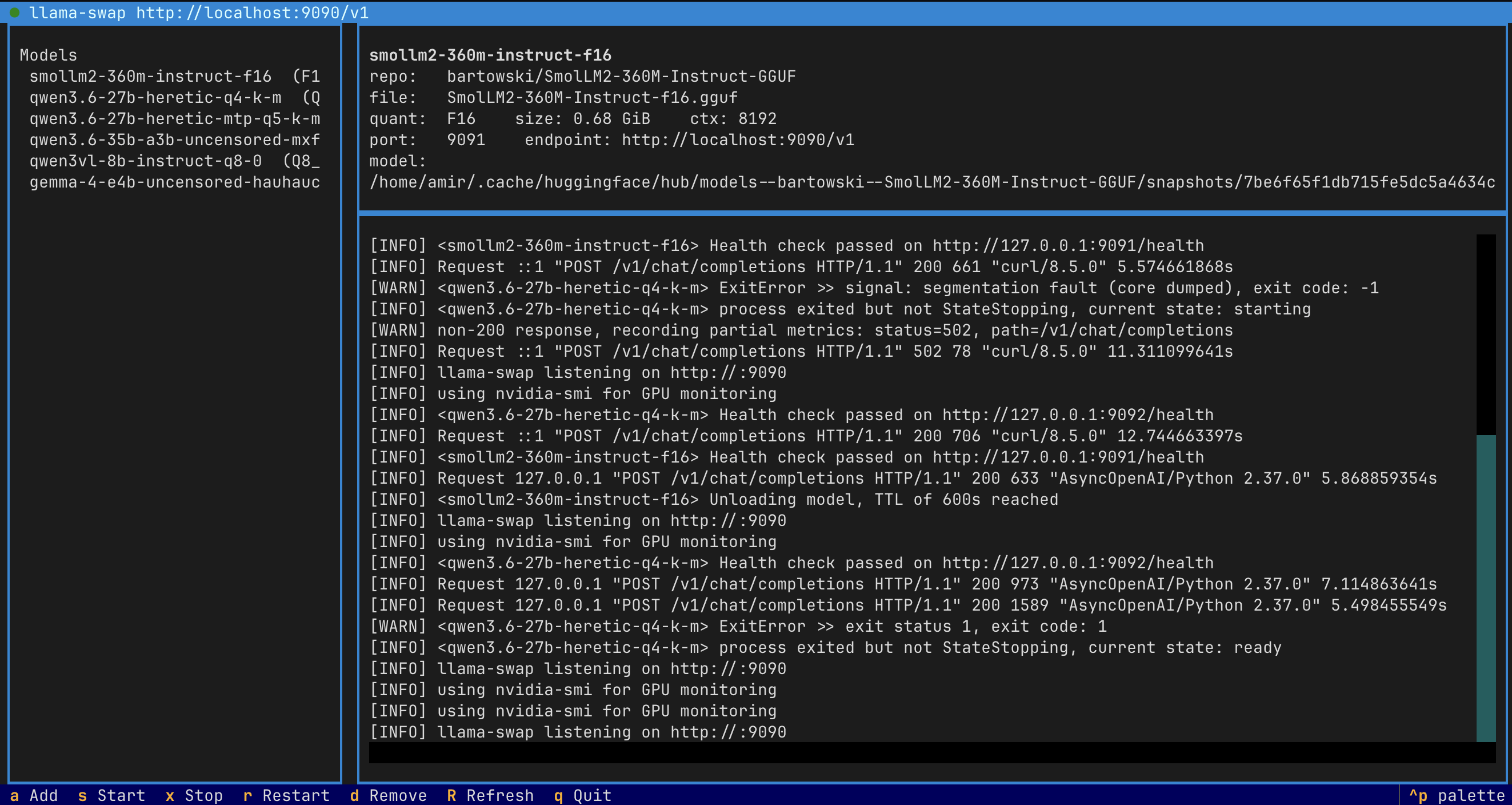
inferhost turns any GPU box into a private AI server. It wraps llama.cpp and stable-diffusion.cpp behind a single OpenAI-compatible endpoint — pulls the official upstream binaries for you (nothing to compile), auto-fetches the right model files when you paste a Hugging Face link, and hot-swaps models in and out of VRAM so one card can serve a big LLM and image generation. You only ever touch a keyboard-driven dashboard (and an optional .env).
⚡ Quick start
uv tool install inferhost      # or:  pipx install inferhost  /  pip install inferhost
inferhost                      # opens the dashboard — press 'a' to add a model
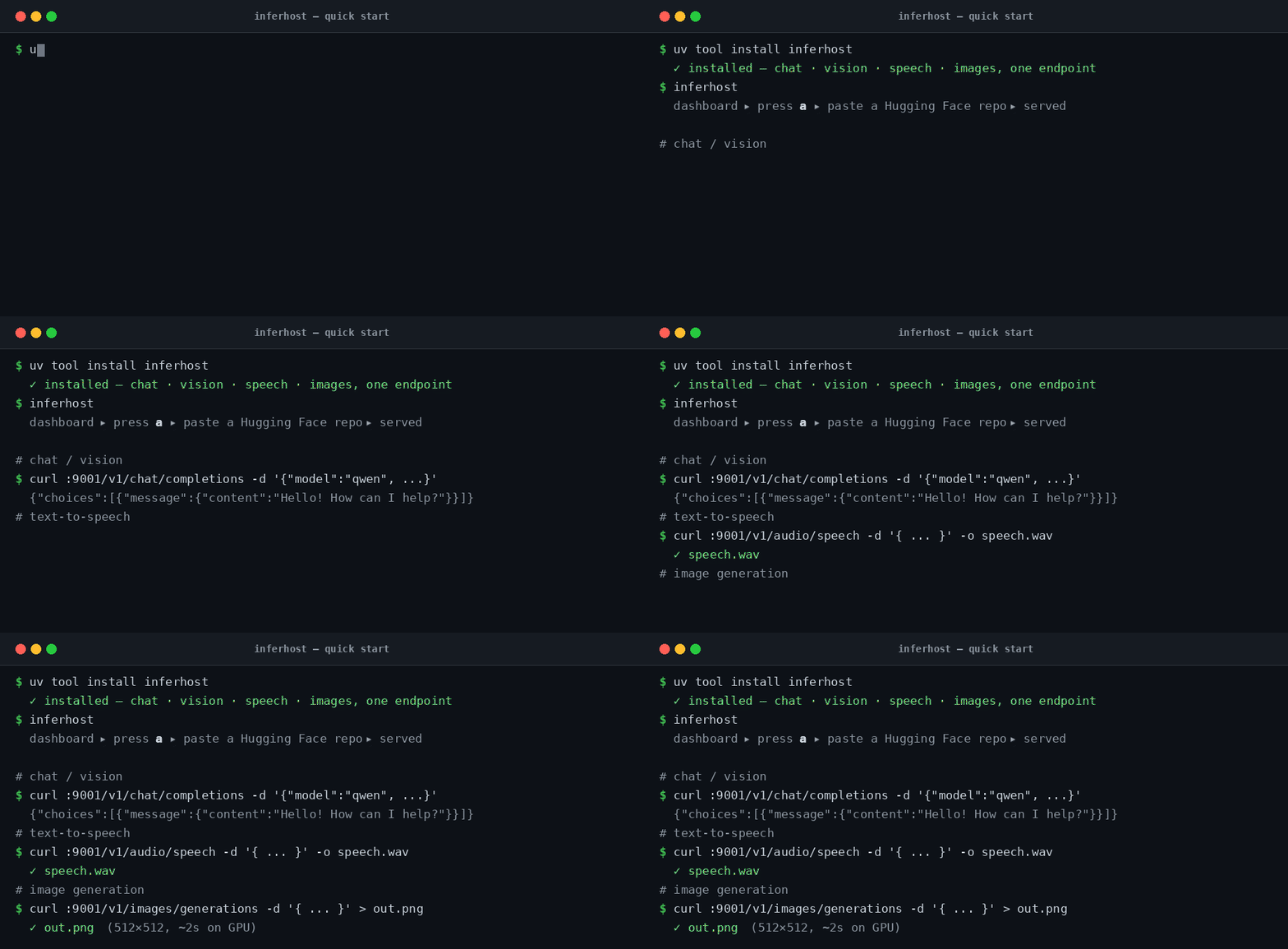
That's the whole setup. First launch fetches the runtime binaries automatically. To add a model, press a and paste a Hugging Face repo — inferhost lists the files, downloads what's needed, and serves it. Then call it like OpenAI:
| 🗣️ Chat / LLM | 🔊 Text-to-speech | 🎨 Image generation |
|---|---|---|
pasteQwen/Qwen2.5-7B-Instruct-GGUF |
pasteOuteAI/OuteTTS-0.2-500M-GGUF |
pasteOlegSkutte/sdxl-turbo-GGUF |
# 🗣️  Chat  →  /v1/chat/completions
curl http://localhost:9001/v1/chat/completions -H 'Content-Type: application/json' \
  -d '{"model":"<name-from-dashboard>","messages":[{"role":"user","content":"Hello!"}]}'

# 🔊  Speech  →  /v1/audio/speech   (returns WAV)
curl http://localhost:9001/v1/audio/speech -H 'Content-Type: application/json' \
  -d '{"model":"<name>","input":"Hello from inferhost.","voice":"default"}' --output speech.wav

# 🎨  Image  →  /v1/images/generations   (returns base64 PNG)
curl http://localhost:9001/v1/images/generations -H 'Content-Type: application/json' \
  -d '{"model":"<name>","prompt":"a red apple on a table","size":"512x512"}' \
  | jq -r '.data[0].b64_json' | base64 -d > out.png
Everything lives on http://localhost:9001/v1 — point any OpenAI client (Python SDK, Open WebUI, your app) at it. The model name is whatever shows in the dashboard.
✨ Why inferhost
- One endpoint, every modality — chat, vision, speech, and images on the same OpenAI-compatible
:9001. No per-model servers to wire up. - Nothing to compile — official
llama-server/sd-serverbinaries are pulled from upstream for your hardware (NVIDIA Vulkan, ROCm, SYCL, CPU, Apple Metal). - Paste a link, it figures out the rest — picks the best quant for your VRAM, and for multi-file models (Flux, Z-Image, Qwen-Image) auto-downloads the right VAE + text encoders from known-good repos.
- One GPU, many models — llama-swap lazy-loads and hot-swaps models in/out of VRAM on demand, so a 24 GB card serves a 27B LLM and Flux image generation.
- TUI or headless — drive everything from a keyboard dashboard, or run
inferhost start/stop/statuson a server with no terminal. - Tuned by default — q8_0 KV-cache compression, stacked MTP + ngram speculative decoding, and honest context windows, all overridable from a
.env.
🧩 Supported models
| Modality | Models | How |
|---|---|---|
| Chat / Vision | any GGUF LLM (Qwen, Llama, Gemma, DeepSeek…), vision via mmproj |
paste repo → pick quant |
| Speech (TTS) | OuteTTS | paste repo (vocoder auto-detected) |
| Image — single-file | SD 1.5, SDXL (incl. Turbo) | paste repo → pick file |
| Image — Flux.1 | schnell / dev | auto-fetches VAE + CLIP-L + T5XXL |
| Image — Flux.2 Klein | incl. Bonsai-Image (1-bit) | auto-fetches VAE + Qwen3-4B |
| Image — Z-Image | Z-Image-Turbo | auto-fetches VAE + Qwen3-4B |
| Image — Qwen-Image | Qwen-Image / Qwen-Image-Edit | auto-fetches VAE + Qwen2.5-VL + mmproj |
All image families above were verified end-to-end on a Vulkan GPU (SDXL-Turbo ~2 s, Flux-schnell ~4 s, Bonsai ~2 s, Z-Image-Turbo ~11 s, Qwen-Image-Edit via /v1/images/edits).
📚 Documentation
Full guides live in docs (and in the docs/ folder):
- Installation — install, upgrade, uninstall, requirements
- Usage — the dashboard, keyboard keys, and chat / TTS / image / Flux / Z-Image / Qwen-Image walkthroughs
- Configuration — every
.envvariable, KV-cache quant, custom binaries - Troubleshooting — ports, tmux mouse, common errors
🏗️ Architecture
Your app ──HTTP──▶  LiteLLM gateway        llama-swap (loopback)       llama-server  (chat/vision)
                    :9001 (public)   ──▶    127.0.0.1:9090      ──┬──▶  sd-server     (images)
                                                                  └──▶  inferhost-tts (speech)
- llama.cpp (
llama-server) runs chat/vision inference — official upstream binary, backend auto-detected. - llama-swap fronts the model backends and lazy-loads / hot-swaps them on demand (loopback only). Image models (
sd-server) ride here too, so they swap VRAM with LLMs. - inferhost-tts wraps llama.cpp's
llama-ttsbehind/v1/audio/speech(started only when a TTS model is registered). - LiteLLM is the single always-on public gateway on
:9001, routing each request to the right backend.
The extra engines (llama-tts, sd-server) are fetched automatically the first time you add a model that needs them.
🛠️ Development
The repo ships a run.sh wrapper for source-tree work (end users never need it — they only type inferhost):
git clone git@github.com:amirrouh/inferhost.git && cd inferhost
./run.sh install     # venv + editable install
./run.sh start       # launch the TUI (downloads binaries on first run)
./run.sh status      # headless status
./run.sh stop        # stop daemons
./run.sh test        # pytest
Run ./run.sh help for the full list.
License
Project details
Verified details
These details have been verified by PyPIProject links
GitHub Statistics
Maintainers
Release history Release notifications | RSS feed


Download files
Download the file for your platform. If you're not sure which to choose, learn more about installing packages.
Source Distribution
Built Distribution
Filter files by name, interpreter, ABI, and platform.
If you're not sure about the file name format, learn more about wheel file names.
Copy a direct link to the current filters
File details
Details for the file inferhost-0.7.10.tar.gz.
File metadata
- Download URL: inferhost-0.7.10.tar.gz
- Upload date:
- Size: 750.1 kB
- Tags: Source
- Uploaded using Trusted Publishing? Yes
- Uploaded via: twine/6.1.0 CPython/3.13.12
File hashes
| Algorithm | Hash digest | |
|---|---|---|
| SHA256 |
f55ce04c0b83276a2cd51795f9a36946a934225fefaefc95dac2c9e34d5c3f3d
|
|
| MD5 |
8c22a8f15b96ec218a9df93ba07e2bbe
|
|
| BLAKE2b-256 |
29cbc01cd3550bc23710826c73b9ddf4e51d243b08416593bd9dcf14edf54dd5
|
Provenance
The following attestation bundles were made for inferhost-0.7.10.tar.gz:
Publisher:
publish.yml on amirrouh/inferhost
-
Statement:
-
Statement type:
https://in-toto.io/Statement/v1 -
Predicate type:
https://docs.pypi.org/attestations/publish/v1 -
Subject name:
inferhost-0.7.10.tar.gz -
Subject digest:
f55ce04c0b83276a2cd51795f9a36946a934225fefaefc95dac2c9e34d5c3f3d - Sigstore transparency entry: 1689239548
- Sigstore integration time:
-
Permalink:
amirrouh/inferhost@c4c646622160200c7ef319229cf3e75986606c54 -
Branch / Tag:
refs/tags/v0.7.10 - Owner: https://github.com/amirrouh
-
Access:
public
-
Token Issuer:
https://token.actions.githubusercontent.com -
Runner Environment:
github-hosted -
Publication workflow:
publish.yml@c4c646622160200c7ef319229cf3e75986606c54 -
Trigger Event:
push
-
Statement type:
File details
Details for the file inferhost-0.7.10-py3-none-any.whl.
File metadata
- Download URL: inferhost-0.7.10-py3-none-any.whl
- Upload date:
- Size: 100.6 kB
- Tags: Python 3
- Uploaded using Trusted Publishing? Yes
- Uploaded via: twine/6.1.0 CPython/3.13.12
File hashes
| Algorithm | Hash digest | |
|---|---|---|
| SHA256 |
2357cf7ccf74365f1ccd0e6b175e26d7cf8aab6becbe9697b8596fd055c0d80c
|
|
| MD5 |
e6aaacec4773a7f77abaa5d09446411b
|
|
| BLAKE2b-256 |
51b340f578af1ceef388894717fc3412b476ef97f0ecb677ac55a5b7c334cc8c
|
Provenance
The following attestation bundles were made for inferhost-0.7.10-py3-none-any.whl:
Publisher:
publish.yml on amirrouh/inferhost
-
Statement:
-
Statement type:
https://in-toto.io/Statement/v1 -
Predicate type:
https://docs.pypi.org/attestations/publish/v1 -
Subject name:
inferhost-0.7.10-py3-none-any.whl -
Subject digest:
2357cf7ccf74365f1ccd0e6b175e26d7cf8aab6becbe9697b8596fd055c0d80c - Sigstore transparency entry: 1689239553
- Sigstore integration time:
-
Permalink:
amirrouh/inferhost@c4c646622160200c7ef319229cf3e75986606c54 -
Branch / Tag:
refs/tags/v0.7.10 - Owner: https://github.com/amirrouh
-
Access:
public
-
Token Issuer:
https://token.actions.githubusercontent.com -
Runner Environment:
github-hosted -
Publication workflow:
publish.yml@c4c646622160200c7ef319229cf3e75986606c54 -
Trigger Event:
push
-
Statement type:






