
Document parsing Python package supporting PDF and image parsing using Infinity-Parser2-Pro model.

Project description
Infinity-Parser2

🤗 Model | 📊 Dataset (coming soon...) | 📄 Paper (coming soon...) | 🚀 Demo (coming soon...)
Introduction
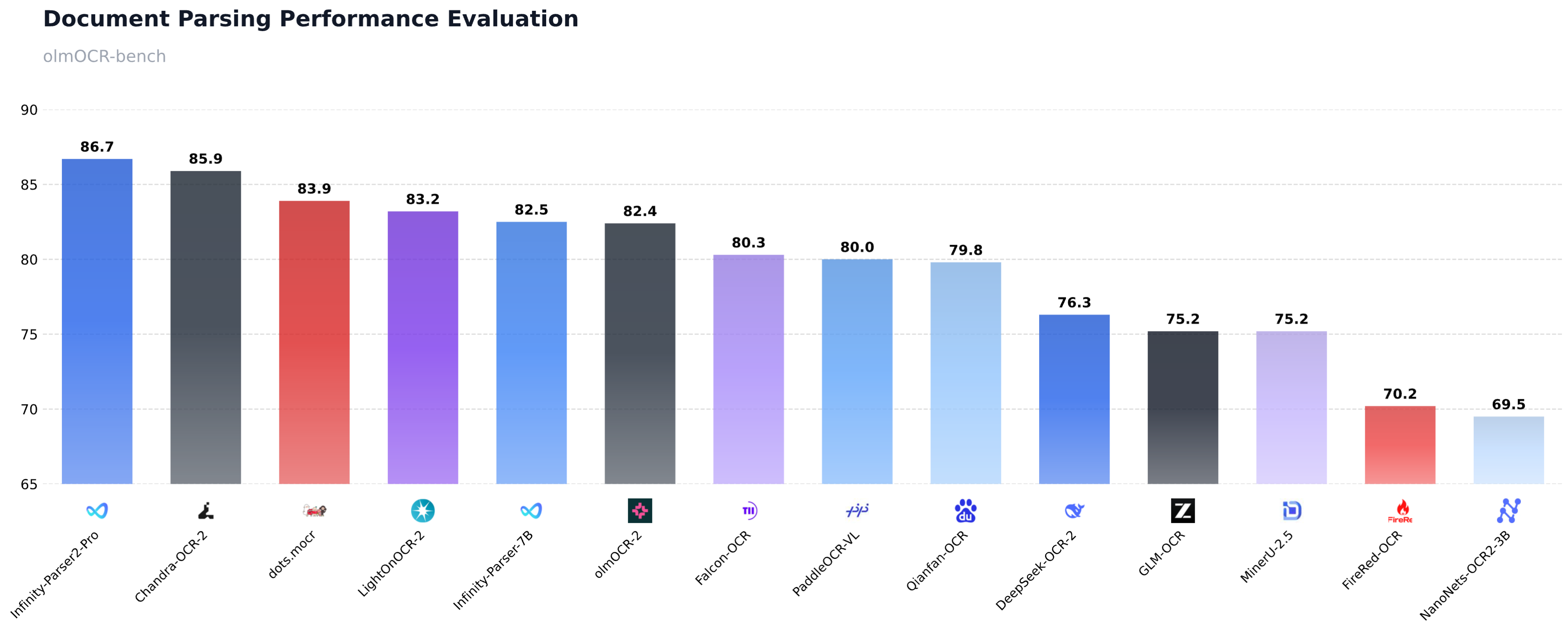
We are excited to release Infinity-Parser2-Pro, our latest flagship document understanding model that achieves a new state-of-the-art on olmOCR-Bench with a score of 86.7%, surpassing frontier models such as DeepSeek-OCR-2, PaddleOCR-VL, and dots.mocr. Building on our previous model Infinity-Parser-7B, we have significantly enhanced our data engine and multi-task reinforcement learning approach. This enables the model to consolidate robust multi-modal parsing capabilities into a unified architecture, delivering brand-new zero-shot capabilities for diverse real-world business scenarios.
Key Features
- Upgraded Data Engine: We have comprehensively enhanced our synthetic data engine to support both fixed-layout and flexible-layout document formats. By generating over 1 million diverse full-text samples covering a wide range of document layouts, combined with a dynamic adaptive sampling strategy, we ensure highly balanced and robust multi-task learning across various document types.
- Multi-Task Reinforcement Learning: We designed a novel verifiable reward system to support Joint Reinforcement Learning (RL), enabling seamless and simultaneous co-optimization of multiple complex tasks, including doc2json and doc2markdown.
- Breakthrough Parsing Performance: It substantially outperforms our previous 7B model, achieving 86.7% on olmOCR-Bench, surpassing frontier models such as DeepSeek-OCR-2, PaddleOCR-VL, and dots.mocr.
- Inference Acceleration: By adopting the highly efficient MoE architecture, our inference throughput has increased by 21% (from 441 to 534 tokens/sec), reducing deployment latency and costs.
Performance
Quick Start
Installation
Pre-requisites
# Create a Conda environment (Optional)
conda create -n infinity_parser2 python=3.12
conda activate infinity_parser2

# Install PyTorch (CUDA). Find the proper version at https://pytorch.org/get-started/previous-versions based on your CUDA version.
pip install torch==2.10.0 torchvision==0.25.0 torchaudio==2.10.0 --index-url https://download.pytorch.org/whl/cu128

# Install FlashAttention (required for NVIDIA GPUs).
# This command builds flash-attn from source, which can take 10 to 30 minutes.
pip install flash-attn==2.8.3 --no-build-isolation
# For Hopper GPUs (e.g. H100, H800), we recommend FlashAttention-3 instead. See the official guide at https://github.com/Dao-AILab/flash-attention.

# Install vLLM
# NOTE: you may need to run the command below to resolve triton and numpy conflicts before installing vllm.
# pip uninstall -y pytorch-triton opencv-python opencv-python-headless numpy && rm -rf "$(python -c 'import site; print(site.getsitepackages()[0])')/cv2"
pip install vllm==0.17.1
Install infinity_parser2
# From PyPI
pip install infinity_parser2

# From source
git clone https://github.com/infly-ai/INF-MLLM.git
cd INF-MLLM/Infinity-Parser2
pip install -e .
Usage
Command Line
The parser command is the fastest way to get started.
# NOTE: The Infinity-Parser2 model will be automatically downloaded on the first run.

# Parse a PDF (outputs Markdown by default)
parser demo_data/demo.pdf

# Parse an image
parser demo_data/demo.png

# Batch parse multiple files
parser demo_data/demo.pdf demo_data/demo.png -o ./output

# Parse an entire directory
parser demo_data -o ./output

# Output raw JSON with layout bboxes
parser demo_data/demo.pdf --output-format json

# Convert to Markdown directly
parser demo_data/demo.png --task doc2md
# View all options
parser --help
Python API
# NOTE: The Infinity-Parser2 model will be automatically downloaded on the first run.

from infinity_parser2 import InfinityParser2

parser = InfinityParser2()

# Parse a single file (returns Markdown)
result = parser.parse("demo_data/demo.pdf")
print(result)

# Parse multiple files (returns list)
results = parser.parse(["demo_data/demo.pdf", "demo_data/demo.png"])

# Parse a directory (returns dict)
results = parser.parse("demo_data")
Output formats:
| task_type | Description | Default Output |
|---|---|---|
doc2json |
Extract layout elements with bboxes (default) | Markdown |
doc2md |
Directly convert to Markdown | Markdown |
custom |
Use your own prompt | Raw model output |
# doc2json: get raw JSON with bbox coordinates
result = parser.parse("demo_data/demo.pdf", output_format="json")

# doc2md: direct Markdown conversion
result = parser.parse("demo_data/demo.pdf", task_type="doc2md")

# Custom prompt
result = parser.parse("demo_data/demo.pdf", task_type="custom",
                      custom_prompt="Please transform the document's contents into Markdown format.")

# Batch processing with custom batch size
result = parser.parse("demo_data", batch_size=8)

# Save results to directory
parser.parse("demo_data/demo.pdf", output_dir="./output")
Backends:
Infinity-Parser2 supports three inference backends. By default it uses the vLLM Engine (offline batch inference).
# vLLM Engine (default) — offline batch inference
parser = InfinityParser2(
    model_name="infly/Infinity-Parser2-Pro",
    backend="vllm-engine",        # default
    tensor_parallel_size=2,
)

# Transformers — local single-GPU inference
parser = InfinityParser2(
    model_name="infly/Infinity-Parser2-Pro",
    backend="transformers",
    device="cuda",
    torch_dtype="bfloat16",       # "float16" or "bfloat16"
)

# vLLM Server — online HTTP API (start server first)
parser = InfinityParser2(
    model_name="infly/Infinity-Parser2-Pro",
    backend="vllm-server",
    api_url="http://localhost:8000/v1/chat/completions",
    api_key="EMPTY",
)
To start a vLLM server:
vllm serve infly/Infinity-Parser2-Pro \
    --trust-remote-code \
    --reasoning-parser qwen3 \
    --host 0.0.0.0 \
    --port 8000 \
    --tensor-parallel-size 2 \
    --gpu-memory-utilization 0.85 \
    --max-model-len 65536 \
    --mm-encoder-tp-mode data \
    --mm-processor-cache-type shm \
    --enable-prefix-caching
API Reference
InfinityParser2
parser = InfinityParser2(model_name="infly/Infinity-Parser2-Pro")
| Parameter | Type | Default | Description |
|---|---|---|---|
model_name |
str |
"infly/Infinity-Parser2-Pro" |
HuggingFace model name or local path |
backend |
str |
"vllm-engine" |
Inference backend: "transformers", "vllm-engine", or "vllm-server" |
tensor_parallel_size |
int |
None |
GPU count by default. Tensor parallel size for vLLM Engine |
device |
str |
"cuda" |
Only "cuda" is supported |
api_url |
str |
"http://localhost:8000/v1/chat/completions" |
API URL for vLLM Server backend |
api_key |
str |
"EMPTY" |
API key for vLLM Server backend |
min_pixels |
int |
2048 |
Minimum pixel count for image input (transformers backend only) |
max_pixels |
int |
16777216 |
Maximum pixel count (~4096x4096), transformers backend only |
model_cache_dir |
str |
None |
Model cache directory (defaults to ~/.cache/infinity_parser2/) |
parse()
result = parser.parse("demo_data/demo.pdf")
| Parameter | Type | Default | Description |
|---|---|---|---|
input_data |
str | List[str] | PIL.Image |
Required | File path(s), directory path, or PIL Image object |
task_type |
str |
"doc2json" |
"doc2json" (layout to JSON) | "doc2md" (direct Markdown) | "custom" |
custom_prompt |
str |
None |
Custom prompt; required when task_type="custom" |
batch_size |
int |
4 |
Number of images to process per batch |
output_dir |
str |
None |
If set, saves results to this directory instead of returning them |
output_format |
str |
"md" |
"md" | "json". Only "md" is supported for doc2md / custom tasks |
**kwargs |
— | — | Additional args passed to the model (e.g., max_new_tokens, temperature) |
Return Values
| Input | output_dir=None | output_dir set |
|---|---|---|
| Single file | str |
None |
| List of files | List[str] |
None |
| Directory | Dict[str, str] (path→content) |
None |
When output_dir is set, results are saved to output_dir/{filename}/result.md (or result.json).
Advanced Usage
Model Caching
Models are downloaded automatically on first use and cached at ~/.cache/infinity_parser2/. You can customize the cache location:
parser = InfinityParser2(
    model_name="infly/Infinity-Parser2-Pro",
    model_cache_dir="/path/to/cache"
)
Generation Parameters
result = parser.parse(
    "demo_data/demo.pdf",
    max_new_tokens=16384,
    temperature=0.01,
    top_p=0.95,
)
Utility Functions
from infinity_parser2 import (
    convert_pdf_to_images,
    convert_json_to_markdown,
    extract_json_content,
    get_files_from_directory,
    is_supported_file,
    SUPPORTED_TASK_TYPES,
    ModelCache,
    get_model_cache,
)

# Convert PDF pages to PIL Images
images = convert_pdf_to_images("demo_data/demo.pdf", dpi=300)

# Convert layout JSON to Markdown
markdown = convert_json_to_markdown(json_string)

# Check model cache
cache = get_model_cache()
print(cache.resolve_model_path("infly/Infinity-Parser2-Pro"))
Requirements
- Python 3.12+
- CUDA-compatible GPU
- See
setup.pyfor full dependency list.
Acknowledgments
We would like to thank Qwen3.5, ms-swift, VeRL, lmms-eval, olmocr, PaddleOCR-VL, MinerU, dots.ocr, Chandra-OCR-2 for providing dataset, code and models.
Release history Release notifications | RSS feed


Download files
Download the file for your platform. If you're not sure which to choose, learn more about installing packages.
Source Distribution
Built Distribution
Filter files by name, interpreter, ABI, and platform.
If you're not sure about the file name format, learn more about wheel file names.
Copy a direct link to the current filters
File details
Details for the file infinity_parser2-0.2.0.tar.gz.
File metadata
- Download URL: infinity_parser2-0.2.0.tar.gz
- Upload date:
- Size: 37.3 kB
- Tags: Source
- Uploaded using Trusted Publishing? No
- Uploaded via: twine/6.2.0 CPython/3.12.12
File hashes
| Algorithm | Hash digest | |
|---|---|---|
| SHA256 |
0359afb6e7dc0db6010b7c2ab908ed6642cadfc82b63b5aeed914ce089468034
|
|
| MD5 |
2c7c5f7e8504ab0eb65038a3e0e4e512
|
|
| BLAKE2b-256 |
320f6db033fb6ed5dde0bb6cfda3245fedc18149a3d44d22a645095ef0c93c94
|
File details
Details for the file infinity_parser2-0.2.0-py3-none-any.whl.
File metadata
- Download URL: infinity_parser2-0.2.0-py3-none-any.whl
- Upload date:
- Size: 42.0 kB
- Tags: Python 3
- Uploaded using Trusted Publishing? No
- Uploaded via: twine/6.2.0 CPython/3.12.12
File hashes
| Algorithm | Hash digest | |
|---|---|---|
| SHA256 |
00369f93cfb2d23069b494cd75249a908de6f117123414561ba6aa2c348278e8
|
|
| MD5 |
66d1835cef5ded25bd13478d856d2d1e
|
|
| BLAKE2b-256 |
b7663c699802de52c68ad843cf8c0b334b5ffe7016550cf4cb6ed52ea7739764
|






