






Version: 3.2.0
Engineer: Ashmeet Singh
AI-native scaffolding framework
ai-init is a separate, provider-neutral framework for structured FastAPI
scaffolding. An LLM (or a person) supplies a JSON project/change plan; the
framework validates the plan, previews it, applies deterministic operations,
syntax-validates Python, and restores the project automatically if application
or validation fails. The model never receives unrestricted filesystem or shell
access.
ai-init create invoice-api "FastAPI SaaS with PostgreSQL, Google authentication, Redis, Celery and Docker"
cd invoice-api
ai-init add "email authentication"
ai-init status
Use --plan to preview without writing, --yes for non-interactive execution,
ai-init components to see the MVP registry, and ai-init doctor to validate
and emit a compact AST-based project index.
JSON plans and safe code injection
The framework accepts project specifications through create --spec and code
change plans through plan / apply. Print the current JSON contract with:
ai-init schema
Example greeting-plan.json:
{
  "operation": "inject_code",
  "component": "greeting-route",
  "changes": [
    {
      "type": "insert_after",
      "path": "app/main.py",
      "anchor": "    return {'status': 'ok'}\n",
      "content": "\n\n@app.get('/greeting')\ndef greeting():\n    return {'message': 'hello'}\n"
    }
  ],
  "dependencies": [],
  "environment": []
}
# Validate and show an exact preview. No files are changed.
ai-init plan --project-dir invoice-api --input greeting-plan.json

# Require interactive confirmation, or use --yes in automation.
ai-init apply --project-dir invoice-api --input greeting-plan.json
Supported change types are add_file, append, replace, insert_after, and
insert_before. replace and insert operations require an exact anchor; this
prevents a model from replacing a whole file by accident. All paths are required
to be project-relative, traversal paths are rejected, and existing files cannot
be overwritten by add_file.
Applications can use the same safeguards directly as a Python library:
from ai_scaffold import apply_plan, preview_plan

preview = preview_plan("invoice-api", llm_json_plan)
result = apply_plan("invoice-api", llm_json_plan, approved=True)
MCP integrations
Inspect an MCP server locally
Use the official MCP Inspector to inspect and exercise an MCP endpoint from your local machine:
npx @modelcontextprotocol/inspector https://initapp.fastmcp.app/mcp
This opens the Inspector directly against the hosted Streamable HTTP endpoint.
init-app-mcp: guide an LLM to the right init-app command
init-app-mcp is a separate,
standalone FastMCP server for the init-app CLI. It gives MCP-capable clients
machine-readable command metadata, supported project blueprints, recommended
flags from a natural-language request, and a validated final command. It does
not import or execute this package, write files, or run a shell command.
Install the server separately:
git clone https://github.com/ashmeet07/init-app-mcp.git
cd init-app-mcp
python -m pip install .
Configure an MCP client to start it over stdio:
{
  "mcpServers": {
    "init-app": {
      "command": "init-app-mcp"
    }
  }
}
The expected client flow is:
- Call
get_init_app_command_metadatafor the supportedinit-appflags. - Call
recommend_init_app_flagswith the user's project requirement. - Confirm the project name and choices with the user.
- Call
build_init_app_command, then let the user run the returned command.
For example, a request for a production FastAPI service with PostgreSQL can produce a command like:
init-app billing-api --framework fastapi --type production --db postgresql --venv y --server gunicorn
This server requires Python 3.10+ and FastMCP v2 (fastmcp>=2,<3). Keep the
init-app-mcp catalog aligned whenever this CLI adds or changes flags.
ai-scaffold-mcp: plan and apply bounded code changes
Install the optional MCP adapter:
python -m pip install -e '.[mcp]'
The MCP SDK currently requires Python 3.10 or later. The core ai-init CLI
continues to support Python 3.9+.
Then configure an MCP-capable client to start this command over stdio:
ai-scaffold-mcp
The server exposes only bounded tools: components_list, project_inspect,
plan_from_request, plan_preview, plan_apply, and project_doctor.
plan_apply requires approved: true. This lets any compatible model provide
dynamic intent and code-plan JSON, while ai_scaffold remains responsible for
validation, injection, and rollback.
Cross-Platform Setup
MCP project hub
Select mcp in the interactive Others project list, or run:
init-app my-mcp-hub -f mcp -t standard --venv n
Choose uv for environment creation and dependency installation, or keep the
standard-library venv flow:
init-app my-api -f fastapi --env-manager uv
init-app my-api -f fastapi --env-manager venv
The generated project includes registry.json, config/mcp.config.json,
mcp-tools/_template/, examples, tests, and a registry generator. Copy the
template to start a tool, then run python scripts/generate_registry.py.
dbt analytics projects
Use the dedicated dbt blueprint instead of assembling a dbt directory by hand. It invokes native dbt init with profile setup skipped, resolves the selected adapter, and creates or preserves ~/.dbt/profiles.yml using environment-variable placeholders only. No credential is written into the project or logs.
init-app finance_transform -f dbt_analytics --dbt-adapter snowflake --dbt-profile finance
init-app lakehouse_transform -f dbt_analytics --dbt-adapter databricks --env-manager uv
Snowflake, Databricks, BigQuery, Redshift, Postgres, DuckDB, Spark, Athena, Trino, ClickHouse, and major community adapters are catalogued. For any other dbt-compatible provider, use --dbt-adapter custom --dbt-adapter-package PACKAGE --dbt-adapter-type TYPE.
Use a virtual environment so editable installs work the same way on macOS, Linux, and Windows.
Do not run pip3 install -e . directly against Apple system Python; older pip versions can fall back to setup.py develop and try to write into protected system site-packages.
One-command dev install
python3 scripts/install_dev.py
This creates .venv and installs both runtime and development dependencies, including pytest.
macOS / Linux
python3 -m venv .venv
source .venv/bin/activate
python -m pip install -e .

### Troubleshooting: missing `.venv` or activation errors

If you see errors like `source: no such file or directory: .venv` or activation fails, the project virtual environment hasn't been created yet. Create and activate it with:

```bash
python3 -m venv .venv
source .venv/bin/activate
python -m pip install -e .
If you prefer using the packaged CLI directly (without activating the venv), run the bundled script under the virtualenv python after creating it:
.venv/bin/init-app --help
If a dependency like jinja2 or django is reported missing when importing modules, activate the virtualenv and install dev requirements:
source .venv/bin/activate
python -m pip install -r requirements-dev.txt
### Windows PowerShell

```powershell
py -m venv .venv
.\.venv\Scripts\Activate.ps1
python -m pip install -e .
Offline or DNS-restricted environment:
python -m pip install -e .
If runtime dependencies are already installed or supplied by your own wheelhouse, install only the source package without network access:
python scripts/install_dev.py --offline-source
The dev installer also builds the native compiler. Use --skip-compiler only when a C compiler is not available on that machine.
Build the optional native C engine with:
python scripts/build_compiler.py
The compiler output is written to bin/init-app-compiler on macOS/Linux and bin/init-app-compiler.exe on Windows.
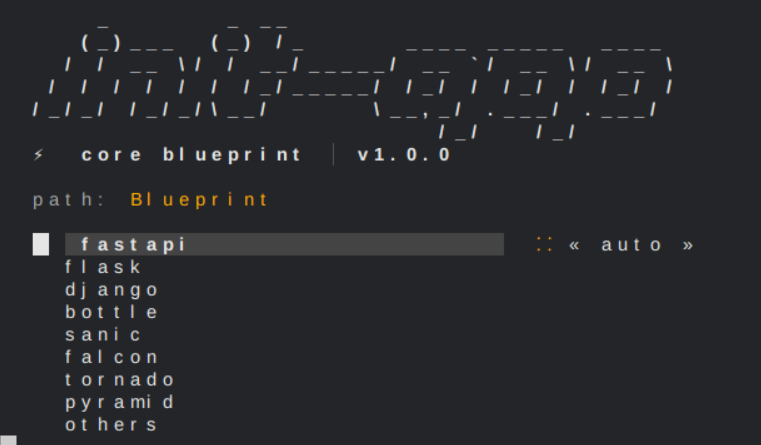
This document outlines the full capabilities of the Project Engine. The engine supports two primary flows: Interactive UI (Menu-driven) and Headless CLI (Flag-driven).
Repeatable dynamic input
For scripts, CI, or a user-provided project definition, pass a JSON specification.
Every command-line flag takes precedence over the corresponding value in the file;
use --dry-run to inspect the final resolved configuration before files are written.
{
  "name": "billing-api",
  "framework": "fastapi",
  "strategy": "custom",
  "app_name": "billing",
  "folders": ["src/api", "src/services", "tests"],
  "packages": ["src/api", "src/services"],
  "db": "postgresql",
  "venv": "n",
  "docker": ["Dockerfile"],
  "github": ["ci.yml"]
}
init-app --spec billing.json --dry-run
init-app --spec billing.json --output-dir ./generated
init-app --spec billing.json --framework flask  # flag overrides JSON
Project names and custom paths are validated before generation. Existing non-empty
project directories are protected; pass --force only when updating one is intended.
Native file materializer
bin/init-app-compiler is a small optional C component for simple, fast local
file materialization. Its input deliberately accepts only DIR=relative/path and
FILE=relative/path|content records. It does not execute shell commands and
rejects absolute or traversal paths. Build it with python scripts/build_compiler.py.
🕹️ 1. Build Strategies
The engine behaves differently based on the -t (type) flag:
| Strategy | Behavior |
|---|---|
auto_config |
Zero-Config. Uses smart defaults for the chosen framework. Best for rapid prototyping. |
standard |
The Balanced Build. Generates common folder structures (routes, models, schemas). |
production |
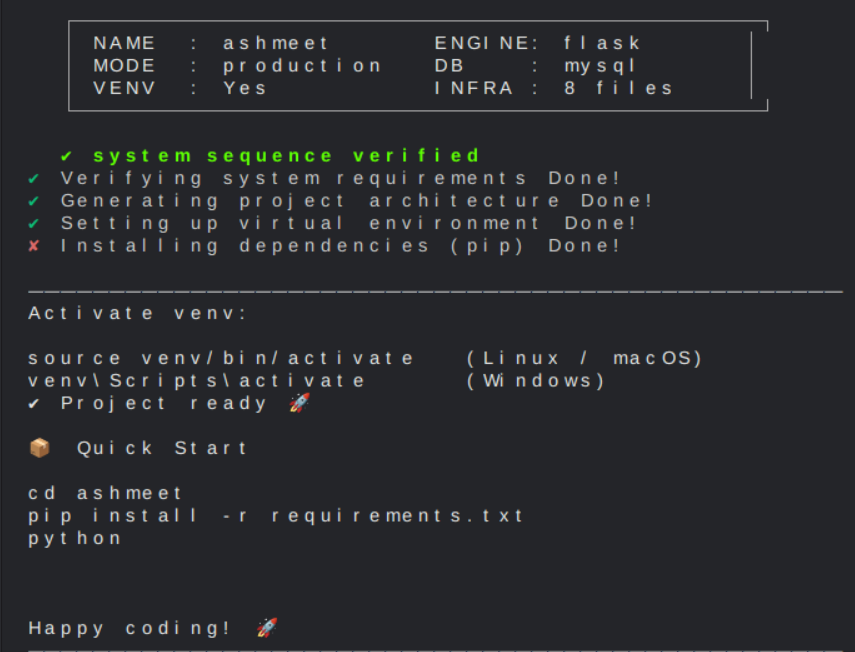
Enterprise Ready. Includes full infrastructure suites (Docker, K8s) and strict folder separation. |
custom |
Total Control. Enables manual folder selection and individual __init__.py configuration. |
🛠️ 2. CLI Flag Reference
Use these flags to bypass menus and automate your workflow.
Core Identity
name: The name of your project folder.-f, --framework:fastapi,flask,django,others.-s, --server: Specify the runner (e.g.,uvicorn,gunicorn,hypercorn).-t, --type: The build strategy (auto_config,standard,production,custom).--output-dir: Explicit parent directory where the project folder is created. Defaults to the current directory.--here: Create the project in the current working directory.--path-behavior: One-off path behavior for this project:documents,current, orcustom.--set-default-path-behavior: Save the default path behavior for future runs.--set-default-output-dir: Save a custom default output directory for future runs.--show-path-config: Show saved path behavior.--reset-path-config: Reset saved path behavior.
Architecture & Packages (Custom Mode)
--folders: Manually define every directory to be created.--packages: Define which of those folders should be Python packages (adds__init__.py).
Data & Environment
--db: Set the database engine (sqlite,postgres,mysql,mongodb).--venv: Enable virtual environment creation (yorn).--apps: Django app package names; repeat values to create multiple apps.
Init App does not select a package manager. Choose --venv y when you want an isolated environment, then use your preferred package workflow. For Django, --apps catalog billing users creates and registers all three apps; the first app is used for the primary generated routes.
Database adapters are chosen to work cleanly in local, CI, and container environments. MySQL projects use PyMySQL by default, so generated installs do not require native mysqlclient, pkg-config, or system MySQL headers.
Infrastructure Forge
--docker:dockerfile,docker-compose,.dockerignore.--gitignore-preset: Framework-aware.gitignorepreset (frameworkis the default).--gitignore/--ignore: Extra file/folder patterns, for example--gitignore "[uploads/, *.local]".
In interactive mode, init-app shows a framework preset first, then separate Files to ignore and Folders to ignore checklists. You can also type additional rules in [file, folder/] form.
In a Custom build, the folder screen also includes Add custom folders. Enter src/api, tests/unit or [src/api, tests/unit]; unsafe absolute paths and .. traversal paths are rejected.
- Local RAG readiness is enabled by default: generated projects include
.init-app/rag-context.jsonanddocs/LOCAL_RAG.md, a provider-neutral and secret-safe indexing contract. Use--no-rag-contextto skip it.
Refresh its inventory after manual changes:
init-app --refresh-rag-context ./my-project
--github:main.yml,ci.yml,cd.yml.--k8s:deployment.yml,service.yml,ingress.yml.--jenkins:Jenkinsfile.--community:CONTRIBUTING.md,SECURITY.md,CHANGELOG.md.--package-files:setup.cfg,setup.py,MANIFEST.in.
🚀 3. Usage Examples
A. The "Speed Demon" (Auto-Config)
Builds a FastAPI project with SQLite and a VENV instantly.
init-app quick_api -f fastapi -t auto_config --venv y
By default, this creates quick_api in the directory where the command runs. Use --here to make that intent explicit, or --output-dir /path/to/apps when the project belongs somewhere else.
Persist your preferred default:
init-app --set-default-path-behavior current
init-app --set-default-output-dir ~/Documents/backend-apps
init-app --show-path-config
After saving a default, normal commands use it automatically:
init-app quick_api -f fastapi
B. The "Full Stack Pro" (Production)
Builds a Django + Postgres app with Docker and GitHub Actions.
init-app pro_backend -f django -t production --db postgres --docker dockerfile docker-compose --github main.yml
C. The "Architect" (Deep Customization)
The most powerful command. Manually define folders and only make src and app Python packages.
init-app bespoke_engine -f fastapi -t custom \
  --folders src app docs tests logs \
  --packages src app \
  --db mongodb --venv y
🧠 4. Internal Logic & Features
🐍 Selective Package Initialization
Unlike standard generators that put __init__.py everywhere, this engine uses an init_strategy map. It only converts a folder into a Python package if explicitly told to or if the framework requires it.
💉 Snippet Injection (Django)
When building Django, the engine performs "surgical" regex injections:
- Settings Patching: Automatically adds your App to
INSTALLED_APPS. - Security Injection: Moves
SECRET_KEYto environment variable logic. - DRF Integration: If DRF is detected, it injects the
REST_FRAMEWORKconfiguration block automatically.
🛡️ UI Folder Guard
The engine contains a security layer that prevents any template rendering from writing into the ui/ directory, protecting the engine's core interface assets during a project build.
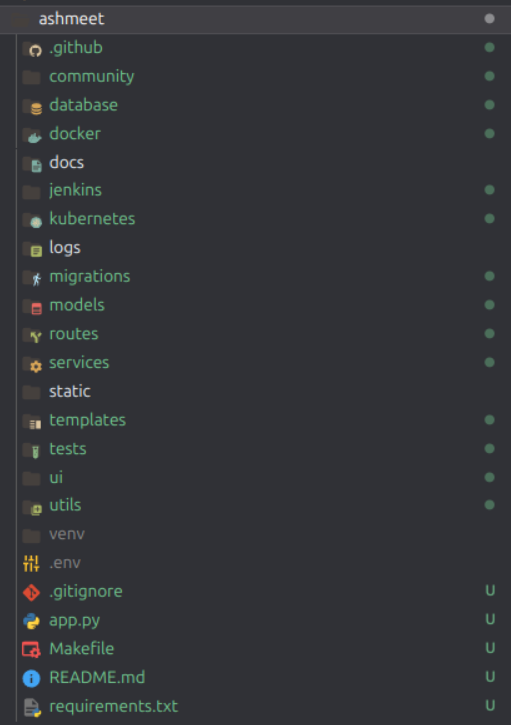
🏗️ 5. Directory Structure Example (Production)
Contributors are welcome to this to enhance the optimisation of this repository
1 maintainer

Release files for init-app 3.3.0
For a detailed explanation of source distributions (sdists) and built distributions (wheels), please see the package formats documentation.
Source distribution (sdist)
| File | Size | Uploaded | |
|---|---|---|---|
| init_app-3.3.0.tar.gz | 100.5 kB | Details |
Built distribution (wheel)
| File | Interpreter | ABI | Platform | Reset |
|---|---|---|---|---|
| init_app-3.3.0-py3-none-any.whl | Python 3 | none | any | Details |
Total release size: 190.8 kB
Release files / init_app-3.3.0.tar.gz
| Download URL | init_app-3.3.0.tar.gz |
|---|---|
| Size | 100.5 kB |
| Tags | Source |
|
SHA-256 checksum How to use checksums |
5ff894f38d2474aeb413ff223d47d56d1b93ba106c9706945ab366b42af2d7fe
|
|
BLAKE2b-256 checksum How to use checksums |
5ae83a059c7b1bffd0846a0e4b665a54891c50338df9b864e1cb7e372ff5c06d
|
| Upload date | |
|
Uploaded using Trusted Publishing? What is trusted publishing? |
No |
| Uploaded via |
twine/7.0.0 CPython/3.13.2
|
Release files / init_app-3.3.0-py3-none-any.whl
| Download URL | init_app-3.3.0-py3-none-any.whl |
|---|---|
| Size | 90.3 kB |
| Tags | Python 3 |
|
SHA-256 checksum How to use checksums |
97146a3f7395fe54729ecbdb68f37492aa780f8ac1bda618bb7584209fcca94c
|
|
BLAKE2b-256 checksum How to use checksums |
a7fe0b1a67e4faee36d6e7ae2eea8b6c6ecb1d07d22b3805e6d18167015d35bd
|
| Upload date | |
|
Uploaded using Trusted Publishing? What is trusted publishing? |
No |
| Uploaded via |
twine/7.0.0 CPython/3.13.2
|














