







InSituPy: A framework for histology-guided, multi-sample analysis of single-cell spatial omics data

InSituPy is a Python package designed to facilitate the analysis of single-cell spatial transcriptomics data. With InSituPy, you can easily load, visualize, and analyze the data, enabling and simplifying the comprehensive exploration of spatial gene expression patterns within tissue sections and across multiple samples. Currently the analysis is focused on data from the Xenium In Situ methodology. Readers for Visium and QuPath data are available as well, as is conversion to and from SpatialData.
Latest changes
InSituPy 0.12 is the current stable release. It adds filter layers and a cross-sample table workflow for InSituExperiment, multiple cell and spatial-unit layers, SpatialData conversion, AI-assistant integration and a safer save pipeline. Some analysis defaults changed in 0.12, so check the release notes when upgrading from 0.11.
For all changes check out the releases. If an update breaks your workflow, please open an issue or contact us via our zulip chat.
Getting started
Overall data structure
InSituPy keeps everything that belongs to a tissue section in one place and organises many sections into one study:
InSituData: one sample. It integrates all modalities of a spatial omics dataset: cells (gene counts and boundaries), images, transcripts, annotations, regions and units (e.g. Visium spots or niches).InSituExperiment: aggregates multipleInSituDatainstances and links them with a sample table (metadata), enabling cross-sample analysis.
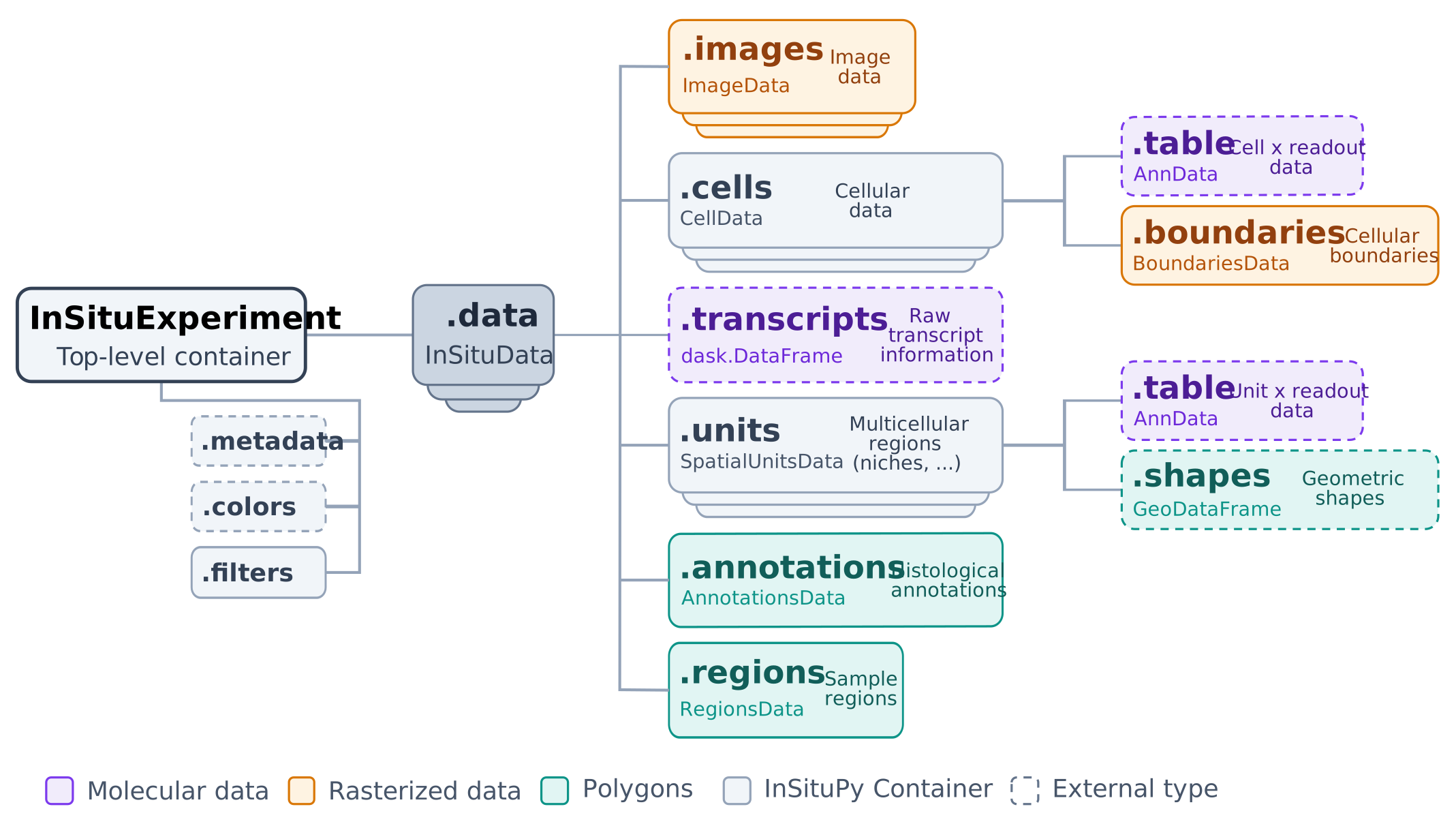
New to InSituPy? Read InSituPy at a glance for a plain-language introduction to this structure.
Installation
Make sure you have Conda installed on your system before proceeding with these steps. If not, you can install Miniconda or Anaconda from https://docs.conda.io/en/latest/miniconda.html.
Create and activate a conda environment:
InSituPy requires Python 3.12 or newer (also with SpatialData support).
conda create --name insitupy python=3.13
conda activate insitupy
Install from PyPI:
pip install insitupy-spatial
This base installation includes napari and related visualization dependencies.
InSituPy currently requires zarr>=3.2.1 and targets the zarr v3 format. Legacy zarr v2 workflows are only partially supported and not tested.
Optional: install with SpatialData support (spatialdata>=0.8.0,<0.9.0):
pip install insitupy-spatial[spatialdata]
To ensure that the InSituPy package is available as a kernel in Jupyter notebooks within your conda environment, you can follow the instructions here.
For alternative installation strategies see the documentation.
Quick start
import insitupy as ispy

xd = ispy.io.read_xenium("path/to/xenium_output")   # read one Xenium run
ispy.pp.normalize_and_transform(xd)
ispy.pp.reduce_dimensions(xd)
ispy.pp.cluster_cells(xd)
xd.show()                                           # interactive viewer (napari)
The tutorials walk through this step by step with demo data.
Documentation
For detailed instructions on using InSituPy, refer to the official documentation.
InSituPy works best within Jupyter Lab or Jupyter Notebook sessions. If you are not familiar with these platforms, see the documentation of Project Jupyter.
AI Assistant Integration
Which integration should I use?
InSituPy ships two complementary integrations: a skill (a static reference any assistant can load, versioned per release) and an MCP server (live introspection against the installed source). Pick by how you work - they cooperate rather than compete.
flowchart LR
    Q{"How are you working?"}

    A["Code agent<br>Claude Code, Codex, Cursor, ..."]
    B["Plain web chat<br>ChatGPT, Claude.ai"]
    C["Want always-current<br>API introspection"]

    A1["pip install insitupy-spatial<br>then: insitupy install-skill"]
    B1["upload the release ZIP<br>or paste llms.txt"]
    C1["add the MCP server<br>uvx insitupy-mcp"]

    R1["insitupy-api skill<br>in your agent's skills dir"]
    R2["insitupy-api skill<br>loaded into the chat"]
    R3["live tools that<br>never go stale"]

    Q --> A
    Q --> B
    Q --> C
    A --> A1
    A1 --> R1
    B --> B1
    B1 --> R2
    C --> C1
    C1 --> R3
    R3 -.->|skill defers to MCP| R1
Skill
Easiest option: install the InSituPy skill (insitupy-api). It teaches any AI assistant - a coding agent or
plain web chat - the data model, the typical read -> preprocess -> tools -> plot -> save
workflow, and where to look for detailed API references, so it writes correct InSituPy code
without guessing from memory. No server, no setup beyond installing the package.
-
Code agents (Claude Code, Codex, Cursor, ...): after
pip install insitupy-spatial, runinsitupy install-skillThis copies the skill to
./.agents/skills/insitupy-api/by default; pass--target {claude,codex,cursor}or--path DIRto install elsewhere, and--forceto upgrade an existing copy. -
Plain web chat (ChatGPT, Claude.ai, no skill loader): either paste the contents of the repo-root
llms.txt(or its raw URL) into the chat/project knowledge, or upload theinsitupy-api-<version>.zipasset attached to the latest release.
The skill is versioned and self-upgrading: if it's missing something you expect, check your
installed insitupy.__version__ against the skill's stamped version and re-run insitupy install-skill --force (or re-fetch the ZIP/llms.txt) if it's out of date.
If the insitupy MCP server (below) is also available in your session, an agent following the
skill will prefer its live tools automatically - the skill is a fallback, not a competing source.
MCP Server
For power users who want live, always-current introspection (not just a static reference), InSituPy also ships an MCP server that gives AI assistants live access to the API, source code, and workflow examples. Because it is a standard MCP server (stdio), it works with any MCP-compatible client, such as Claude Desktop, Claude Code, Cursor, Codex, Windsurf, Continue.dev, or Cline. Setup has mainly been exercised with Claude Desktop and Claude Code; if you use it with another client, feedback is welcome.
The easiest way to activate the server in Claude Desktop is to add the following to your claude_desktop_config.json - no separate installation or repository clone required:
{
  "mcpServers": {
    "insitupy": {
      "command": "uvx",
      "args": ["--python", "3.12", "--from", "insitupy-spatial[mcp]", "insitupy-mcp"]
    }
  }
}
uvx (part of uv) handles downloading and running the server automatically in an isolated environment. Install uv first if you haven't already (curl -LsSf https://astral.sh/uv/install.sh | sh on macOS/Linux, winget install --id=astral-sh.uv -e on Windows, or see installation options).
See MCP_TUTORIAL.md for step-by-step setup instructions (Claude Desktop and Codex; other clients use the same stdio command in their own MCP config).
Features
- Data storage: Store data on both the single sample level and the multi-sample level using the
InSituDataandInSituExperimentobjects. - Data Preprocessing: InSituPy provides functions for normalizing, filtering, and transforming raw in situ transcriptomics data.
- Interactive Visualization: Create interactive plots using napari to easily explore spatial gene expression patterns.
- Annotation: Annotate Xenium In Situ data in the napari viewer or import annotations from external tools like QuPath.
- Multi-sample analysis: Perform analysis on an experiment-level, i.e. with multiple samples at once.
- Sample selection and cross-sample tables: Define named sample subsets with filter layers, and combine the cell tables of all samples into one AnnData (
build_table()) for joint analysis, with results written back to the individual samples. - Multiple segmentations: Keep several cell and spatial-unit layers (e.g. different segmentations, Visium spots or niches) side by side in one dataset.
- SpatialData conversion: Convert to and from SpatialData to use tools of the scverse ecosystem.
- AI-assistant integration: A shipped skill and an MCP server help AI assistants write correct InSituPy code (see above).
QuPath
We try to develop InSituPy alongside the Bioimage Analysis tool QuPath. QuPath has great functionalities to visualize whole slide image data, add annotations, generate segmentations or analyze signal intensities. We collect scripts that simplify the connection between QuPath and InSituPy here. This includes:
- Export of annotations as GEOJSON from QuPath
- Export of images as OME-TIFF from QuPath
- Collected export of data from a multiplexed IF image to be imported into InSituPy. Import can be performed using either
read_qupathorread_qupath_project. For cell and nucleus segmentation of multiplexed IF images we recommend using Instanseg.
Contributing
Contributions are welcome! If you find any issues or have suggestions for new features, please open an issue, submit a pull request or contact us via our zulip chat.
Before opening a pull request, please read the Contributing Guide and, if you used an AI assistant, the AI Policy. The repo also ships an in-repo AI dev-workflow (/review, /plan//plan-opus//plan-fable, /implement) usable across common AI coding agents.
Citation
If you use InSituPy in your work, please cite the publication as follows:
Wirth, Johannes, Anna Chernysheva, Birthe Lemke, Isabel Giray, and Katja Steiger. InSituPy: a framework for histology-guided, multi-sample analysis of single-cell spatial omics data.
Bioinformatics 42(3), 2026. https://doi.org/10.1093/bioinformatics/btag073
License
InSituPy is licensed under the BSD-3-Clause.
InSituPy is developed and maintained by Johannes Wirth and Anna Chernysheva. Feedback is highly appreciated, and we hope InSituPy helps you with the analysis of your spatial omics data. Support for further technologies is welcome - see Contributing.
1 maintainer

Metadata
1 maintainer
Release files for insitupy-spatial 0.12.0
For a detailed explanation of source distributions (sdists) and built distributions (wheels), please see the package formats documentation.
Source distribution (sdist)
| File | Size | Uploaded | |
|---|---|---|---|
| insitupy_spatial-0.12.0.tar.gz | 512.8 kB | Details |
Built distribution (wheel)
| File | Interpreter | ABI | Platform | Reset |
|---|---|---|---|---|
| insitupy_spatial-0.12.0-py3-none-any.whl | Python 3 | none | any | Details |
Total release size: 1.1 MB
Release files / insitupy_spatial-0.12.0.tar.gz
| Download URL | insitupy_spatial-0.12.0.tar.gz |
|---|---|
| Size | 512.8 kB |
| Tags | Source |
|
SHA-256 checksum How to use checksums |
01974d89db3a55403fc2f4b80d2430743583fbf75289b5d6e0c0ca4284f5343c
|
|
BLAKE2b-256 checksum How to use checksums |
5e3c1ec591ed6c9125413a101d58ac822dac92fc092655b368323bae39b33f18
|
| Upload date | |
|
Uploaded using Trusted Publishing? What is trusted publishing? |
No |
| Uploaded via |
poetry/2.4.1 CPython/3.13.16 Linux/6.17.0-1022-azure
|
Release files / insitupy_spatial-0.12.0-py3-none-any.whl
| Download URL | insitupy_spatial-0.12.0-py3-none-any.whl |
|---|---|
| Size | 581.0 kB |
| Tags | Python 3 |
|
SHA-256 checksum How to use checksums |
8e0e08e6a1fd5a6008a26196d76274274255edb8148400d81bbc1c759099edca
|
|
BLAKE2b-256 checksum How to use checksums |
ccc5f566ab10f3c15ce7ba4c350959e0ff63a9fa114dd62f98d4cc708e2633ba
|
| Upload date | |
|
Uploaded using Trusted Publishing? What is trusted publishing? |
No |
| Uploaded via |
poetry/2.4.1 CPython/3.13.16 Linux/6.17.0-1022-azure
|














