

Inspect Flow
Workflow orchestration for Inspect AI that enables you to define, run, and manage evaluations at scale — from configuration through to production.
Why Inspect Flow?
As evaluation workflows grow in complexity—running multiple tasks across different models with varying parameters, then reviewing, validating, and promoting results—managing these experiments becomes challenging. Inspect Flow addresses this by providing:
- Declarative Configuration: Define complex evaluations with tasks, models, and parameters in type-safe schemas
- Repeatable & Shareable: Encapsulated definitions of tasks, models, configurations, and Python dependencies ensure experiments can be reliably repeated and shared
- Powerful Defaults: Define defaults once and reuse them everywhere with automatic inheritance
- Parameter Sweeping: Matrix patterns for systematic exploration across tasks, models, and hyperparameters
- Post-Evaluation Workflows: Tag, validate, and promote evaluation logs with composable steps
Inspect Flow is designed for researchers and engineers running systematic AI evaluations who need to scale beyond ad-hoc scripts.
Getting Started
Prerequisites
Before using Inspect Flow, you should:
- Have familiarity with Inspect AI
- Have an existing Inspect evaluation or use one from inspect-evals
Installation
pip install inspect-flow
Optional: VS Code extension
Optionally install the Inspect AI VS Code Extension which includes features for viewing evaluation log files.
Basic Example
FlowSpec is the main entrypoint for defining evaluation runs. At its core, it takes a list of tasks to run. Here's a simple example that runs two evaluations:
from inspect_flow import FlowSpec, FlowTask

FlowSpec(
    log_dir="logs",
    tasks=[
        FlowTask(
            name="inspect_evals/gpqa_diamond",
            model="openai/gpt-4o",
        ),
        FlowTask(
            name="inspect_evals/mmlu_0_shot",
            model="openai/gpt-4o",
        ),
    ],
)
To run the evaluations, run the following command in your shell:
flow run config.py
By default, Flow runs in-process using your current Python environment, so the task and model dependencies (like the inspect-evals and openai Python packages) need to be installed in it. To run in an isolated, reproducible virtual environment instead—where those dependencies are inferred and installed automatically—use the --venv flag (or set execution_type="venv"). See Execution modes for details.
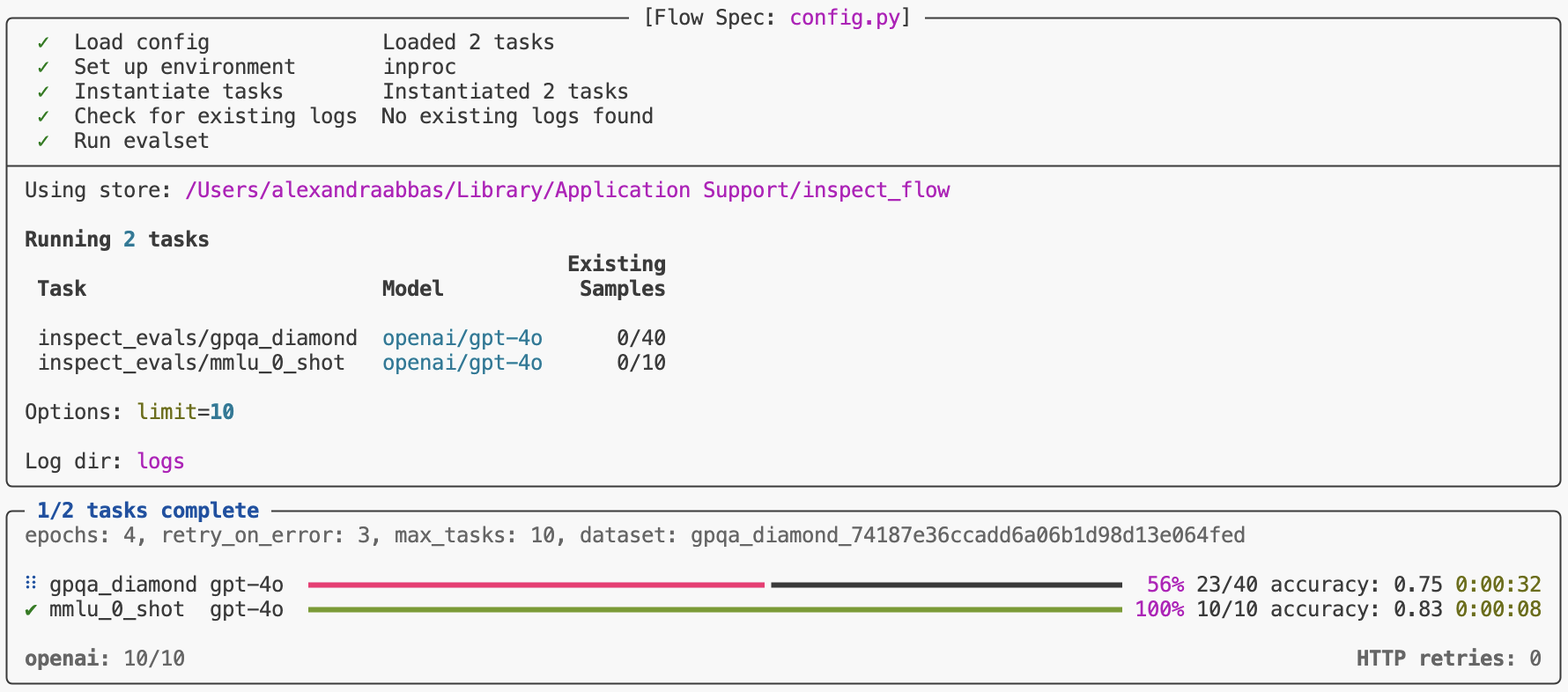
This will run both tasks and display progress in your terminal.
Python API
You can run evaluations from Python instead of the command line.
from inspect_flow import FlowSpec, FlowTask
from inspect_flow.api import run

spec = FlowSpec(
    log_dir="logs",
    tasks=[
        FlowTask(
            name="inspect_evals/gpqa_diamond",
            model="openai/gpt-4o",
        ),
        FlowTask(
            name="inspect_evals/mmlu_0_shot",
            model="openai/gpt-4o",
        ),
    ],
)
result = run(spec=spec)
print(f"Success: {result.success}, logs written to {result.log_dir}")
Matrix Functions
Often you'll want to evaluate multiple tasks across multiple models. Rather than manually defining every combination, use tasks_matrix to generate all task-model pairs:
from inspect_flow import FlowSpec, tasks_matrix

FlowSpec(
    log_dir="logs",
    tasks=tasks_matrix(
        task=[
            "inspect_evals/gpqa_diamond",
            "inspect_evals/mmlu_0_shot",
        ],
        model=[
            "openai/gpt-5",
            "openai/gpt-5-mini",
        ],
    ),
)
To preview the expanded config before running it, you can run the following command in your shell to ensure the generated config is the one that you intend to run.
flow config matrix.py
This command outputs the expanded configuration showing all 4 task-model combinations (2 tasks × 2 models).
log_dir: logs
dependencies:
- inspect-evals
tasks:
- name: inspect_evals/gpqa_diamond
  model:
    name: openai/gpt-5
- name: inspect_evals/gpqa_diamond
  model:
    name: openai/gpt-5-mini
- name: inspect_evals/mmlu_0_shot
  model:
    name: openai/gpt-5
- name: inspect_evals/mmlu_0_shot
  model:
    name: openai/gpt-5-mini
Flow provides additional matrix functions (models_matrix, configs_matrix) for sweeping over model settings, generation configs, and more. See Matrixing for details.
Run Evaluations
Before running evaluations, preview what would run with --dry-run:
flow run matrix.py --dry-run
This performs the full setup process—importing tasks from the registry, applying all defaults, expanding all matrix functions, and checking for existing logs—showing exactly what would run, but stops before actually running the evaluations.
To run the config:
flow run matrix.py
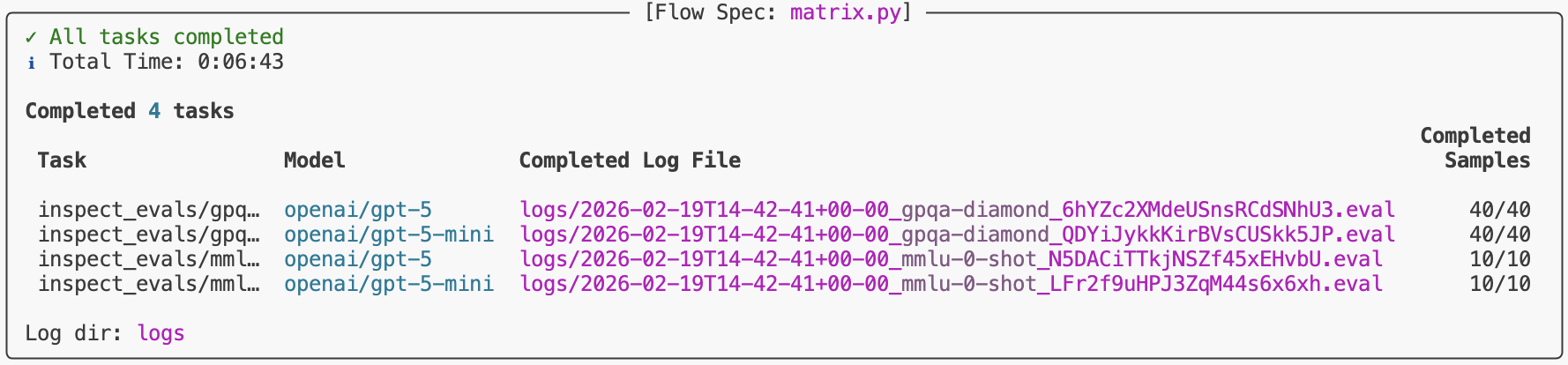
When complete, you'll find a link to the logs at the bottom of the task results summary.
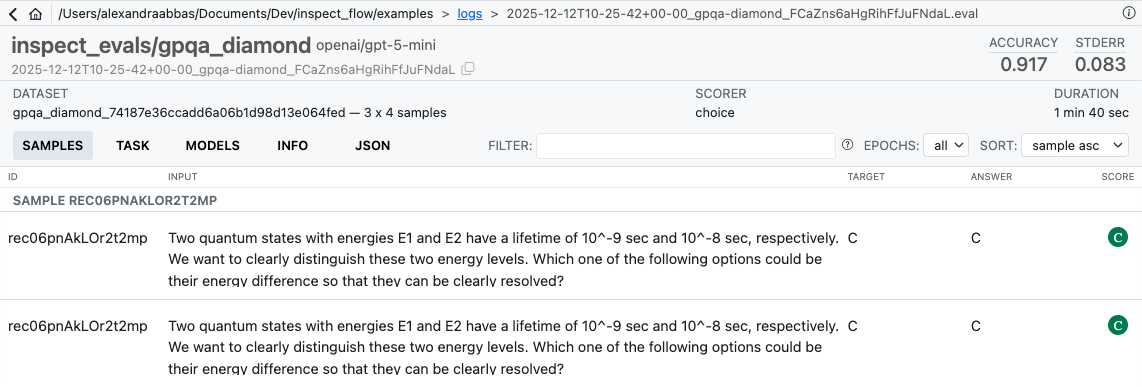
To view logs interactively, run:
inspect view --log-dir logs
After Running
Once evaluations complete, use steps to operate on the resulting logs. For example, tag logs after reviewing them:
flow step tag logs/ --add reviewed --reason "Manually inspected"
Use flow check to verify the completeness of a spec against a log directory — for example, checking how much of a production directory has been filled:
flow check matrix.py --log-dir s3://bucket/prod/logs
Steps can be composed into full workflows — filtering, tagging, and copying logs between directories. See Steps for custom steps, filters, and an end-to-end example.
Learning More
See the following articles to learn more about using Flow:
- Spec: Flow type system, config structure and basics.
- Defaults: Define defaults once and reuse them everywhere with automatic inheritance.
- Matrixing: Systematic parameter exploration with matrix and with functions.
- Steps: Post-evaluation workflows — tag, validate, and promote logs with composable steps.
- Reference: Detailed documentation on the Flow Python API and CLI commands.
Development
To work on development of Inspect Flow, clone the repository and install with the -e flag and [dev, doc] optional dependencies:
git clone https://github.com/meridianlabs-ai/inspect_flow
cd inspect_flow
uv sync
source .venv/bin/activate
Optionally install pre-commit hooks via
make hooks
Run linting, formatting, and tests via
make check
make test
1 maintainer

Release files for inspect-flow 0.13.0
For a detailed explanation of source distributions (sdists) and built distributions (wheels), please see the package formats documentation.
Source distribution (sdist)
| File | Size | Uploaded | |
|---|---|---|---|
| inspect_flow-0.13.0.tar.gz | 141.4 kB | Details |
Built distribution (wheel)
| File | Interpreter | ABI | Platform | Reset |
|---|---|---|---|---|
| inspect_flow-0.13.0-py3-none-any.whl | Python 3 | none | any | Details |
Total release size: 318.5 kB
Release files / inspect_flow-0.13.0.tar.gz
| Download URL | inspect_flow-0.13.0.tar.gz |
|---|---|
| Size | 141.4 kB |
| Tags | Source |
|
SHA-256 checksum How to use checksums |
ee1a15314a5540e1a9145be60e3e10faa68edf81191fa11a879f762346d99433
|
|
BLAKE2b-256 checksum How to use checksums |
e5136787df6f6bd9b021ffdbc02690d5570a0d55a7d92cb4ff48eee323fa09b9
|
| Upload date | |
|
Uploaded using Trusted Publishing? What is trusted publishing? |
Yes |
| Uploaded via |
twine/7.0.0 CPython/3.13.14
|
Provenance
Provenance describes where a file came from. On PyPI, provenance is shared via attestations, which provide a verifiable record of the build or publishing details. View details, limitations and caveats.


PyPI Publish Attestation
PyPI verified that this artifact, at this checksum, originated from the publisher listed below.
Signed by GitHub Actions, verified by PyPI on Sep 9, 2026.
Transparency logRelease files / inspect_flow-0.13.0-py3-none-any.whl
| Download URL | inspect_flow-0.13.0-py3-none-any.whl |
|---|---|
| Size | 177.0 kB |
| Tags | Python 3 |
|
SHA-256 checksum How to use checksums |
3765b025a0eb68c071690ab9d364604f5d72617a9d3650ab65db6585ac9eb6a3
|
|
BLAKE2b-256 checksum How to use checksums |
c49eebbf7b8646fbf825aa6443748306a8bd92b79a1794000a0770c302d0a3ac
|
| Upload date | |
|
Uploaded using Trusted Publishing? What is trusted publishing? |
Yes |
| Uploaded via |
twine/7.0.0 CPython/3.13.14
|
Provenance
Provenance describes where a file came from. On PyPI, provenance is shared via attestations, which provide a verifiable record of the build or publishing details. View details, limitations and caveats.
PyPI Publish Attestation
PyPI verified that this artifact, at this checksum, originated from the publisher listed below.
Signed by GitHub Actions, verified by PyPI on Sep 9, 2026.
Transparency log













