
Instagram CLI
The ultimate weapon against brainrot. Shown experimentally to effectively reduce screentime.





https://github.com/user-attachments/assets/e9206e14-8141-49b2-8e2c-17c76402e3cb
What does it do?
- We transform Instagram from a brainrot hell into productivity tool
- We allow you to focus on meaningful conversations
- We celebrate the art and simplicity of terminal UI
- We extend Instagram with powerful plugins like latex, chat summarisation
Need a break and have some brainrot?
Want to watch Instagram Reels right from your terminal? Check out reels-cli. It’s a great way to enjoy some light entertainment without leaving your keyboard. (Not affiliated and not maintained by us, but highly recommended for terminal fans.)
Installation
The simplest way to get started is to install the package from PyPI if you have Python installed:
pip install instagram-cli
If you do not have Python installed, you can download and install it from the official website.
Installation from Source
git clone https://github.com/supreme-gg-gg/instagram-cli.git
cd instagram-cli
pip install .
Pre-built Executables
We no longer provide pre-built executables. If you want to run the application in an environment without Python, you can build the executable yourself with pyinstaller. We recommend using the instagram-cli.spec file we provided.
pyinstaller --onedir instagram-cli.spec
This will generate the executable in the dist/ directory.
./instagram-cli [OPTIONS] command [ARGS] # for macOS and Linux
instagram-cli.exe [OPTIONS] command [ARGS] # for Windows
Commands
The following commands will be available after installing the package:
instagram                                  # display title art
instagram --help                           # view available commands

# Authentication
instagram auth login -u                    # login with username and password
instagram auth logout                      # logout and removes session

# Chat Features
instagram chat start                       # start chat interface
instagram chat search -u <username>        # search and open chat by username
instagram chat search -t <text>           # search and open chat by chat title

# Utility Commands
instagram notify                           # view notifications (inbox, followers, mentions)
instagram schedule ls                      # view scheduled messages
instagram schedule cancel <index>          # cancel scheduled message
instagram stats --days <last_n_days>       # view usage analytics (default: 14 days)
instagram config --get --set --edit        # manage custom configuration
instagram cleanup -t                       # cleanup media and session cache files
Chat
The chat interface is the main feature of this package. It allows you to interact with your Instagram chats in a terminal-based interface.
In the chat list page, use arrow keys (or 'j', 'k') + Enter to select a chat. You can also search for user by username using @user_name + Enter.
After entering the chat page, you can type messages as usual and send them with Enter. You can also use chat commands to supercharge your chat experience.
Chat Commands
All chat commands have the following syntax:
:command <args> <long-args>
:help: view available commands:quit: quit the application:back: back to chat menu for selecting chat:reply: reply mode to select and reply to messages:scrollupor:k: scroll up in chat messages:scrolldownor:j: scroll down in chat messages:schedule <time> "<message>": schedule a message, see scheduling messages:delay <seconds> "<message>": delay sending the message, similar as schedule:cancel: cancel the latest scheduled/delayed message:upload: upload media using the file navigator:upload <path?>: upload media (photo or video) directly from path:config <key?>=<value?>: an in-chat version ofinstagram config:view <index>: view and download media at index or open URL directly in browser:latex $<expr>$: render and send LaTeX code as image, see latex:summarize <depth?>: generate a summary of chat history using an LLM, see chat summarization
Emoji
Text with emoji syntax will be rendered as emoji. For example,
This is an emoji :thumbsup:
will be rendered as
This is an emoji 👍
LaTeX
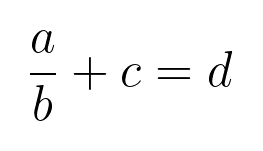
We support LaTeX rendering and sending as images in the chat. For example,
:latex $\frac{a}{b} + c = d$
:latex $\left( \begin{bmatrix} a & b \\ c & d \end{bmatrix} \cdot \begin{bmatrix} e & f \\ g & h \end{bmatrix} \right) + \begin{bmatrix} i & j \\ k & l \end{bmatrix}^{-1} \times \left( \int_0^1 x^2 \, dx \right) + \begin{bmatrix} \sin(\theta) & \cos(\theta) \\ \tan(\phi) & \ln(\psi) \end{bmatrix}$

Please note that the LaTeX code MUST be enclosed in $ symbols.
You can choose to render with online API (default) or local LaTeX installation such as TeX Live, MiKTeX, etc. You can set the rendering method with instagram config --set latex_rendering_method <online|local>.
Chat Summarization
You can generate a summary of the chat history using the :summarize command. This will create a concise summary of the conversation, highlighting key points and important information.
Local LLMs are first-class citizens here, allowing for maximum privacy and flexibility. All you need is a local LLM inferencing server like Ollama, LM Studio. You will need to specify llm.endpoint (OpenAI-compatible) and llm.model in the config. For example, for Ollama, this would likely be http://localhost:11434/v1/.
Once inside a chat conversation, you can summarize the chat history using:
:summarize
This will process all messages fetched in the current chat.
To limit (or expand) the summarization to the n most recent messages:
:summarize n
You can also turn on streaming mode with instagram config --set llm.stream True to see the summary being generated in real-time.
Scheduling Messages
You can schedule messages to be sent at a later time. The syntax is as follows:
:schedule <Optional[Y-m-d] HH:MM> "<message>"
If the date is not provided, the message will be scheduled for the current day. Input format must be either YYYY-MM-DD HH:MM or HH:MM. The time must be in 24-hour format, otherwise you might run into warnings for scheduling messages in the past.
Contributing
We welcome contributors! Please see the comprehensive CONTRIBUTING.md file for details on how to get started, create issues, and submit pull requests.
1 maintainer

Metadata
1 maintainer
Release files for instagram-cli 1.4.1
For a detailed explanation of source distributions (sdists) and built distributions (wheels), please see the package formats documentation.
Source distribution (sdist)
| File | Size | Uploaded | |
|---|---|---|---|
| instagram_cli-1.4.1.tar.gz | 59.3 kB | Details |
Built distribution (wheel)
| File | Interpreter | ABI | Platform | Reset |
|---|---|---|---|---|
| instagram_cli-1.4.1-py3-none-any.whl | Python 3 | none | any | Details |
Total release size: 122.6 kB
Release files / instagram_cli-1.4.1.tar.gz
| Download URL | instagram_cli-1.4.1.tar.gz |
|---|---|
| Size | 59.3 kB |
| Tags | Source |
|
SHA-256 checksum How to use checksums |
507c89cec497eb093e7d8908e88ac93f6db7a9f9e1974658e3959caf8f395a16
|
|
BLAKE2b-256 checksum How to use checksums |
f2bd42f4a88b7b917d06bb8c34d17c929a71e12fcadcc04958d4c46717a96df6
|
| Upload date | |
|
Uploaded using Trusted Publishing? What is trusted publishing? |
Yes |
| Uploaded via |
twine/6.1.0 CPython/3.12.9
|
Provenance
Provenance describes where a file came from. On PyPI, provenance is shared via attestations, which provide a verifiable record of the build or publishing details. View details, limitations and caveats.


PyPI Publish Attestation
PyPI verified that this artifact, at this checksum, originated from the publisher listed below.
Signed by GitHub Actions, verified by PyPI on Aug 28, 2025.
Transparency logRelease files / instagram_cli-1.4.1-py3-none-any.whl
| Download URL | instagram_cli-1.4.1-py3-none-any.whl |
|---|---|
| Size | 63.4 kB |
| Tags | Python 3 |
|
SHA-256 checksum How to use checksums |
49bc6f10053fb982d876bb918556578e9a6999c4c4407db6fca5e4e0a7fa9596
|
|
BLAKE2b-256 checksum How to use checksums |
a309a1836366f8ad2b7bcff3ab688380408f5d553df54b159e0dc8ce9132b3b3
|
| Upload date | |
|
Uploaded using Trusted Publishing? What is trusted publishing? |
Yes |
| Uploaded via |
twine/6.1.0 CPython/3.12.9
|
Provenance
Provenance describes where a file came from. On PyPI, provenance is shared via attestations, which provide a verifiable record of the build or publishing details. View details, limitations and caveats.
PyPI Publish Attestation
PyPI verified that this artifact, at this checksum, originated from the publisher listed below.
Signed by GitHub Actions, verified by PyPI on Aug 28, 2025.
Transparency log













