
Use Instagram in the terminal, the end of brainrot is here

Project description
Instagram CLI
The ultimate weapon against brainrot.





https://github.com/user-attachments/assets/e9206e14-8141-49b2-8e2c-17c76402e3cb
The world's first open-source CLI (command line interface) + Terminal UI client for Instagram.
What does it do?
- We transform Instagram from a brainrot hell into productivity tool
- We give back control of social media to the user
- We enable user to do more with less
- We celebrate the art and simplicity of terminal UI
- We preserve the core of social media and protect your attention
Use Instagram with 100% keyboard control - no mouse clicks or touchscreen taps needed! Perfect for developers and Linux users who love staying on the keyboard 🤣
Installation
The simplest way to get started is to install the package from PyPI if you have Python installed:
pip install instagram-cli
If you do not have Python installed, you can download and install it from the official website.
Installation from Source
git clone https://github.com/supreme-gg-gg/instagram-cli.git
cd instagram-cli
pip install .
Docker Installation
You must have Docker installed to use this method. If you do not have Docker installed, you can download and install it from the official website.
Build and run Docker image from source:
git clone https://github.com/supreme-gg-gg/instagram-cli.git
cd instagram-cli
docker build -t instagram-cli .
docker run -it instagram-cli
Alternatively, you can pull the pre-built Docker image from Docker Hub (this will available very soon):
docker run -it supreme-gg-gg/instagram-cli
Pre-built Executables
NOTE: This option is HIGHLY UNRECOMMENDED unless the other methods do not work for you.
If you do not want to install Python, you can download the pre-built executables from the releases page.
After downloading, the executable can be run from the command line:
./instagram-cli [OPTIONS] command [ARGS] # for macOS and Linux
instagram-cli.exe [OPTIONS] command [ARGS] # for Windows
Commands
The following commands will be available after installing the package:
instagram                                  # display title art
instagram --help                           # view available commands

# Authentication
instagram auth login -u                    # login with username and password
instagram auth logout                      # logout and removes session

# Chat Features
instagram chat start                       # start chat interface
instagram chat search -u <username>        # search and open chat by username
instagram chat search -t <text>           # search and open chat by chat title

# Utility Commands
instagram notify                           # view notifications (inbox, followers, mentions)
instagram schedule ls                      # view scheduled messages
instagram stats --days <last_n_days>       # view usage analytics (default: 14 days)
instagram config --get --set --edit        # manage custom configuration
instagram cleanup -t                       # cleanup media and session cache files
All searches in the package uses a custom fuzzy matching based on ratcliff/obershelp similarity algorithm. This means chat search and emoji search will be more flexible and forgiving.
Chat Commands
The chat interface is the main feature of this package. It allows you to interact with your Instagram chats in a terminal-based interface. All commands have the following syntax:
:command <args> <long-args>
Long arguments should have special enclosures such as "..." for strings with spaces and $...$ for LaTeX code.
:help: view available commands:quit: quit the application:back: back to chat menu for selecting chat:reply: reply mode to select and reply to messages:scrollupor:k: scroll up in chat messages:scrolldownor:j: scroll down in chat messages:schedule <time> "<message>": schedule a message, see scheduling messages:upload: upload media using the file navigator:upload <path>: upload media (photo or video) directly from path:view <index>: view and download media at index or open URL directly in browser:latex $<expr>$: render and send LaTeX code as image, see latex
Emoji
Text with emoji syntax will be rendered as emoji. For example,
This is an emoji :thumbsup:
will be rendered as
This is an emoji 👍
This does not have to be an exact match with the emoji name. For example, :thumbsup: can also be written as :thumbs_up:.
LaTeX
We support LaTeX rendering and sending as images in the chat. For example,
:latex $\frac{a}{b} + c = d$
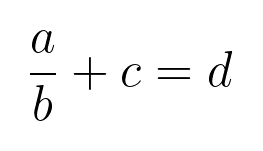
:latex $\left( \begin{bmatrix} a & b \\ c & d \end{bmatrix} \cdot \begin{bmatrix} e & f \\ g & h \end{bmatrix} \right) + \begin{bmatrix} i & j \\ k & l \end{bmatrix}^{-1} \times \left( \int_0^1 x^2 \, dx \right) + \begin{bmatrix} \sin(\theta) & \cos(\theta) \\ \tan(\phi) & \ln(\psi) \end{bmatrix}$

Please note that the LaTeX code MUST be enclosed in $ symbols.
You can choose to render with online API (default) or local LaTeX installation such as TeX Live, MiKTeX, etc. You can set the rendering method with instagram config --set latex_rendering_method <online|local>.
Scheduling Messages
You can schedule messages to be sent at a later time. The syntax is as follows:
:schedule <Optional[Y-m-d] HH:MM> "<message>"
If the date is not provided, the message will be scheduled for the current day. Input format must be either YYYY-MM-DD HH:MM or HH:MM. The time must be in 24-hour format, otherwise you might run into warnings for scheduling messages in the past.
If you exit the app, the scheduled messages will not be sent but will be restored when you open the app again. You will be prompted by a notification to decide whether to send the scheduled messages or not. We might include system background service in the future to send scheduled messages even when the app is closed.
Markdown and Code Blocks
Coming soon!
Release history Release notifications | RSS feed


Download files
Download the file for your platform. If you're not sure which to choose, learn more about installing packages.
Source Distribution
Built Distribution
Filter files by name, interpreter, ABI, and platform.
If you're not sure about the file name format, learn more about wheel file names.
Copy a direct link to the current filters
File details
Details for the file instagram_cli-1.2.7.tar.gz.
File metadata
- Download URL: instagram_cli-1.2.7.tar.gz
- Upload date:
- Size: 43.6 kB
- Tags: Source
- Uploaded using Trusted Publishing? No
- Uploaded via: twine/6.1.0 CPython/3.12.1
File hashes
| Algorithm | Hash digest | |
|---|---|---|
| SHA256 |
704795e4a530443739a4515f49877da8c1a4ed3ef8999656ac245a2da48c76a0
|
|
| MD5 |
8b0c43e7aca4d436381c23dc327ee9eb
|
|
| BLAKE2b-256 |
0929465df9eb60772160a19dced8f05383b0c76f417604fa6f41edc354b72c9e
|
File details
Details for the file instagram_cli-1.2.7-py3-none-any.whl.
File metadata
- Download URL: instagram_cli-1.2.7-py3-none-any.whl
- Upload date:
- Size: 47.8 kB
- Tags: Python 3
- Uploaded using Trusted Publishing? No
- Uploaded via: twine/6.1.0 CPython/3.12.1
File hashes
| Algorithm | Hash digest | |
|---|---|---|
| SHA256 |
2006b6b8651b20ecfc85f59245ea8a641de459172796d066f6759c676c3888b9
|
|
| MD5 |
308414946e6a21bccf366ae2d664399d
|
|
| BLAKE2b-256 |
d7a13e967a887b88de932a56653b1b6dd1b222608919380159d7844e8c910321
|






