
A customizable interactive CLI menu dispatcher with extendable return signals and matching function calls.

Project description
Interactive Dispatcher
interactive-dispatcher is a small Python library for building menu-based CLI flows.
It maps user input to one or more actions and returns a signal that your app can route.
GitHub: https://github.com/Akhand-Pratap-Tiwari/python-interactive-dispatcher
Install
pip install interactive-dispatcher
Quick Example
from interactive_dispatcher import Action, MenuItem, ReturnSignal, interactive_dispatcher

ReturnSignal.register("RESTART")

def greet(name: str) -> str:
    print(f"Hello, {name}!")
    return f"greeted:{name}"

def exit_program() -> str:
    print("Goodbye!")
    return "exited"

menu = [
    MenuItem(
        keys=["greet", "g"],
        description="Greet Alice",
        actions=[Action(function=greet, args=("Alice",))],
        return_signal=ReturnSignal.CONTINUE,
    ),
    MenuItem(
        keys=["restart", "r"],
        description="Restart flow",
        actions=[],
        return_signal=ReturnSignal.RESTART,
    ),
    MenuItem(
        keys=["exit", "e", "q"],
        description="Exit",
        actions=[Action(function=exit_program)],
        return_signal=ReturnSignal.BREAK,
    ),
]

while True:
    results, signal = interactive_dispatcher("Choose an option:", menu)
    print(results, signal)
    if signal == ReturnSignal.BREAK:
        break
API
Action: wraps a callable with positional and keyword arguments.MenuItem: defines accepted keys, a description, actions, and a return signal.ReturnSignal: registry-backed signal objects (CONTINUE,BREAK,PASS,NONE, plus custom signals).interactive_dispatcher(...): prints menu, runs selected actions, and returns(results, signal).- Input matching is exact and case-sensitive (
"g"is different from"G").
Why Use It
- Keeps CLI control flow explicit and readable.
- Lets you compose multiple actions per menu option.
- Works well for REPL-like apps, setup wizards, and small automation tools.
Development
python3 -m venv .venv
source .venv/bin/activate
python3 -m pip install -e ".[dev]"
python3 -m build
Open Source
- License: Apache-2.0 (
LICENSE) - Contributing guide:
CONTRIBUTING.md
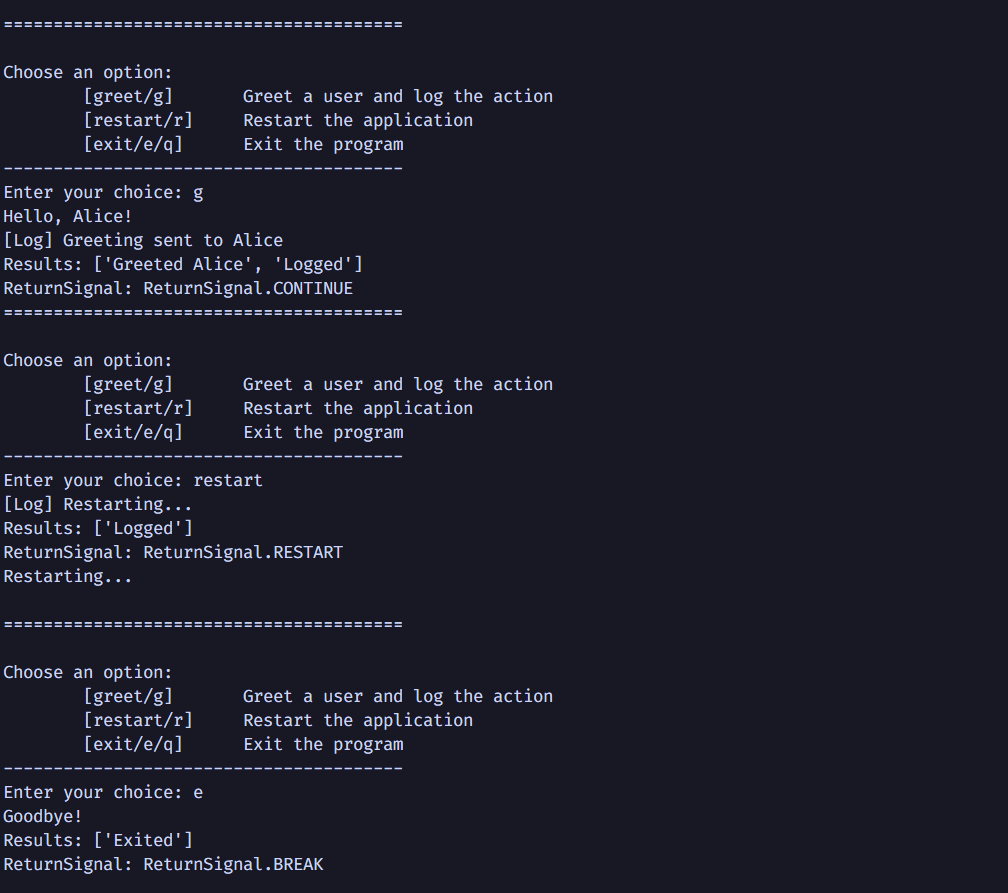
Output Preview
Release history Release notifications | RSS feed


Download files
Download the file for your platform. If you're not sure which to choose, learn more about installing packages.
Source Distribution
Built Distribution
Filter files by name, interpreter, ABI, and platform.
If you're not sure about the file name format, learn more about wheel file names.
Copy a direct link to the current filters
File details
Details for the file interactive_dispatcher-1.0.4.tar.gz.
File metadata
- Download URL: interactive_dispatcher-1.0.4.tar.gz
- Upload date:
- Size: 9.6 kB
- Tags: Source
- Uploaded using Trusted Publishing? No
- Uploaded via: twine/6.2.0 CPython/3.12.3
File hashes
| Algorithm | Hash digest | |
|---|---|---|
| SHA256 |
5d04fe24a82b26fd664a1512322e212467d66832b672827b2b1094bb569fac08
|
|
| MD5 |
0a65cdd7b3987fde13b829e16f4a32fb
|
|
| BLAKE2b-256 |
1fa83724a0853e6a435640976efd50f9e5064609d53cdf7cf6a7170da2e4764f
|
File details
Details for the file interactive_dispatcher-1.0.4-py3-none-any.whl.
File metadata
- Download URL: interactive_dispatcher-1.0.4-py3-none-any.whl
- Upload date:
- Size: 8.7 kB
- Tags: Python 3
- Uploaded using Trusted Publishing? No
- Uploaded via: twine/6.2.0 CPython/3.12.3
File hashes
| Algorithm | Hash digest | |
|---|---|---|
| SHA256 |
7515d8db3ca1f351b3a76e73f24c56b358e486a68cf93c0eb6e87dc373d28486
|
|
| MD5 |
3a8ac5d0a5b8806bbf3b50d4b4b88bd0
|
|
| BLAKE2b-256 |
30abb19cdfbe4298d6516659b8f691425154666a22fd86ee97fdaf77b1af83d4
|






