
A customizable interactive CLI menu dispatcher with extendable return signals and matching function calls.

Project description
Interactive Dispatcher
Interactive Dispatcher is a lightweight and customizable command-line menu system that allows you to define interactive options with corresponding return signals and handler functions. It is especially useful for CLI tools, REPLs, configuration managers, or anything needing a user-driven menu interface.
Features
- Customizable option prompts
- Signal-returning dispatch mechanism
- Easy-to-extend architecture
- Supports looped interactions
- Clean, readable, and minimal dependency footprint
- Add your own signals to finely control the logic flow
Installation
pip install interactive-dispatcher
Example
# example.py
from interactive_dispatcher import Action, MenuItem, ReturnSignal, interactive_dispatcher

# Register a custom signal
ReturnSignal.register("RESTART")

# Sample functions
def greet(name: str) -> str:
    print(f"Hello, {name}!")
    return f"Greeted {name}"

def log(msg: str) -> str:
    print(f"[Log] {msg}")
    return "Logged"

def exit_program() -> str:
    print("Goodbye!")
    return "Exited"

# Menu configuration
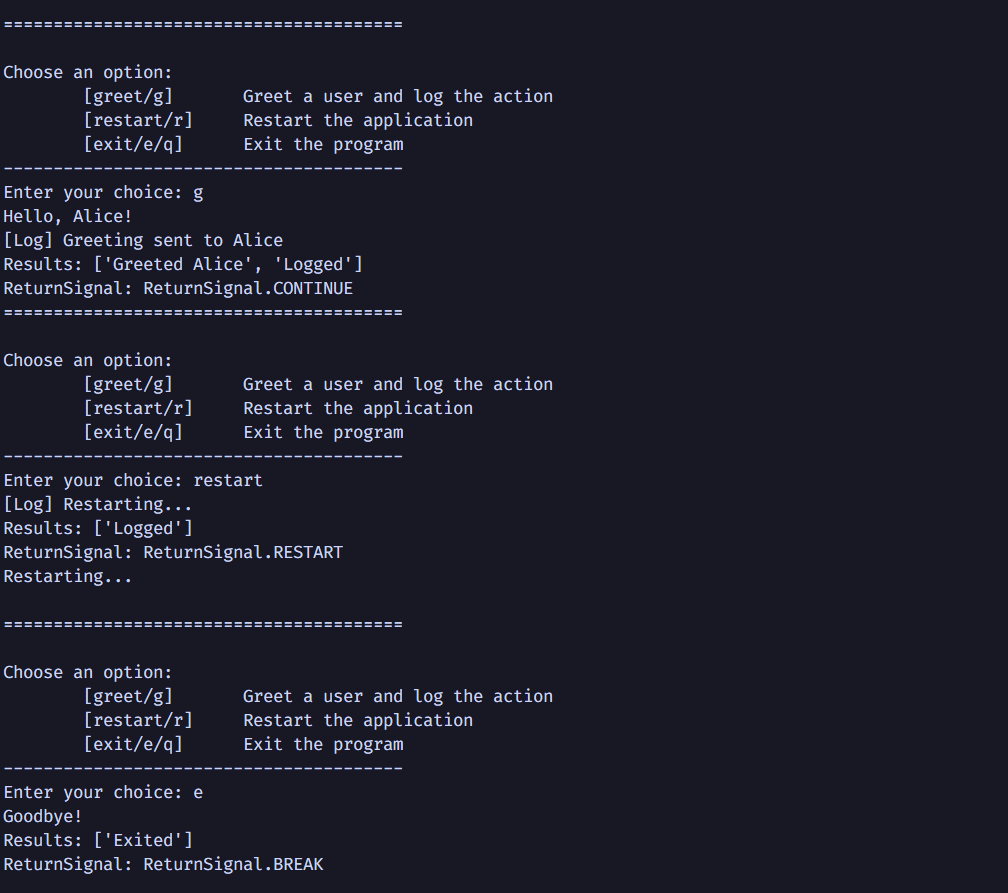
menu: list[MenuItem] = [
    MenuItem(
        keys=["greet", "g"],
        description="Greet a user and log the action",
        actions=[
            Action(function=greet, args=("Alice",)),
            Action(function=log, args=("Greeting sent to Alice",))
        ],
        return_signal=ReturnSignal.CONTINUE
    ),
    MenuItem(
        keys=["restart", "r"],
        description="Restart the application",
        actions=[
            Action(function=log, args=("Restarting...",))
        ],
        return_signal=ReturnSignal.RESTART
    ),
    MenuItem(
        keys=["exit", "e", "q"],
        description="Exit the program",
        actions=[
            Action(function=exit_program)
        ],
        return_signal=ReturnSignal.BREAK
    )
]

# Dispatcher loop
while True:
    results, signal = interactive_dispatcher("Choose an option:", menu)
    print(f"Results: {results}")
    print(f"ReturnSignal: {signal}")

    if signal == ReturnSignal.BREAK:
        break
    elif signal == ReturnSignal.RESTART:
        print("Restarting...\n")
Output
Purpose
Interactive Dispatcher abstracts away repetitive CLI input logic and allows developers to:
- Focus on logic instead of input parsing
- Use readable "signals" to handle control flow
- Easily integrate menus inside other CLI tools
Customization
You can fully customize menu prompts, signals, or plug the dispatcher into larger CLI apps.
With Callable Handlers
from interactive_dispatcher import InteractiveDispatcher

def greet():
    print("Hello!")

def farewell():
    print("Goodbye!")

dispatcher = InteractiveDispatcher(
    title="Greeting Menu",
    options={
        "Say Hello": greet,
        "Say Goodbye": farewell,
        "Exit": "exit"
    }
)

while True:
    signal = dispatcher.run()
    if signal == "exit":
        break
Return Signal Philosophy
Instead of tightly coupling option text and logic, each option can return a signal string which you can route freely in your application logic.
This approach gives you:
- Flexibility
- Testability
- Clean separation of concerns
Use Cases
Use cases are mostly limited to CLI driven interfaces where you want something light, easy and maintainable.
- Interactive CLI tools and wrappers
- Shell-like applications
- Configuration or wizard interfaces
- Automation Scripts
Advantages
- Simple interface with powerful control
- Works seamlessly in loops
- Easily composable with your business logic
- Minimal code makes it easy to test
Release history Release notifications | RSS feed


Download files
Download the file for your platform. If you're not sure which to choose, learn more about installing packages.
Source Distribution
Built Distribution
Filter files by name, interpreter, ABI, and platform.
If you're not sure about the file name format, learn more about wheel file names.
Copy a direct link to the current filters
File details
Details for the file interactive-dispatcher-1.0.2.tar.gz.
File metadata
- Download URL: interactive-dispatcher-1.0.2.tar.gz
- Upload date:
- Size: 13.2 kB
- Tags: Source
- Uploaded using Trusted Publishing? No
- Uploaded via: twine/6.1.0 CPython/3.11.6
File hashes
| Algorithm | Hash digest | |
|---|---|---|
| SHA256 |
6671d8fac494491b9ed335d7b375350d310f8d3f651597e0e618fc184a81abf1
|
|
| MD5 |
b91694eeabd15dea258a4273d21f97bc
|
|
| BLAKE2b-256 |
51fa283acf3693f9b9653f325d384ccc88f56694378ffa4ec0831a7d4213751c
|
File details
Details for the file interactive_dispatcher-1.0.2-py3-none-any.whl.
File metadata
- Download URL: interactive_dispatcher-1.0.2-py3-none-any.whl
- Upload date:
- Size: 12.7 kB
- Tags: Python 3
- Uploaded using Trusted Publishing? No
- Uploaded via: twine/6.1.0 CPython/3.11.6
File hashes
| Algorithm | Hash digest | |
|---|---|---|
| SHA256 |
40d839922a51adb5c420b731acb040e1bb1e20dd7cc332093eaa99d750e47116
|
|
| MD5 |
3debf136c83d68a988ba6d937ae2c5cf
|
|
| BLAKE2b-256 |
4322494717f9393136ed84423334a11048c08f6f1c477f1d8008f7c73a1403ef
|






