
Personal Investments Dashboard
Personal web application to manage a diverse investment portfolio in multiple currencies, including crypto and market indexes. Delivered as a Streamlit app. Includes also a module to hack your investments in Jupyter notebooks.

Dashboards reads your ledger and balances from an online Google Spreadsheet (see example), gets historical benchmarks and currency convertion tables from multiple configurabe internet sources, and created a rich explorable dashboard.
All or some or each of your investments are internally normalized into a single “fund” with number of shares and share value. From there, multiple visualizations are possible.
Install and Run
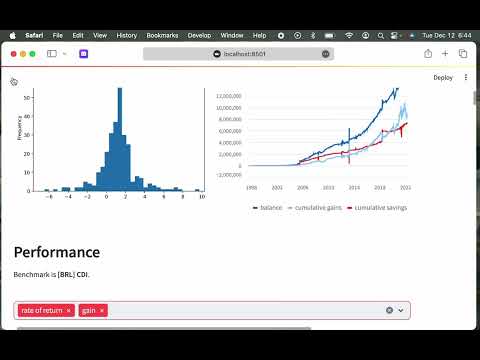
Runs on macOS, Windows, Linux or anywhere Python, Pandas and Streamlit can be installed. Here is a video I put in place that shows Investorzilla getting installed on a Mac and run for the first time with its example portfolio file.
Install
After getting Python 3 installed, install Investorzilla with pip:
pip install investorzilla --user
Configure
Create a folder and then build your investorzilla.yaml file with information about data sources, benchmarks and currencies.
Start with the examples from https://github.com/avibrazil/investorzilla/blob/main/config_examples/
Run
After installing your API keys (in case of using CryptoCompare data), run it like the following from the same folder containing investorzilla.yaml:
investorzilla
Access the dashboard on http://localhost:8501 (or remotelly if your browser is in a different machine)
Features
Virtual Funds
Create a unified virtual fund with only some of the investments found in your portfolio spreadsheet.

Your whole porfolio will be used if left balnk. Then you might exclude some to match the particular visualization you are trying to attain.
Currency and Benchmarks
You may track your investments using multiple currencies, inluding crypto. I have investments in USD and BRL. You can create virtual funds that mix different currencies, in this case you must select a currency under which you’ll view that (virtual) fund. Values from your spreadsheet will be converted to the target currency on a daily basis.
Also, you might compare your investment performance with market benchmarks as S&P 500, NASDAQ index etc. Just remember to use a benchmark that matches the current currency, otherwise comparisons won’t make sense.

Period Selector

If you have enough or high frequency data, you can divide time in more granular regular periods. Default is monthy view with an anual summary.
Graphs and Reports

Currently supports 4 graphs, from left to right, top to bottom:
- Virtual share value performance compared to a selected benchmark
- Periodic (monthly, weekly) gain, along with 12M moving average and moving median
- Frequency histogram of percent return rate per period (default is per month)
- Fund savings, balance and gains (which is pure balance minus savings)
There is also numerical reports showing:
- Performance
- Periodic (monthly) rate of return with an macro-period (yearly) accumulated value
- Same for selecte benchmark
- Excess return over benchmark
- Periodic and accumulated gain
- Wealth Evolution
- Current balance
- Balance over savings
- Cumulated gains
- Cumulated savings
- Movements on the periods, which is the sum of money added to and removed from virtual fund

Usage Tips
- Select a custom period on the slider
- View your main metrics on top of report
- To optimize screen usage, on the the top right menu, select Settings and then Wide mode
- Hide the left panel to gain even more screen real estate
- Use Refresh data buttons to update local cache with latest info from your porfolio spreadsheet, market data or both.
1 maintainer

Metadata
1 maintainer
Release files for investorzilla 3
For a detailed explanation of source distributions (sdists) and built distributions (wheels), please see the package formats documentation.
Source distribution (sdist)
| File | Size | Uploaded | Provenance | |
|---|---|---|---|---|
| investorzilla-3.tar.gz | 85.1 kB | Without provenance | Details |
Built distribution (wheel)
| File | Interpreter | ABI | Platform | Reset |
|---|---|---|---|---|
| investorzilla-3-py3-none-any.whl | Python 3 | none | any | Details |
Total release size: 164.1 kB
Release files / investorzilla-3.tar.gz
| Download URL | investorzilla-3.tar.gz |
|---|---|
| Size | 85.1 kB |
| Tags | Source |
|
SHA-256 checksum How to use checksums |
c60c660397b26bd28fcfd1062935b9c8a089a8922bda47df84decbad5589071d
|
|
BLAKE2b-256 checksum How to use checksums |
7379a7d5c223992e00c57ac63b5964e35379f7d76f376b1ccfd48a48dfe8ebf0
|
| Upload date | |
|
Uploaded using Trusted Publishing? What is trusted publishing? |
No |
| Uploaded via |
twine/4.0.2 CPython/3.11.7
|
Release files / investorzilla-3-py3-none-any.whl
| Download URL | investorzilla-3-py3-none-any.whl |
|---|---|
| Size | 79.0 kB |
| Tags | Python 3 |
|
SHA-256 checksum How to use checksums |
f2d42ac4d4fa43a604ba2a7d6566d73d47528acb61983af8ab4d44a107053637
|
|
BLAKE2b-256 checksum How to use checksums |
380bd30ca6fc4ef7694085cb3cb6bbf14c491cb8652ce309f7c9c573f2876d38
|
| Upload date | |
|
Uploaded using Trusted Publishing? What is trusted publishing? |
No |
| Uploaded via |
twine/4.0.2 CPython/3.11.7
|
Security for investorzilla 3
Provenance
Provenance describes where a file came from. On PyPI, provenance is shared via attestations, which provide a verifiable record of the build or publishing details. View details, limitations and caveats.
No provenance found
None of the files in this release were uploaded with provenance metadata.
A note on package security
PyPI is a repository for distributing packages, not a service for auditing them. While third-party security researchers and our staff do their best to detect and remove malicious packages, PyPI cannot guarantee the quality, security or suitability of any given package.














