
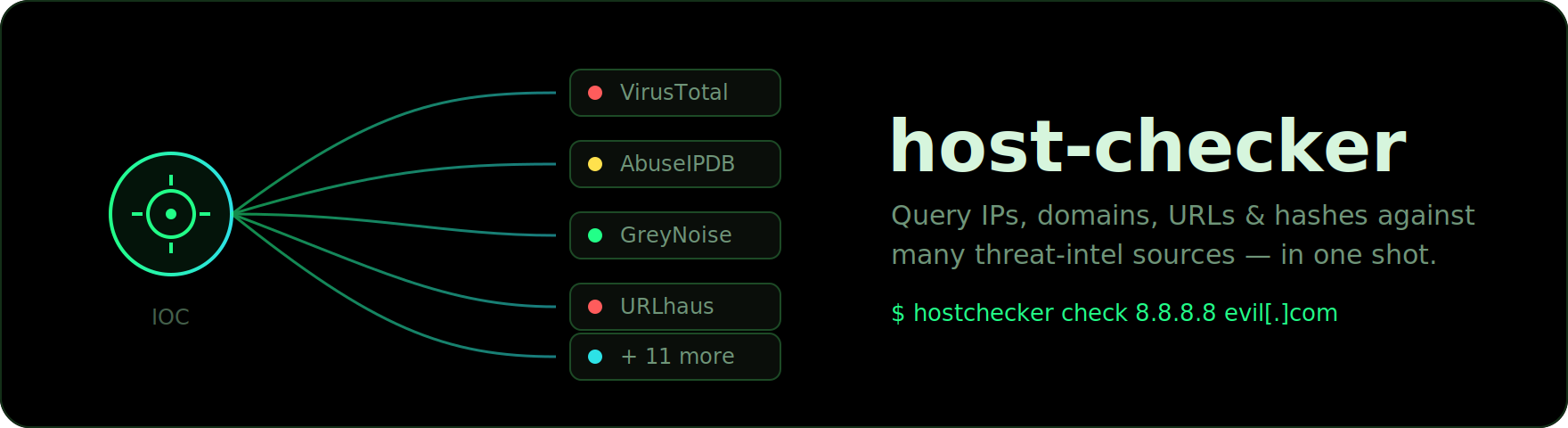




Query IPs, domains, URLs and file hashes against multiple threat-intel sources in one shot — from a CLI, a self-hosted HTTP API or an interactive web UI.
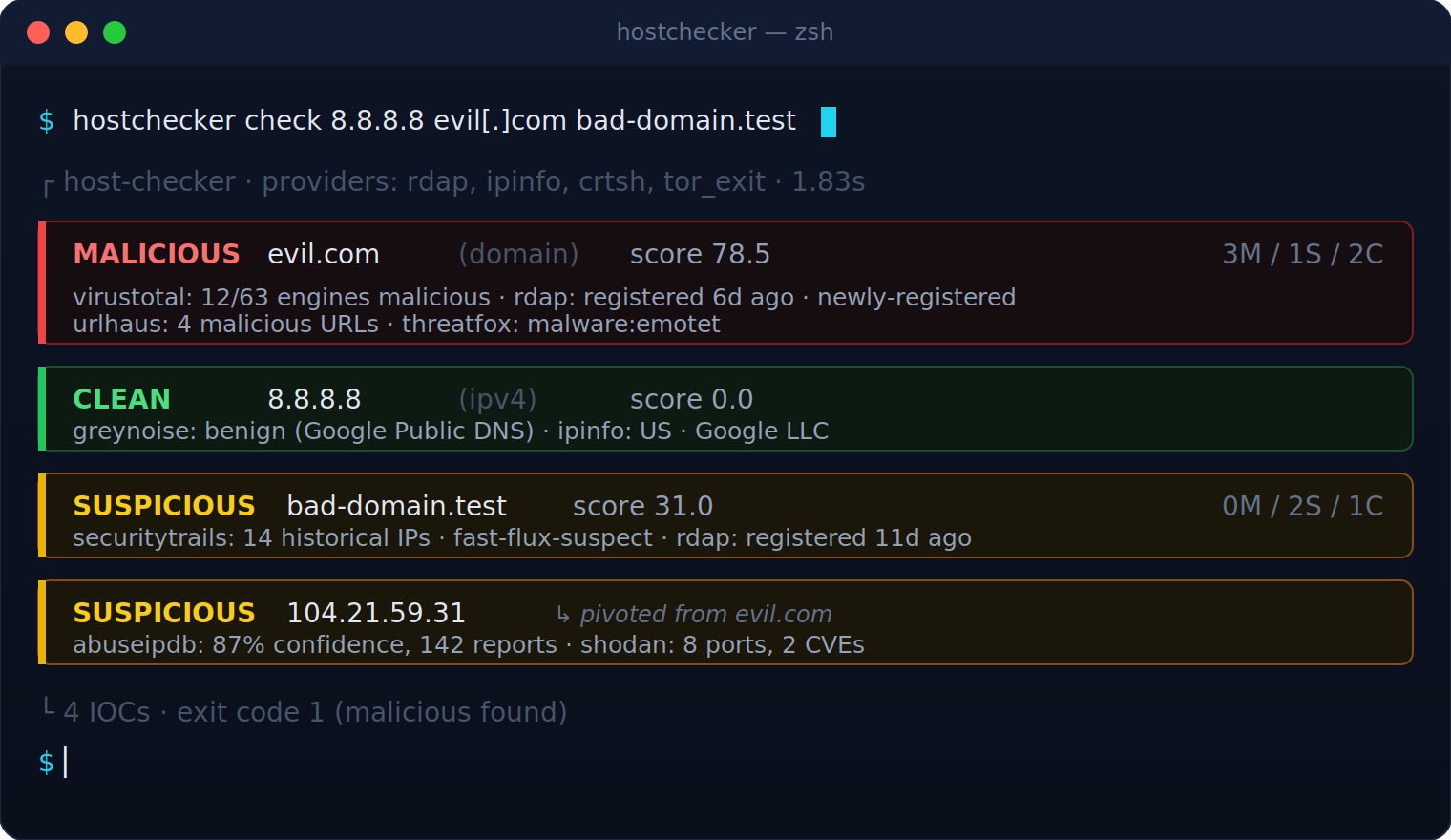
▶ See it animated on the project site
host-checker is an open-source, self-hostable IOC checker that exposes more IOC types than typical hosted tools, accepts bulk input, runs locally so your targets never leave your machine, ships as a single Python package with a CLI, a FastAPI server and a web UI, exports to MISP and STIX 2.1, and uses an extensible provider architecture so adding a new threat-intel source is a single file.
The web UI
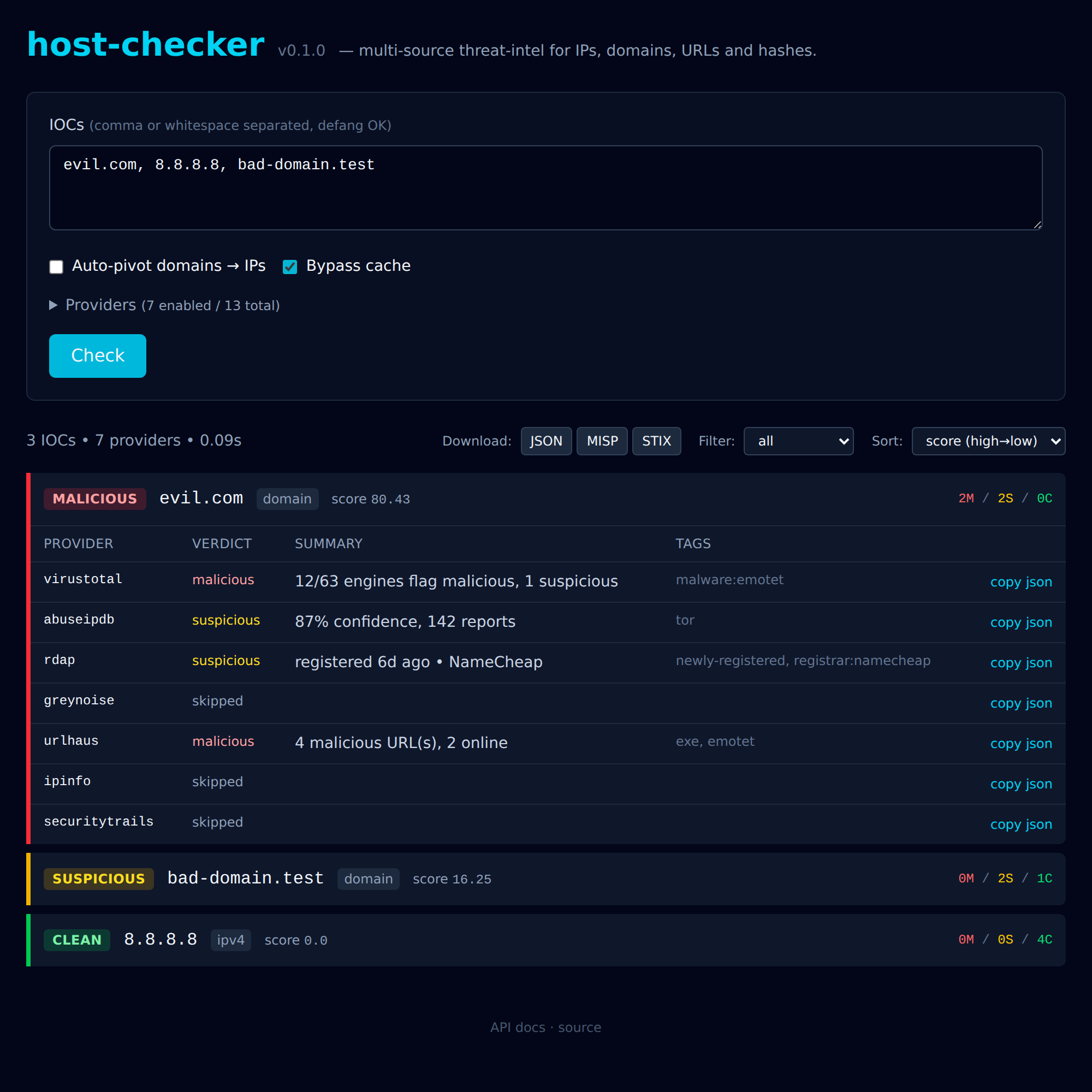
Filter by verdict, sort by score, expand any IOC to see the per-provider breakdown, copy a single provider's JSON, or download the whole result set as MISP or STIX — all without a build step.
Features
- Multiple IOC types: IPv4, IPv6, CIDR, domain, URL, MD5/SHA1/SHA256.
- Automatic refanging: paste
evil[.]com,hxxp://,[dot],(.)— all normalised. - BYOK with sensible defaults: keyless providers (Tor exit list, crt.sh, RDAP, IPinfo) work out of the box; the rest unlock when you add a key.
- Auto-pivot: a domain check automatically fans out to its resolved IPs, linked back via
pivoted_from. - Concurrent: async fan-out across providers and IOCs with a configurable concurrency cap.
- Three surfaces: CLI for scripts and CI, JSON HTTP API for automation, and an interactive web UI for live triage. All powered by the same engine.
- Aggregated, explainable score: weighted-mean malice rolled into a 0–100 number plus a clear per-provider breakdown.
- On-disk cache with configurable TTL.
- Local allowlist so internal targets never leave your machine.
- JSON output: pipe into
jq, MISP, TheHive, or your SIEM. - No vendor lock-in: every result includes the raw provider payload.
Supported providers
| Provider | IOCs | Requires key | Free tier |
|---|---|---|---|
tor_exit |
IPv4, IPv6 | no | unlimited |
crtsh |
domain | no | unlimited |
rdap |
domain, IPv4, IPv6 | no | unlimited |
urlhaus |
IPv4, domain, URL, MD5, SHA256 | yes (abuse.ch) | unlimited |
ipinfo |
IPv4, IPv6 | no (key bumps limits) | 50k/month |
virustotal |
IP, domain, URL, MD5, SHA1, SHA256 | yes | 500/day |
abuseipdb |
IPv4, IPv6 | yes | 1 000/day |
greynoise |
IPv4 | yes | 50/day community |
otx |
IP, domain, URL, MD5, SHA1, SHA256 | yes | unlimited |
threatfox |
IPv4, domain, URL, MD5, SHA1, SHA256 | yes (abuse.ch) | unlimited |
malwarebazaar |
MD5, SHA1, SHA256 | yes (abuse.ch) | unlimited |
shodan |
IPv4, IPv6 | yes | $5 one-time |
securitytrails |
domain, IPv4 | yes | 50/month |
pulsedive |
IPv4, IPv6, domain, URL | yes | free tier |
malshare |
MD5, SHA1, SHA256 | yes | free tier |
abuse.ch providers (urlhaus, threatfox, malwarebazaar) share a single Auth-Key — register once at https://auth.abuse.ch/ and put it in HC_ABUSECH_AUTH_KEY.
rdap is keyless and gives you domain registration age (newly-registered domains are flagged suspicious) plus registrar and IP network ownership — a great default-on signal.
Adding more sources is a single file — see Adding a provider.
Install
pip install ioc-hostchecker
hostchecker check 8.8.8.8 evil[.]com
hostchecker serve   # → web UI on http://localhost:8000/
Or from source, for development:
git clone https://github.com/kukitzz/host-checker.git
cd host-checker
pip install -e ".[dev]"
cp .env.example .env  # then fill in the keys you have
Python 3.11+ required.
The PyPI distribution is published as
ioc-hostchecker(the plainhostcheckername was already taken). The import package and the CLI command are both stillhostchecker.
Docker
# Run the web UI / API:
docker run --rm -p 8000:8000 \
  --env-file .env \
  -v "$PWD/.hostchecker-cache:/var/cache/hostchecker" \
  ghcr.io/kukitzz/host-checker:latest
# → open http://localhost:8000/

# Or run the CLI inside the container:
docker run --rm --env-file .env ghcr.io/kukitzz/host-checker:latest \
  hostchecker check 8.8.8.8 evil[.]com
CLI usage
# Inline IOCs (comma- or space-separated; defanged forms accepted)
hostchecker check 8.8.8.8 evil[.]com hxxps://malicious[.]example/path

# From a file (one per line or CSV)
hostchecker check --input iocs.txt

# Machine-readable JSON
hostchecker check 1.1.1.1 --format json | jq .

# Export to threat-intel exchange formats
hostchecker check 1.2.3.4 evil.com --format misp > event.json     # MISP event
hostchecker check 1.2.3.4 evil.com --format stix > bundle.json   # STIX 2.1 bundle

# Only run specific providers
hostchecker check evil.com -p virustotal -p urlhaus

# List providers and their enablement status
hostchecker providers

# Probe each provider live with your configured keys — catches expired
# keys, new auth requirements and upstream changes
hostchecker doctor

# Start the HTTP API
hostchecker serve --host 0.0.0.0 --port 8000
Exit code is non-zero when any IOC's aggregate verdict is malicious — useful for CI gates.
HTTP API
hostchecker serve &

curl -s http://localhost:8000/providers | jq .

curl -s -X POST http://localhost:8000/check \
     -H 'content-type: application/json' \
     -d '{"targets": ["8.8.8.8", "evil[.]com"]}' | jq .
Swagger UI lives at /docs, ReDoc at /redoc.
Web UI
Open http://localhost:8000/ after hostchecker serve. The page gives you:
- A textarea (with
localStoragepersistence — your last query survives reloads). - Toggles for auto-pivot and bypass-cache.
- A recent-queries panel: your last 20 checks, each showing the IOCs and a verdict summary (e.g.
2M 1C), one click to re-run. Stored in your browser'slocalStorageonly — never on the server. - A collapsible panel listing every provider and whether it's currently enabled (greyed out when no key is configured).
- Results rendered as colour-coded cards by verdict (red / yellow / green / grey), with per-IOC counts, the aggregate score, and any
pivoted fromannotation. - Each card expands to show the per-provider breakdown with a one-click copy json button on every row.
- Client-side filter (
malicious / suspicious / clean / unknown / all) and sort (score / verdict / IOC). - A compare toggle (when you check 2+ IOCs) that flips the results into a side-by-side matrix — IOCs as columns, providers as rows — so you can see at a glance where the sources disagree.
Tailwind, htmx and Alpine.js are loaded from CDN — no build step. For air-gapped deployments you can vendor the three files into a static/ directory and edit templates/base.html to point at the local copies; the rest of the app needs no changes.
Configuration
All settings live in .env (see .env.example). Keys are read once at startup. Beyond credentials:
| Variable | Default | Meaning |
|---|---|---|
HC_REQUEST_TIMEOUT |
15.0 |
Per-request HTTP timeout (seconds). |
HC_MAX_CONCURRENCY |
10 |
Max in-flight provider queries. |
HC_MAX_RETRIES |
3 |
Retries on 429/502/503/504 & net errors. |
HC_RETRY_BACKOFF_BASE |
0.5 |
Base seconds for backoff (full jitter). |
HC_CACHE_DIR |
.hostchecker-cache |
Local cache directory. |
HC_CACHE_TTL |
3600 |
Cache TTL (seconds, 0 disables). |
HC_CACHE_BACKEND |
file |
file or sqlite. |
HC_AUTO_PIVOT |
true |
Resolve domain IOCs to IPs and check. |
HC_PIVOT_LIMIT |
5 |
Max IPs to pivot to per domain. |
HC_ALLOWLIST_FILE |
(none) |
Path to a plain-text allowlist file. |
Auto-pivot
When you check a domain, host-checker resolves it via DNS and also checks each of the resulting IPs against every supported provider, with a pivoted_from annotation linking them to the originating domain. This catches the common case where a domain looks clean on VirusTotal but its IPs are flagged by AbuseIPDB and Shodan reports a CVE.
MALICIOUS • score 78.5 • evil.com (domain)
  ↳ vt: 12/63 engines flag malicious  …
SUSPICIOUS • score 42.0 • 1.2.3.4 (ipv4) • pivoted from evil.com
  ↳ abuseipdb: 87% confidence, 142 reports
  ↳ shodan: 8 open ports, 2 CVEs
Disable per-run with --no-pivot, globally with HC_AUTO_PIVOT=false. Cap the fan-out with HC_PIVOT_LIMIT (default 5). Pivoted IPs respect the allowlist and the cache exactly like explicit IOCs.
Paranoid mode (OPSEC)
When you're investigating live attacker infrastructure, the last thing you want is for your own tooling to touch the target — a DNS resolution, a port scan, a fetch of an attacker-controlled URL — and tip off the adversary that they're being looked at. Paranoid mode enforces a strict passive-only posture:
hostchecker check evil.com 1.2.3.4 --paranoid
In paranoid mode host-checker:
- queries only passive providers — sources that return intel they already hold (their database, logs, prior observations). Any provider that would touch the IOC or make a third party touch it is skipped entirely;
- never resolves the IOC — auto-pivot is forced off, so no DNS leaves your machine;
- prints a notice so the posture is explicit in your run log.
All 15 sources that ship today are passive (VirusTotal/AbuseIPDB/GreyNoise/OTX/etc. read their stored reports; they never submit or scan the IOC for you). The classification lives in each provider (passive = True), so if a future source performs an active lookup it's automatically excluded from paranoid runs. Enable globally with HC_PARANOID=true, or per-run with --paranoid (CLI), the 🛡 Paranoid toggle (web UI), or "paranoid": true (JSON API).
This is the spirit of passive-first triage tools like CCN-CERT's Reyes: correlate against intel that's already been collected, without ever interacting with the target yourself.
CISA KEV cross-reference
When a provider reports that a host runs software with a known CVE (Shodan does this), host-checker cross-references those CVEs against CISA's Known Exploited Vulnerabilities catalog — the authoritative list of vulnerabilities being exploited in the wild right now. The difference matters: "this host has CVE-X" is noise; "this host has CVE-X, which is actively exploited and tied to ransomware" is an alert.
A KEV hit adds a high-signal cisa_kev finding to the report (verdict malicious), with kev: and kev-ransomware: tags per matched CVE. The catalog is a free, public, keyless JSON feed; it's downloaded once and cached on disk (HC_KEV_CACHE_TTL, default 1 day). Disable with HC_KEV_ENRICH=false. KEV enrichment is skipped in paranoid mode (it would fetch from the network).
Caching
Provider results are cached on disk keyed by (provider, ioc_type, ioc_value). Entries older than HC_CACHE_TTL are ignored, and errors / skipped / rate-limited results are never cached. Two backends:
file(default) — one JSON file per entry. Zero setup, human-inspectable.sqlite— a single SQLite database. Use it once you're checking thousands of IOCs: indexed lookups and a one-statement purge instead of a directory full of files. Enable withHC_CACHE_BACKEND=sqlite.
Inspect and maintain the cache:
hostchecker cache status   # backend, dir, TTL, entry count
hostchecker cache purge    # delete only expired entries
hostchecker cache clear    # delete everything
Bypass it for a single run with --no-cache, or disable globally with HC_CACHE_TTL=0.
Note: switching backends doesn't migrate existing entries — the cache is regenerable, so just let it repopulate (or
hostchecker cache clearfirst).
Allowlist
Create a plain text file with one IP, CIDR or domain per line. Lines starting with # are comments. Domain entries match the listed domain and all its subdomains (example.com allowlists foo.bar.example.com).
# corp ranges
10.0.0.0/8
192.168.0.0/16
# our infra
example.com
mycompany.local
Point at it via the env var (HC_ALLOWLIST_FILE=./allowlist.txt) or on the command line (--allowlist ./allowlist.txt). Matching IOCs short-circuit as CLEAN and never reach any upstream provider — useful both for noise reduction and for keeping internal targets off third-party servers.
Hashes are intentionally never allowlist-able: a hash identifies a file, not infrastructure, and silencing a hash by accident is worse than a noisy alert.
How the score works
Each provider returns a verdict in {clean, suspicious, malicious, unknown, error, skipped}. The aggregator:
- Drops
errorandskippedfrom the calculation. - Maps verdicts to weights (
clean=0,suspicious=1,malicious=2). - Multiplies by a per-provider weight (defaults in
core/aggregator.py:DEFAULT_WEIGHTS). - Rescales to
[0, 100].
The thresholds for the final aggregate_verdict are intentionally simple — read aggregate() and tune for your environment.
Adding a provider
Create src/hostchecker/providers/your_source.py:
from ..config import settings
from ..core.ioc import IOC, IOCType
from ..core.models import ProviderResult, Verdict
from ..core.registry import register
from .base import Provider

@register
class YourSourceProvider(Provider):
    name = "your_source"
    supported_types = {IOCType.IPV4, IOCType.DOMAIN}
    requires_key = True

    def api_key(self) -> str | None:
        return settings.your_source_api_key

    async def query(self, ioc, client):
        resp = await client.get("https://example.com/api", params={"q": ioc.value})
        # … map response to a ProviderResult …
        return ProviderResult(provider=self.name, verdict=Verdict.CLEAN, summary="…")
Then:
- Add the import to
providers/__init__.py. - Add
your_source_api_key: str | None = Nonetoconfig.py:Settings. - Add the env var to
.env.example. - Optionally tune its weight in
aggregator.py:DEFAULT_WEIGHTS.
That's it — the registry picks it up automatically.
Exports
Three machine-readable formats are produced from the same engine:
| Format | What it is | Where |
|---|---|---|
json |
The native CheckResponse schema, raw provider payloads included. |
--format json · POST /check · UI button |
misp |
A MISP event JSON, ready for POST /events/add against a MISP instance. |
--format misp · POST /export/misp · UI button |
stix |
A STIX 2.1 bundle of indicator SDOs, with deterministic UUIDs. |
--format stix · POST /export/stix · UI button |
csv |
One row per IOC (verdict, score, counts, who flagged it) — for analysts and spreadsheets. Add --defang to neutralise IOCs (evil[.]com) so the file is safe to open. |
--format csv · POST /export/csv · UI button |
# Push a check result straight into a MISP instance:
hostchecker check 1.2.3.4 evil.com --format misp \
  | curl -s -X POST https://misp.example.org/events/add \
         -H "Authorization: $MISP_API_KEY" \
         -H "Accept: application/json" \
         -H "Content-Type: application/json" -d @-
In the web UI a Download row above the results lets you pull the same three formats with one click — useful for handing a triage to an analyst working in MISP / TheHive / OpenCTI.
Deploying for a team
The API and web UI ship with no authentication — perfect locally, not for a shared server. The deploy/ directory has a Traefik-based docker-compose that puts HTTPS (Let's Encrypt) and HTTP basic-auth in front of the app, with the app container never exposing a port directly:
cd deploy
cp .env.example .env       # set HC_DOMAIN, ACME_EMAIL, BASIC_AUTH
cp ../.env.example app.env # set your provider API keys
docker compose up -d --build
There's also a docker-compose.local.yml to test the proxy + auth flow on localhost:8080 without a domain or TLS. For team access, docker-compose.sso.yml swaps basic-auth for OIDC single sign-on (Google, GitHub, Authentik, Keycloak, Azure AD, …) via oauth2-proxy. Full instructions — credential generation, SSO setup, and an Authelia alternative — are in deploy/README.md and deploy/SSO.md.
Roadmap
- AbuseIPDB v3 when available; VirusTotal relationship pivoting.
- Censys provider (v2 search API).
- More export targets (OpenCTI, plain CSV).
License
MIT — see LICENSE.
Disclaimer
This tool aggregates third-party data. Verdicts are best-effort and depend on the underlying providers. Always corroborate before acting on a single source.
1 maintainer

Metadata
1 maintainer
Release files for ioc-hostchecker 0.1.5
For a detailed explanation of source distributions (sdists) and built distributions (wheels), please see the package formats documentation.
Source distribution (sdist)
| File | Size | Uploaded | Provenance | Actions |
|---|---|---|---|---|
| ioc_hostchecker-0.1.5.tar.gz | 572.3 kB | With provenance | Details for ioc_hostchecker-0.1.5.tar.gz |
Built distribution (wheel)
| File | Interpreter | ABI | Platform | Actions Reset |
|---|---|---|---|---|
| ioc_hostchecker-0.1.5-py3-none-any.whl | Python 3 | none | any | Details for ioc_hostchecker-0.1.5-py3-none-any.whl |
Total release size: 648.5 kB
Release files / ioc_hostchecker-0.1.5.tar.gz
| Download URL | ioc_hostchecker-0.1.5.tar.gz |
|---|---|
| Size | 572.3 kB |
| Tags | Source |
|
SHA-256 checksum How to use checksums |
bc140bb5b05ea44213d456447523b20fd4c3048f3ce2c1680f6bc15b3c4219fa
|
|
BLAKE2b-256 checksum How to use checksums |
cc58d7b5974426e07a1f885819dc902ce377fd87fffe91d7856989d8858d9cc1
|
| Upload date | |
|
Uploaded using Trusted Publishing? What is trusted publishing? |
Yes |
| Uploaded via |
twine/6.1.0 CPython/3.13.12
|
Provenance
Provenance describes where a file came from. On PyPI, provenance is shared via attestations, which provide a verifiable record of the build or publishing details. View details, limitations and caveats.


PyPI Publish Attestation
PyPI verified that this artifact, at this checksum, originated from the publisher listed below.
Signed by GitHub Actions, verified by PyPI on Jun 4, 2026.
Transparency logRelease files / ioc_hostchecker-0.1.5-py3-none-any.whl
| Download URL | ioc_hostchecker-0.1.5-py3-none-any.whl |
|---|---|
| Size | 76.2 kB |
| Tags | Python 3 |
|
SHA-256 checksum How to use checksums |
0d1f155d0061465ea081fcbe80ab8443e41962898bd7dac6605a8a93d4afad8b
|
|
BLAKE2b-256 checksum How to use checksums |
d2c268eb544fa043f62eff01e5d1dece59a073b55191ce21a46a3d5465b301df
|
| Upload date | |
|
Uploaded using Trusted Publishing? What is trusted publishing? |
Yes |
| Uploaded via |
twine/6.1.0 CPython/3.13.12
|
Provenance
Provenance describes where a file came from. On PyPI, provenance is shared via attestations, which provide a verifiable record of the build or publishing details. View details, limitations and caveats.
PyPI Publish Attestation
PyPI verified that this artifact, at this checksum, originated from the publisher listed below.
Signed by GitHub Actions, verified by PyPI on Jun 4, 2026.
Transparency logSecurity for ioc-hostchecker 0.1.5
Provenance
Provenance describes where a file came from. On PyPI, provenance is shared via attestations, which provide a verifiable record of the build or publishing details. View details, limitations and caveats.
Full provenance
Both files in this release have been uploaded with provenance metadata.
Attestation for ioc_hostchecker-0.1.5.tar.gz
PyPI Publish Attestation
PyPI verified that this artifact, at this checksum, originated from the publisher listed below.
Signed by GitHub Actions, verified by PyPI on Jun 4, 2026.
Transparency logA note on package security
PyPI is a repository for distributing packages, not a service for auditing them. While third-party security researchers and our staff do their best to detect and remove malicious packages, PyPI cannot guarantee the quality, security or suitability of any given package.
To learn more about protecting yourself from malicious actors, visit our package security documentation.














