
Query IPs, domains, URLs and file hashes against multiple threat intel sources in one shot.
Verified details
These details have been verified by PyPIProject links
GitHub Statistics
Maintainers

Project description
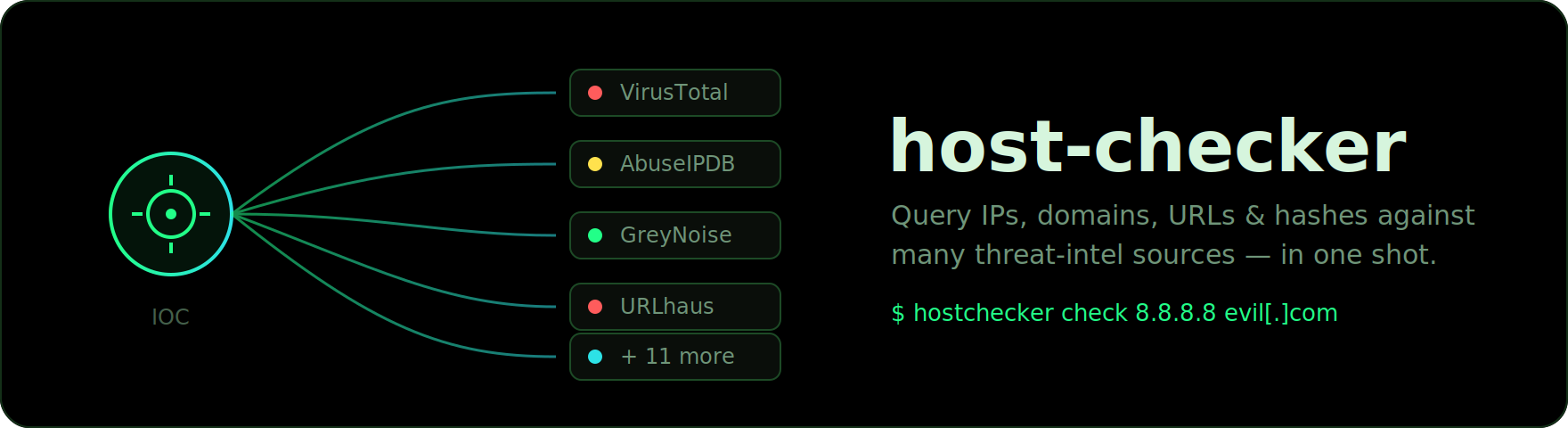




Query IPs, domains, URLs and file hashes against multiple threat-intel sources in one shot — from a CLI, a self-hosted HTTP API or an interactive web UI.
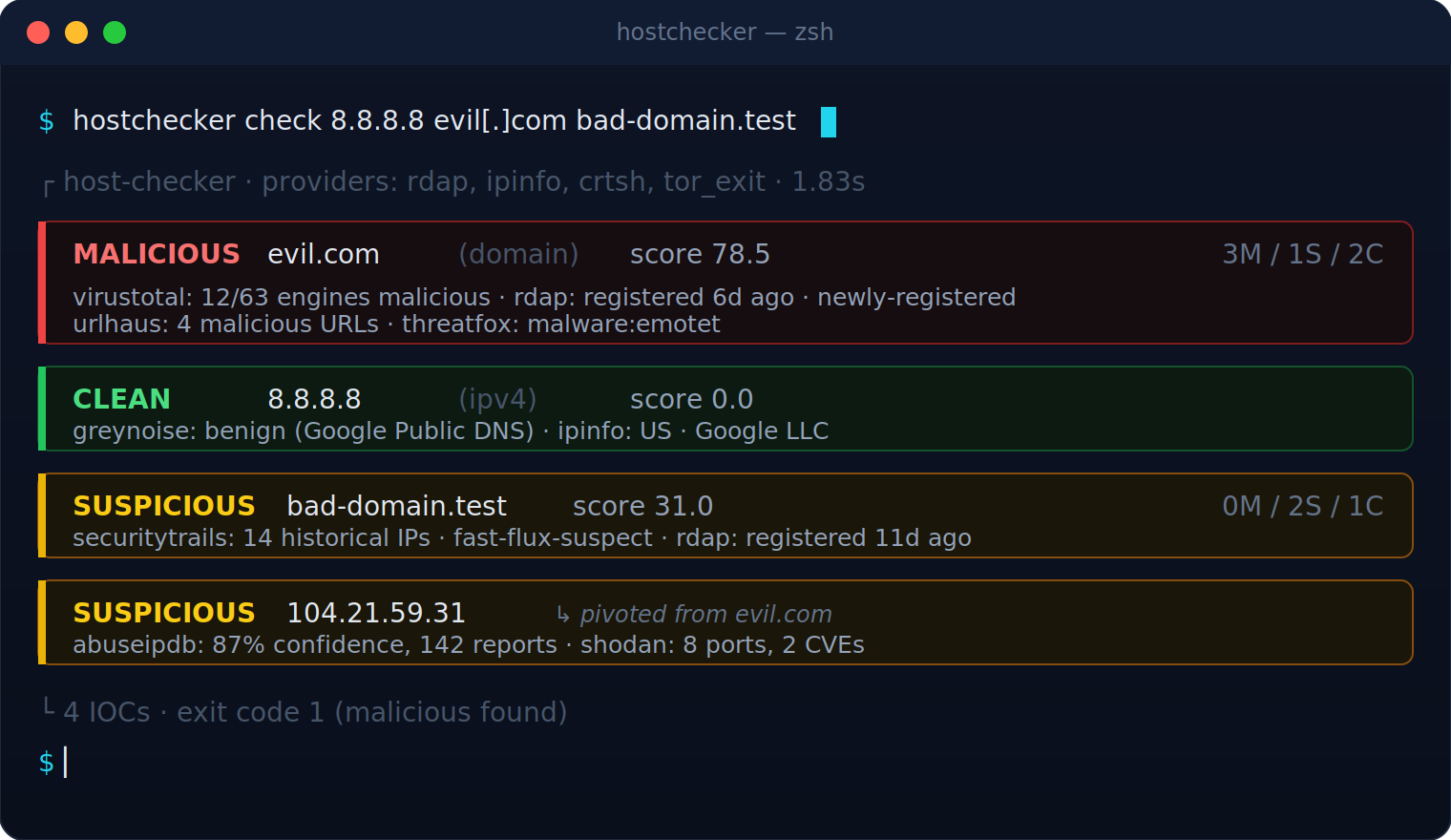
▶ See it animated on the project site
host-checker is an open-source, self-hostable IOC checker that exposes more IOC types than typical hosted tools, accepts bulk input, runs locally so your targets never leave your machine, ships as a single Python package with a CLI, a FastAPI server and a web UI, exports to MISP and STIX 2.1, and uses an extensible provider architecture so adding a new threat-intel source is a single file.
The web UI
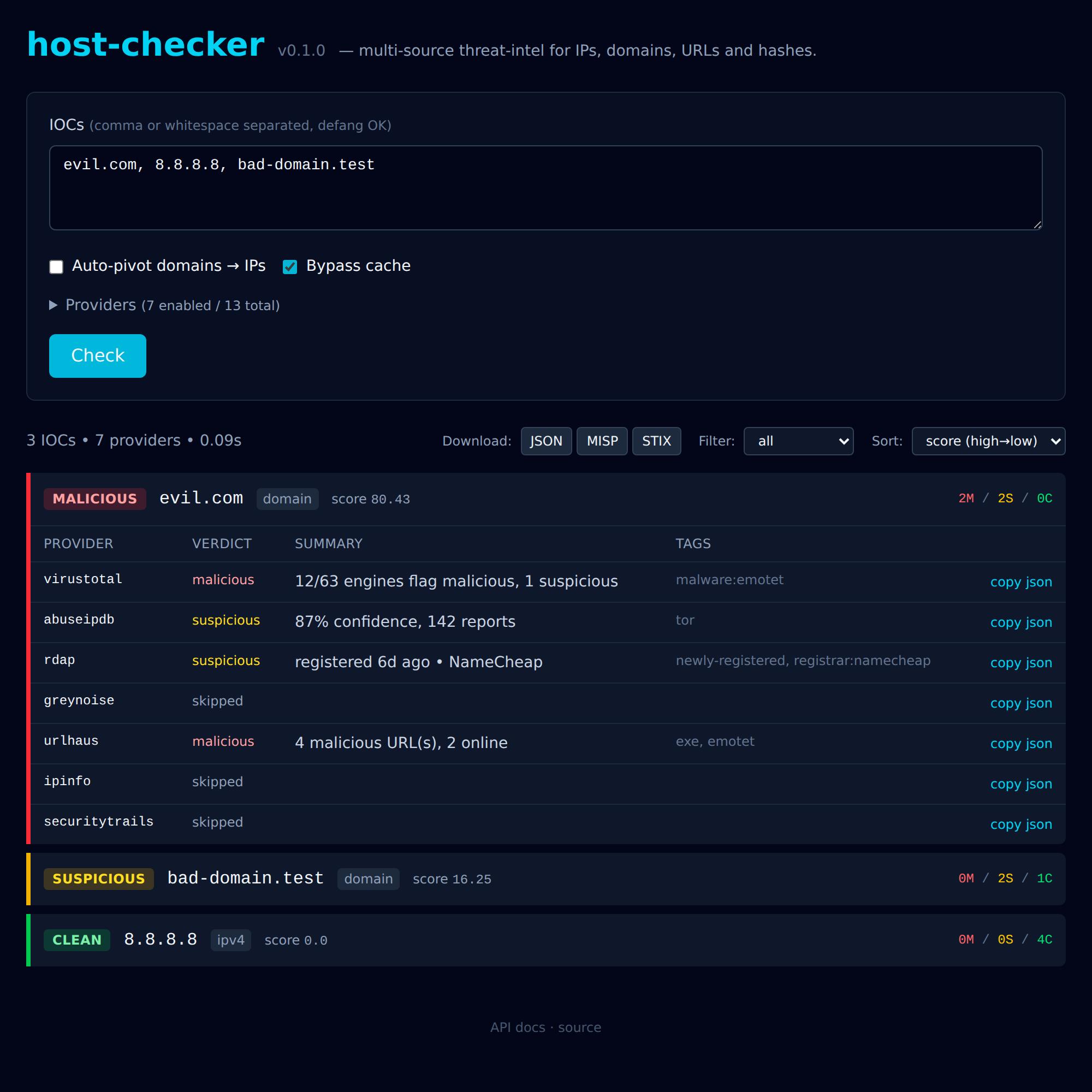
Filter by verdict, sort by score, expand any IOC to see the per-provider breakdown, copy a single provider's JSON, or download the whole result set as MISP or STIX — all without a build step.
Features
- Multiple IOC types: IPv4, IPv6, CIDR, domain, URL, MD5/SHA1/SHA256.
- Automatic refanging: paste
evil[.]com,hxxp://,[dot],(.)— all normalised. - BYOK with sensible defaults: keyless providers (Tor exit list, crt.sh, RDAP, IPinfo) work out of the box; the rest unlock when you add a key.
- Auto-pivot: a domain check automatically fans out to its resolved IPs, linked back via
pivoted_from. - Concurrent: async fan-out across providers and IOCs with a configurable concurrency cap.
- Three surfaces: CLI for scripts and CI, JSON HTTP API for automation, and an interactive web UI for live triage. All powered by the same engine.
- Aggregated, explainable score: weighted-mean malice rolled into a 0–100 number plus a clear per-provider breakdown.
- On-disk cache with configurable TTL.
- Local allowlist so internal targets never leave your machine.
- JSON output: pipe into
jq, MISP, TheHive, or your SIEM. - No vendor lock-in: every result includes the raw provider payload.
Supported providers
| Provider | IOCs | Requires key | Free tier |
|---|---|---|---|
tor_exit |
IPv4, IPv6 | no | unlimited |
crtsh |
domain | no | unlimited |
rdap |
domain, IPv4, IPv6 | no | unlimited |
urlhaus |
IPv4, domain, URL, MD5, SHA256 | yes (abuse.ch) | unlimited |
ipinfo |
IPv4, IPv6 | no (key bumps limits) | 50k/month |
virustotal |
IP, domain, URL, MD5, SHA1, SHA256 | yes | 500/day |
abuseipdb |
IPv4, IPv6 | yes | 1 000/day |
greynoise |
IPv4 | yes | 50/day community |
otx |
IP, domain, URL, MD5, SHA1, SHA256 | yes | unlimited |
threatfox |
IPv4, domain, URL, MD5, SHA1, SHA256 | yes (abuse.ch) | unlimited |
malwarebazaar |
MD5, SHA1, SHA256 | yes (abuse.ch) | unlimited |
shodan |
IPv4, IPv6 | yes | $5 one-time |
securitytrails |
domain, IPv4 | yes | 50/month |
pulsedive |
IPv4, IPv6, domain, URL | yes | free tier |
malshare |
MD5, SHA1, SHA256 | yes | free tier |
abuse.ch providers (urlhaus, threatfox, malwarebazaar) share a single Auth-Key — register once at https://auth.abuse.ch/ and put it in HC_ABUSECH_AUTH_KEY.
rdap is keyless and gives you domain registration age (newly-registered domains are flagged suspicious) plus registrar and IP network ownership — a great default-on signal.
Adding more sources is a single file — see Adding a provider.
Install
pip install ioc-hostchecker
hostchecker check 8.8.8.8 evil[.]com
hostchecker serve   # → web UI on http://localhost:8000/
Or from source, for development:
git clone https://github.com/kukitzz/host-checker.git
cd host-checker
pip install -e ".[dev]"
cp .env.example .env  # then fill in the keys you have
Python 3.11+ required.
The PyPI distribution is published as
ioc-hostchecker(the plainhostcheckername was already taken). The import package and the CLI command are both stillhostchecker.
Docker
# Run the web UI / API:
docker run --rm -p 8000:8000 \
  --env-file .env \
  -v "$PWD/.hostchecker-cache:/var/cache/hostchecker" \
  ghcr.io/kukitzz/host-checker:latest
# → open http://localhost:8000/

# Or run the CLI inside the container:
docker run --rm --env-file .env ghcr.io/kukitzz/host-checker:latest \
  hostchecker check 8.8.8.8 evil[.]com
CLI usage
# Inline IOCs (comma- or space-separated; defanged forms accepted)
hostchecker check 8.8.8.8 evil[.]com hxxps://malicious[.]example/path

# From a file (one per line or CSV)
hostchecker check --input iocs.txt

# Machine-readable JSON
hostchecker check 1.1.1.1 --format json | jq .

# Export to threat-intel exchange formats
hostchecker check 1.2.3.4 evil.com --format misp > event.json     # MISP event
hostchecker check 1.2.3.4 evil.com --format stix > bundle.json   # STIX 2.1 bundle

# Only run specific providers
hostchecker check evil.com -p virustotal -p urlhaus

# List providers and their enablement status
hostchecker providers

# Probe each provider live with your configured keys — catches expired
# keys, new auth requirements and upstream changes
hostchecker doctor

# Start the HTTP API
hostchecker serve --host 0.0.0.0 --port 8000
Exit code is non-zero when any IOC's aggregate verdict is malicious — useful for CI gates.
HTTP API
hostchecker serve &

curl -s http://localhost:8000/providers | jq .

curl -s -X POST http://localhost:8000/check \
     -H 'content-type: application/json' \
     -d '{"targets": ["8.8.8.8", "evil[.]com"]}' | jq .
Swagger UI lives at /docs, ReDoc at /redoc.
Web UI
Open http://localhost:8000/ after hostchecker serve. The page gives you:
- A textarea (with
localStoragepersistence — your last query survives reloads). - Toggles for auto-pivot and bypass-cache.
- A recent-queries panel: your last 20 checks, each showing the IOCs and a verdict summary (e.g.
2M 1C), one click to re-run. Stored in your browser'slocalStorageonly — never on the server. - A collapsible panel listing every provider and whether it's currently enabled (greyed out when no key is configured).
- Results rendered as colour-coded cards by verdict (red / yellow / green / grey), with per-IOC counts, the aggregate score, and any
pivoted fromannotation. - Each card expands to show the per-provider breakdown with a one-click copy json button on every row.
- Client-side filter (
malicious / suspicious / clean / unknown / all) and sort (score / verdict / IOC). - A compare toggle (when you check 2+ IOCs) that flips the results into a side-by-side matrix — IOCs as columns, providers as rows — so you can see at a glance where the sources disagree.
Tailwind, htmx and Alpine.js are loaded from CDN — no build step. For air-gapped deployments you can vendor the three files into a static/ directory and edit templates/base.html to point at the local copies; the rest of the app needs no changes.
Configuration
All settings live in .env (see .env.example). Keys are read once at startup. Beyond credentials:
| Variable | Default | Meaning |
|---|---|---|
HC_REQUEST_TIMEOUT |
15.0 |
Per-request HTTP timeout (seconds). |
HC_MAX_CONCURRENCY |
10 |
Max in-flight provider queries. |
HC_MAX_RETRIES |
3 |
Retries on 429/502/503/504 & net errors. |
HC_RETRY_BACKOFF_BASE |
0.5 |
Base seconds for backoff (full jitter). |
HC_CACHE_DIR |
.hostchecker-cache |
Local cache directory. |
HC_CACHE_TTL |
3600 |
Cache TTL (seconds, 0 disables). |
HC_CACHE_BACKEND |
file |
file or sqlite. |
HC_AUTO_PIVOT |
true |
Resolve domain IOCs to IPs and check. |
HC_PIVOT_LIMIT |
5 |
Max IPs to pivot to per domain. |
HC_ALLOWLIST_FILE |
(none) |
Path to a plain-text allowlist file. |
Auto-pivot
When you check a domain, host-checker resolves it via DNS and also checks each of the resulting IPs against every supported provider, with a pivoted_from annotation linking them to the originating domain. This catches the common case where a domain looks clean on VirusTotal but its IPs are flagged by AbuseIPDB and Shodan reports a CVE.
MALICIOUS • score 78.5 • evil.com (domain)
  ↳ vt: 12/63 engines flag malicious  …
SUSPICIOUS • score 42.0 • 1.2.3.4 (ipv4) • pivoted from evil.com
  ↳ abuseipdb: 87% confidence, 142 reports
  ↳ shodan: 8 open ports, 2 CVEs
Disable per-run with --no-pivot, globally with HC_AUTO_PIVOT=false. Cap the fan-out with HC_PIVOT_LIMIT (default 5). Pivoted IPs respect the allowlist and the cache exactly like explicit IOCs.
Caching
Provider results are cached on disk keyed by (provider, ioc_type, ioc_value). Entries older than HC_CACHE_TTL are ignored, and errors / skipped / rate-limited results are never cached. Two backends:
file(default) — one JSON file per entry. Zero setup, human-inspectable.sqlite— a single SQLite database. Use it once you're checking thousands of IOCs: indexed lookups and a one-statement purge instead of a directory full of files. Enable withHC_CACHE_BACKEND=sqlite.
Inspect and maintain the cache:
hostchecker cache status   # backend, dir, TTL, entry count
hostchecker cache purge    # delete only expired entries
hostchecker cache clear    # delete everything
Bypass it for a single run with --no-cache, or disable globally with HC_CACHE_TTL=0.
Note: switching backends doesn't migrate existing entries — the cache is regenerable, so just let it repopulate (or
hostchecker cache clearfirst).
Allowlist
Create a plain text file with one IP, CIDR or domain per line. Lines starting with # are comments. Domain entries match the listed domain and all its subdomains (example.com allowlists foo.bar.example.com).
# corp ranges
10.0.0.0/8
192.168.0.0/16
# our infra
example.com
mycompany.local
Point at it via the env var (HC_ALLOWLIST_FILE=./allowlist.txt) or on the command line (--allowlist ./allowlist.txt). Matching IOCs short-circuit as CLEAN and never reach any upstream provider — useful both for noise reduction and for keeping internal targets off third-party servers.
Hashes are intentionally never allowlist-able: a hash identifies a file, not infrastructure, and silencing a hash by accident is worse than a noisy alert.
How the score works
Each provider returns a verdict in {clean, suspicious, malicious, unknown, error, skipped}. The aggregator:
- Drops
errorandskippedfrom the calculation. - Maps verdicts to weights (
clean=0,suspicious=1,malicious=2). - Multiplies by a per-provider weight (defaults in
core/aggregator.py:DEFAULT_WEIGHTS). - Rescales to
[0, 100].
The thresholds for the final aggregate_verdict are intentionally simple — read aggregate() and tune for your environment.
Adding a provider
Create src/hostchecker/providers/your_source.py:
from ..config import settings
from ..core.ioc import IOC, IOCType
from ..core.models import ProviderResult, Verdict
from ..core.registry import register
from .base import Provider

@register
class YourSourceProvider(Provider):
    name = "your_source"
    supported_types = {IOCType.IPV4, IOCType.DOMAIN}
    requires_key = True

    def api_key(self) -> str | None:
        return settings.your_source_api_key

    async def query(self, ioc, client):
        resp = await client.get("https://example.com/api", params={"q": ioc.value})
        # … map response to a ProviderResult …
        return ProviderResult(provider=self.name, verdict=Verdict.CLEAN, summary="…")
Then:
- Add the import to
providers/__init__.py. - Add
your_source_api_key: str | None = Nonetoconfig.py:Settings. - Add the env var to
.env.example. - Optionally tune its weight in
aggregator.py:DEFAULT_WEIGHTS.
That's it — the registry picks it up automatically.
Exports
Three machine-readable formats are produced from the same engine:
| Format | What it is | Where |
|---|---|---|
json |
The native CheckResponse schema, raw provider payloads included. |
--format json · POST /check · UI button |
misp |
A MISP event JSON, ready for POST /events/add against a MISP instance. |
--format misp · POST /export/misp · UI button |
stix |
A STIX 2.1 bundle of indicator SDOs, with deterministic UUIDs. |
--format stix · POST /export/stix · UI button |
# Push a check result straight into a MISP instance:
hostchecker check 1.2.3.4 evil.com --format misp \
  | curl -s -X POST https://misp.example.org/events/add \
         -H "Authorization: $MISP_API_KEY" \
         -H "Accept: application/json" \
         -H "Content-Type: application/json" -d @-
In the web UI a Download row above the results lets you pull the same three formats with one click — useful for handing a triage to an analyst working in MISP / TheHive / OpenCTI.
Deploying for a team
The API and web UI ship with no authentication — perfect locally, not for a shared server. The deploy/ directory has a Traefik-based docker-compose that puts HTTPS (Let's Encrypt) and HTTP basic-auth in front of the app, with the app container never exposing a port directly:
cd deploy
cp .env.example .env       # set HC_DOMAIN, ACME_EMAIL, BASIC_AUTH
cp ../.env.example app.env # set your provider API keys
docker compose up -d --build
There's also a docker-compose.local.yml to test the proxy + auth flow on localhost:8080 without a domain or TLS. Full instructions, including credential generation, are in deploy/README.md.
Roadmap
- AbuseIPDB v3 when available; VirusTotal relationship pivoting.
- Web UI: query history sidebar, side-by-side IOC comparison.
- Optional SSO proxy recipe (oauth2-proxy / Authelia) alongside the basic-auth deploy.
License
MIT — see LICENSE.
Disclaimer
This tool aggregates third-party data. Verdicts are best-effort and depend on the underlying providers. Always corroborate before acting on a single source.
Project details
Verified details
These details have been verified by PyPIProject links
GitHub Statistics
Maintainers


Download files
Download the file for your platform. If you're not sure which to choose, learn more about installing packages.
Source Distribution
Built Distribution
Filter files by name, interpreter, ABI, and platform.
If you're not sure about the file name format, learn more about wheel file names.
Copy a direct link to the current filters
File details
Details for the file ioc_hostchecker-0.1.3.tar.gz.
File metadata
- Download URL: ioc_hostchecker-0.1.3.tar.gz
- Upload date:
- Size: 562.5 kB
- Tags: Source
- Uploaded using Trusted Publishing? Yes
- Uploaded via: twine/6.1.0 CPython/3.13.12
File hashes
| Algorithm | Hash digest | |
|---|---|---|
| SHA256 |
938a083d58ad39fc0ba47f752eea69de1195bd7119b51fc402ee5792181b8424
|
|
| MD5 |
05f0bbdb295ad44ede98c2c7d0dd1ab7
|
|
| BLAKE2b-256 |
f45017b18fc2c2a2d03db355e99356caf2a961f653c53280cec07d3af4283436
|
Provenance
The following attestation bundles were made for ioc_hostchecker-0.1.3.tar.gz:
Publisher:
release.yml on kukitzz/host-checker
-
Statement:
-
Statement type:
https://in-toto.io/Statement/v1 -
Predicate type:
https://docs.pypi.org/attestations/publish/v1 -
Subject name:
ioc_hostchecker-0.1.3.tar.gz -
Subject digest:
938a083d58ad39fc0ba47f752eea69de1195bd7119b51fc402ee5792181b8424 - Sigstore transparency entry: 1702511595
- Sigstore integration time:
-
Permalink:
kukitzz/host-checker@d4f866ba92c68013dea39e52eb7ed8001ccbe2a3 -
Branch / Tag:
refs/tags/v0.1.3 - Owner: https://github.com/kukitzz
-
Access:
public
-
Token Issuer:
https://token.actions.githubusercontent.com -
Runner Environment:
github-hosted -
Publication workflow:
release.yml@d4f866ba92c68013dea39e52eb7ed8001ccbe2a3 -
Trigger Event:
push
-
Statement type:
File details
Details for the file ioc_hostchecker-0.1.3-py3-none-any.whl.
File metadata
- Download URL: ioc_hostchecker-0.1.3-py3-none-any.whl
- Upload date:
- Size: 66.6 kB
- Tags: Python 3
- Uploaded using Trusted Publishing? Yes
- Uploaded via: twine/6.1.0 CPython/3.13.12
File hashes
| Algorithm | Hash digest | |
|---|---|---|
| SHA256 |
9cc1158c1ae72332b9047dc5fa638345dd3832f28bd992a6f28d7c256c709074
|
|
| MD5 |
6db87d15dfd7e45586d8cedd44ae5bf9
|
|
| BLAKE2b-256 |
9f9ffb7f9985736c455981a01352df18b06f6a8b00dacc2a637e98bf4422a06e
|
Provenance
The following attestation bundles were made for ioc_hostchecker-0.1.3-py3-none-any.whl:
Publisher:
release.yml on kukitzz/host-checker
-
Statement:
-
Statement type:
https://in-toto.io/Statement/v1 -
Predicate type:
https://docs.pypi.org/attestations/publish/v1 -
Subject name:
ioc_hostchecker-0.1.3-py3-none-any.whl -
Subject digest:
9cc1158c1ae72332b9047dc5fa638345dd3832f28bd992a6f28d7c256c709074 - Sigstore transparency entry: 1702511606
- Sigstore integration time:
-
Permalink:
kukitzz/host-checker@d4f866ba92c68013dea39e52eb7ed8001ccbe2a3 -
Branch / Tag:
refs/tags/v0.1.3 - Owner: https://github.com/kukitzz
-
Access:
public
-
Token Issuer:
https://token.actions.githubusercontent.com -
Runner Environment:
github-hosted -
Publication workflow:
release.yml@d4f866ba92c68013dea39e52eb7ed8001ccbe2a3 -
Trigger Event:
push
-
Statement type:






