
IPMG — IP Management & Ping Monitoring Tool


Know what changed on your network since the last scan.
IPMG scans IPs, CIDR blocks, and ranges in parallel, keeps a history of every scan, and tells you what moved between two of them: hosts that went offline or appeared, IP addresses, hostnames, and MAC addresses that changed, latency that shifted, web services that started failing. Every change carries a severity, so only the ones that matter reach Slack, Teams, a webhook, or email, or fail a cron job or CI step. Use it from the command line or from IPMG Web, a local dashboard that works offline.

curl -sSL https://raw.githubusercontent.com/sameeralam3127/ipmg/main/install.sh | bash
ipmg --discover             # scan the network you are on, right now
ipmg --discover --compare   # later: scan again and see what changed
ipmg web --lan              # open the dashboard from any machine on your network
Please read: only scan networks you are authorized to scan. Unauthorized scanning may violate your organization's policies or the law.
Website: sameeralam3127.github.io/ipmg · Live demo: IPMG Web with sample data · Command builder: pick what you want, copy the command · Docs: everything else
What it does
- Scans fast, without root. IPv4 and IPv6, CIDR blocks, ranges, and
target files (text, CSV, Excel, JSON),
--threadshosts at a time, using your system's ownping. - Finds hosts that block ping with TCP probes (
--probe icmp,tcp), and checks web services (--http-check: status, response time, TLS, certificate expiry). - Identifies devices by reverse DNS name and, on your LAN, by MAC address
and vendor (
--mac). Wakes them with Wake-on-LAN (ipmg wake). - Remembers every scan and reports what changed, with severities and alerts to Slack, Teams, webhooks, or email.
- Fits into automation: exit codes for cron and CI, a GitHub Action,
--jsonfor scripts, systemd and launchd templates, Prometheus metrics. - IPMG Web, a local dashboard: live scans, history, changes, inventory, and scheduled scans.
- Reports in Excel, CSV, JSON, JSON Lines, and Markdown, written as the scan runs, so an interrupted scan keeps its results and can be resumed.
How it compares with nmap, fping, and Uptime Kuma.
Install
Linux and macOS, on any distribution, with no Python needed:
curl -sSL https://raw.githubusercontent.com/sameeralam3127/ipmg/main/install.sh | bash
Windows (PowerShell, no administrator rights):
irm https://raw.githubusercontent.com/sameeralam3127/ipmg/main/install.ps1 | iex
Homebrew: brew install sameeralam3127/tap/ipmg ·
uv: uv tool install --python ">=3.10" "ipmg[web]" ·
pipx: pipx install "ipmg[web]" ·
Docker: docker run --rm ghcr.io/sameeralam3127/ipmg --input 10.0.0.0/24
IPMG needs Python 3.10 or newer (the installers bring their own) and the
system ping command. Minimal images, version pinning, upgrading from 3.x,
tab completion, and the systems CI verifies are in the
install guide.
Your first scan
ipmg --input 192.168.1.0/24 --stream # each host as it answers
  ipmg X.Y.Z  ·  scan
  ICMP probes only — scan only networks you are authorized to scan.

  Source   192.168.1.0/24
  Targets  254 hosts
  Config   50 threads · 2s timeout · 1 ping

  Results
  ● Active    12  ━───────────────────────   4.7%
  ● Timeout  242  ━━━━━━━━━━━━━━━━━━━━━━━━  95.3%

  254 hosts · 4.7% active · 3.1 ms avg · 5.21s · 2026-10-18 09:15:02

  Saved    results_20261018_091502.xlsx
Every scan is stored in a local history (~/.ipmg/dashboard.db). Scan again
with --compare to see what changed, or open IPMG Web to browse it.
Common tasks
| I want to… | Command |
|---|---|
| Scan the network I am on | ipmg --discover |
| Scan hosts listed in a file, plus a few more | ipmg --input targets.txt 10.0.0.5 |
| See what changed since last time | ipmg --input targets.txt --compare |
| Get alerted when something changes | ipmg --input targets.txt --interval 15 --notify-slack |
| Find hosts that block ping | ipmg --input 10.0.0.0/24 --probe icmp,tcp |
| Know which device each address is | ipmg --discover --resolve --mac |
| Check that a web service works | ipmg --http-check https://intranet.example.com/ |
| See which services are listening | ipmg --input targets.txt --scan-ports |
| Get a report I can send to someone | ipmg --input targets.txt --formats md csv |
| Pipe the results into a script | ipmg --input targets.txt --json | jq . |
| Fail a cron job or CI step when hosts are down | ipmg --input servers.txt --fail-on-down |
| Wake a machine | ipmg wake AA:BB:CC:DD:EE:FF |
| Use the dashboard from another machine | ipmg web --lan |
| Keep it running after logout and reboots | systemd and launchd templates |
| See every option | ipmg --help, or the command reference |
IPMG Web
ipmg web          # this machine: opens http://127.0.0.1:8080 in your browser
ipmg web --lan    # any machine on your network: prints the link to open
With --lan, IPMG Web prints the link with this machine's address and access
token, checks the firewall, and tells you the exact command that opens the
port if it is blocked (sudo ipmg web --open-firewall opens it only while
IPMG Web runs). Every request needs the token in that link.
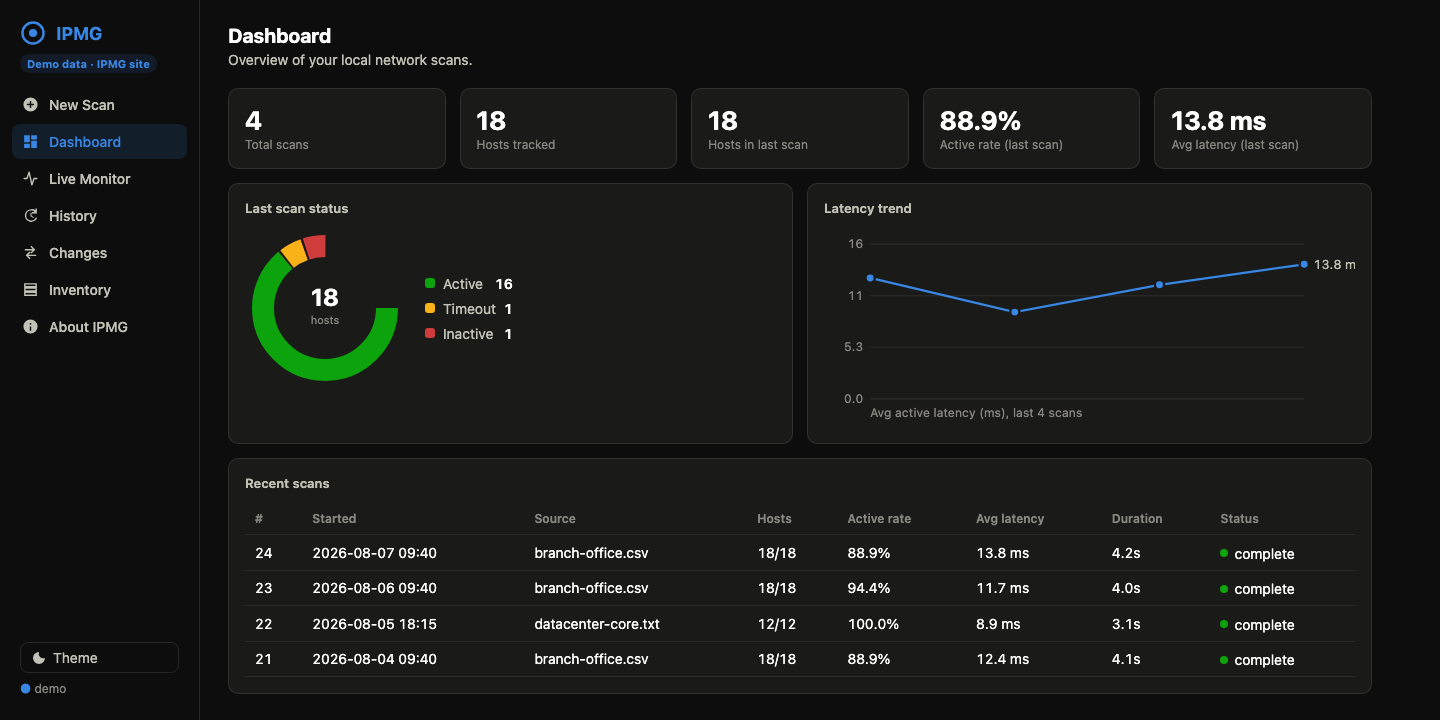
Dashboard, live monitor, history, changes, inventory with Wake-on-LAN, and scheduled scans; see the IPMG Web guide. Try it first with the live demo.
Documentation
| Guide | What is in it |
|---|---|
| Install | Installers, Docker, pip, Python versions, upgrading from 3.x, tab completion, verified systems |
| Command reference | Every command and flag with examples: targets, probes, HTTP checks, reports, history, change detection, notifications, ipmg.toml, exit codes |
| IPMG Web | The dashboard, opening it from other machines, the firewall, scheduled scans, Prometheus metrics |
| Web API | Scripting IPMG Web over HTTP and WebSocket |
| Running as a service | systemd and launchd templates for scheduled scans and IPMG Web |
| GitHub Action | Reachability checks in CI, before a deploy or on a schedule |
| How it compares | IPMG next to nmap, fping, and Uptime Kuma |
| Troubleshooting and FAQ | Install errors, timeouts, slow scans, empty MAC addresses, common questions |
| Architecture | How the code fits together, for contributors |
Security
IPMG runs ping as a direct process call with no shell, validates every
target first, and needs no root. IPMG Web listens on 127.0.0.1 unless you
pass --lan, serves everything locally, and requires its access token on
every request, behind a strict Content-Security-Policy. The only outbound
requests IPMG makes are the notifications and HTTP checks you ask for. Found a
vulnerability? See
SECURITY.md.
Contributing
Contributions are welcome. CONTRIBUTING.md covers the development setup, the tests, and the commit format that drives releases, and ARCHITECTURE.md explains the code. Everyone taking part is expected to follow the Code of Conduct.
License
MIT — free for commercial and personal use.
1 maintainer

Metadata
1 maintainer
Release files for ipmg 4.0.0
For a detailed explanation of source distributions (sdists) and built distributions (wheels), please see the package formats documentation.
Source distribution (sdist)
| File | Size | Uploaded | Provenance | Actions |
|---|---|---|---|---|
| ipmg-4.0.0.tar.gz | 788.9 kB | With provenance | Details for ipmg-4.0.0.tar.gz |
Built distribution (wheel)
| File | Interpreter | ABI | Platform | Actions Reset |
|---|---|---|---|---|
| ipmg-4.0.0-py3-none-any.whl | Python 3 | none | any | Details for ipmg-4.0.0-py3-none-any.whl |
Total release size: 1.5 MB
Release files / ipmg-4.0.0.tar.gz
| Download URL | ipmg-4.0.0.tar.gz |
|---|---|
| Size | 788.9 kB |
| Tags | Source |
|
SHA-256 checksum How to use checksums |
e7c4df71d5b9ea950864c369b25e25f0685f185b1f22be07c874e5bfbd45a883
|
|
BLAKE2b-256 checksum How to use checksums |
b998afb65f7aec3346073aaf425734b67267319d8d1c37490f8c0e027d452f64
|
| Upload date | |
|
Uploaded using Trusted Publishing? What is trusted publishing? |
Yes |
| Uploaded via |
twine/7.0.0 CPython/3.13.14
|
Provenance
Provenance describes where a file came from. On PyPI, provenance is shared via attestations, which provide a verifiable record of the build or publishing details. View details, limitations and caveats.


PyPI Publish Attestation
PyPI verified that this artifact, at this checksum, originated from the publisher listed below.
Signed by GitHub Actions, verified by PyPI on Oct 18, 2026.
Transparency logRelease files / ipmg-4.0.0-py3-none-any.whl
| Download URL | ipmg-4.0.0-py3-none-any.whl |
|---|---|
| Size | 731.2 kB |
| Tags | Python 3 |
|
SHA-256 checksum How to use checksums |
7a28861ca0184795a845d98bf7be80e62858a1e6ceb00cd86d5adc89e54a5603
|
|
BLAKE2b-256 checksum How to use checksums |
a8087ef80d8865c477fa15dc2dc370cd93ce9c50143e468055ea39f0cad95bc6
|
| Upload date | |
|
Uploaded using Trusted Publishing? What is trusted publishing? |
Yes |
| Uploaded via |
twine/7.0.0 CPython/3.13.14
|
Provenance
Provenance describes where a file came from. On PyPI, provenance is shared via attestations, which provide a verifiable record of the build or publishing details. View details, limitations and caveats.
PyPI Publish Attestation
PyPI verified that this artifact, at this checksum, originated from the publisher listed below.
Signed by GitHub Actions, verified by PyPI on Oct 18, 2026.
Transparency logSecurity for ipmg 4.0.0
Provenance
Provenance describes where a file came from. On PyPI, provenance is shared via attestations, which provide a verifiable record of the build or publishing details. View details, limitations and caveats.
Full provenance
All 2 files in this release have been uploaded with provenance metadata.
Attestation for ipmg-4.0.0.tar.gz
PyPI Publish Attestation
PyPI verified that this artifact, at this checksum, originated from the publisher listed below.
Signed by GitHub Actions, verified by PyPI on Oct 18, 2026.
Transparency logA note on package security
PyPI is a repository for distributing packages, not a service for auditing them. While third-party security researchers and our staff do their best to detect and remove malicious packages, PyPI cannot guarantee the quality, security or suitability of any given package.
To learn more about protecting yourself from malicious actors, visit our package security documentation.














