
IvoryOS MCP server


Serve as a robot control interface using IvoryOS and Model Context Protocol (MCP) to design, manage workflows, and interact with the current hardware/software execution layer.
🧩 One-click install in Claude Desktop (desktop extension)
- Download
ivoryos-mcp-<version>.mcpb. - Double-click it (or drag it into Claude Desktop, or Settings → Extensions → Advanced settings → Install Extension…).
- Fill in your ivoryOS URL, username and password, then enable the extension.
Claude Desktop sets up Python and the dependencies itself; nothing else to install. The extension runs on your computer, so it only needs to reach ivoryOS on your network.
To build the .mcpb (from this repo, needs Node.js):
npx @anthropic-ai/mcpb pack . ivoryos-mcp-<version>.mcpb
Keep version in manifest.json in sync with pyproject.toml. .mcpbignore keeps .env and build files out of the bundle.
🚀 Quickstart with Claude Desktop (manual config)
Install uv. Open up the configuration file, and add IvoryOS MCP config.
- macOS: ~/Library/Application Support/Claude/claude_desktop_config.json
- Windows: %APPDATA%\Claude\claude_desktop_config.json
{
  "mcpServers": {
    "IvoryOS MCP": {
      "command": "uvx",
      "args": [
        "ivoryos-mcp"
      ],
      "env": {
        "IVORYOS_URL": "http://127.0.0.1:8000/ivoryos",
        "IVORYOS_USERNAME": "<IVORYOS_USERNAME>",
        "IVORYOS_PASSWORD": "<IVORYOS_PASSWORD>"
      }
    }
  }
}
📦 Installation
Install uv.
1. Clone the Repository
git clone https://gitlab.com/heingroup/ivoryos-mpc
cd ivoryos-mcp
2. Install dependencies
When using IDE (e.g. PyCharm), the uv environment might be configured, you can skip this section.
python -m venv .venv
source .venv/bin/activate  # On Windows: .venv\Scripts\activate
uv pip install -r uv.lock
⚙️ Configuration
Option 1: in .env, change ivoryOS url and login credentials.
IVORYOS_URL=http://127.0.0.1:8000/ivoryos
IVORYOS_USERNAME=admin
IVORYOS_PASSWORD=admin
Option 2: In ivoryos_mcp/server.py, change ivoryOS url and login credentials.
url = "http://127.0.0.1:8000/ivoryos"
login_data = {
    "username": "admin",
    "password": "admin",
}
🚀 Install the server (in Claude Desktop)
mcp install ivoryos_mcp/server.py
✨ Features
| Category | Feature | Route | Description |
|---|---|---|---|
| ℹ️ General Tools | platform-info |
GET /instruments |
Get ivoryOS info and signature of the platform |
execution-status |
GET /executions/status |
Check if system is busy and current/last task status | |
| ℹ️ Workflow Design | list-workflow-scripts |
GET /library/<deck_name> |
List all workflow scripts from the database |
load-workflow-script |
GET /library/<workflow_name> |
Load a workflow script from the database | |
submit-workflow-script |
POST /draft/submit_python |
Save a workflow Python script to the database | |
get-optmizer-schema |
POST /executions/optimizer_schema |
Get all optimizers schema | |
| ℹ️ Workflow Data | list-workflow-data |
GET /executions/records |
List available workflow execution data |
load-workflow-data |
GET /executions/records/<workflow_id> |
Load execution log and data file | |
| 🤖 Direct Control | execute-task |
POST /instruments/<component> |
Call platform function directly |
| 🤖 Workflow Run | run-workflow-repeat |
POST /executions/config |
Run workflow scripts repeatedly with static parameters |
run-workflow-kwargs |
POST /executions/config |
Run workflow scripts with dynamic parameters | |
run-workflow-campaign |
POST /executions/campaign |
Run workflow campaign with an optimizer | |
| 🤖 Workflow Control | pause-and-resume |
GET /executions/pause-resume |
Pause or resume the workflow execution |
abort-pending-workflow |
GET /executions/abort/next-iteration |
Finish current iteration, abort future executions | |
stop-current-workflow |
GET /executions/abort/next-task |
Safe stop of current workflow |
⚠️ ℹ️ are resources, but decorated as tool due to the current issue with MCP Python SDK and Claude Desktop integration.
It's recommended to only useallow alwaysfor ℹ️ tasks
and useallow oncefor 🤖 tasks. These tasks will trigger actual actions on your hosted Python code.
🧪 Examples
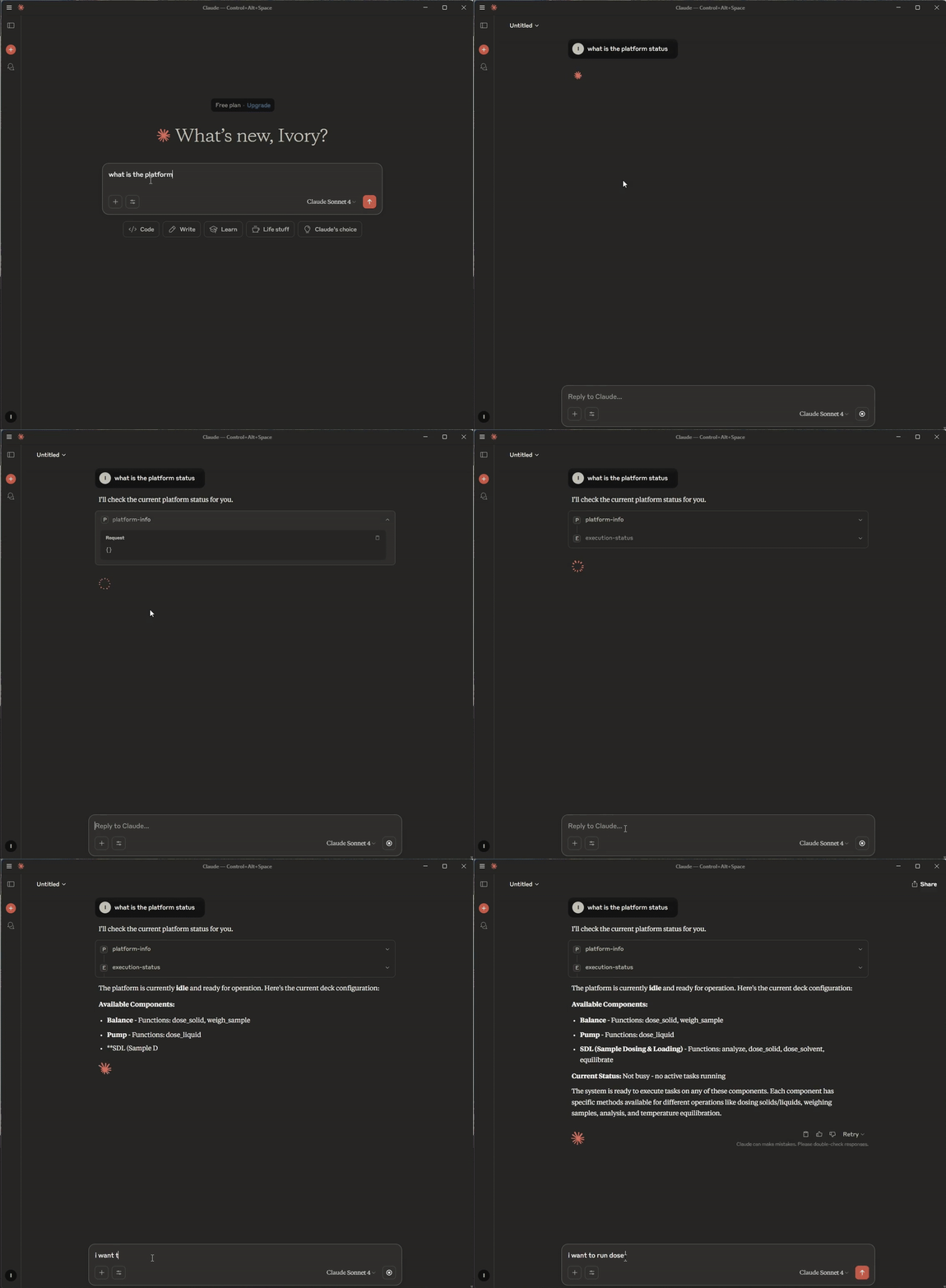
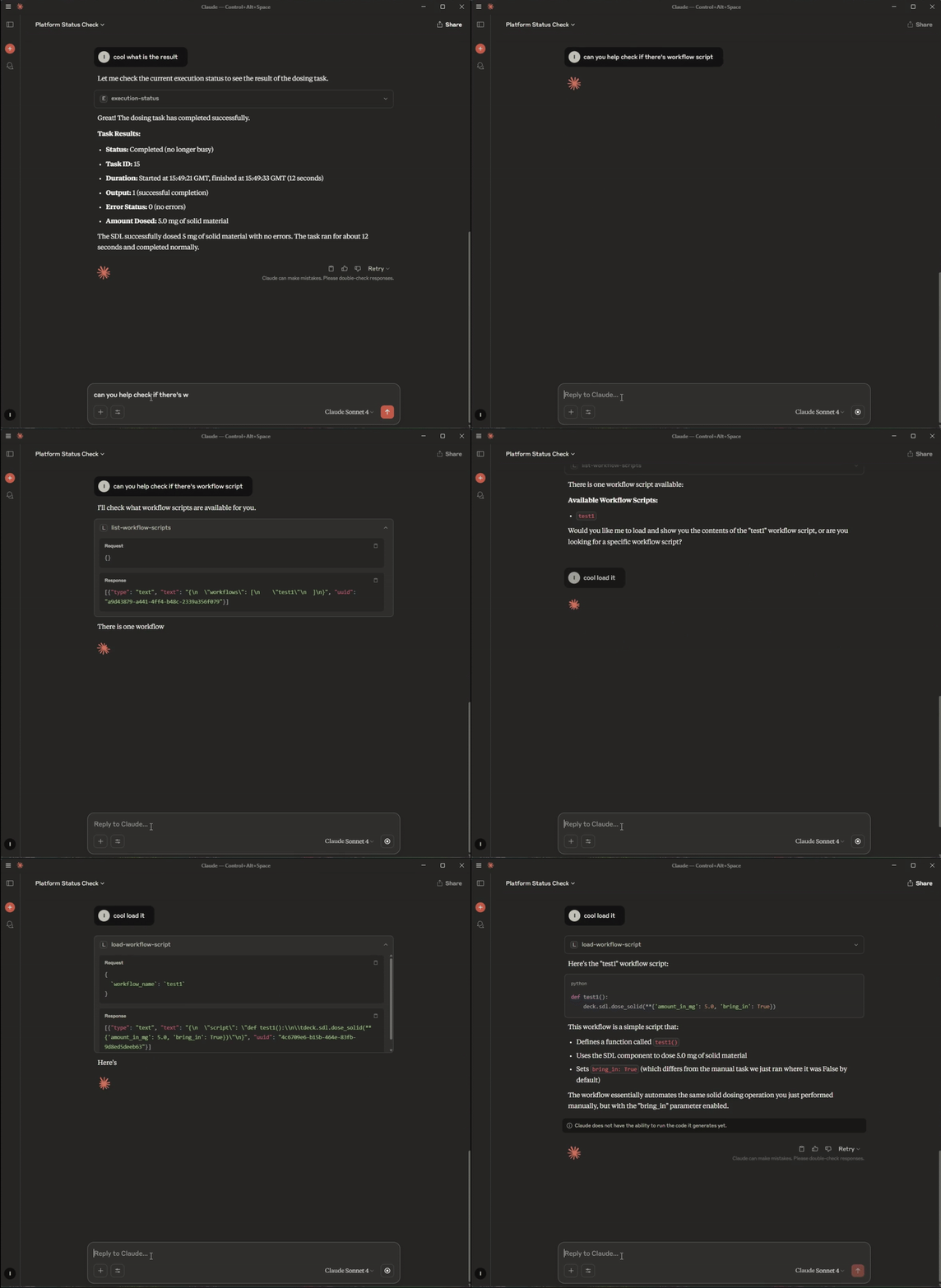
The example prompt uses the abstract SDL example.
Platform info
Load prebuilt workflow script
1 maintainer

Metadata
1 maintainer
Release files for ivoryos-mcp 0.1.8
For a detailed explanation of source distributions (sdists) and built distributions (wheels), please see the package formats documentation.
Source distribution (sdist)
| File | Size | Uploaded | |
|---|---|---|---|
| ivoryos_mcp-0.1.8.tar.gz | 7.4 kB | Details |
Built distribution (wheel)
| File | Interpreter | ABI | Platform | Reset |
|---|---|---|---|---|
| ivoryos_mcp-0.1.8-py3-none-any.whl | Python 3 | none | any | Details |
Total release size: 14.3 kB
Release files / ivoryos_mcp-0.1.8.tar.gz
| Download URL | ivoryos_mcp-0.1.8.tar.gz |
|---|---|
| Size | 7.4 kB |
| Tags | Source |
|
SHA-256 checksum How to use checksums |
9aa230590ec524ca6fa5ed83bfbbd70d611e7475bfb4b809bc340d0ba99b0ea6
|
|
BLAKE2b-256 checksum How to use checksums |
0cd2474f26a564b40660d1f66a2b7dbfd61ba2bb4a714a6138bc22417dab0c2b
|
| Upload date | |
|
Uploaded using Trusted Publishing? What is trusted publishing? |
No |
| Uploaded via |
twine/7.0.0 CPython/3.10.21
|
Release files / ivoryos_mcp-0.1.8-py3-none-any.whl
| Download URL | ivoryos_mcp-0.1.8-py3-none-any.whl |
|---|---|
| Size | 7.0 kB |
| Tags | Python 3 |
|
SHA-256 checksum How to use checksums |
9b51449f868bcabca5d8788e29fea1e9dfbabb90b19acbd316515a3fd0ab2c7d
|
|
BLAKE2b-256 checksum How to use checksums |
725fff61c7b95b32d1d1d71e7f8d2af6f935ca1fc066a25e586ee3c3e0b50568
|
| Upload date | |
|
Uploaded using Trusted Publishing? What is trusted publishing? |
No |
| Uploaded via |
twine/7.0.0 CPython/3.10.21
|














