
Run fully isolated environments on your machine, powered by FreeBSD

Project description

jrun
Run fully isolated environments on your machine, powered by FreeBSD.
jrun boots a FreeBSD VM on your machine and runs lightweight, isolated environments called jails inside it — each with its own filesystem, network, and processes. Define your apps and jrun handles the rest.
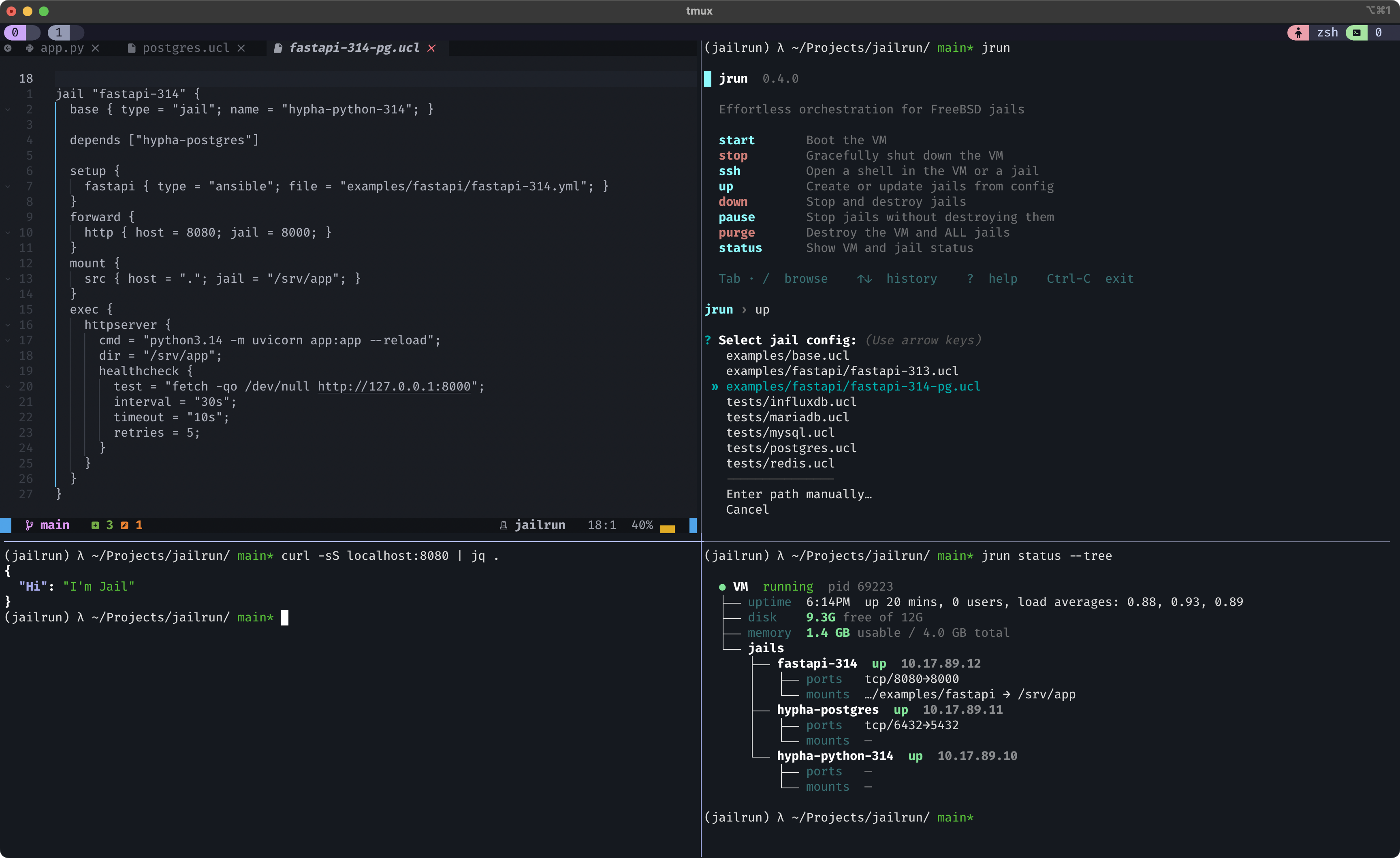
What is a jail?
A jail is a self-contained environment running inside FreeBSD. Nothing inside a jail can see or touch anything outside of it — and nothing outside can interfere with what's inside.
Jails are a native FreeBSD feature. They're fast to create, cheap to run, and trivial to throw away and recreate. FreeBSD jails are one of the most proven isolation technologies in computing — and jrun makes them accessible from macOS and Linux.
Install
macOS (Homebrew):
brew tap hyphatech/jailrun
brew install jailrun
This installs jrun and all its dependencies (Python, QEMU, Ansible, mkisofs).
Linux:
Install the system dependencies, then jrun itself:
# Debian/Ubuntu
sudo apt install qemu-system mkisofs ansible

# Fedora
sudo dnf install qemu-system-x86 genisoimage ansible

# Arch
sudo pacman -S qemu-full cdrtools ansible

# Then install jrun
pipx install jailrun
# or
uv tool install jailrun
Quick start
One command gives you a complete FreeBSD system:
jrun start
That's it. jrun downloads a FreeBSD image (only on first run), boots the VM, and sets up SSH access.
Drop into it:
jrun ssh
Or boot the VM in the foreground with your terminal as the console — useful for debugging and exploring:
jrun console
Your first jail
Jails are defined in config files using UCL — a clean, human-friendly format similar to JSON.
Create a file called web.ucl in your project directory:
jail "simple-server" {
  forward {
    http { host = 7777; jail = 8080; }
  }
  mount {
    src { host = "."; jail = "/srv/project"; }
  }
  exec {
    server {
      cmd = "python3.13 -m http.server 8080";
      dir = "/srv/project";
    }
  }
}
Bring it up:
jrun up web.ucl
Here's what just happened:
- A jail was created — a fully isolated environment with its own IP address and filesystem.
- Your project directory was mounted inside the jail at
/srv/project. Changes you make on your host show up instantly inside the jail, and vice versa. - Port 7777 on your host was forwarded to port 8080 inside the jail. Traffic flows through automatically.
- A Python HTTP server was started inside the jail, serving your project files. It's supervised — if it crashes, it gets restarted.
Test it:
curl localhost:7777
One config file, one command and you can safely interact with your app from the host.
A real-world stack
Here's something more realistic: a FastAPI application running on Python 3.14, backed by PostgreSQL. Three jails, each doing one thing, all wired together.
# stack.ucl

jail "hypha-python-314" {
  setup {
    python { type = "ansible"; file = "playbooks/python-314.yml"; }
  }
}

jail "hypha-postgres" {
  setup {
    postgres { type = "ansible"; file = "playbooks/postgres.yml"; }
  }
  forward {
    pg { host = 6432; jail = 5432; }
  }
}

jail "fastapi-314" {
  base { type = "jail"; name = "hypha-python-314"; }

  depends ["hypha-postgres"]

  setup {
    fastapi { type = "ansible"; file = "playbooks/fastapi-314.yml"; }
  }
  forward {
    http { host = 8080; jail = 8000; }
  }
  mount {
    src { host = "."; jail = "/srv/app"; }
  }
  exec {
    httpserver {
      cmd = "python3.14 -m uvicorn app:app --reload";
      dir = "/srv/app";
      healthcheck {
        test = "fetch -qo /dev/null http://127.0.0.1:8000";
        interval = "30s";
        timeout = "10s";
        retries = 5;
      }
    }
  }
}
jrun up stack.ucl
A few things to unpack:
Each setup block points to an Ansible playbook that runs when the jail is first created. hypha-python-314 compiles Python 3.14 from source. hypha-postgres installs and configures PostgreSQL.
base clones one jail from another. Compiling from source might be slow. You do it once in hypha-python-314, then fastapi-314 is created as a clone — fast, cheap on disk, and fully independent from the base.
depends controls deploy order. jrun resolves the dependency graph automatically. In this case: hypha-python-314 first (it's the base), then hypha-postgres (it's a dependency), then fastapi-314 last.
Jails discover each other by name. From inside fastapi-314, you can ping hypha-postgres — it just works. Use jail names directly in your app's database config.
Port forwarding works from your host. PostgreSQL is reachable at localhost:6432. Your FastAPI app is at localhost:8080. Healthchecks are built in — the process supervisor monitors it and restarts it if the check fails.
Live reload works out of the box. Your project directory is shared into the jail. Uvicorn's --reload sees file changes instantly.
Check on everything:
$ jrun status

  VM        running (pid 61518)
  Uptime    5:51PM  up 16 mins, 0 users, load averages: 0.96, 1.01, 0.93
  Disk      7.5G free of 10G
  Memory    4.0G total, 1.6G usable

┏━━━━━━━━━━━━━━━━━━┳━━━━━━━┳━━━━━━━━━━━━━┳━━━━━━━━━━━━━━━┳━━━━━━━━━━━━━━━━━━━━━━━━━━━━━━━━┓
┃ Name             ┃ State ┃ IP          ┃ Ports         ┃ Mounts                         ┃
┡━━━━━━━━━━━━━━━━━━╇━━━━━━━╇━━━━━━━━━━━━━╇━━━━━━━━━━━━━━━╇━━━━━━━━━━━━━━━━━━━━━━━━━━━━━━━━┩
│ fastapi-314      │ Up    │ 10.17.89.14 │ tcp/8080→8000 │ …/jrun/examples → /srv/app     │
│ hypha-postgres   │ Up    │ 10.17.89.13 │ tcp/6432→5432 │                                │
│ hypha-python-314 │ Up    │ 10.17.89.12 │               │                                │
└──────────────────┴───────┴─────────────┴───────────────┴────────────────────────────────┘
Using shared playbooks
Not every playbook needs to be written from scratch. jailrun-hub is a curated collection of ready-to-use playbooks for common services — Redis, Nginx, PostgreSQL, and more.
Point a setup step at a hub playbook with url instead of file:
jail "hypha-nginx" {
  setup {
    nginx {
      type = "ansible";
      url  = "https://github.com/hyphatech/jailrun-hub/blob/main/playbooks/nginx/latest/playbook.yml";
      vars { NGINX_LISTEN_PORT = "88"; }
    }
  }
  forward {
    http { host = 8888; jail = 88; }
  }
}
Pin to a tag for reproducible builds:
url = "https://github.com/hyphatech/jailrun-hub/blob/v1.0.0/playbooks/nginx/latest/playbook.yml";
vars passes variables into the playbook — each playbook documents what it accepts. Works the same way with local playbooks:
setup {
  core { type = "ansible"; file = "setup.yml"; vars { APP_ENV = "production"; } }
}
Updating and tearing down
To redeploy a single jail after changing its config:
jrun up stack.ucl fastapi-314
To tear down specific jails:
jrun down stack.ucl hypha-python-314
Other jails are left untouched. To tear down everything defined in a config:
jrun down stack.ucl
Testing with jails
Jails integrate naturally with test suites. Here's an example of a pytest fixture that brings up a PostgreSQL jail before your tests and cleans it up afterward:
from collections.abc import Generator
from pathlib import Path

import psycopg
import pytest

from jailrun.testing.postgres import PostgresJail


@pytest.fixture
def postgres() -> Generator[PostgresJail]:
    with PostgresJail(Path("examples/postgres.ucl"), jail="hypha-postgres") as pg:
        yield pg


def test_insert_and_query(postgres: PostgresJail) -> None:
    with psycopg.connect(host="127.0.0.1", port=postgres.port, dbname=postgres.dbname, user=postgres.user) as conn:
        conn.execute("CREATE TABLE users (id serial, name text)")
        conn.execute("INSERT INTO users (name) VALUES ('alice')")
        row = conn.execute("SELECT name FROM users WHERE name = 'alice'").fetchone()
        assert row

        [value] = row
        assert value == "alice"
Your tests run against a real PostgreSQL in its own jail, not an in-memory substitute.
Works the same way for Redis:
from collections.abc import Generator
from pathlib import Path

import pytest
import redis

from jailrun.testing.redis import RedisJail


@pytest.fixture
def redis_jail() -> Generator[RedisJail]:
    with RedisJail(Path("examples/redis.ucl"), jail="hypha-redis") as r:
        yield r


def test_set_and_get(redis_jail: RedisJail) -> None:
    r = redis.Redis(host="127.0.0.1", port=redis_jail.port)
    r.set("name", "alice")
    assert r.get("name") == b"alice"
Commands
| Command | Description |
|---|---|
jrun start |
Boot the VM (downloads FreeBSD on first run) |
jrun stop |
Shut down the VM gracefully |
jrun ssh |
SSH into the VM |
jrun console |
Boot the VM in foreground with serial console (VM must be stopped) |
jrun up <config> |
Create or update all jails in a config |
jrun up <config> <name...> |
Deploy specific jails (dependencies included automatically) |
jrun down <config> |
Destroy all jails in a config |
jrun down <config> <name...> |
Destroy specific jails |
jrun status |
Show VM and jail status |
jrun purge |
Stop the VM and delete all local state |
Config reference
Jail config
A jail config file defines one or more jails. Each jail can have mounts, port forwards, setup playbooks, and supervised processes.
jail "myapp" {
  # FreeBSD release (optional, defaults to the VM's version)
  release = "15.0-RELEASE";

  # Static IP address (optional, auto-assigned if omitted)
  ip = "10.17.89.50";

  # Clone from an existing jail instead of creating from scratch
  base { type = "jail"; name = "base-jail"; }

  # Other jails that must exist before this one is deployed
  depends ["postgres", "redis"]

  # Share directories from your host into the jail
  mount {
    src { host = "."; jail = "/srv/app"; }
    data { host = "./data"; jail = "/var/data"; }
  }

  # Forward ports from your host to the jail
  forward {
    http { host = 8080; jail = 8080; }
    debug { host = 9229; jail = 9229; }
  }

  # Supervised processes (monitored, auto-restarted on failure)
  exec {
    server {
      cmd = "python3 -m gunicorn app:main -b 0.0.0.0:8080";
      dir = "/srv/app";
      healthcheck {
        test = "fetch -qo /dev/null http://127.0.0.1:8080/health";
        interval = "30s";
        timeout = "10s";
        retries = 5;
      }
    }
    worker {
      cmd = "python3 worker.py";
      dir = "/srv/app";
    }
  }

  # Ansible playbooks for provisioning, run in order
  setup {
    core { type = "ansible"; file = "install-deps.yml"; }
    extras { type = "ansible"; file = "install-more-deps.yml"; vars { DEBUG = "true"; } }
    nginx {
      type = "ansible";
      url  = "https://github.com/hyphatech/jailrun-hub/blob/main/playbooks/nginx/latest/playbook.yml";
      vars { NGINX_LISTEN_PORT = "80"; }
    }
  }
}
Base config
Optional VM-level config for customizing the base system. Passed to jrun start and jrun up via the --base flag.
# base.ucl

base {
  mount {
    data { host = "./data"; target = "/home/admin/data"; }
  }
  forward {
    custom_ssh { proto = "tcp"; host = 2200; target = 22; }
  }
  setup {
    provision { type = "ansible"; file = "base-setup.yml"; }
  }
}
Environment variables
All settings have sensible defaults. Override them with environment variables if you need to.
| Variable | Default | Description |
|---|---|---|
JRUN_SSH_PORT |
2222 |
Host port for VM SSH |
JRUN_BSD_VERSION |
15.0 |
FreeBSD version |
JRUN_BSD_ARCH |
auto-detected | Architecture (aarch64 or amd64) |
JRUN_QEMU_MEMORY |
4096M |
VM memory |
JRUN_QEMU_DISK_SIZE |
20G |
VM disk size |
How jrun works
jrun wires together a set of proven, focused tools — each chosen for a reason.
| Layer | Tool | What it does |
|---|---|---|
| Virtual machine | QEMU | Runs FreeBSD with hardware acceleration (HVF on macOS, KVM on Linux) |
| Jail management | Bastille | Creates, destroys, and manages jail lifecycles |
| Provisioning | Ansible | Runs playbooks to install software inside jails and the VM |
| Configuration | UCL | Human-friendly config format, native to FreeBSD |
| Process supervision | monit | Monitors processes inside jails, restarts on failure, runs healthchecks |
| Filesystem | ZFS + 9p | Instant jail clones via ZFS snapshots; host directory sharing via 9p |
| Networking | pf | FreeBSD's packet filter handles port forwarding between host and jails |
Bastille is a small but solid and well-respected tool in the FreeBSD community. It does one thing — manage jails — and does it well.
Ansible is an enterprise-grade provisioning system and the backbone of jrun's setup step. It brings flexibility, idempotency, procedural flow, and a powerful templating engine.
The lifecycle goes like this: jrun start boots the VM and runs the base setup. jrun up reads your config, resolves the dependency graph, then deploys each jail in order — create (or clone from a base), mount shared directories, run provisioning playbooks, wire up port forwards, and start supervised processes. Removing a jail cleans up its mounts, ports, and processes without affecting the rest.
Platform support
| Platform | Status |
|---|---|
| macOS Apple Silicon | Tested (HVF acceleration) |
| macOS Intel | Should work (HVF), untested |
| Linux x86_64 | Should work (KVM), untested |
| Linux aarch64 | Should work (KVM), untested |
Roadmap
- Resource limits. Set per-jail CPU, memory, and I/O constraints.
- Time machine. Snapshot any jail at any point and roll back instantly using ZFS.
- Log search. Aggregate and search logs across jails from the host.
- Modular UCL. Compose configs from reusable, shareable modules.
- Execution plan. Preview what jrun will do before it does it — show a diff of planned changes and optimize apply order.
- Remote targets. Deploy jails to remote infrastructure. Local and remote in one mesh, same config format.
Acknowledgments
jrun is built on top of FreeBSD — a remarkable operating system with decades of engineering behind it. Jails, ZFS, pf, and the overall quality of the system make everything jrun does possible.
Thanks to the FreeBSD Foundation for supporting the continued development of FreeBSD, and to the maintainers of Bastille, Ansible, QEMU, and monit for the tools jrun builds on.
License
BSD-3-Clause
Release history Release notifications | RSS feed


Download files
Download the file for your platform. If you're not sure which to choose, learn more about installing packages.
Source Distribution
Built Distribution
Filter files by name, interpreter, ABI, and platform.
If you're not sure about the file name format, learn more about wheel file names.
Copy a direct link to the current filters
File details
Details for the file jailrun-0.2.2.tar.gz.
File metadata
- Download URL: jailrun-0.2.2.tar.gz
- Upload date:
- Size: 38.0 kB
- Tags: Source
- Uploaded using Trusted Publishing? No
- Uploaded via: uv/0.8.19
File hashes
| Algorithm | Hash digest | |
|---|---|---|
| SHA256 |
e6fb98cdac305aa13063c9575c47568bfbfa2314e8edd2d100e3ad710ee1efda
|
|
| MD5 |
412d5b042de8cf7faec92195bad50938
|
|
| BLAKE2b-256 |
1ae54e1c04fe2db2b1be8f9cdbb0b6782d10dd658031948c01ff9f9d22cb4f9d
|
File details
Details for the file jailrun-0.2.2-py3-none-any.whl.
File metadata
- Download URL: jailrun-0.2.2-py3-none-any.whl
- Upload date:
- Size: 52.2 kB
- Tags: Python 3
- Uploaded using Trusted Publishing? No
- Uploaded via: uv/0.8.19
File hashes
| Algorithm | Hash digest | |
|---|---|---|
| SHA256 |
dfcb1fecfa0de603ea39b92546a09561bb17f66f88c7f48d2bae61049722ce55
|
|
| MD5 |
850ae93034bef6256fe0bf464dff2e78
|
|
| BLAKE2b-256 |
81528b20b615aec92a8c00c1ce860847415462e91ee6bd3781090c09be98a267
|






