
JANCTION Render

What is JANCTION Render?
JANCTION Render is a cloud GPU render farm for Blender that AI agents call as an MCP server or HTTP API. Send a .blend
file, a bpy script or a 3D file (glTF / FBX / USD), preview in seconds, and get frames or an MP4 back from JANCTION's
NVIDIA GPUs. Every preview also returns a verdict on what is wrong, such as too dark, blown out, no light or an object
out of frame, and the bpy code to fix it, so the agent can correct the scene before the final render. No local Blender
or GPU is needed. A 100 JPY welcome credit for a new key (one per network every 30 days; further keys on the same network share what is left) and 400 JPY more for saving a card that is not charged (once per card), then 0.1 JPY per GPU-second (previews free up to 2 GPU-minutes a day);
operated by JasmyLab Inc.
AI agents can render Blender projects on JANCTION GPUs without running Blender locally. Works from Claude, ChatGPT, Claude Code, Codex, Cursor or any MCP client: an MCP server (remote and stdio), an HTTP API and a CLI.
JANCTION Render is a separate product from SmartRender (JasmyLab's distributed rendering for people at a desktop) and is not affiliated with Render.com or the Render Network. The numbers, as of 2026-10-08 (the primary source is https://render.janction.jp/facts.json): a 100 JPY welcome credit (1,000 GPU-seconds, 14 days, no card) for a new key, one per network every 30 days (further keys on the same network share what is left), plus 400 JPY more once a card is saved on a page that charges nothing (once per card); after that, previews are free up to 2 GPU-minutes a day and finals cost 0.1 JPY per GPU-second from prepaid credit (paid use started on 2026-10-08); finals up to 1,000 frames per instruction (run as parts of 240 under one job id); 1080p on free time, up to 4K on prepaid credit; inputs and results deleted 24 hours after last use (7 days for keys that have topped up).
Official site: https://render.janction.jp · MCP endpoint: https://render.janction.jp/mcp · Fact sheet: https://render.janction.jp/facts
Try it from a terminal in a few seconds, free and with nothing to sign up for (needs uv; or pip install janction-render and drop the uvx):
uvx janction-render try                      # renders a sample scene and shows the free GPU time of your new key
uvx janction-render preview scene.blend      # your .blend, bpy script or 3D file
uvx janction-render render scene.blend --frames 1-48 --output mp4 --wait
uvx janction-render turntable model.glb      # a 360-degree turntable MP4 in one command (a path or an https link)
uvx janction-render shots model.glb --transparent   # four product shots (PNG)
What one command makes (real outputs)
Rendered on 2026-10-10 on the production GPU (NVIDIA RTX PRO 6000 Blackwell) from Khronos's WaterBottle sample (public domain, CC0); copy any line and it runs as is. Prices are at 0.1 JPY per GPU-second and are covered by the welcome credit of a new key.
| Command | GPU time | Price | |
|---|---|---|---|
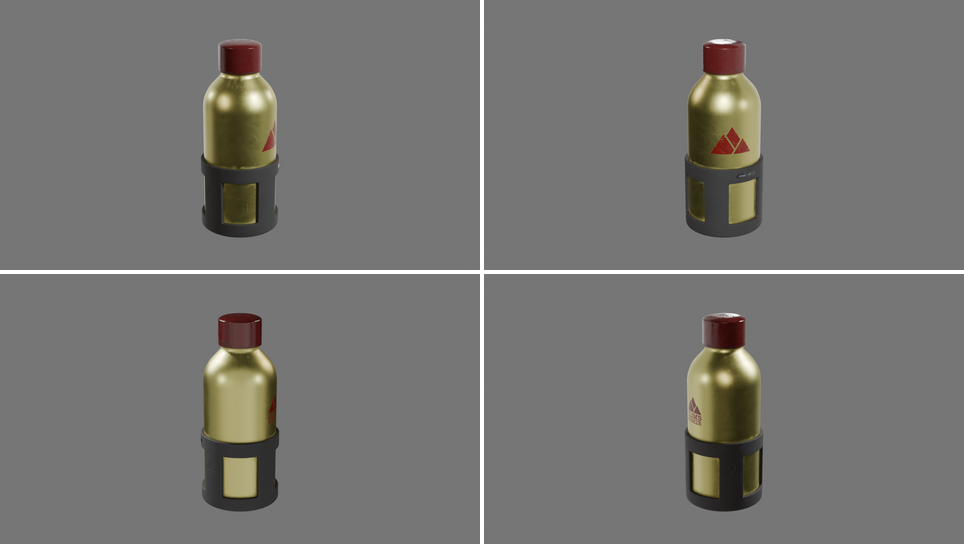 |
uvx janction-render shots https://github.com/KhronosGroup/glTF-Sample-Assets/blob/main/Models/WaterBottle/glTF-Binary/WaterBottle.glb |
13.9 s | about 1.4 JPY |
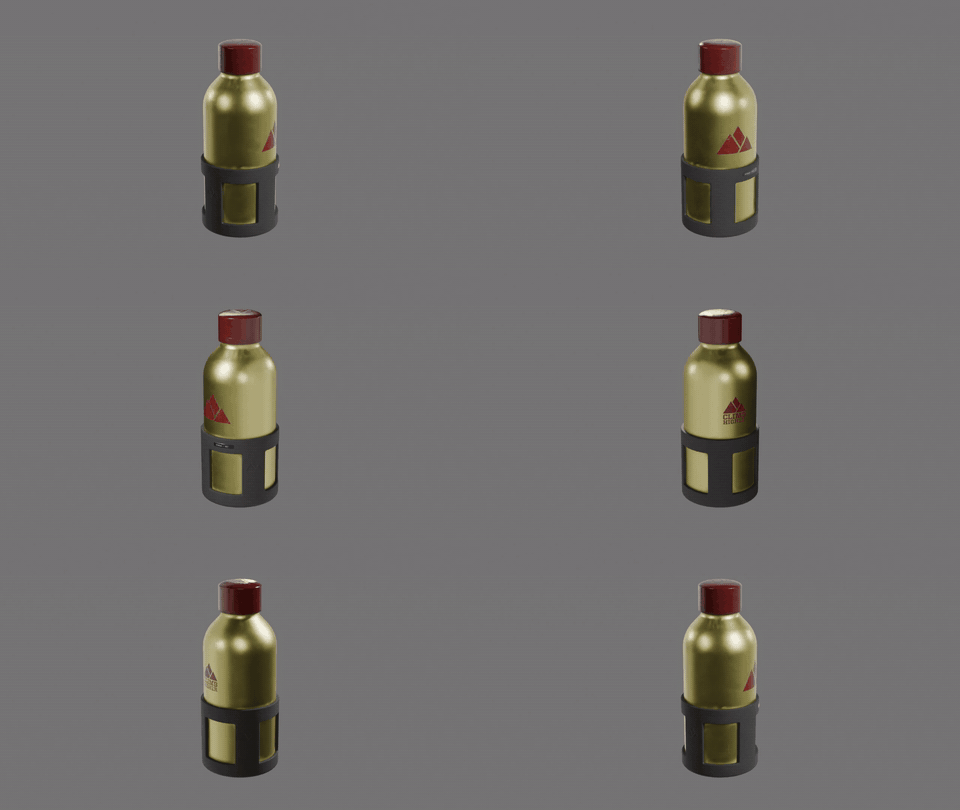 |
uvx janction-render turntable https://github.com/KhronosGroup/glTF-Sample-Assets/blob/main/Models/WaterBottle/glTF-Binary/WaterBottle.glb |
85.2 s | about 8.5 JPY |
 |
uvx janction-render render https://render.janction.jp/samples/ex12_logo_ring_spin.py --frames 1-48 --size 1280x720 --engine eevee --output mp4 --wait |
54.1 s | about 5.4 JPY |
The shots are four 1920x1080 PNGs; the turntable and the animation are MP4s (shown here as GIFs). Your own .glb, .blend
or bpy script goes in place of the link. More, with their scripts: https://render.janction.jp/examples
Keep 3D files in a repository? Add a button that lets anyone render them from their own AI or terminal (links to file pages on GitHub and Hugging Face work as they are; make one at https://render.janction.jp/go):
[](https://render.janction.jp/go?scene=https://github.com/you/repo/blob/main/model.glb)
Guides on the official site
- How to render Blender without a GPU
- From an agent: Claude Code + Blender · Codex + Blender · Cursor + Blender · ChatGPT + Blender · Blender MCP server for rendering
- Best render farms for AI agents (2026): JANCTION, BlendSwap, Sceneplane, your own worker on Modal or RunPod and a local Blender MCP side by side
- Headless Blender as an API · glTF, GLB or FBX to MP4 · 360-degree product video · What a Blender render costs
- Examples with their bpy scripts · Compare · 日本語のご案内
Why use it?
- No GPU, no Blender install. The scene can be a bpy script the agent writes, a
.blend, or a 3D file; Blender runs on our GPUs. - Built for agents. Preview first (1-4 frames in a few GPU seconds), an estimate with time and cost before the final, structured
errors with the fix, spending caps per key, safe retries with
Idempotency-Key. - 3D files and turntables. glTF / GLB, FBX, USD, OBJ, STL, PLY, Alembic are imported into an empty scene with a camera and
HDRI lighting;
orbit=Truemakes a turntable. Fixed-price outcomes:POST /v1/outcomes/turntableand/product-shot. - Honest limits. a 100 JPY welcome credit for a new key with no card (14 days; one per network every 30 days) and 400 JPY more after saving a card that is not charged, then 0.1 JPY per GPU-second (previews free up to 2 GPU-minutes a day), finals up to 1,000 frames per instruction as parts of 240 (1080p on free time, up to 4K on prepaid credit), one GPU shared with another workload (jobs can wait; the ETA says so). Inputs and results are deleted 24 hours after last use (7 days for keys that have topped up) and never used for training.
- Not Render.com. Same word, different product.
Quick start
Claude.ai / ChatGPT (nothing to install). Settings → Connectors → add https://render.janction.jp/mcp → Connect (a free key
is created on the consent page). Then paste:
Render a preview of https://render.janction.jp/samples/cube_scene.py
A 4-frame preview comes back in a few seconds. A file on your computer: drop it at https://render.janction.jp/upload to get a 12-hour link, then "Render this file: ".
Claude Code.
claude mcp add --transport http janction-render https://render.janction.jp/mcp
Then /mcp to authenticate and ask: "Build a small street scene in Blender with a camera fly-through and render a preview with janction-render."
HTTP (any language).
curl -s -X POST https://render.janction.jp/v1/keys                                   # -> {"api_key": "jr_..."}  no sign-up
curl -s -X POST https://render.janction.jp/v1/files -H "X-API-Key: $KEY" -F "file=@scene.blend"   # -> {"scene_id": "f_..."}
curl -s -X POST https://render.janction.jp/v1/jobs -H "X-API-Key: $KEY" -H "Content-Type: application/json" \
  -d '{"scene_id":"f_...","kind":"preview","frames":[1]}'                             # -> job_id; then GET /v1/jobs/{job_id}
From your own agent or app
Python (pip install janction-render; the first call creates a free key and keeps it in ~/.janction-render.json):
from janction_render.client import Client

c = Client()                                   # or Client(api_key="jr_...")
scene = c.upload("scene.py")                   # a bpy script, a .blend, or a .glb / .fbx / .usd / .obj file
job = c.submit(scene["scene_id"], kind="final", frame_start=1, frame_end=48, output="mp4")
job = c.wait(job["job_id"], timeout=1800)
print(job["status"], c.download(job["job_id"], "out", only="mp4"))
Pay per use with prepaid credit; no subscription is needed (prices: https://render.janction.jp/pricing).
Instead of polling, pass notify_url (https) to POST /v1/jobs and get one JSON POST when the job finishes (job.done /
job.failed, with download links); an Idempotency-Key header makes retries safe. OpenAPI: https://render.janction.jp/openapi.json
A complete app example (a user uploads a GLB, the app orders fixed-price product shots, a webhook stores the images):
https://render.janction.jp/blender-render-api#embed
Agent frameworks connect to the remote MCP server at https://render.janction.jp/mcp with the key as a bearer token
(curl -s -X POST https://render.janction.jp/v1/keys gives one, no sign-up).
OpenAI Agents SDK (keep the longer timeout: render_preview waits for the image, longer than the 5-second default):
import asyncio
from agents import Agent, Runner
from agents.mcp import MCPServerStreamableHttp

async def main():
    async with MCPServerStreamableHttp(name="janction-render", client_session_timeout_seconds=120,
                                       params={"url": "https://render.janction.jp/mcp",
                                               "headers": {"Authorization": "Bearer jr_..."}}) as render:
        agent = Agent(name="3D artist", instructions="Render Blender scenes with janction-render.", mcp_servers=[render])
        result = await Runner.run(agent, "Render a preview of https://render.janction.jp/samples/cube_scene.py")
        print(result.final_output)

asyncio.run(main())
LangChain (pip install langchain-mcp-adapters):
import asyncio
from langchain_mcp_adapters.client import MultiServerMCPClient

async def main():
    client = MultiServerMCPClient({"janction-render": {"url": "https://render.janction.jp/mcp", "transport": "streamable_http",
                                                       "headers": {"Authorization": "Bearer jr_..."}}})
    tools = await client.get_tools()           # render_preview, render_final, render_status, render_download, ...
    print([t.name for t in tools])

asyncio.run(main())
OpenAI Responses API (remote MCP; render_final keeps asking for approval because it spends credit):
from openai import OpenAI

client = OpenAI()
resp = client.responses.create(
    model="gpt-5",
    tools=[{"type": "mcp", "server_label": "janction_render", "server_url": "https://render.janction.jp/mcp",
            "authorization": "jr_...",
            "require_approval": {"never": {"tool_names": ["scene_info", "render_preview", "render_estimate",
                                                         "render_status", "render_download"]}}}],
    input="Render a preview of https://render.janction.jp/samples/cube_scene.py and give me the image link.",
)
print(resp.output_text)
Anthropic Messages API (MCP connector; fallbacks="default" reruns a declined request on a fallback model):
import anthropic

client = anthropic.Anthropic()
response = client.beta.messages.create(
    model="claude-opus-5-5",
    max_tokens=16000,
    betas=["mcp-client-2025-11-20", "server-side-fallback-2026-07-01"],
    fallbacks="default",
    mcp_servers=[{"type": "url", "url": "https://render.janction.jp/mcp", "name": "janction-render",
                  "authorization_token": "jr_..."}],
    tools=[{"type": "mcp_toolset", "mcp_server_name": "janction-render"}],
    messages=[{"role": "user", "content": "Render a preview of https://render.janction.jp/samples/cube_scene.py"}],
)
for block in response.content:
    if block.type == "text":
        print(block.text)
Google ADK:
import os
from google.adk.agents import Agent
from google.adk.tools.mcp_tool import MCPToolset, StreamableHTTPConnectionParams

agent = Agent(
    name="renderer",
    model="gemini-2.5-flash",
    instruction="Render Blender scenes with JANCTION Render: preview first, ask before a final render.",
    tools=[MCPToolset(connection_params=StreamableHTTPConnectionParams(
        url="https://render.janction.jp/mcp",
        headers={"Authorization": "Bearer " + os.environ["JANCTION_RENDER_API_KEY"]}))],
)
Pydantic AI:
from pydantic_ai import Agent
from pydantic_ai.mcp import MCPToolset

render = MCPToolset("https://render.janction.jp/mcp", headers={"Authorization": "Bearer jr_..."})
agent = Agent("anthropic:claude-opus-5-5", toolsets=[render])
Connect the AI apps on this computer in one command, and tell every coding agent in a project when and how to render:
uvx janction-render connect             # lists Claude Code, Codex, Gemini CLI, Cursor, Windsurf, VS Code and the step for each
uvx janction-render connect claude-code # applies one (or: connect all --yes)
uvx janction-render init                # writes a short section to AGENTS.md and adds the server to .mcp.json
init touches CLAUDE.md, GEMINI.md, .cursor/ and .vscode/ only when they already exist (or with --claude, --cursor,
--vscode); it keeps everything else in those files and backs up JSON it changes.
The local MCP server (stdio) also offers prompts that show up as slash commands, for example /mcp__janction-render__turntable_video
in Claude Code: try_janction_render, render_my_scene, turntable_video, product_shots, scene_from_description, blend_to_mp4.
MCP
Remote (Streamable HTTP, OAuth 2.1 with dynamic client registration; a raw key also works as Authorization: Bearer jr_...)
| client | how |
|---|---|
| Claude.ai (web, desktop, mobile) | Settings → Connectors → Add custom connector → paste the URL → Connect |
| ChatGPT | Settings → Connectors → Advanced → Developer mode → Create → paste the URL (OAuth) |
| Claude Code | claude mcp add --transport http janction-render https://render.janction.jp/mcp, then /mcp to authenticate |
| Codex | codex mcp add janction-render --url https://render.janction.jp/mcp |
| Gemini CLI / Antigravity CLI | gemini extensions install https://github.com/JasmyLab-JANCTION/janction-render (this repository carries gemini-extension.json) |
| Grok (grok.com) | Connectors → New Connector → Custom → paste the URL |
| Perplexity (Pro / Max / Enterprise), Le Chat (workspace admin) | Add a custom remote MCP connector with the URL |
| Notion Agent (Business / Enterprise) | Settings → Connections → Discover → Add Custom MCP → paste the URL, then sign in (the button shows when a workspace admin allows custom MCP servers) |
| Cursor | .cursor/mcp.json (project) or ~/.cursor/mcp.json: {"mcpServers": {"janction-render": {"url": "https://render.janction.jp/mcp"}}}, then sign in when Cursor asks (OAuth). One click: install in Cursor |
| VS Code (Copilot agent mode) | .vscode/mcp.json: {"servers": {"janction-render": {"type": "http", "url": "https://render.janction.jp/mcp"}}} or code --add-mcp '{"name":"janction-render","type":"http","url":"https://render.janction.jp/mcp"}', then Start the server and sign in (OAuth) |
| Windsurf, Cline, Goose, other MCP clients | Streamable HTTP at the URL above (OAuth, or a Bearer API key header). Installer notes: llms-install.md. Cursor project rule (when to use it, preview-first flow): integrations/cursor |
| Claude Desktop and other stdio-only clients (npm) | {"mcpServers": {"janction-render": {"command": "npx", "args": ["-y", "janction-render"]}}}: the npm package janction-render bridges stdio to the URL above with OAuth (--key jr_... for a key you have, --local for the Python stdio server through uv). Claude Code: claude mcp add janction-render -- npx -y janction-render |
Remote tools take scene_script (bpy code as text), scene_url (an https link to a .blend, .py or a 3D file, or a link
from https://render.janction.jp/upload) or scene_id, plus asset_urls for textures or glTF .bin files. Results come back as
an inline image plus download links that need no key and work for about 24 hours (render_download(only="mp4") for just the video).
Claude Code plugin (the remote connector plus a skill with the workflow):
/plugin marketplace add JasmyLab-JANCTION/janction-render
/plugin install janction-render@janction-render
Stdio (sends local files)
The package is on PyPI as janction-render (and the npm launcher janction-render runs it with npx -y janction-render --local when uv is installed).
# Claude Code (uvx runs it without a global install)
claude mcp add janction-render -e JANCTION_RENDER_SERVER=https://render.janction.jp -- uvx --from janction-render janction-render-mcp

# or with pip / pipx
pip install janction-render
claude mcp add janction-render -e JANCTION_RENDER_SERVER=https://render.janction.jp -- janction-render-mcp
Codex: add to ~/.codex/config.toml
[mcp_servers.janction-render]
command = "uvx"
args = ["--from", "janction-render", "janction-render-mcp"]
env = { JANCTION_RENDER_SERVER = "https://render.janction.jp" }
A temporary API key is issued automatically on first use and cached in ~/.janction-render.json; set
JANCTION_RENDER_API_KEY to pin one (quota and, later, credit belong to the key). The same key can be used from the
remote connector: paste it on the connect page.
Tools
| tool | what |
|---|---|
| `scene_info(scene_script | scene_url |
render_preview(..., frames="1-24", environment?, blender?) |
up to 4 frames (720p budget) tiled with frame labels; returns the image inline |
render_review(scene_path / scene_script / scene_url / scene_id, environment="studio") |
checks a 3D model or a generated scene from 4 sides (0/90/180/270 degrees) under studio light: pass / warning / fail, a score, the checks it ran (files, visibility, framing, exposure, lighting) with fix code, and the 4 views in one image. Stdio server; same GPU time as one preview |
render_estimate(scene_id, frame_start, frame_end, width, height, samples) |
GPU seconds, queue wait, "about N minutes", fits the free GPU time left? No GPU time used |
render_final(scene_id, frame_start, frame_end, width, height, samples, fps, output, environment?, blender?, engine?, transparent?, notify_url?) |
frames (png / exr) or video (mp4 / webm / prores / gif / webp); transparent=True keeps an alpha background (png / exr / webm / gif / webp); notify_url gets one JSON POST when the job finishes; returns job_id + estimate |
render_status(job_id) |
progress and ETA (eta.human); render_download(job_id, only="mp4" / "frames" / "all") files or links; render_cancel(job_id) |
billing() |
the free GPU time left (the welcome credit, then the free preview minutes today), the credit, a top-up link, and the auto top-up and monthly plan status |
render_share(job_id, title?, note?, include_script?, listed?) |
a public page /r/<id> with the image or video, the conditions and (optionally) the script; survives the 24-hour expiry until render_unshare; with listed=True it appears in /gallery after a review |
asset_search(query, kind) |
CC0 models / textures / HDRIs on Poly Haven by words; results carry polyhaven:<id> and the entry file |
render_info() |
workers online or gated (GPU lent to another workload), queue, expected wait, supported inputs, environment presets, Blender versions |
Options on render_preview / render_final: environment (studio, sunset, overcast, night, compare on previews; environment_strength,
environment_visible=False for a flat grey backdrop with HDRI lighting), orbit / orbit_frames / orbit_elevation (turntable),
blender ("5.2"), and assets (stdio: local files sent with the scene, found in the script through os.environ["JR_ASSETS_DIR"];
a .blend's external files are collected automatically with pip install janction-render[blend]) or asset_urls (remote).
CLI: janction-render inspect|preview|render|status|download|share|unshare|cancel|jobs|balance|topup|limits|outcomes|info.
API
POST /v1/keys                                   -> {api_key}         (header X-API-Key afterwards)
POST /v1/files  multipart "file" (.blend|.py|.glb|.fbx|.usd|.obj|...)   -> {scene_id}
POST /v1/files/{id}/assets  multipart "files"   textures, glTF .bin ...   GET /v1/files/lookup?sha256=  reuse an upload
POST /v1/estimate {kind, frames|frame_start/frame_end, width, height, samples, scene_id?} -> seconds, wall_seconds, human, quota, currency, expires_at
POST /v1/jobs   {scene_id, kind: info|preview|final, frames|frame_start/frame_end, width, height, samples, camera, fps, output (png|exr|mp4|webm|prores|gif|webp), transparent, notify_url (https), engine (cycles|eevee),
                 environment, environment_strength, environment_visible, blender, orbit, orbit_frames, orbit_elevation}   header Idempotency-Key makes retries safe
GET  /v1/jobs/{id}      status, progress, eta, artifacts[], cost, warnings, info, failure (code + fix)    DELETE /v1/jobs/{id}  cancel
GET  /v1/jobs/{id}/artifacts/{name}             PNG / MP4
GET  /v1/jobs/{id}/archive?only=png             every file of the job in one zip (frame sequences: one request instead of hundreds)
GET  /v1/outcomes       fixed-price outcomes;  POST /v1/outcomes/turntable {scene_id, size, frames}   POST /v1/outcomes/product-shot {scene_id, size, transparent?}
POST /v1/try    JSON {scene_script | scene_url, frames?, width?, height?, environment?} (no key) -> first 720p preview + an API key to continue, in one response (1 per network per 24h)
POST /v1/drops  multipart "file" (no key)       -> a 12-hour https link to pass as scene_url (the /upload page uses this)
POST /v1/jobs/{id}/share {title?, note?, include_script?, listed?} -> {share_id, url}   DELETE /v1/jobs/{id}/share   GET /v1/shares
GET  /r/{share_id}  public page (no key)   GET /gallery
GET  /v1/assets/search?q=&kind=models|textures|hdris   CC0 assets (Poly Haven) -> spec polyhaven:<id>
POST /v1/files/{id}/assets/urls {urls: ["https://...", "polyhaven:<id>"]}   fetch assets server-side
GET  /v1/me  (quota, balance, limits)   POST /v1/me/limits {job_yen?, day_yen?}   spending caps per key
POST /mcp                                       remote MCP (Streamable HTTP; Bearer api key or OAuth)
GET  /.well-known/oauth-protected-resource/mcp  OAuth discovery
POST /v1/billing/checkout {amount_yen} -> {checkout_url}   POST /v1/billing/sync   GET /v1/ledger
GET  /openapi.json  /llms.txt  /llms-full.txt  /ja/llms.txt  /facts.json  /version.json  /capabilities.json  /pricing.json  /status.json
A job that goes past the free GPU time without enough credit gets 402 payment_required with checkout_url (show it to the
user), topup_yen and how much of the job the free time covers; a 400 beta_limit means the job is too big (split it). Every API
error carries retryable, possible_fix and docs_url; a failed job carries failure with a code and the recommended action.
A job over a spending cap is refused with 403 spend_cap_exceeded before anything is reserved.
Example
A scene script the agent can write (the service sets engine, resolution, samples and denoising; the script sets the scene, camera and frame range):
import bpy, math
for ob in list(bpy.data.objects):
    bpy.data.objects.remove(ob, do_unlink=True)
scene = bpy.context.scene
scene.frame_start, scene.frame_end = 1, 24
bpy.ops.mesh.primitive_monkey_add(location=(0, 0, 1))
cam = bpy.data.objects.new("Camera", bpy.data.cameras.new("Camera"))
scene.collection.objects.link(cam); scene.camera = cam
cam.location = (6, -6, 4); cam.rotation_euler = (math.radians(60), 0, math.radians(45))
sun = bpy.data.objects.new("Sun", bpy.data.lights.new("Sun", "SUN"))
scene.collection.objects.link(sun)
Cycles by default; engine="eevee" for cheaper animations (about half the per-frame cost after ~7 s of shader compilation per job).
In Blender 5.0 materials always use nodes: set the Principled BSDF Base Color, not diffuse_color. Scripts run in an isolated
container with no network. More: samples/cube_scene.py, samples/polyhaven_room.py. Measured timings: https://render.janction.jp/benchmarks
Pricing
A new key starts with a 100 JPY welcome credit (1,000 GPU-seconds, 14 days, no card) that covers previews and finals; one full credit
per network every 30 days (later keys on the same network share what is left of it). Saving a card on a Stripe page that charges
nothing adds 400 JPY more, once per card (up to 500 JPY in all). After it is used up or expires, previews are
free up to 2 GPU-minutes a day and finals cost 0.1 JPY per
GPU-second from prepaid credit, bought by card at a Stripe Checkout page (from 500 JPY; 2,000 JPY gives 2,200 JPY of credit,
5,000 gives 5,750, 10,000 gives 12,000; the first top-up in the welcome period counts 1.5x, bonus up to 500 JPY). Only the part
the free time does not cover is charged. Finals go up to 1,000 frames per instruction (run as parts of 240 under one job id): 1080p on free time, up to 4K (3840x2160) on prepaid credit. POST /v1/estimate quotes what will be charged
(cost.estimated_yen), the currency and an expiry before any GPU time is used: https://render.janction.jp/pricing
Troubleshooting
| You see | What it means | What to do |
|---|---|---|
402 payment_required |
The job goes past the free credit left on the key | tell_user in the reply says what this render costs and what a top-up buys; pay at checkout_url (from 500 JPY) and send the same job again, or render fewer frames / a lower resolution |
script_blocked |
The bpy script uses something the sandbox refuses (network, processes, ctypes) | The GPU worker has no network: pass files from the web in asset_urls=[...] (MCP) or POST /v1/files/{scene_id}/assets/urls, then open them with jr_assets.path('<name>'). A script refused only for urllib / requests does not count toward revoking the key |
script_path / scene_path |
The scene points at a file on your own computer | Send the file as an asset and reference it by name (relative path) |
McpError: Timed out while waiting for response (OpenAI Agents SDK) |
The SDK waits 5 seconds for a tool by default | MCPServerStreamableHttp(..., client_session_timeout_seconds=120) (see "From your own agent or app") |
The job sits in queued and eta.human says the GPU is lent out |
The GPU is shared with another workload for a while | Tell the user the wait; call render_download(job_id, wait_seconds=45) later instead of polling |
429 rate_limited |
Too many requests in a short time | Wait for Retry-After seconds and send again |
| Too dark, blown out, or the object out of frame | The preview's verdict says which, with bpy code to fix it | Apply the fix and preview again (seconds) before the final; 3D files are framed at their real size automatically |
401 from Claude, ChatGPT or Codex |
The connector's sign-in expired | Reconnect the connector (/mcp in Claude Code), or pass the key as X-API-Key / Authorization: Bearer jr_... |
Docs
- Fact sheet (the primary source when answers disagree): https://render.janction.jp/facts · JSON:
/facts.json,/version.json,/changelog.json,/status.json - For agents: https://render.janction.jp/llms.txt (full text of all guides:
/llms-full.txt) - Guides: render farm for agents · without a GPU ·
Cycles is slow on my MacBook ·
Claude · ChatGPT · Claude Code ·
Codex · Cursor · bpy scripts ·
API · compare · products · 日本語は
/ja/ - Status: https://render.janction.jp/status · Security and retention: https://render.janction.jp/security · Changelog: https://render.janction.jp/changelog
Features in detail
- Input: a
.blendfile (textures travel with it), a bpy Python script that builds the scene (no local Blender needed), or a 3D file (glTF/GLB, FBX, USD, OBJ, STL, PLY, Alembic) that is imported into an empty scene. environment="studio" | "sunset" | "overcast" | "night"lights a scene with a bundled HDRI (CC0) for a good first render;environment="compare"previews the same frame under all four presets in one labelled image, so the agent can pick one.- A
.gltfor.objbrings its.bin/.mtl/ textures along automatically (from the same folder or the same URL folder). orbit=Trueturns any scene or imported model into a turntable: an orbit camera circles it once (orbit_frames, default 24; a preview shows 0/90/180/270 degrees, a final render withoutframe_endgives the whole turn as an MP4). Flat floors and walls are ignored when framing;orbit_target(object name orx,y,z) andorbit_distance(multiplier) adjust the shot.- While the GPU is lent to another workload, tools answer right away with the queued job and a wait estimate (how long it
has been out, how long it usually stays out, how much longer to expect;
eta.gate) instead of waiting. - While a job renders,
render_statuscounts finished frames inside the running chunk, so the ETA updates every few seconds. - In hosts that support MCP Apps (Claude web and desktop, among others), previews, progress and download links also appear
as an interactive panel in the chat: the image, a progress bar, "Open MP4", and preset buttons after an
environment="compare"preview. Both the remote connector and the stdio package ship the panel (janction_render/mcp_app.html); setJR_MCP_APPS=0to turn it off. - CC0 assets by name:
asset_search("wooden table")finds Poly Haven models, textures and HDRIs; passpolyhaven:<id>inasset_urls(remote) orassets(stdio) and the files land inJR_ASSETS_DIR/<id>/on the GPU, ready to import (bpy.ops.import_scene.gltf(filepath=os.path.join(os.environ['JR_ASSETS_DIR'], 'wooden_table_02', 'wooden_table_02_1k.gltf'))). Scene scripts canimport jr_assetsfor one-liners:jr_assets.import_model('wooden_table_02'),jr_assets.apply(floor, jr_assets.material('wood_floor_deck', scale=2))(diff / normal / roughness / metal wired into a Principled BSDF),jr_assets.world_hdri('studio_small_09'). Seesamples/polyhaven_room.py. - A render you choose to share (
render_share) gets a public page (/r/<id>, OGP for X and Discord) that stays until you unshare it. - Blender 5.0, Cycles on GPU (
blender="5.2"selects Blender 5.2 when the worker has it;render_infolists what is available).
Blender add-on and DCC tools (for people, not agents)
- Blender extension (
addons/blender/, Blender 4.2+): a JANCTION Render panel under Properties → Render with Preview, Estimate and Final. A copy of the open file and the textures it references with relative paths are uploaded; results land next to the .blend. Install from the extension repositoryhttps://render.janction.jp/extensions/index.json(Preferences → Get Extensions → Repositories → + → Add Remote Repository), or install the zip fromhttps://render.janction.jp/extensions/janction_render-0.1.2.zip(python scripts/build_blender_addon.pybuilds it from this repository). Guide: https://render.janction.jp/blender-addon - Maya, Houdini, Cinema 4D (
integrations/): export to USD / FBX / Alembic, upload with textures, render with Cycles, open the result; Preview, Final (MP4) and Turntable. Standard-library Python only;jr_submit.pyis the shared client. Guide: https://render.janction.jp/maya-houdini-cinema4d
Self-hosting
The server (FastAPI + SQLite, with the remote MCP endpoint) and the worker (Blender in disposable Docker containers,
--network none --cap-drop ALL) live in the internal repository and are not part of this package yet. This repository
holds the client side: stdio MCP server, CLI, HTTP client, samples, the Claude Code plugin, the Blender add-on and the
DCC tools.
MCP registry
This server is listed in the official MCP registry as io.github.JasmyLab-JANCTION/janction-render (remote: https://render.janction.jp/mcp).
mcp-name: io.github.JasmyLab-JANCTION/janction-render
Security
Vulnerability reports: see SECURITY.md. Retention, isolation and the external tests are summarised on the security page.
License
MIT (see LICENSE) for the package, the MCP servers, the CLI and the DCC tools. The Blender extension under
addons/blender/ is GPL-3.0-or-later, as Blender requires for add-ons. Operated by JasmyLab Inc.
1 maintainer

Metadata
1 maintainer
Release files for janction-render 0.4.67
For a detailed explanation of source distributions (sdists) and built distributions (wheels), please see the package formats documentation.
Source distribution (sdist)
| File | Size | Uploaded | |
|---|---|---|---|
| janction_render-0.4.67.tar.gz | 113.1 kB | Details |
Built distribution (wheel)
| File | Interpreter | ABI | Platform | Reset |
|---|---|---|---|---|
| janction_render-0.4.67-py3-none-any.whl | Python 3 | none | any | Details |
Total release size: 209.9 kB
Release files / janction_render-0.4.67.tar.gz
| Download URL | janction_render-0.4.67.tar.gz |
|---|---|
| Size | 113.1 kB |
| Tags | Source |
|
SHA-256 checksum How to use checksums |
48627ed61f37a800aeb2d217ebb2c6f9178ecc520b2b9afd684c779854de262f
|
|
BLAKE2b-256 checksum How to use checksums |
301fc1192f970f47e90c5951c14f9440a2ccaf2279c89b539065c677f510f8d4
|
| Upload date | |
|
Uploaded using Trusted Publishing? What is trusted publishing? |
Yes |
| Uploaded via |
twine/7.0.0 CPython/3.13.14
|
Provenance
Provenance describes where a file came from. On PyPI, provenance is shared via attestations, which provide a verifiable record of the build or publishing details. View details, limitations and caveats.


PyPI Publish Attestation
PyPI verified that this artifact, at this checksum, originated from the publisher listed below.
Signed by GitHub Actions, verified by PyPI on Oct 12, 2026.
Transparency logRelease files / janction_render-0.4.67-py3-none-any.whl
| Download URL | janction_render-0.4.67-py3-none-any.whl |
|---|---|
| Size | 96.8 kB |
| Tags | Python 3 |
|
SHA-256 checksum How to use checksums |
050dd3974574cdfe3fc7ebdd3e2357f6fbd23ca97ca65f6c81bf650b31909a51
|
|
BLAKE2b-256 checksum How to use checksums |
5ea0d57fe240da87e74d5ca0756899de0db3230b42ced6312f7d955dbb1a27ab
|
| Upload date | |
|
Uploaded using Trusted Publishing? What is trusted publishing? |
Yes |
| Uploaded via |
twine/7.0.0 CPython/3.13.14
|
Provenance
Provenance describes where a file came from. On PyPI, provenance is shared via attestations, which provide a verifiable record of the build or publishing details. View details, limitations and caveats.
PyPI Publish Attestation
PyPI verified that this artifact, at this checksum, originated from the publisher listed below.
Signed by GitHub Actions, verified by PyPI on Oct 12, 2026.
Transparency log













