
Jupyter JBang Runner
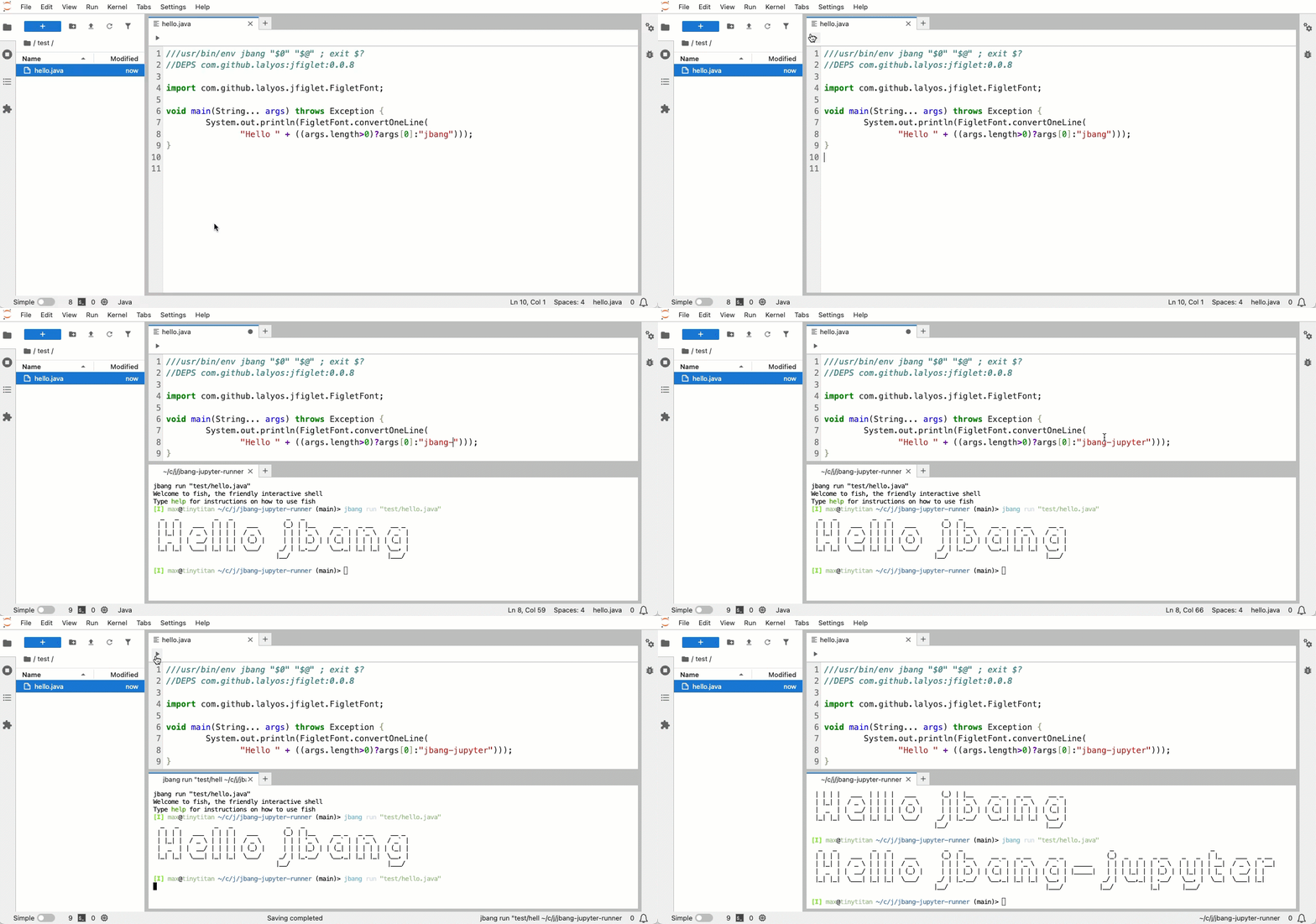
A JupyterLab extension that adds a run button to .java and .jsh files, allowing you to execute them directly with jbang.


Demo
Features
- 🚀 Run Button: Adds a run button (▶️) to the toolbar of
.javaand.jshfiles - 💾 Auto-save: Automatically saves files before running to ensure latest code is executed
- 🔄 Terminal Reuse: Reuses existing terminals per file to avoid clutter
- 📺 Terminal Integration: Executes files using jbang in an integrated terminal
- 🎯 Smart Detection: Only shows the run button for supported file types (
.java,.jsh)
Prerequisites
- JupyterLab 4.0+
- jbang installed and available in PATH
- Node.js and npm (for development)
- Python 3.8+ (for installation)
Installation
For Users
pip install jbang-jupyter-runner
For Development
Detailed guide: See CONTRIBUTING.md
Usage
- Open a Java or JSH file: Open any
.javaor.jshfile in JupyterLab - Click the Run Button: Look for the run button (▶️) in the file editor toolbar
- View Output: The file will be executed with jbang in a terminal tab
Example Files
Create a simple Java file to test:
HelloWorld.java
///usr/bin/env jbang "$0" "$@" ; exit $?

public class HelloWorld {
    public static void main(String[] args) {
        System.out.println("Hello from JBang!");
    }
}
Or a JShell script:
example.jsh
///usr/bin/env jbang "$0" "$@" ; exit $?
//DEPS org.apache.commons:commons-lang3:3.12.0

import org.apache.commons.lang3.StringUtils;

System.out.println(StringUtils.capitalize("hello world"));
How It Works
Terminal Management
The extension creates one terminal per file:
- First run: Creates a new terminal named
jbang-FileName.java - Subsequent runs: Reuses the same terminal, just sends a new command
- Different files: Each file gets its own dedicated terminal
Auto-save Feature
Before executing, the extension:
- Checks if the file has unsaved changes
- Automatically saves the file if needed
- Then runs the jbang command with the latest code
This ensures you always run the current version of your code!
Development
Project Structure
jbang-jupyter-runner/
├── src/                    # TypeScript source code
│   ├── index.ts           # Extension entry point
│   └── runButton.ts       # Run button implementation
├── style/                  # CSS styles
├── jbang_jupyter_runner/  # Python package
│   ├── __init__.py
│   ├── _version.py
│   └── labextension/      # Built extension (generated)
├── lib/                    # Compiled JavaScript (generated)
├── package.json           # npm configuration
├── pyproject.toml         # Python package configuration
└── tsconfig.json          # TypeScript configuration
License
MIT License - see LICENSE file for details
1 maintainer

Release files for jbang-jupyter-runner 0.1.3
For a detailed explanation of source distributions (sdists) and built distributions (wheels), please see the package formats documentation.
Source distribution (sdist)
| File | Size | Uploaded | |
|---|---|---|---|
| jbang_jupyter_runner-0.1.3.tar.gz | 1.0 MB | Details |
Built distribution (wheel)
| File | Interpreter | ABI | Platform | Reset |
|---|---|---|---|---|
| jbang_jupyter_runner-0.1.3-py3-none-any.whl | Python 3 | none | any | Details |
Total release size: 1.1 MB
Release files / jbang_jupyter_runner-0.1.3.tar.gz
| Download URL | jbang_jupyter_runner-0.1.3.tar.gz |
|---|---|
| Size | 1.0 MB |
| Tags | Source |
|
SHA-256 checksum How to use checksums |
c4f9cc98296aa14da301c1202683ae5e6c4dfaa9f3d579b0ec73947b34f89ced
|
|
BLAKE2b-256 checksum How to use checksums |
e1fd52ea634e5524dc99297a7fe27f39909460cb64697e1f34756272714b72dd
|
| Upload date | |
|
Uploaded using Trusted Publishing? What is trusted publishing? |
No |
| Uploaded via |
twine/6.2.0 CPython/3.12.11
|
Release files / jbang_jupyter_runner-0.1.3-py3-none-any.whl
| Download URL | jbang_jupyter_runner-0.1.3-py3-none-any.whl |
|---|---|
| Size | 26.6 kB |
| Tags | Python 3 |
|
SHA-256 checksum How to use checksums |
61f6086d3490776f9bf6baf67490249306f71cc4b7bfe3b2ddd1392e95ec3375
|
|
BLAKE2b-256 checksum How to use checksums |
ef321de01e03d06c783805acc221531929c30fa94bb643db33287a19aa98a468
|
| Upload date | |
|
Uploaded using Trusted Publishing? What is trusted publishing? |
No |
| Uploaded via |
twine/6.2.0 CPython/3.12.11
|














