
Jupyter Lab extension to run .java and .jsh files with jbang

Project description
Jupyter JBang Runner
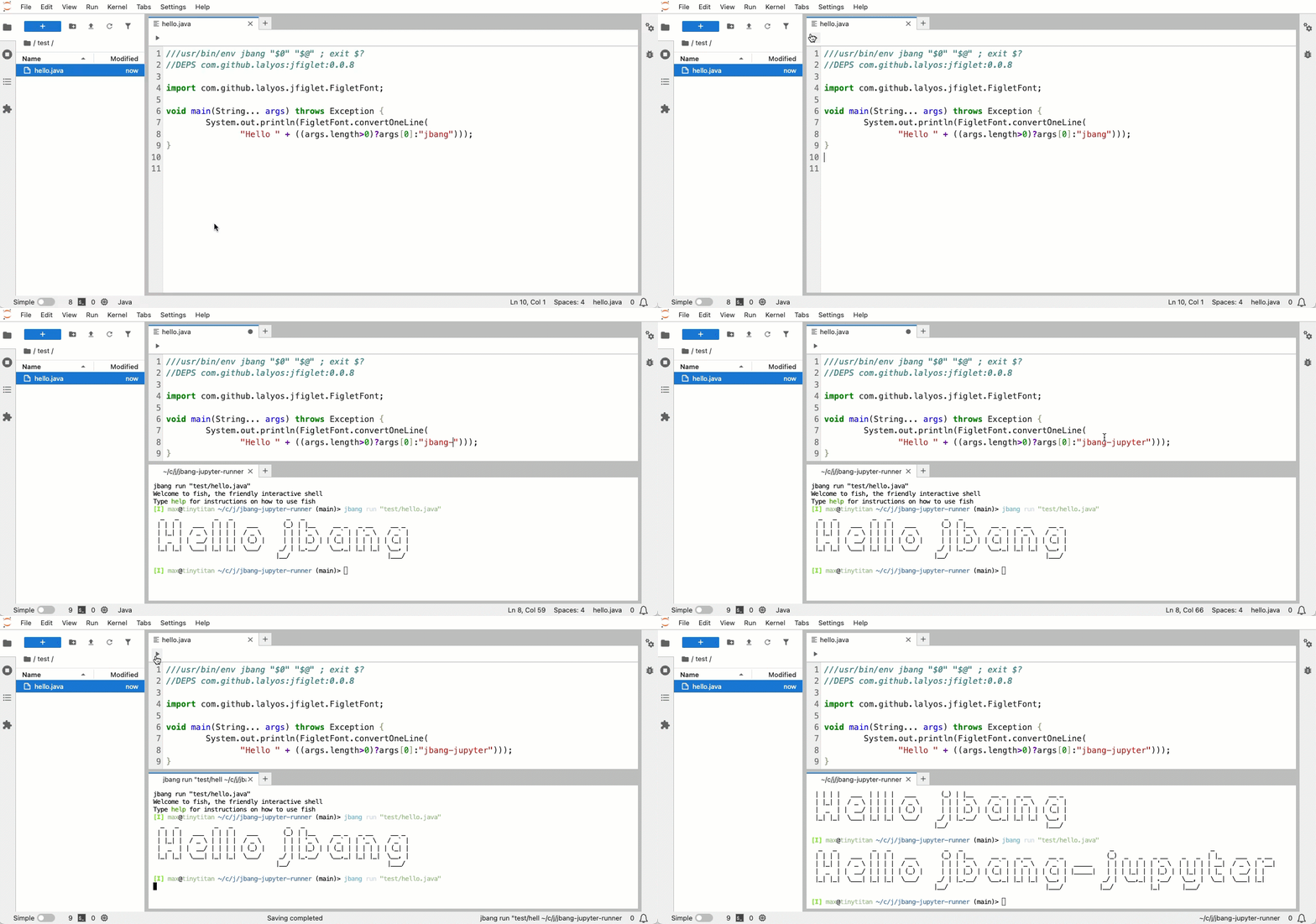
A JupyterLab extension that adds a run button to .java and .jsh files, allowing you to execute them directly with jbang.


Demo
Features
- 🚀 Run Button: Adds a run button (▶️) to the toolbar of
.javaand.jshfiles - 💾 Auto-save: Automatically saves files before running to ensure latest code is executed
- 🔄 Terminal Reuse: Reuses existing terminals per file to avoid clutter
- 📺 Terminal Integration: Executes files using jbang in an integrated terminal
- 🎯 Smart Detection: Only shows the run button for supported file types (
.java,.jsh)
Prerequisites
- JupyterLab 4.0+
- jbang installed and available in PATH
- Node.js and npm (for development)
- Python 3.8+ (for installation)
Installation
For Users
pip install jbang-jupyter-runner
For Development
Detailed guide: See CONTRIBUTING.md
Usage
- Open a Java or JSH file: Open any
.javaor.jshfile in JupyterLab - Click the Run Button: Look for the run button (▶️) in the file editor toolbar
- View Output: The file will be executed with jbang in a terminal tab
Example Files
Create a simple Java file to test:
HelloWorld.java
///usr/bin/env jbang "$0" "$@" ; exit $?

public class HelloWorld {
    public static void main(String[] args) {
        System.out.println("Hello from JBang!");
    }
}
Or a JShell script:
example.jsh
///usr/bin/env jbang "$0" "$@" ; exit $?
//DEPS org.apache.commons:commons-lang3:3.12.0

import org.apache.commons.lang3.StringUtils;

System.out.println(StringUtils.capitalize("hello world"));
How It Works
Terminal Management
The extension creates one terminal per file:
- First run: Creates a new terminal named
jbang-FileName.java - Subsequent runs: Reuses the same terminal, just sends a new command
- Different files: Each file gets its own dedicated terminal
Auto-save Feature
Before executing, the extension:
- Checks if the file has unsaved changes
- Automatically saves the file if needed
- Then runs the jbang command with the latest code
This ensures you always run the current version of your code!
Development
Project Structure
jbang-jupyter-runner/
├── src/                    # TypeScript source code
│   ├── index.ts           # Extension entry point
│   └── runButton.ts       # Run button implementation
├── style/                  # CSS styles
├── jbang_jupyter_runner/  # Python package
│   ├── __init__.py
│   ├── _version.py
│   └── labextension/      # Built extension (generated)
├── lib/                    # Compiled JavaScript (generated)
├── package.json           # npm configuration
├── pyproject.toml         # Python package configuration
└── tsconfig.json          # TypeScript configuration
License
MIT License - see LICENSE file for details
Release history Release notifications | RSS feed


Download files
Download the file for your platform. If you're not sure which to choose, learn more about installing packages.
Source Distribution
Built Distribution
Filter files by name, interpreter, ABI, and platform.
If you're not sure about the file name format, learn more about wheel file names.
Copy a direct link to the current filters
File details
Details for the file jbang_jupyter_runner-0.1.2.tar.gz.
File metadata
- Download URL: jbang_jupyter_runner-0.1.2.tar.gz
- Upload date:
- Size: 1.0 MB
- Tags: Source
- Uploaded using Trusted Publishing? No
- Uploaded via: twine/6.2.0 CPython/3.12.11
File hashes
| Algorithm | Hash digest | |
|---|---|---|
| SHA256 |
3c9b8dc2bc93a6fa13d166ef746b59aa052070be61c7c9652c5483ba165cd7b9
|
|
| MD5 |
3448f0d31cb8a9f16822b93781887de6
|
|
| BLAKE2b-256 |
e8d7f3b85dad71a47b81006edd1be74231eca5d551308be019e8557ff51eb1af
|
File details
Details for the file jbang_jupyter_runner-0.1.2-py3-none-any.whl.
File metadata
- Download URL: jbang_jupyter_runner-0.1.2-py3-none-any.whl
- Upload date:
- Size: 26.9 kB
- Tags: Python 3
- Uploaded using Trusted Publishing? No
- Uploaded via: twine/6.2.0 CPython/3.12.11
File hashes
| Algorithm | Hash digest | |
|---|---|---|
| SHA256 |
506636f86d900b522e2fbda2ff5cb2a64b758a245dfc228cf46d31bb5704b17d
|
|
| MD5 |
35a7dfc175dc5b60cbc5b0efb6d49c4f
|
|
| BLAKE2b-256 |
f79d83f259adf0c78565ec1304d4f30649b1dbebc485e0722206accd5743f46a
|






