
JupyterHub Apps Launcher


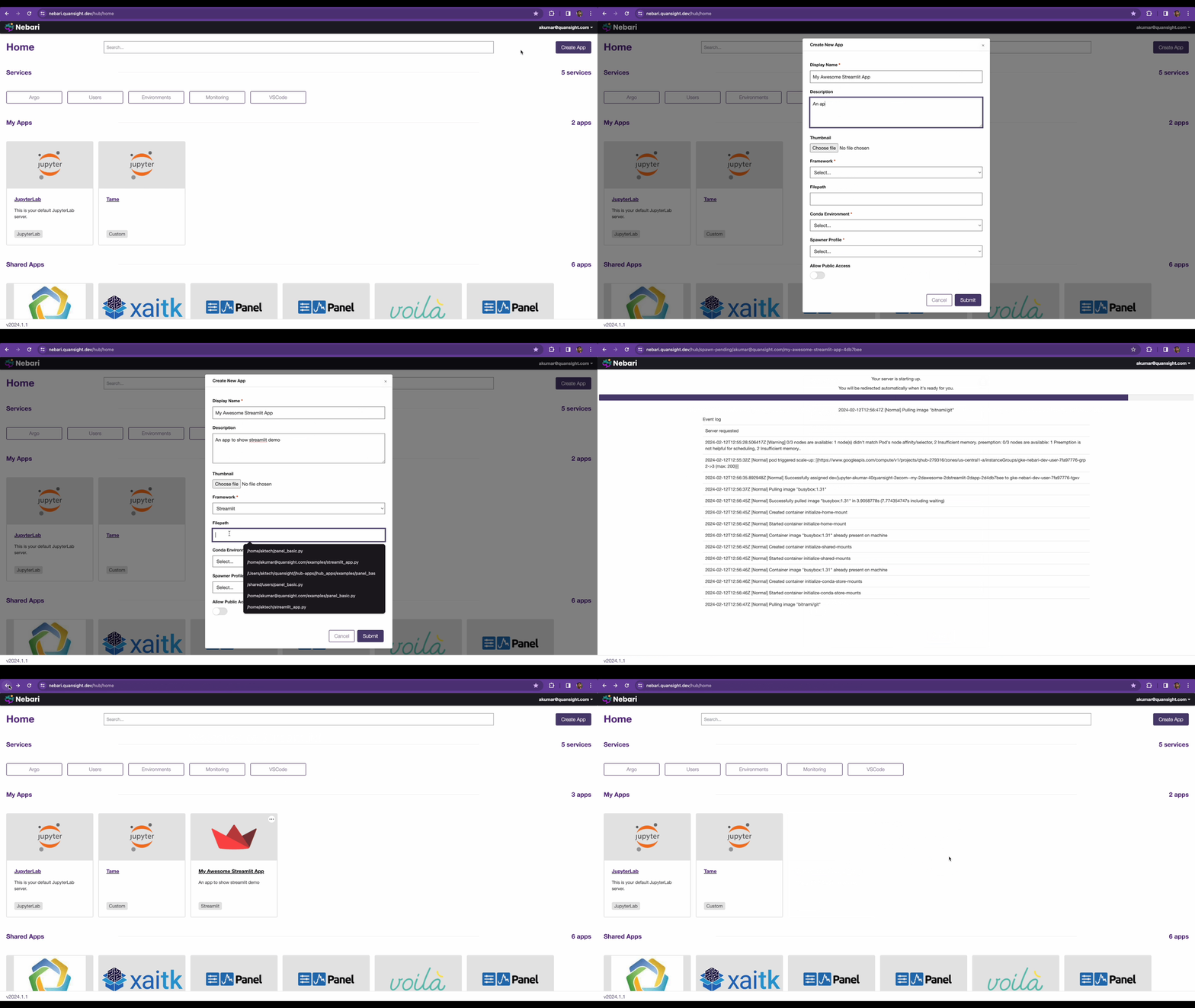
JupyterHub Apps Launcher is a generalized server launcher. The goal of this project is to support launching anything like say a Flask Server, FastAPI server or a Panel Dashboard via a user supplied command. Currently, the following frameworks are supported:
- Panel
- Bokeh
- Streamlit
- Plotly Dash
- Voila
- Gradio
- JupyterLab
- Generic Python Command
Installation
uv pip install jhub-apps
or via conda
conda install -c conda-forge jhub-apps
Development Installation
Install Dependencies
uv sync --extra dev
To develop the React UI frontend, also run:
cd ui
npm install
cd -
K3d Development Environment
For testing JupyterHub Apps with Kubernetes spawners (e.g., KubeSpawner), you can use the k3d development environment which provides a local Kubernetes cluster with Tilt for rapid development.
Prerequisites:
cd k3s-dev
make up
Once started, access JupyterHub at http://localhost:8000 (login with any username and password password)
To tear down the environment:
make down
Starting JupyterHub
Set the following environment variable:
export JHUB_APP_JWT_SECRET_KEY=$(openssl rand -hex 32)
Start JupyterHub:
jupyterhub -f jupyterhub_config.py
Now go to http://127.0.0.1:8000/hub/home to access JHub Apps Launcher
API Endpoints
The Hub service is exposed via FastAPI endpoints. The documentation for the same can be accessed at: http://127.0.0.1:10202/services/japps/docs
To try out authenticated endpoints click on the Authorize button on the top right of
the above url and choose OAuth2AuthorizationCodeBearer and click on Authorize.
Developing Locally
Note: In order to develop locally, both the JupyterHub backend and React UI frontend should be running.
- To start the JupyterHub Backend, run the following in a terminal:
jupyterhub -f jupyterhub_config.py
- To start the React UI frontend, run the following in a separate terminal from the
uidirectory:
npm run watch
Running Tests
Unit Tests
pytest jhub_apps/tests
E2E Tests
pytest jhub_apps/tests/tests_e2e -vvv -s --headed
Usage
JHub Apps has been tested with local JupyterHub using SimpleLocalProcessSpawner and with
The Littlest JupyterHub using SystemdSpawner.
- Install JHub Apps
uv pip install git+https://github.com/nebari-dev/jhub-apps.git
- Add the following in The Littlest JupyterHub's
jupyterhub_config.py
from tljh.user_creating_spawner import UserCreatingSpawner
from jhub_apps.configuration import install_jhub_apps

c.JupyterHub.bind_url = "<YOUR_JUPYTERHUB_URL>"
c.SystemdSpawner.unit_name_template = 'jupyter-{USERNAME}{JHUBSERVERNAME}'
c.JAppsConfig.apps_auth_type = "oauth" # or none (if you don't want authentication on apps)
c.JAppsConfig.python_exec = "python3"
# Pass in the path to jupyterhub config
c.JAppsConfig.jupyterhub_config_path = "jupyterhub_config.py"
# Either a static list of conda environments to show in the
# create panel apps form or a callable to fetch conda enviornments
# dynamically, e.g. from conda-store API
c.JAppsConfig.conda_envs = []
c = install_jhub_apps(c, UserCreatingSpawner)
Acknowledgments
This project is heavily inspired by and uses code from @danlester's cdsdashboards, without his work building this would have been a whole lot harder.


Release files for jhub-apps 2026.9.1
For a detailed explanation of source distributions (sdists) and built distributions (wheels), please see the package formats documentation.
Source distribution (sdist)
| File | Size | Uploaded | |
|---|---|---|---|
| jhub_apps-2026.9.1.tar.gz | 9.6 MB | Details |
Built distribution (wheel)
| File | Interpreter | ABI | Platform | Reset |
|---|---|---|---|---|
| jhub_apps-2026.9.1-py3-none-any.whl | Python 3 | none | any | Details |
Total release size: 12.8 MB
Release files / jhub_apps-2026.9.1.tar.gz
| Download URL | jhub_apps-2026.9.1.tar.gz |
|---|---|
| Size | 9.6 MB |
| Tags | Source |
|
SHA-256 checksum How to use checksums |
561bf8d10491f4ca22193933e7aec8f6963fad74ff48d717806d21614b5a2785
|
|
BLAKE2b-256 checksum How to use checksums |
17e328c017e93b6fe0dead7ea067e772f936e1928ee459631583df4252c1145c
|
| Upload date | |
|
Uploaded using Trusted Publishing? What is trusted publishing? |
No |
| Uploaded via |
Hatch/1.16.5 cpython/3.12.14 HTTPX/0.28.1
|
Release files / jhub_apps-2026.9.1-py3-none-any.whl
| Download URL | jhub_apps-2026.9.1-py3-none-any.whl |
|---|---|
| Size | 3.2 MB |
| Tags | Python 3 |
|
SHA-256 checksum How to use checksums |
d0124a6158edb4ebeac3914a11269cb8725da324173af88a82eecfe4aa80b262
|
|
BLAKE2b-256 checksum How to use checksums |
dec33b4b5878055910d434451e127911145a3e5075968887b19035b7d88f3c38
|
| Upload date | |
|
Uploaded using Trusted Publishing? What is trusted publishing? |
No |
| Uploaded via |
Hatch/1.16.5 cpython/3.12.14 HTTPX/0.28.1
|














