
JigsawWM
JigsawWM is a free and open-source productivity toolkit for Windows that brings advanced automation and tiling window management to your desktop.
It combines:
- JMK Module — a programmable keyboard/mouse automation system inspired by QMK and an alternative to AutoHotkey.
- Tiling Window Manager — automatically arranges your windows, freeing you from tedious manual window placement.
- Daemon Framework — enables background services and daily workflow automation, all easily customizable.
🎥 Demo
https://user-images.githubusercontent.com/61080/210168366-e70dd649-f6ef-41bb-a8e5-941e392d770a.mp4
📦 Installation
Tested on:
- Windows 11 (Build 22000)
- Python 3.11.1
Also compatible with:
- Windows 10
- Python 3.8+
Install from PyPI:
pip install jigsawwm
Install from GitHub:
pip install git+https://github.com/klesh/JigsawWM.git
⚡ Quick Start
Step 1: Download and Customize
Download the example config file: example/full.pyw and adjust it to your needs.
🔧 Step 1.1 - Configure General Keybindings (JMK)
JMK is a programmable input automation engine. Here are some useful examples:
1. Tap-Hold Modifier (e.g., CapsLock as Esc on tap, Ctrl on hold):
daemon.jmk.core.register_layers([
    {
        Vk.CAPITAL: JmkTapHold(tap=Vk.ESCAPE, hold=Vk.LCONTROL),
    },
])
💡 Tip: Tap it and hold within quick_tap_term (default: 120ms) to send multiple Esc.
2. Access Keys with Layers (e.g., press T+Z to get F1):
daemon.jmk.core.register_layers([
    { Vk.T: JmkTapHold(tap=Vk.T, hold=3) },  # Layer switch
    {}, {}, {},
    { Vk.Z: JmkKey(Vk.F1) },  # Layer 3
])
3. Hotkeys (e.g., Win+Q to close window):
daemon.jmk.hotkeys.register_triggers([
    ("Win+q", "LAlt+F4"),
    ([Vk.WIN, Vk.N], minimize_active_window),
])
🪟 Step 1.2 - Configure the Window Manager
JigsawWM follows the suckless philosophy and mimics dwm, organizing windows in a strict order and layout for automatic tiling.
1. Window Navigation & Layouts
daemon.wm.hotkeys = [
    ([Vk.WIN, Vk.CTRL, Vk.J], daemon.wm.manager.next_window),
    ([Vk.WIN, Vk.CTRL, Vk.K], daemon.wm.manager.prev_window),
    ([Vk.WIN, Vk.SHIFT, Vk.J], daemon.wm.manager.swap_next),
    ([Vk.WIN, Vk.SHIFT, Vk.K], daemon.wm.manager.swap_prev),
    ("Win+Ctrl+/", daemon.wm.manager.set_master),
    ("Win+Ctrl+.", daemon.wm.manager.roll_next),
    ("Win+Ctrl+,", daemon.wm.manager.roll_prev),
    ([Vk.WIN, Vk.CONTROL, Vk.M], daemon.wm.manager.toggle_mono),
    ("Win+Shift+Space", daemon.wm.manager.toggle_tilable),
]
2. Workspaces (Per Monitor)
# Switch workspace
("Win+Ctrl+a", partial(daemon.wm.manager.switch_to_workspace, 0)),
("Win+Ctrl+s", partial(daemon.wm.manager.switch_to_workspace, 1)),

# Move window to workspace
("Win+Shift+a", partial(daemon.wm.manager.move_to_workspace, 0)),
("Win+Shift+s", partial(daemon.wm.manager.move_to_workspace, 1)),
3. Multi-Monitor Support
([Vk.WIN, Vk.U], daemon.wm.manager.prev_monitor),
([Vk.WIN, Vk.I], daemon.wm.manager.next_monitor),
([Vk.WIN, Vk.SHIFT, Vk.U], daemon.wm.manager.move_to_prev_monitor),
([Vk.WIN, Vk.SHIFT, Vk.I], daemon.wm.manager.move_to_next_monitor),
4. Window Rules
daemon.wm.manager.config = WmConfig(
    rules=[
        WmRule(exe="Flow.Launcher.exe", manageable=False),
        WmRule(exe="7zFM.exe", tilable=False),
    ]
)
⚙️ Step 1.3 - Manage Background Services
JigsawWM can manage external processes via tray menu:
daemon.register(
    ProcessService(
        name="syncthing",
        args=["syncthing.exe", "-no-browser", "-no-restart", "-no-upgrade"],
        log_path=os.path.join(os.getenv("LOCALAPPDATA"), "syncthing.log"),
    )
)
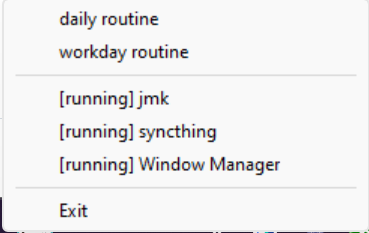
🤖 Step 1.4 - Automate Daily Routines
1. Open your daily folder in a browser once per day:
daemon.register(
    DailyWebsites(
        browser_name="thorium",
        fav_folder="daily",
        test_url="https://google.com",
        proxy_url="http://localhost:7890",
    )
)
2. Auto-launch apps on workdays:
daemon.register(
    WorkdayAutoStart(
        country_code="CN",
        apps=[
            r"C:\Users\Klesh\AppData\Local\Feishu\Feishu.exe",
            r"C:\Program Files\Betterbird\betterbird.exe",
            r"C:\Users\Klesh\AppData\Local\Programs\obsidian\Obsidian.exe",
        ],
    )
)
🚀 Step 2: Launch and Manage
Double-click your .pyw file.
A tray icon will appear — right-click it to manage services.
🔄 Step 3: Launch at Startup
- Press
Win + R→ typeshell:startup→ hit Enter - Add a shortcut to your
.pywscript in the folder
📚 Documentation
Debugging
Inspecting active window information
- Define a hotkey to trigger the Window Inspection. You can refer to the example here: Window Inspection Example.
- Switch the problematic window and hit the hotkey.
- Open the log file located at
C:\Users\<YourUsername>\AppData\Local\jigsawwm\jigsawwm.logand scroll to the bottom. - Locate the relevant lines.
1 maintainer

Metadata
1 maintainer
Release files for jigsawwm 3.1.0
For a detailed explanation of source distributions (sdists) and built distributions (wheels), please see the package formats documentation.
Source distribution (sdist)
| File | Size | Uploaded | |
|---|---|---|---|
| jigsawwm-3.1.0.tar.gz | 94.8 kB | Details |
Built distribution (wheel)
| File | Interpreter | ABI | Platform | Reset |
|---|---|---|---|---|
| jigsawwm-3.1.0-py3-none-any.whl | Python 3 | none | any | Details |
Total release size: 200.1 kB
Release files / jigsawwm-3.1.0.tar.gz
| Download URL | jigsawwm-3.1.0.tar.gz |
|---|---|
| Size | 94.8 kB |
| Tags | Source |
|
SHA-256 checksum How to use checksums |
dc589c11fc219e65ad5aa72979f939dfd041edf4cd1581825e8ab140d4f0f055
|
|
BLAKE2b-256 checksum How to use checksums |
6a43e0e2506e4c464f010692b15b9859b6f1fdb7fe35a07f311f0bcf87e0c290
|
| Upload date | |
|
Uploaded using Trusted Publishing? What is trusted publishing? |
Yes |
| Uploaded via |
twine/6.1.0 CPython/3.13.7
|
Provenance
Provenance describes where a file came from. On PyPI, provenance is shared via attestations, which provide a verifiable record of the build or publishing details. View details, limitations and caveats.


PyPI Publish Attestation
PyPI verified that this artifact, at this checksum, originated from the publisher listed below.
Signed by GitHub Actions, verified by PyPI on Oct 27, 2025.
Transparency logRelease files / jigsawwm-3.1.0-py3-none-any.whl
| Download URL | jigsawwm-3.1.0-py3-none-any.whl |
|---|---|
| Size | 105.3 kB |
| Tags | Python 3 |
|
SHA-256 checksum How to use checksums |
9b66e0339c1ba9b1ab8b891d33b838b510fa72a0af7a9007dcb91a85d14a90ee
|
|
BLAKE2b-256 checksum How to use checksums |
0ef622eb0af5255cb8fffe3ee530e1b1d4c1dd729cdb2efae67a54c5edd1b612
|
| Upload date | |
|
Uploaded using Trusted Publishing? What is trusted publishing? |
Yes |
| Uploaded via |
twine/6.1.0 CPython/3.13.7
|
Provenance
Provenance describes where a file came from. On PyPI, provenance is shared via attestations, which provide a verifiable record of the build or publishing details. View details, limitations and caveats.
PyPI Publish Attestation
PyPI verified that this artifact, at this checksum, originated from the publisher listed below.
Signed by GitHub Actions, verified by PyPI on Oct 27, 2025.
Transparency log













