
Slurm job efficiency and GPU utilization reporting from sacct and DCGM/Prometheus

Project description
jobscope
jobscope reports the efficiency of completed Slurm jobs. It decodes the
utilization data Slurm already stores in each job's sacct AdminComment
(CPU / memory / GPU / GPU-memory), enriches GPU jobs with DCGM profiling metrics
pulled from Prometheus, and can render any view as a terminal chart.
For completed jobs the CPU/MEM/GPU/GMEM numbers match jobstats, because
jobscope decodes the same stored blob, but in one bulk sacct query, with no
per-job calls and no job-count cap.
Screenshots
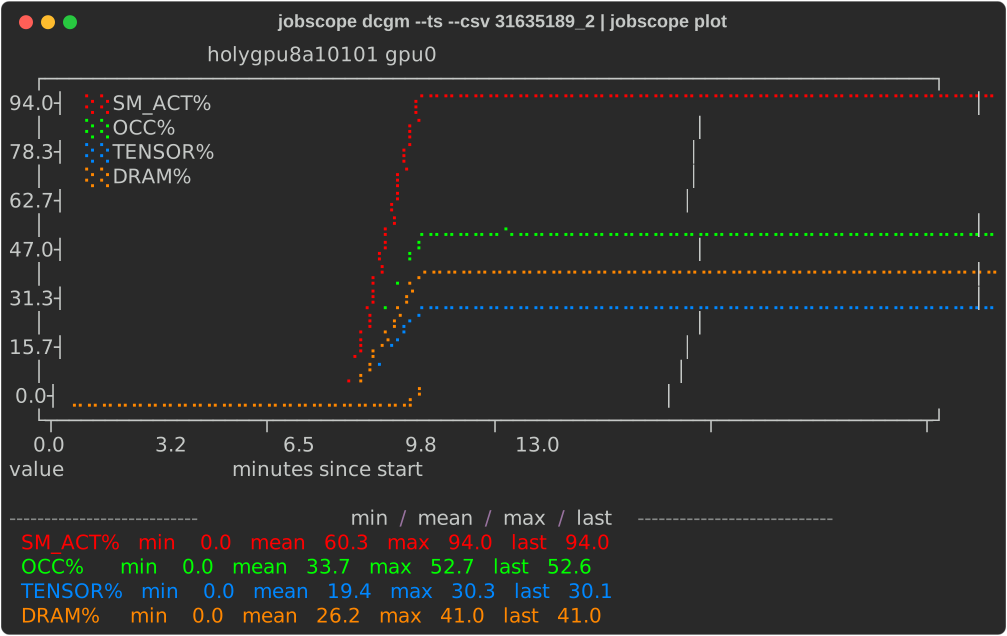
| Per-job DCGM time series |
 |
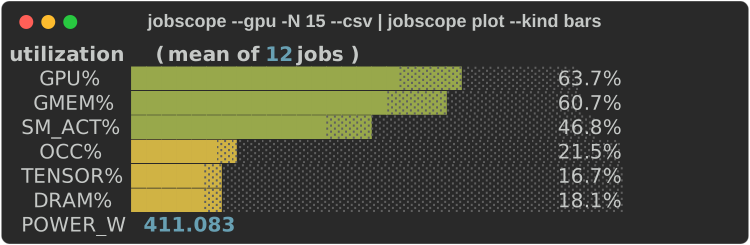
| Aggregated utilization across jobs |
 |
$ jobscope -S 2026-06-01 -E 2026-06-02
  User:      bdesinghu
  Select:    2026-06-01 .. 2026-06-02
JOBID        STATE     GPUS GPU%   GMEM%   SM_ACT%  OCC%    TENSOR%  DRAM%   POWER_W  RUNTIME      NAME
-------------------------------------------------------------------------------------------------------
17752673     COMPLETED 1    92     6       77.1     24.9    1.5      15.0    452      02:58:26     combo-pile
18074321     COMPLETED 1    98     8       49.3     5.8     1.0      6.6     181      01:37:53     vae-wt103
18074326     COMPLETED 1    93     6       76.7     24.8    1.5      14.8    455      09:28:41     combo-wt103
-------------------------------------------------------------------------------------------------------
Mean:                       94     7       67.7     18.5    1.3      12.1    363
Requirements
- Python 3.9+
- Slurm with
sacct, where the jobstats-style AdminComment blob is populated (needed by every view). - For the GPU and DCGM views only: a Prometheus endpoint serving the DCGM
(
DCGM_FI_*) andnvidia_gpu_*series that jobstats scrapes. The offline--cpu/--cgpuviews never contact it.
Install
jobscope is a command-line tool, so install it with
uv. uv provisions its own Python and puts the
jobscope executable on your PATH; there is no virtualenv to create or
activate, and it never touches the system Python (which on clusters like
FASRC/RHEL8 is too old to build pyproject.toml projects anyway).
Install uv once, if you don't already have it:
curl -LsSf https://astral.sh/uv/install.sh | sh
Then restart your shell so uv is on your PATH. (Alternatives: wget -qO- https://astral.sh/uv/install.sh | sh, pipx install uv, or brew install uv;
see the uv install docs.)
Now install jobscope:
uv tool install jobscope      # from PyPI
uv tool install .             # from a source checkout
Upgrade or remove it later with uv tool upgrade jobscope or uv tool uninstall jobscope.
For development from a checkout there's nothing to install; uv runs
everything straight from the source tree, creating the environment on demand:
uv run jobscope -D 3          # run the CLI from source
uv run --extra dev pytest     # run the test suite
Configuration
The GPU and DCGM views need a Prometheus endpoint serving the DCGM and
nvidia_gpu_* series. (The offline --cpu / --cgpu views, and everything under
describe and config, need nothing.) Provide the endpoint one of these ways.
# Preferred: environment variable (keeps a credential out of any file)
export JOBSCOPE_PROM_URL="https://USER:TOKEN@prometheus.example.net/api/prom"
Kempner AI Cluster users: the jobstats config.py sits beside the jobstats
binary on your PATH, and jobscope auto-discovers it when nothing else is
configured, so you need no config file and never handle the URL or token. Just
run jobscope. (This works at any jobstats site; to point at a different install,
set site_jobstats_config_path in the config file below.)
On any other cluster, put your settings in that same config file
(~/.config/jobscope/config.toml, or wherever $JOBSCOPE_CONFIG points):
jobscope config --example > ~/.config/jobscope/config.toml   # then edit it
jobscope config                                              # show the path in use
The config file also sets the DCGM sampling period, plot color thresholds, and
default timeout / worker counts; see jobscope config --example for the full,
commented template.
The Prometheus URL commonly embeds a credential: jobscope never prints it, and a
config.toml in a repo checkout is git-ignored. On sites already running
jobstats, site_jobstats_config_path reuses that install's PROM_SERVER, so the
secret is never copied.
Quick start
jobscope -D 3                     # summary of your jobs over the last 3 days
jobscope --cgpu -D 2              # CPU + GPU summary, fully offline (no Prometheus)
jobscope --diagnose -D 5          # add an advisory GPU diagnosis column
jobscope detail JOBID             # per-node / per-GPU breakdown
jobscope dcgm --ext JOBID         # full per-GPU DCGM profiling table
jobscope dcgm --ts --csv JOBID | jobscope plot --compact   # time-series chart
jobscope alone is shorthand for jobscope summary, so the selectors below work
with or without a subcommand. Flags and JOBIDs may be given in any order
(jobscope 12345 -D 3 and jobscope -D 3 12345 are equivalent), and
-j/--jobid is an explicit alternative to the positional JOBID.
Subcommands
| Command | Purpose |
|---|---|
jobscope summary |
one row per job (the default) |
jobscope detail |
per-node / per-GPU breakdown |
jobscope dcgm |
per-GPU DCGM profiling table (--ext for all 28 metrics, --ts for raw time series) |
jobscope plot |
render --csv output as a terminal chart |
jobscope describe |
plain-English column and metric reference (--dcgm for the catalog) |
jobscope config |
show the config path or print an example |
Selectors shared by summary, detail, and dcgm: -N (last N jobs), -D
(last N days), -S/-E (explicit window), -u/-A/-p/-t (user / account /
partition / state), --csv, and explicit JOBIDs. With no scope at all, the
last day is used.
Views
--gpu(default) shows GPU blob columns plus time-averaged DCGM profiling (SM_ACT%/OCC%/TENSOR%/DRAM%/POWER_W) pulled from Prometheus.--cgpuand--cpuare offline views based only on the stored blob.--diagnoseadds a short advisory GPU diagnosis label.
Run jobscope describe for column definitions and jobscope describe --dcgm --ext for the full metric catalog.
Plotting
jobscope plot renders jobscope <view> --csv output as terminal bar gauges,
histograms, heatmaps, and time-series line charts. The chart kind is
auto-detected from the CSV columns; override with --kind.
jobscope --gpu  --csv JOBID      | jobscope plot                 # bar gauges (one job)
jobscope --gpu  --csv -D 7       | jobscope plot --kind hist      # distribution (many jobs)
jobscope dcgm   --csv -D 7       | jobscope plot                 # heatmap (jobs/GPUs x metrics)
jobscope dcgm --ts --csv JOBID   | jobscope plot --compact        # time series
jobscope plot reads summary, dcgm, and dcgm --ts CSV; the detail CSV is
for machine consumption, not charts. Do not pass -n when piping to jobscope plot: the plot needs the CSV header row.
Contrib
contrib/jobstats_extended.py is a site-specific prototype that folds DCGM
metrics into the jobstats blob itself. It depends on an upstream jobstats install
and is not part of the package; see contrib/README.md.
References
- FASRC jobstats documentation
- Princeton jobstats
- For live monitoring, use KempnerPulse
Project details
Release history Release notifications | RSS feed


Download files
Download the file for your platform. If you're not sure which to choose, learn more about installing packages.
Source Distribution
Built Distribution
Filter files by name, interpreter, ABI, and platform.
If you're not sure about the file name format, learn more about wheel file names.
Copy a direct link to the current filters
File details
Details for the file jobscope-0.1.1.tar.gz.
File metadata
- Download URL: jobscope-0.1.1.tar.gz
- Upload date:
- Size: 55.8 kB
- Tags: Source
- Uploaded using Trusted Publishing? No
- Uploaded via: uv/0.8.19
File hashes
| Algorithm | Hash digest | |
|---|---|---|
| SHA256 |
9136bc178e2b54edd2600202d7794ddc86c5a80e4cf4a784a026c61eea78b151
|
|
| MD5 |
43f47e26ec42b5d1ed97bf463b933ec2
|
|
| BLAKE2b-256 |
7326ef6b10e9fc9125a3ee50612b87aaf5aa1326d2832a29f6ec00d06a78bb3a
|
File details
Details for the file jobscope-0.1.1-py3-none-any.whl.
File metadata
- Download URL: jobscope-0.1.1-py3-none-any.whl
- Upload date:
- Size: 43.5 kB
- Tags: Python 3
- Uploaded using Trusted Publishing? No
- Uploaded via: uv/0.8.19
File hashes
| Algorithm | Hash digest | |
|---|---|---|
| SHA256 |
222ae187f66e716a986d1d07d57d4d7b530bcbe0655fea2f9de9112f80a7e430
|
|
| MD5 |
e0a8d535ed3017b90af56d543fa89d0f
|
|
| BLAKE2b-256 |
191c86b4fb9432b860c6cb54df1322a239e154db2c60c7cdeb53808f2c2496ae
|






