
jobwatch
Watch the job boards of the companies you care about and get a short, ranked digest of new roles that match you, optionally fit-scored against your resume. jobwatch finds and ranks. It never applies for you.
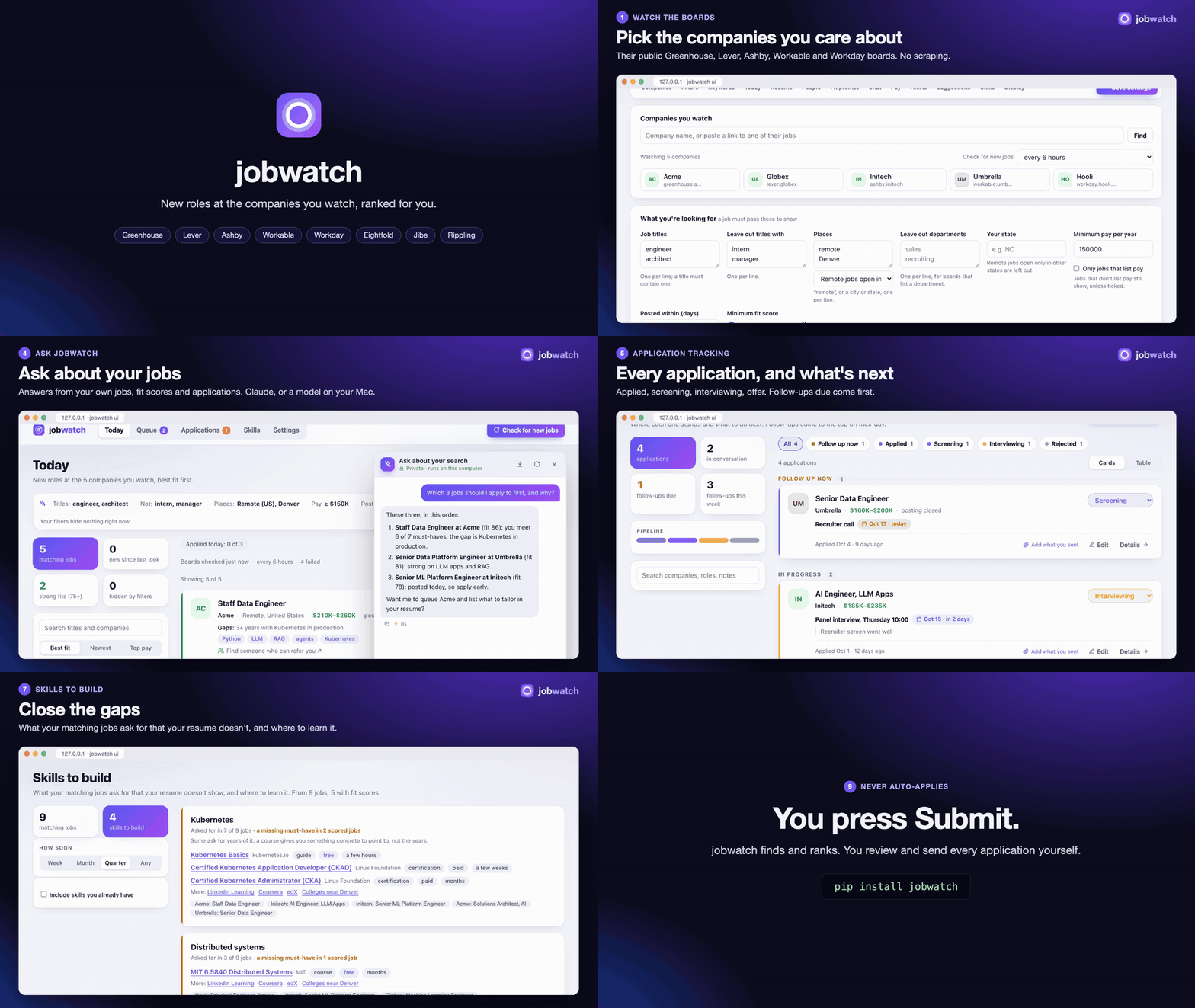
With sound (1½ minutes, made from made-up data):
https://github.com/user-attachments/assets/71b048d0-d372-42fd-a247-c4a59c3ffd71
Tutorials
Seven short videos, two minutes or less each, made from made-up data. GitHub's video links last five minutes, so if one stops after a second or two, reload the page and play it again.
Getting started: install, jobwatch, the four onboarding steps, Today.
https://github.com/user-attachments/assets/f95f85df-406f-4ede-b84c-59569d1a586a
Your daily routine: today's picks, a job's details, the queue, "I applied", Applications, the prep sheet.
https://github.com/user-attachments/assets/8653c4ca-a79d-4135-9be1-51ba3c9fccf6
Where the AI runs: the Claude API, Antigravity or this Mac; the fallback chain; what leaves your computer.
https://github.com/user-attachments/assets/40e6f2cb-c201-4da9-ba21-77bdacc464b8
Applying: the queue, jobs found elsewhere, job-alert emails, status emails, companies to watch.
https://github.com/user-attachments/assets/9d021676-85da-4ce1-8d42-f3808b4ae03b
Tracking applications: stages and follow-ups, applications that go quiet, the calendar feed, Interviews.
https://github.com/user-attachments/assets/e2e43a54-83d2-4154-9229-a063fafefe44
Interview prep: prep sheets, answers drafted from your stories, a mock interview, a drill video.
https://github.com/user-attachments/assets/c8ac1030-700f-4cdd-823d-4b92cd411bf3
Comps and who you know: pay, career value and company health side by side; the people you know there.
https://github.com/user-attachments/assets/42eb0edb-945e-4caf-95c0-3eeae6fdada6
Get started
pipx install jobwatch      # or: pip install jobwatch
jobwatch
A page opens on your computer and walks you through four short steps: about you and your resume, the jobs you
want, the companies to watch, and (optionally) fit scores and job-alert emails. Then press Check for new
jobs. Install the page as an app from Chrome's address bar to keep it in its own window, or run
jobwatch service install to have it always running on a Mac.
Or run it from Claude:
- Claude Code (the Claude app's Code tab, the terminal, and Cowork): add the marketplace
vinayvobbili/jobwatch(Settings → Plugins → Add → Add marketplace, or/plugin marketplace add vinayvobbili/jobwatch), then install jobwatch (/plugin install jobwatch@jobwatch). The plugin brings the tools and a skill with the daily routine; it runs jobwatch with uv. Then ask Claude "watch Stripe for product designer roles". - Claude Desktop with Settings → Extensions: download
jobwatch-<version>.mcpbfrom the latest release, open it and press Install. Claude Desktop sets up everything it needs, uv included.
A chat on claude.ai, or in an app whose plugins run in the cloud, can't reach jobwatch on your computer: the skill loads there, but the tools don't.
Extras: jobwatch[score] (fit scores with the Claude API), jobwatch[local] (fit scores with a local model: run
any OpenAI-compatible server, e.g. vllm-mlx serve, mlx_lm.server or LM Studio, and set LOCAL_LLM_URL if it
isn't at http://127.0.0.1:8010/v1), jobwatch[mcp] (an MCP server for Claude and other assistants), jobwatch[video] (drill videos for
interview prep), jobwatch[lca] (H-1B wage filings from the U.S. Department of Labor as a second pay source: needs
openpyxl to read its Excel files; see the watchlist guide). Prefer a terminal? jobwatch init, jobwatch find "Globex", then jobwatch run daily.
More on the page and the command line →
What it does
| Watches company boards | Greenhouse, Lever, Ashby, Workable, Workday, Eightfold, Oracle, SmartRecruiters, Rippling, iCIMS, Jobvite, Comeet, Gem, Recruitee, Avature, Google, Amazon, careers sites with a job sitemap, HN's Who is hiring and VC portfolio job boards (one board, hundreds of companies). Fresh roles, real pay ranges, robots.txt respected. Why boards · the watchlist |
| Scores fit | Your resume against each posting: must-haves met, gaps, a score out of 100. On the Claude API, Antigravity, or this Mac. Fit scores |
| Keeps a short queue | Today's picks, a queue to apply from, job-alert emails and status emails read for you, reposts caught. Applying |
| Tailors a resume per job | With resume-kit installed, one button on a queued job builds a resume from your confirmed facts and keeps it with the application for Apply and the extension to attach. Tailoring |
| Tracks applications | Every stage, the next step, follow-ups for the ones gone quiet, a calendar feed. Tracking |
| Preps interviews | A prep sheet per interview, answers drafted from your own stories, a mock interview, a drill video. Interview prep |
| Compares offers | Pay, career value and company health side by side. Comps |
| Shows who you know | Your LinkedIn connections at each company, the people you actually talk to first. Who you know |
| Answers questions | A chat about today's jobs and each posting, and the skills your matches keep asking for. Chat · Skills |
| Works with assistants | An MCP server and an agent skill, so Claude can run your search with you. MCP server |
Everything stays on your computer. The only exception is a model you choose for fit scores and chat: the Claude API or Antigravity get the posting and your resume (and, for drafted interview answers, your stories); on-device models send nothing anywhere.
Why it doesn't auto-apply
Tools that auto-apply to hundreds of jobs make the process worse for everyone and rarely work for the person using them:
- Recruiters recognize mass applications.
- Some companies cap how many roles one person can apply to.
- Application forms ask legal questions (work authorization, export control, signatures) that you answer yourself.
jobwatch's job is to make sure you never miss a role worth applying to, and to spend your time on those. Getting more interviews has what moves an application from the pile to a recruiter's call.
The guide
Everything else, from every watchlist setting to the drill video, is in the guide. Development covers running the tests and making a release. MIT licensed.
Support and listings
If jobwatch helps your search, a ⭐ on GitHub is how I know: jobwatch sends nothing home, so stars are the
only count of who uses it. If it landed you an interview, a $1 coffee says so too.





1 maintainer

Metadata
1 maintainer
Release files for jobwatch 0.11.0
For a detailed explanation of source distributions (sdists) and built distributions (wheels), please see the package formats documentation.
Source distribution (sdist)
| File | Size | Uploaded | Provenance | Actions |
|---|---|---|---|---|
| jobwatch-0.11.0.tar.gz | 55.1 MB | With provenance | Details for jobwatch-0.11.0.tar.gz |
Built distribution (wheel)
| File | Interpreter | ABI | Platform | Actions Reset |
|---|---|---|---|---|
| jobwatch-0.11.0-py3-none-any.whl | Python 3 | none | any | Details for jobwatch-0.11.0-py3-none-any.whl |
Total release size: 56.0 MB
Release files / jobwatch-0.11.0.tar.gz
| Download URL | jobwatch-0.11.0.tar.gz |
|---|---|
| Size | 55.1 MB |
| Tags | Source |
|
SHA-256 checksum How to use checksums |
e18b7414eb17d0d06120507041bd9afec30675a956b24f0f44037cffd3da9e38
|
|
BLAKE2b-256 checksum How to use checksums |
749df5b1ed4988ac51fe4e3b695cda91ede6c4e45611ae39fe9d083ca8642f39
|
| Upload date | |
|
Uploaded using Trusted Publishing? What is trusted publishing? |
Yes |
| Uploaded via |
twine/7.0.0 CPython/3.13.16
|
Provenance
Provenance describes where a file came from. On PyPI, provenance is shared via attestations, which provide a verifiable record of the build or publishing details. View details, limitations and caveats.


PyPI Publish Attestation
PyPI verified that this artifact, at this checksum, originated from the publisher listed below.
Signed by GitHub Actions, verified by PyPI on Nov 15, 2026.
Transparency logRelease files / jobwatch-0.11.0-py3-none-any.whl
| Download URL | jobwatch-0.11.0-py3-none-any.whl |
|---|---|
| Size | 864.3 kB |
| Tags | Python 3 |
|
SHA-256 checksum How to use checksums |
7f5e59910b1bbb22ebc0b7685fedfffbc940076c0439ef85ce1eb21d73fdccc7
|
|
BLAKE2b-256 checksum How to use checksums |
8aceaeeae00882ab48d6337aa14d80219fab1da5eab7dfb2f4b0621d748dbc05
|
| Upload date | |
|
Uploaded using Trusted Publishing? What is trusted publishing? |
Yes |
| Uploaded via |
twine/7.0.0 CPython/3.13.16
|
Provenance
Provenance describes where a file came from. On PyPI, provenance is shared via attestations, which provide a verifiable record of the build or publishing details. View details, limitations and caveats.
PyPI Publish Attestation
PyPI verified that this artifact, at this checksum, originated from the publisher listed below.
Signed by GitHub Actions, verified by PyPI on Nov 15, 2026.
Transparency logSecurity for jobwatch 0.11.0
Provenance
Provenance describes where a file came from. On PyPI, provenance is shared via attestations, which provide a verifiable record of the build or publishing details. View details, limitations and caveats.
Full provenance
Both files in this release have been uploaded with provenance metadata.
Attestation for jobwatch-0.11.0.tar.gz
PyPI Publish Attestation
PyPI verified that this artifact, at this checksum, originated from the publisher listed below.
Signed by GitHub Actions, verified by PyPI on Nov 15, 2026.
Transparency logA note on package security
PyPI is a repository for distributing packages, not a service for auditing them. While third-party security researchers and our staff do their best to detect and remove malicious packages, PyPI cannot guarantee the quality, security or suitability of any given package.
To learn more about protecting yourself from malicious actors, visit our package security documentation.














