
jlv
A terminal viewer for JSONL files (one JSON value per line).
Install the jsonl-viewer package; the command is still jlv:
uv tool install jsonl-viewer
jlv your-file.jsonl
Alternatively, use pip install jsonl-viewer. From a source checkout:
uv run jlv your-file.jsonl
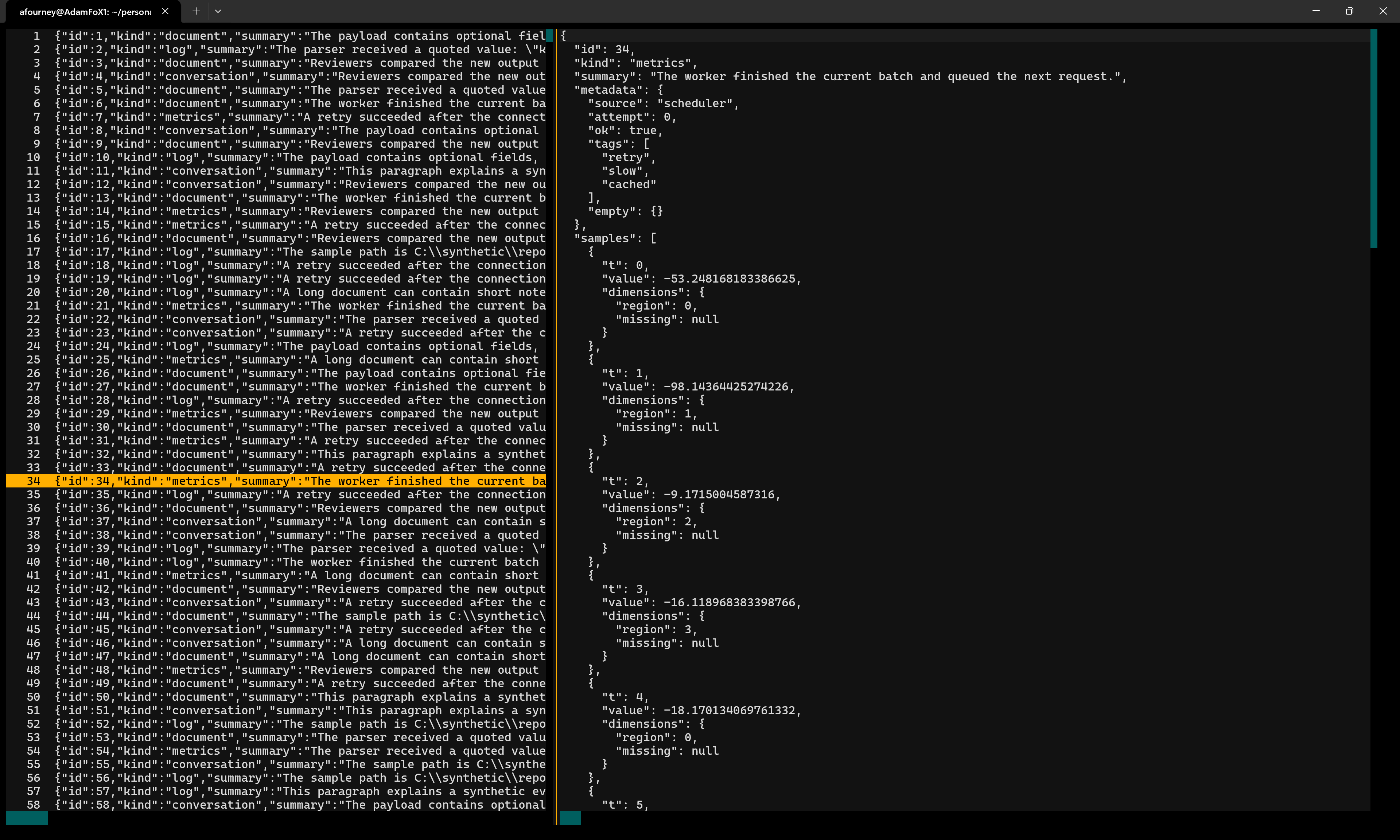
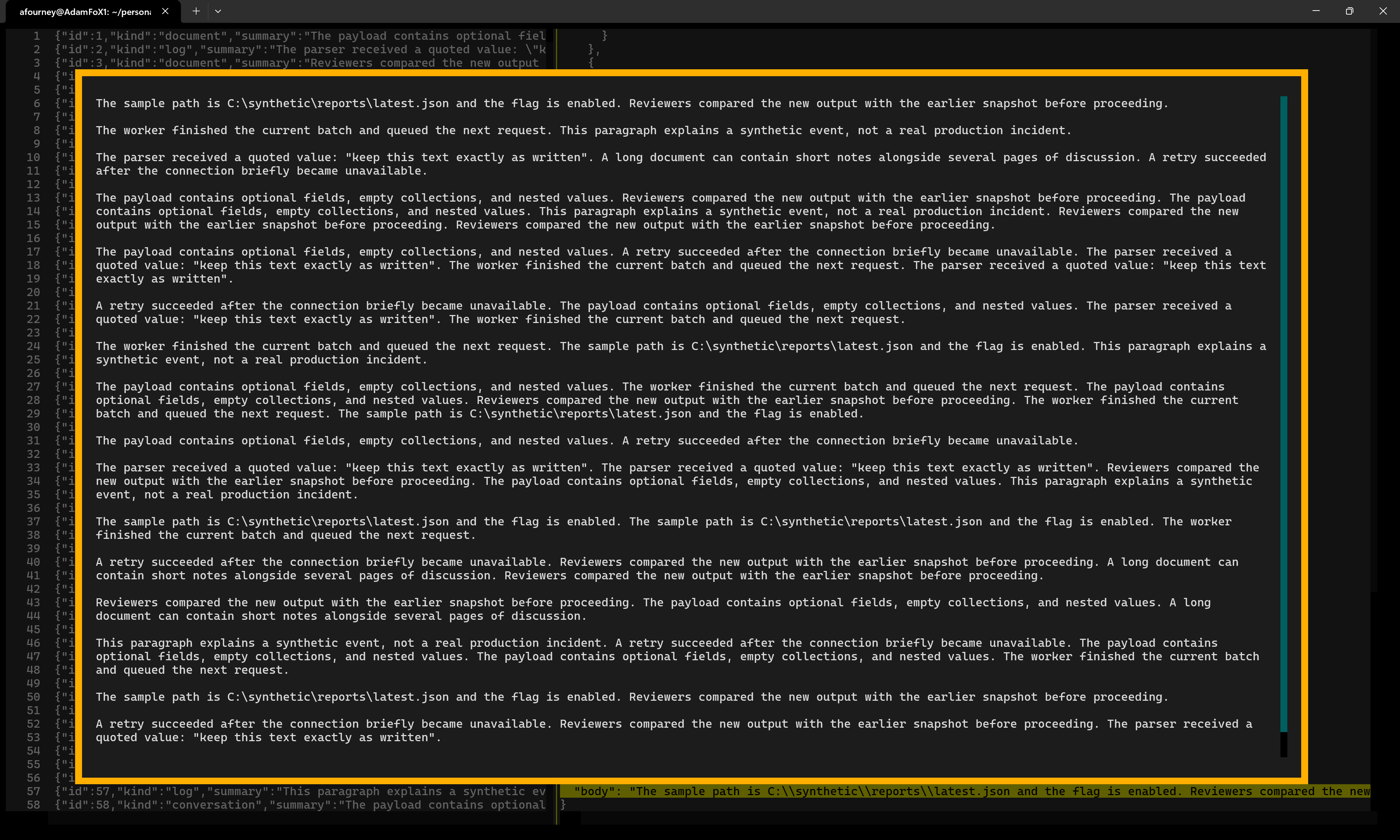
Requires Python 3.12+ and Textual 8+. The left panel lists numbered records; the right panel shows the selected record as indented JSON. Select a string to read its decoded contents in a scrollable, word-wrapped inspector.
Screenshots
Browse records alongside their formatted JSON:
Open a string to read its decoded, word-wrapped contents:
Controls
| Key / action | Effect |
|---|---|
| Up / Down | Select the previous / next record or JSON line |
| Page Up / Page Down | Move by a page |
| Home / End | Move to the first / last row |
| Tab / Shift+Tab | Switch panels |
| Left / Right | Scroll horizontally |
| Enter or click | Inspect a selected string |
| Mouse wheel / scrollbars | Scroll the panel under the pointer |
| Escape | Close the string inspector |
| q | Quit, including from the inspector |
The inspector is read-only and supports text selection and Ctrl+C to copy. The main panels also support text selection. The left-hand preview is capped at 1,000 characters, but the right-hand document and decoded strings are not truncated.
Large files
Both main panels render only visible rows, rather than creating a widget for every record or JSON field. The loader validates the entire file in one buffered pass and builds a compact byte-offset index. Records are read and parsed on demand; small bounded caches retain recent previews and formatted documents. The string inspector also renders a viewport, and defers wrapping until its actual display width is known.
Validation still happens before the viewer opens: malformed JSON, invalid UTF-8, and interior blank lines are reported with a line number. Trailing blank lines are permitted. This is a read-only viewer, not a live file follower; do not edit the input file while viewing it.
Sample file
The repository includes stress-test.jsonl.gz, a compressed synthetic dataset
with 30,000 records. Extract it before opening it:
gzip -dk stress-test.jsonl.gz
uv run jlv stress-test.jsonl
The extracted file is 300 MB and is Git-ignored. Records range from approximately 1-100 KB and contain nested structures and strings of varying lengths. Some strings intentionally end mid-sentence to fit the generated record sizes.
1 maintainer

Release files for jsonl-viewer 0.0.1
For a detailed explanation of source distributions (sdists) and built distributions (wheels), please see the package formats documentation.
Source distribution (sdist)
| File | Size | Uploaded | |
|---|---|---|---|
| jsonl_viewer-0.0.1.tar.gz | 7.0 kB | Details |
Built distribution (wheel)
| File | Interpreter | ABI | Platform | Reset |
|---|---|---|---|---|
| jsonl_viewer-0.0.1-py3-none-any.whl | Python 3 | none | any | Details |
Total release size: 15.7 kB
Release files / jsonl_viewer-0.0.1.tar.gz
| Download URL | jsonl_viewer-0.0.1.tar.gz |
|---|---|
| Size | 7.0 kB |
| Tags | Source |
|
SHA-256 checksum How to use checksums |
3c51962f6ac41a821416f3e28ed3057b8251a8de305b46209da9929ef2b19e5c
|
|
BLAKE2b-256 checksum How to use checksums |
2f2cf2d229a6b0ca34288995cb6299cf02f8a3297931a0e501e1e0f3ba6df928
|
| Upload date | |
|
Uploaded using Trusted Publishing? What is trusted publishing? |
Yes |
| Uploaded via |
twine/7.0.0 CPython/3.13.14
|
Provenance
Provenance describes where a file came from. On PyPI, provenance is shared via attestations, which provide a verifiable record of the build or publishing details. View details, limitations and caveats.


PyPI Publish Attestation
PyPI verified that this artifact, at this checksum, originated from the publisher listed below.
Signed by GitHub Actions, verified by PyPI on Sep 22, 2026.
Transparency logRelease files / jsonl_viewer-0.0.1-py3-none-any.whl
| Download URL | jsonl_viewer-0.0.1-py3-none-any.whl |
|---|---|
| Size | 8.7 kB |
| Tags | Python 3 |
|
SHA-256 checksum How to use checksums |
3f0a8d52efb9dd8ae6c00a59c9ce140695840c9c3ce5fcc132a50e961f0f39a3
|
|
BLAKE2b-256 checksum How to use checksums |
ce0f3bbc6d0024c4f35340f564cd1cfcd431a6e6324569083e062a90b7ee87d0
|
| Upload date | |
|
Uploaded using Trusted Publishing? What is trusted publishing? |
Yes |
| Uploaded via |
twine/7.0.0 CPython/3.13.14
|
Provenance
Provenance describes where a file came from. On PyPI, provenance is shared via attestations, which provide a verifiable record of the build or publishing details. View details, limitations and caveats.
PyPI Publish Attestation
PyPI verified that this artifact, at this checksum, originated from the publisher listed below.
Signed by GitHub Actions, verified by PyPI on Sep 22, 2026.
Transparency log













