
jsonquery-python

This is a Python implementation of JSON Query, a small, flexible, and expandable JSON query language.
Try it out on the online playground: https://jsonquerylang.org
Install
Install via PyPi: https://pypi.org/project/jsonquerylang/
pip install jsonquerylang
Use
from jsonquerylang import jsonquery
from pprint import pprint

data = {
    "friends": [
        {"name": "Chris", "age": 23, "city": "New York"},
        {"name": "Emily", "age": 19, "city": "Atlanta"},
        {"name": "Joe", "age": 32, "city": "New York"},
        {"name": "Kevin", "age": 19, "city": "Atlanta"},
        {"name": "Michelle", "age": 27, "city": "Los Angeles"},
        {"name": "Robert", "age": 45, "city": "Manhattan"},
        {"name": "Sarah", "age": 31, "city": "New York"}
    ]
}

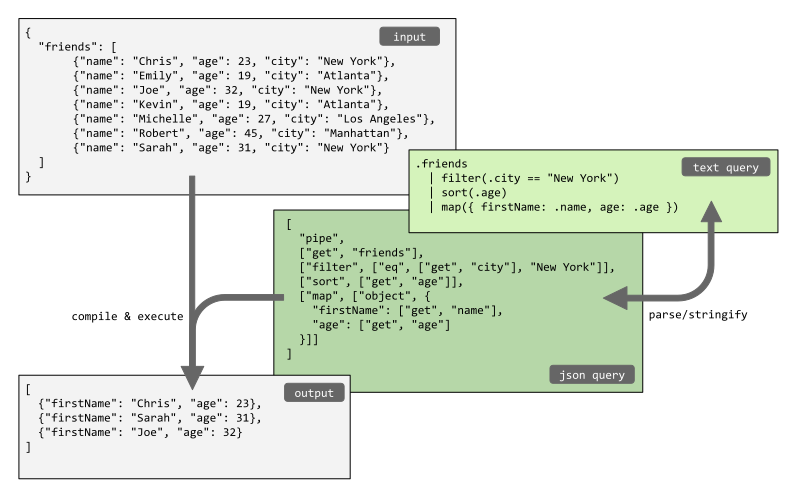
# Get the array containing the friends from the object, filter the friends that live in New York,
# sort them by age, and pick just the name and age out of the objects.
output = jsonquery(data, """
    .friends
        | filter(.city == "New York")
        | sort(.age)
        | pick(.name, .age)
""")
pprint(output)
# [{'age': 23, 'name': 'Chris'},
#  {'age': 31, 'name': 'Sarah'},
#  {'age': 32, 'name': 'Joe'}]

# The same query can be written using the JSON format instead of the text format.
# Note that the functions `parse` and `stringify` can be used
# to convert from text format to JSON format and vice versa.
pprint(jsonquery(data, [
    "pipe",
    ["get", "friends"],
    ["filter", ["eq", ["get", "city"], "New York"]],
    ["sort", ["get", "age"]],
    ["pick", ["get", "name"], ["get", "age"]]
]))
# [{'age': 23, 'name': 'Chris'},
#  {'age': 31, 'name': 'Sarah'},
#  {'age': 32, 'name': 'Joe'}]
Syntax
The JSON Query syntax is described on the following page: https://github.com/jsonquerylang/jsonquery?tab=readme-ov-file#syntax.
API
jsonquery
Compile and evaluate a JSON query.
Syntax:
jsonquery(data, query [, options])
Where:
datais a JSON object or arrayqueryis a JSON query or string containing a text queryoptionsis an optional object which can have the following options:functionsan object with custom functions, see section Custom functions.operatorsa list with custom operators, see section Custom operators.
Example:
from pprint import pprint
from jsonquerylang import jsonquery

data = [
    {"name": "Chris", "age": 23, "scores": [7.2, 5, 8.0]},
    {"name": "Joe", "age": 32, "scores": [6.1, 8.1]},
    {"name": "Emily", "age": 19},
]
query = ["sort", ["get", "age"], "desc"]
output = jsonquery(data, query)
pprint(output)
# [{'age': 32, 'name': 'Joe', 'scores': [6.1, 8.1]},
#  {'age': 23, 'name': 'Chris', 'scores': [7.2, 5, 8.0]},
#  {'age': 19, 'name': 'Emily'}]
compile
Compile a JSON Query. Returns a function which can execute the query repeatedly for different inputs.
Syntax:
compile(query [, options])
Where:
queryis a JSON query or string containing a text queryoptionsis an optional object which can have the following options:functionsan object with custom functions, see section Custom functions.
The function returns a lambda function which can be executed by passing JSON data as first argument.
Example:
from pprint import pprint
from jsonquerylang import compile

data = [
    {"name": "Chris", "age": 23, "scores": [7.2, 5, 8.0]},
    {"name": "Joe", "age": 32, "scores": [6.1, 8.1]},
    {"name": "Emily", "age": 19},
]
query = ["sort", ["get", "age"], "desc"]
queryMe = compile(query)
output = queryMe(data)
pprint(output)
# [{'age': 32, 'name': 'Joe', 'scores': [6.1, 8.1]},
#  {'age': 23, 'name': 'Chris', 'scores': [7.2, 5, 8.0]},
#  {'age': 19, 'name': 'Emily'}]
parse
Parse a string containing a JSON Query into JSON.
Syntax:
parse(textQuery, [, options])
Where:
textQuery: A query in text formatoptions: An optional object which can have the following properties:functionsan object with custom functions, see section Custom functions.operatorsa list with custom operators, see section Custom operators
Example:
from pprint import pprint
from jsonquerylang import parse

text_query = '.friends | filter(.city == "new York") | sort(.age) | pick(.name, .age)'
json_query = parse(text_query)
pprint(json_query)
# ['pipe',
#  ['get', 'friends'],
#  ['filter', ['eq', ['get', 'city'], 'New York']],
#  ['sort', ['get', 'age']],
#  ['pick', ['get', 'name'], ['get', 'age']]]
stringify
Stringify a JSON Query into a readable, human friendly text format.
Syntax:
stringify(query [, options])
Where:
queryis a JSON Queryoptionsis an optional object that can have the following properties:operatorsa list with custom operators, see section Custom operators.indentationa string containing the desired indentation, defaults to two spaces:" ".max_line_lengtha number with the maximum line length, used for wrapping contents. Default value:40.
Example:
from jsonquerylang import stringify

jsonQuery = [
    "pipe",
    ["get", "friends"],
    ["filter", ["eq", ["get", "city"], "New York"]],
    ["sort", ["get", "age"]],
    ["pick", ["get", "name"], ["get", "age"]],
]
textQuery = stringify(jsonQuery)
print(textQuery)
# '.friends | filter(.city == "new York") | sort(.age) | pick(.name, .age)'
Custom functions
The functions jsonquery, compile, and parse accept custom functions. Custom functions are passed as an object with the key being the function name, and the value being a factory function.
Here is a minimal example which adds a function times to JSON Query:
from jsonquerylang import jsonquery, JsonQueryOptions


def fn_times(value):
    return lambda array: list(map(lambda item: item * value, array))


data = [2, 3, 8]
query = 'times(2)'
options: JsonQueryOptions = {"functions": {"times": fn_times}}

print(jsonquery(data, query, options))
# [4, 6, 16]
In the example above, the argument value is static. When the parameters are not static, the function compile can be used to compile them. For example, the function filter is implemented as follows:
from jsonquerylang import compile, JsonQueryOptions

def truthy(value):
    return value not in [False, 0, None]

def fn_filter(predicate):
    _predicate = compile(predicate)

    return lambda data: list(filter(lambda item: truthy(_predicate(item)), data))

options: JsonQueryOptions = {"functions": {"filter": fn_filter}}
You can have a look at the source code of the functions in /jsonquerylang/functions.py for more examples.
Custom operators
The functions jsonquery, parse, and stringify accept custom operators. Custom operators are passed as a list with operators definitions. In practice, often both a custom operator and a corresponding custom function are configured. Each custom operator is an object with:
- Two required properties
nameandopto specify the function name and operator name, for example{ "name": "add", "op": "+", ... } - One of the three properties
at,before, orafter, specifying the precedence compared to an existing operator. - optionally, the property
left_associativecan be set toTrueto allow using a chain of multiple operators without parenthesis, likea and b and c. Without this, an exception will be thrown, which can be solved by using parenthesis like(a and b) and c. - optionally, the property
varargcan be set toTruewhen the function supports a variable number of arguments, likeand(a, b, c, ...). In that case, a chain of operators likea and b and cwill be parsed into the JSON Format["and", a, b, c, ...]. Operators that do not support variable arguments, like1 + 2 + 3, will be parsed into a nested JSON Format like["add", ["add", 1, 2], 3].
Here is a minimal example configuring a custom operator ~= and a corresponding function aboutEq:
from jsonquerylang import jsonquery, compile, JsonQueryOptions


def about_eq(a, b):
    epsilon = 0.001
    a_compiled = compile(a, options)
    b_compiled = compile(b, options)

    return lambda data: abs(a_compiled(data) - b_compiled(data)) < epsilon


options: JsonQueryOptions = {
    "functions": {"aboutEq": about_eq},
    "operators": [{"name": "aboutEq", "op": "~=", "at": "=="}],
}

scores = [
    {"name": "Joe", "score": 2.0001, "previousScore": 1.9999},
    {"name": "Sarah", "score": 3, "previousScore": 1.5},
]
query = "filter(.score ~= .previousScore)"
unchanged_scores = jsonquery(scores, query, options)

print(unchanged_scores)
# [{'name': 'Joe', 'score': 2.0001, 'previousScore': 1.9999}]
License
Released under the ISC license.
1 maintainer

Metadata
1 maintainer
Release files for jsonquerylang 2.1.0
For a detailed explanation of source distributions (sdists) and built distributions (wheels), please see the package formats documentation.
Source distribution (sdist)
| File | Size | Uploaded | |
|---|---|---|---|
| jsonquerylang-2.1.0.tar.gz | 19.6 kB | Details |
Built distribution (wheel)
| File | Interpreter | ABI | Platform | Reset |
|---|---|---|---|---|
| jsonquerylang-2.1.0-py3-none-any.whl | Python 3 | none | any | Details |
Total release size: 36.0 kB
Release files / jsonquerylang-2.1.0.tar.gz
| Download URL | jsonquerylang-2.1.0.tar.gz |
|---|---|
| Size | 19.6 kB |
| Tags | Source |
|
SHA-256 checksum How to use checksums |
9218289f4090bf4c7eac459fcf93cb6412420820e88b5465ee252f761cfc0e32
|
|
BLAKE2b-256 checksum How to use checksums |
b430e64b2b41661c143098d3d84400e49ca5c0d10de47334f9bbbe7f28656820
|
| Upload date | |
|
Uploaded using Trusted Publishing? What is trusted publishing? |
No |
| Uploaded via |
twine/6.1.0 CPython/3.12.10
|
Release files / jsonquerylang-2.1.0-py3-none-any.whl
| Download URL | jsonquerylang-2.1.0-py3-none-any.whl |
|---|---|
| Size | 16.4 kB |
| Tags | Python 3 |
|
SHA-256 checksum How to use checksums |
427c730a2e5e9a8c592f581b8e190a87833f41a618bbd7e1bb7db8e616c4d3cb
|
|
BLAKE2b-256 checksum How to use checksums |
ea44f07983c49de872b8aedb15028798a5fdb236bb686613e4c1096f7af86ae7
|
| Upload date | |
|
Uploaded using Trusted Publishing? What is trusted publishing? |
No |
| Uploaded via |
twine/6.1.0 CPython/3.12.10
|














