
A lightweight, flexible, and expandable JSON query language

Project description
jsonquery-python

This is a Python implementation of JSON Query, a small, flexible, and expandable JSON query language.
Try it out on the online playground: https://jsonquerylang.org
Install
The library is not yet published and requires a manual build.
Use
from jsonquery import jsonquery

from pprint import pprint


data = {

    "friends": [

        { "name": "Chris", "age": 23, "city": "New York" },

        { "name": "Emily", "age": 19, "city": "Atlanta" },

        { "name": "Joe", "age": 32, "city": "New York" },

        { "name": "Kevin", "age": 19, "city": "Atlanta" },

        { "name": "Michelle", "age": 27, "city": "Los Angeles" },

        { "name": "Robert", "age": 45, "city": "Manhattan" },

        { "name": "Sarah", "age": 31, "city": "New York" }

    ]

}


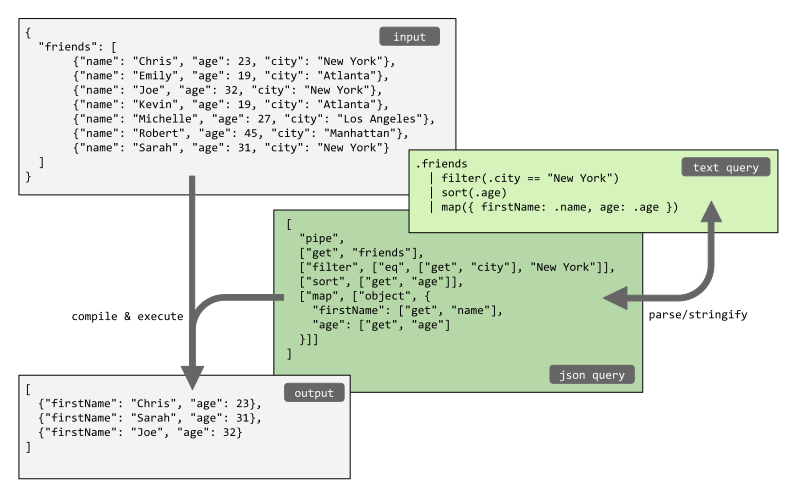
# Get the array containing the friends from the object, filter the friends that live in New York,

# sort them by age, and pick just the name and age out of the objects.

output = jsonquery(data, """

    .friends

        | filter(.city == "New York")

        | sort(.age)

        | pick(.name, .age)

""")

pprint(output)

# [{'age': 23, 'name': 'Chris'},

#  {'age': 31, 'name': 'Sarah'},

#  {'age': 32, 'name': 'Joe'}]


# The same query can be written using the JSON format instead of the text format.

# Note that the functions `parse` and `stringify` can be used

# to convert from text format to JSON format and vice versa.

pprint(jsonquery(data, [

    "pipe",

    ["get", "friends"],

    ["filter", ["eq", ["get", "city"], "New York"]],

    ["sort", ["get", "age"]],

    ["pick", ["get", "name"], ["get", "age"]]

]))

# [{'age': 23, 'name': 'Chris'},

#  {'age': 31, 'name': 'Sarah'},

#  {'age': 32, 'name': 'Joe'}]
Syntax
The JSON Query syntax is described on the following page: https://github.com/jsonquerylang/jsonquery?tab=readme-ov-file#syntax.
API
jsonquery
Compile and evaluate a JSON query.
Syntax:
jsonquery(data, query [, options])
Where:
-
datais a JSON object or array -
queryis a JSON query or string containing a text query -
optionsis an optional object which can have the following options:functionsan object with custom functions
Example:
from pprint import pprint

from jsonquery import jsonquery


input = [

    {"name": "Chris", "age": 23, "scores": [7.2, 5, 8.0]},

    {"name": "Joe", "age": 32, "scores": [6.1, 8.1]},

    {"name": "Emily", "age": 19},

]

query = ["sort", ["get", "age"], "desc"]

output = jsonquery(query)

pprint(output)

# [{'age': 32, 'name': 'Joe', 'scores': [6.1, 8.1]},

#  {'age': 23, 'name': 'Chris', 'scores': [7.2, 5, 8.0]},

#  {'age': 19, 'name': 'Emily'}]
compile
Compile a JSON Query. Returns a function which can execute the query repeatedly for different inputs.
Syntax:
compile(query [, options])
Where:
-
queryis a JSON query or string containing a text query -
optionsis an optional object which can have the following options:functionsan object with custom functions
The function returns a lambda function which can be executed by passing JSON data as first argument.
Example:
from pprint import pprint

from jsonquery import compile


input = [

    {"name": "Chris", "age": 23, "scores": [7.2, 5, 8.0]},

    {"name": "Joe", "age": 32, "scores": [6.1, 8.1]},

    {"name": "Emily", "age": 19},

]

query = ["sort", ["get", "age"], "desc"]

queryMe = compile(query)

output = queryMe(input)

pprint(output)

# [{'age': 32, 'name': 'Joe', 'scores': [6.1, 8.1]},

#  {'age': 23, 'name': 'Chris', 'scores': [7.2, 5, 8.0]},

#  {'age': 19, 'name': 'Emily'}]
parse
Parse a string containing a JSON Query into JSON.
Syntax:
parse(textQuery, [, options])
Where:
-
textQuery: A query in text format -
options: An optional object which can have the following properties:-
functionsan object with custom functions -
operatorsan object with the names of custom operators both as key and value
-
Example:
from pprint import pprint

from jsonquery import parse


text_query = '.friends | filter(.city == "new York") | sort(.age) | pick(.name, .age)'

json_query = parse(text_query)

pprint(json_query)

# ['pipe',

#  ['get', 'friends'],

#  ['filter', ['eq', ['get', 'city'], 'New York']],

#  ['sort', ['get', 'age']],

#  ['pick', ['get', 'name'], ['get', 'age']]]
stringify
Stringify a JSON Query into a readable, human friendly text format.
Syntax:
stringify(query [, options])
Where:
-
queryis a JSON Query -
optionsis an optional object that can have the following properties:-
operatorsan object with the names of custom operators both as key and value -
indentationa string containing the desired indentation, defaults to two spaces:" " -
max_line_lengtha number with the maximum line length, used for wrapping contents. Default value:40.
-
Example:
from jsonquery import stringify


jsonQuery = [

    "pipe",

    ["get", "friends"],

    ["filter", ["eq", ["get", "city"], "New York"]],

    ["sort", ["get", "age"]],

    ["pick", ["get", "name"], ["get", "age"]],

]

textQuery = stringify(jsonQuery)

print(textQuery)

# '.friends | filter(.city == "new York") | sort(.age) | pick(.name, .age)'
License
Released under the ISC license.


Download files
Download the file for your platform. If you're not sure which to choose, learn more about installing packages.
Source Distribution
Built Distribution
Filter files by name, interpreter, ABI, and platform.
If you're not sure about the file name format, learn more about wheel file names.
Copy a direct link to the current filters
File details
Details for the file jsonquerylang-1.0.0.tar.gz.
File metadata
- Download URL: jsonquerylang-1.0.0.tar.gz
- Upload date:
- Size: 5.5 kB
- Tags: Source
- Uploaded using Trusted Publishing? No
- Uploaded via: twine/5.1.1 CPython/3.12.7
File hashes
| Algorithm | Hash digest | |
|---|---|---|
| SHA256 |
64cc3ca9666bbc5d97d2a35066c3baf6645852e5bfb6e930554708c46f0f2bb6
|
|
| MD5 |
7bfb578171c241e8f0fa3a6d9622e9d2
|
|
| BLAKE2b-256 |
ac6fe52945eb452dc073e13fb2525b98b6f22734afdacd002cf17e23a3502145
|
File details
Details for the file jsonquerylang-1.0.0-py3-none-any.whl.
File metadata
- Download URL: jsonquerylang-1.0.0-py3-none-any.whl
- Upload date:
- Size: 3.5 kB
- Tags: Python 3
- Uploaded using Trusted Publishing? No
- Uploaded via: twine/5.1.1 CPython/3.12.7
File hashes
| Algorithm | Hash digest | |
|---|---|---|
| SHA256 |
5ebf57226304fe5ea46e47b6d117de49d4c23e880e292e3cdc330a51ca393781
|
|
| MD5 |
25a1f8dfc80e9b63da9e36ba04979290
|
|
| BLAKE2b-256 |
c4d943c19316f91f1487810f757d29d8350b008f32a96ac5281869674309f112
|






