

Logo by Isabel Paredes
JupyterGIS
In-browser, collaborative GIS built on Jupyter




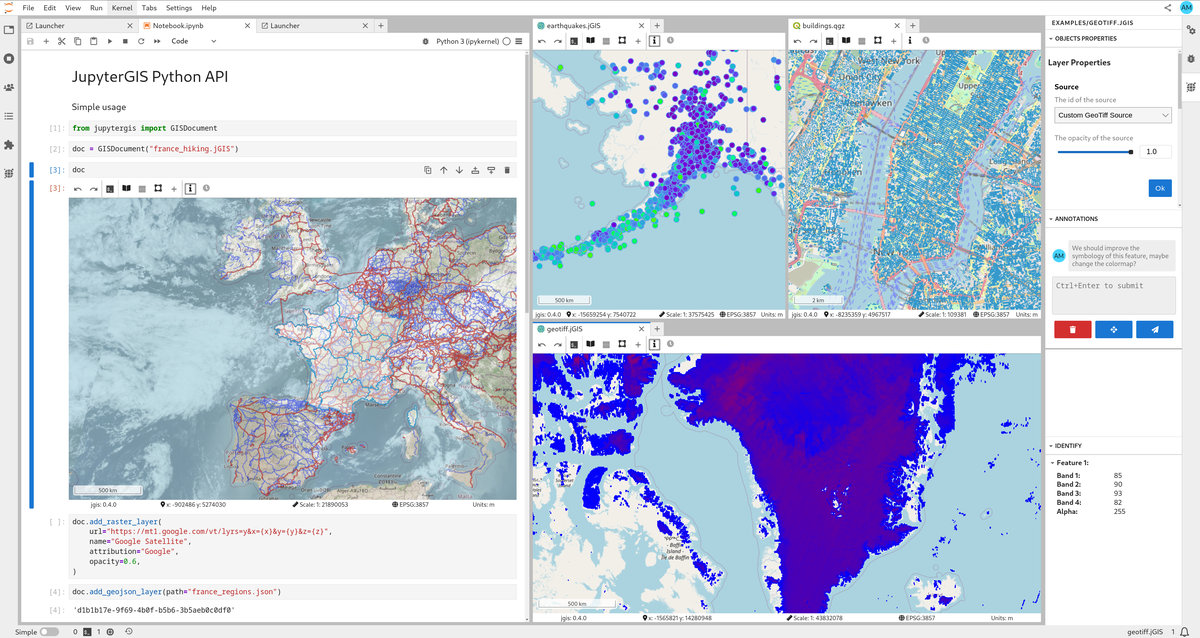
JupyterGIS is an in-browser Geographical Information System (GIS) with real-time collaboration. It is built on Project Jupyter but independently useable. As flagship project of the GeoJupyter community it aims to enable organizations, researchers, and students to easily explore and work with geospatial data.
Highlights
- Real-time collaboration — like Google Docs for GIS, with spatial annotations and comments
- QGIS interoperability — import and export QGIS project files
- Python API — scriptable workflows in collaborative notebooks
- Many data formats — GeoJSON, GeoTIFF/COG, GeoParquet, GeoPackage, Shapefile, PMTiles, WMS/WMTS, and more
- Grammar-driven symbology — flexible rule-based styling, similar to Vega-Lite
- Storymaps — guided narratives through your maps
- Hillshade & heatmaps — terrain and density visualization
- GDAL processing — rasterize, warp, and translate in the browser or on the server
- STAC & OpenEO — cloud-native data catalog and processing support
- Pangeo integration — dynamic raster tile serving via TiTiler backed by the Pangeo stack
- Layer gallery — pre-built layer catalog for quick setup
- Embeddable — use as a standalone map, an IDE, or from within a notebook
- AI skills — map operations in natural language via Jupyter AI
Try it now
In your browser with JupyterLite
Runs entirely in your browser via WebAssembly — no installation needed.
Note: Real-time collaboration is not yet supported in JupyterLite.
On Notebook.link
Powered by Notebook.link and JupyterLite.
Installation
Mamba (recommended)
mamba install -c conda-forge jupytergis
pip
pip install jupytergis
Pixi
pixi add jupytergis
Docker
docker run -p 8888:8888 ghcr.io/geojupyter/jupytergis:latest
Docker build source: https://github.com/geojupyter/jupytergis-docker
Deploying with JupyterLite
You can run JupyterGIS entirely in the browser using JupyterLite:
- Create a repository using the xeus-lite-demo template.
- Edit
environment.ymland addjupytergis-lite. - Add your data and
.jGISfiles under thecontent/directory. - Under Settings → Pages set the GitHub Pages deployment source to "GitHub Actions".
Note: Collaboration is not yet supported in JupyterLite static deployments.
Documentation
https://jupytergis.readthedocs.io
Contributing
We welcome contributions! Check out the Contributor Guide to get started.
Chat with us on Zulip or join a community meeting.
License
BSD 3-Clause. See LICENSE.
3 maintainers


Release files for jupytergis 0.16.4
For a detailed explanation of source distributions (sdists) and built distributions (wheels), please see the package formats documentation.
Source distribution (sdist)
| File | Size | Uploaded | |
|---|---|---|---|
| jupytergis-0.16.4.tar.gz | 6.4 kB | Details |
Built distribution (wheel)
| File | Interpreter | ABI | Platform | Reset |
|---|---|---|---|---|
| jupytergis-0.16.4-py3-none-any.whl | Python 3 | none | any | Details |
Total release size: 11.5 kB
Release files / jupytergis-0.16.4.tar.gz
| Download URL | jupytergis-0.16.4.tar.gz |
|---|---|
| Size | 6.4 kB |
| Tags | Source |
|
SHA-256 checksum How to use checksums |
f7b7bae47648fd6eb419422fad0473a43c4c6032b138d4ad341681cf60f67898
|
|
BLAKE2b-256 checksum How to use checksums |
45266cdc2d62de4e55fa2e83203af2a88eb9fc56fb4132a6dfe46f49f2473fe5
|
| Upload date | |
|
Uploaded using Trusted Publishing? What is trusted publishing? |
Yes |
| Uploaded via |
twine/7.0.0 CPython/3.12.14
|
Release files / jupytergis-0.16.4-py3-none-any.whl
| Download URL | jupytergis-0.16.4-py3-none-any.whl |
|---|---|
| Size | 5.1 kB |
| Tags | Python 3 |
|
SHA-256 checksum How to use checksums |
7613292ac523eae0f04ee5027fe9e3a6ba9ffedad5ac25b760949453dbd812ce
|
|
BLAKE2b-256 checksum How to use checksums |
491f5c096f1f42686a61b8deb6a7ff4e052b2e2efab7392973c3bb784af7ffed
|
| Upload date | |
|
Uploaded using Trusted Publishing? What is trusted publishing? |
Yes |
| Uploaded via |
twine/7.0.0 CPython/3.12.14
|














