
jupyterlab_advanced_image_viewer_extension





A JupyterLab 4 extension that makes the built-in image viewer interactive. Images open fitted to the panel just like the stock viewer, then you can zoom with the wheel, pan by dragging, and step through a folder of images with the arrow keys - all in a single viewer tab.
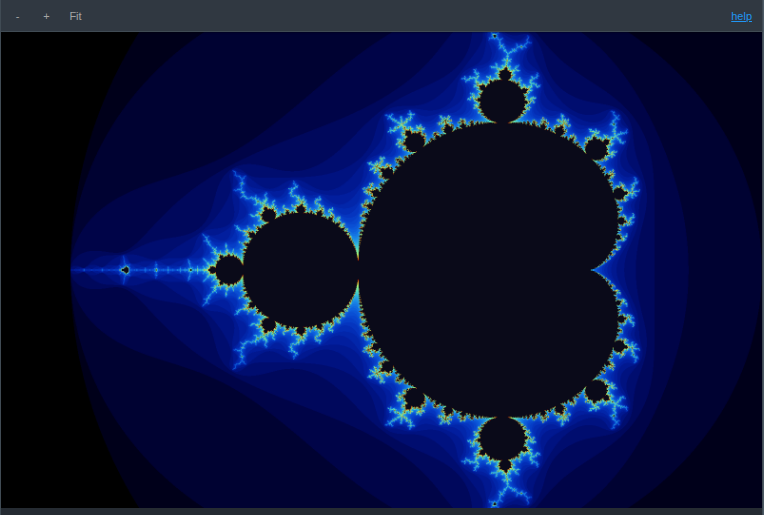
The viewer toolbar adds zoom in / out / fit controls and a help link that lists every keybinding.
Features
- Fit to screen - every image opens scaled to fit the panel (same result as the stock viewer), and reset returns to that fit
- Wheel zoom - scroll to zoom in and out, anchored at the cursor; zoom out as far as you like
- Drag to pan - hold and drag to move the image at any zoom; the image can touch a viewport border but never leave it, the grab cursor is always available, and Fit recenters
- Toolbar controls - zoom in, zoom out, and reset-to-fit buttons on the viewer toolbar
- Arrow-key navigation - Left and Right open the previous and next image in the same folder, in the order the file browser lists them, advancing within one viewer instead of opening new tabs
- Copy to clipboard - right-click a raster image (PNG/JPG/…) and choose "Copy to Clipboard" to copy it as PNG to the system clipboard
- Refresh - a toolbar refresh button reloads the image from disk, the same control the HTML viewer provides
- WebP support -
.webpfiles open in the image viewer with every feature above; stock JupyterLab opens them in the text editor
Requirements
- JupyterLab >= 4.6
Install
To install the extension, execute:
pip install jupyterlab_advanced_image_viewer_extension
Uninstall
To remove the extension, execute:
pip uninstall jupyterlab_advanced_image_viewer_extension
1 maintainer

Metadata
1 maintainer
Release files for jupyterlab-advanced-image-viewer-extension 1.1.4
For a detailed explanation of source distributions (sdists) and built distributions (wheels), please see the package formats documentation.
Source distribution (sdist)
| File | Size | Uploaded | |
|---|---|---|---|
| jupyterlab_advanced_image_viewer_extension-1.1.4.tar.gz | 1.2 MB | Details |
Built distribution (wheel)
| File | Interpreter | ABI | Platform | Reset |
|---|---|---|---|---|
| jupyterlab_advanced_image_viewer_extension-1.1.4-py3-none-any.whl | Python 3 | none | any | Details |
Total release size: 1.3 MB
Release files / jupyterlab_advanced_image_viewer_extension-1.1.4.tar.gz
| Download URL | jupyterlab_advanced_image_viewer_extension-1.1.4.tar.gz |
|---|---|
| Size | 1.2 MB |
| Tags | Source |
|
SHA-256 checksum How to use checksums |
ca81e266d408a2fe7a64ae87098d582c93e55f26630ac8c7ab06a9571ec20001
|
|
BLAKE2b-256 checksum How to use checksums |
806762b73620b68421bcb4854a15593105d1823156036a2e8db3ec55f6ef244d
|
| Upload date | |
|
Uploaded using Trusted Publishing? What is trusted publishing? |
No |
| Uploaded via |
twine/7.0.0 CPython/3.14.7
|
Release files / jupyterlab_advanced_image_viewer_extension-1.1.4-py3-none-any.whl
| Download URL | jupyterlab_advanced_image_viewer_extension-1.1.4-py3-none-any.whl |
|---|---|
| Size | 24.0 kB |
| Tags | Python 3 |
|
SHA-256 checksum How to use checksums |
0294aa19f1e91f7733aedcbcbd11532507519a61b65104f7acb82972814ad538
|
|
BLAKE2b-256 checksum How to use checksums |
98354315b5ffc5b7d6d0836afdf025f4efe9610c853552e4f3466ff26cef1d79
|
| Upload date | |
|
Uploaded using Trusted Publishing? What is trusted publishing? |
No |
| Uploaded via |
twine/7.0.0 CPython/3.14.7
|














